Guides · Fortunest facts reviewed 8 September 2026
Fortunest vs Portfolio Performance: which portfolio tracker fits you in 2026
Portfolio Performance is free, open source and entirely yours: a desktop program for Windows, macOS and Linux that keeps your portfolio in a file on your own disk, with no account and no company behind the data. Fortunest is the hosted-or-local dashboard that does the work for you: automatic broker imports, risk and tax analysis, and an AI assistant that reads the actual portfolio — explaining any metric on your own numbers, filtering the holdings table from a sentence, looking up any company's quote, news, earnings or SEC filing, and entering the assets you describe to it. It runs on a local model through Ollama or LM Studio if you want the ownership story to hold, and on Pro it publishes an MCP server that Claude Code, Codex or any MCP-capable agent can drive. Pick Portfolio Performance if you want ownership; pick Fortunest if you want your evenings back.
The short answer
- Pick Fortunest if you want the maintenance to stop: 29 broker CSV and Excel exports detected automatically, six read-only API connections, 22 brokers through SnapTrade, transfers between your own accounts matched, every day converted at that day's rate, plus Sharpe, Sortino, beta, fair value from six models, a scored trade plan you can backtest and an assistant that reads your holdings and the screen — explaining any metric on your own numbers, filtering the table from a sentence, looking up any company's quote, news, earnings or SEC filing, and adding an asset you describe or screenshot. It runs on a cloud model or a local one through Ollama or LM Studio, which is what the desktop app starts on. Free without an account; Pro €69 a year, and Pro also opens the same tools to Claude Code, Codex or any MCP-capable agent.
- Pick Portfolio Performance if you want software that answers to nobody: open source under the Eclipse Public License, nothing held back, no account, no subscription, no server — your portfolio is a file you back up yourself, with community-built PDF importers, your choice of price providers and a rebalancing tool against a freely defined asset allocation.
The comparison
Each cell is what the vendor's own pages say, in the vendor's terms, on the date in the footnote. Not described means the page does not mention it — a statement about the page, not about the product. A green ✓ marks whichever product leads a row on that row's own terms; five of the twelve rows below go to Portfolio Performance, and one is a tie.
| Fortunest1 | Portfolio Performance2 | |
|---|---|---|
| Runs on |
|
|
| Account required |
|
|
| Free plan |
|
|
| Paid from |
|
|
| Broker imports for EU investors |
|
|
| Currencies |
|
|
| Returns & risk |
|
|
| Tax |
|
|
| AI assistant |
|
|
| Planning & trade decisions |
|
|
| Where your data lives |
|
|
| Open source |
|
|
Portfolio Performance's cells were checked on its own product site and manual on 7 September 2026; volatility, semivariance and maximum drawdown come from our landing-page comparison of 19 August 2026, and its current front page names only TTWROR and IRR. Fortunest's cells come from its documentation. Prices are list prices and, for Fortunest, before VAT.
When to pick which
These two are further apart than most pairs on this site: one is software you run, the other is a service that runs for you. Seven situations, and the honest answer for each:
| Your situation | Pick | Why |
|---|---|---|
| You want everything on your own disk and nothing else | Portfolio Performance | A file you own, no account, no server, open source. Fortunest's desktop app is close, but the company still exists. |
| You run Linux | Portfolio Performance | Windows, macOS and Linux builds. Fortunest ships desktop apps for macOS and Windows only — Linux users get the web app. |
| You hold DEGIRO plus a crypto exchange | Fortunest | The DEGIRO export is detected and the exchange connects with a read-only API key, so the crypto side stays live instead of being typed in. |
| You want Sharpe, Sortino, beta and flow-matched benchmarks | Fortunest | Portfolio Performance gives TTWROR, IRR, volatility, semivariance and drawdown against an index; the rest is not part of it. |
| You want to ask questions in plain language | Fortunest | The assistant reads your actual holdings, on the free plan, and can run locally. Portfolio Performance describes no AI at all. |
| You want your own AI agent — Claude Code, Codex or any MCP client — to read and act on the portfolio | Fortunest, Pro | Pro exposes an MCP server your agent signs into, so it can read the live dashboard and act on it, with sensitive changes reviewed unless covered by an active permission. Portfolio Performance describes no AI and no agent interface of any kind. |
| You refuse to pay a subscription, ever | Portfolio Performance | It is free under EPL 1.0 with nothing held back. Fortunest's free plan is generous but caps accounts and assets, and tax is Pro. |
The verdicts
Fortunest — our pick, if the criterion is time spent per year
Best for: investors who want the same rigour without maintaining the file themselves.
Free without an account · Pro €6.99/mo or €69/yr
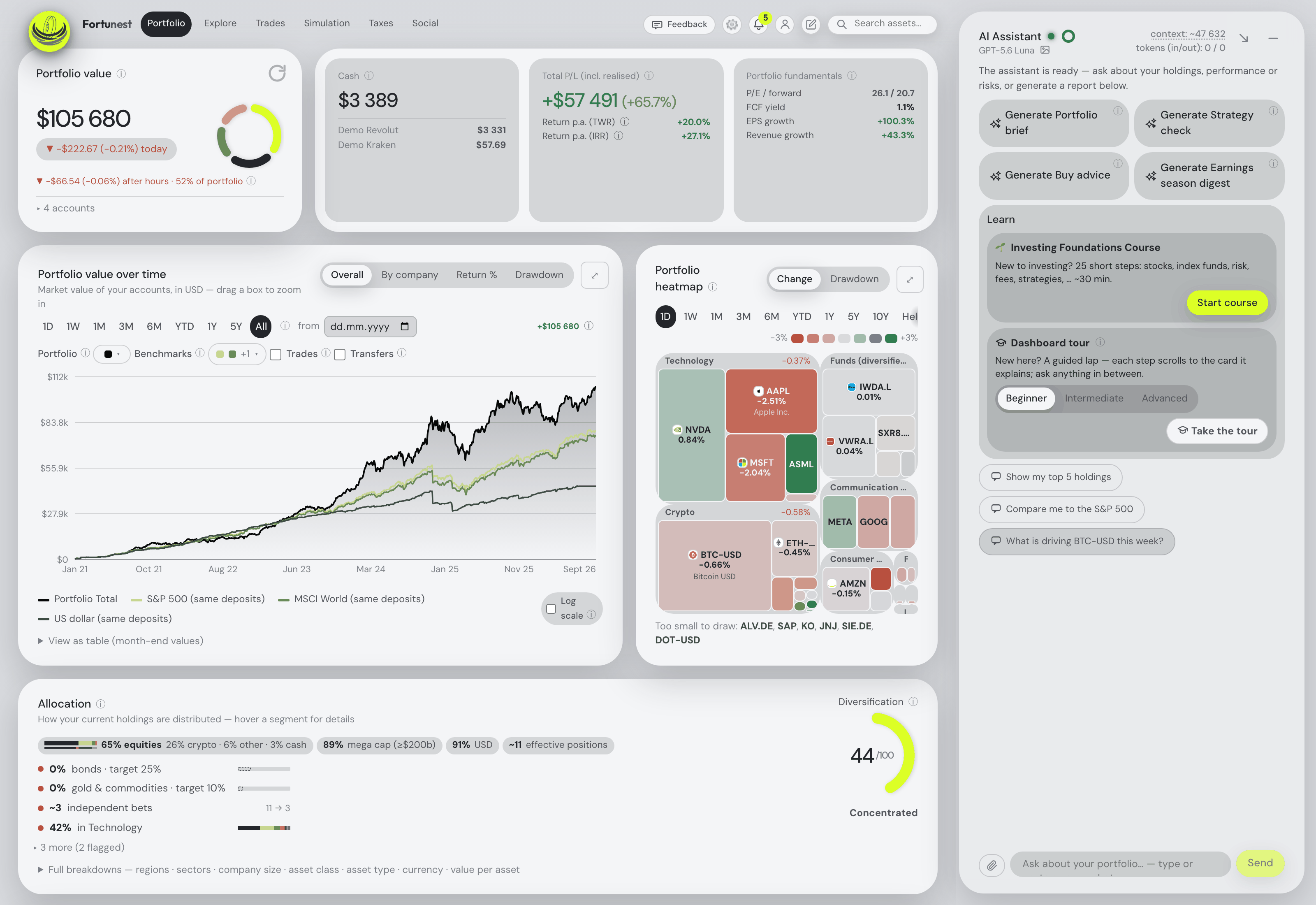
The comparison comes down to who does the work. Fortunest reads the exports your brokers already produce, detects the format per file, matches transfers between your own accounts, converts every historical day at that day's rate and keeps failed rows with a reason and a retry — then puts TWR beside IRR, adds volatility, Sharpe, Sortino, beta, correlation and drawdowns, seven benchmarks fed your actual deposits, fair value from six models, fee totals per account, a scored trade plan you can replay against last year, and an assistant that answers about your holdings and changes the dashboard when you ask. The desktop app keeps all of that on your own machine.
The assistant is the one thing Portfolio Performance has no counterpart for, and it is not a chatbot bolted on the side: it reads the holdings and the live screen, so it explains any metric on your own numbers — what your Sortino ratio is saying, why the drawdown looks like that, what the fair-value gap assumes — filters the holdings table from a sentence, looks up any company held or not down to the results filing the SEC has, and takes instructions: run a what-if trade, start the backtest, add the flat you bought in 2019, read the positions out of a brokerage screenshot. With Ollama or LM Studio on the same computer as the desktop app, model inference stays local. Cloud AI, Pro tax calculations, sharing and hosted sync have separate outbound data flows. On Pro it also publishes an MCP server, so Claude Code, Codex or any MCP-capable client can read and drive one live dashboard with sensitive changes reviewed unless covered by an active permission — the closest thing here to scripting a tool you own.
Where it falls short: it is not open source, and there is a company between you and your numbers; no Linux desktop build and no native mobile app yet; the importer takes CSV and Excel, not the PDF statements Portfolio Performance's community importers handle; you cannot point it at your own price provider; the Taxes tab is Pro, with Czech defaults and no per-country presets; and the MCP server that lets your own agent in needs Pro too.
Portfolio Performance
Best for: free, open source, and a portfolio file that is genuinely yours.
Free — Eclipse Public License v1.0
It has been the reference tool for European DIY investors for over a decade, and the reasons hold up. It runs on Windows, macOS and Linux, keeps everything in a file you back up yourself, needs no account and no network beyond price lookups, and computes the two returns that matter — TTWROR and IRR — with volatility, semivariance and maximum drawdown against an index. It imports CSV files, PDF statements and Interactive Brokers Flex Queries, holds foreign-currency accounts at ECB rates, rebalances against an asset allocation you define freely, pulls prices from Yahoo, Leeway, Quandl, AlphaVantage, CoinGecko or any HTML or JSON source you point it at, and exports to XML, CSV and JSON. Its site now also links a companion mobile app.
Where it falls short: you do the importing, the fixing and the backups; there are no live broker or exchange connections; there is no tax report beyond taxes and fees per transaction, no projection or simulation, and no assistant of any kind; and the manual states plainly that "there are still many blank pages in this handbook", so the learning curve is real.
What Portfolio Performance does that Fortunest doesn't
This is the part a comparison page usually leaves out, so here it is plainly. If any of these matter to you, Portfolio Performance is the better choice — and it costs nothing to try:
- It is open source, under EPL 1.0. You can read the code that computes your return, fork it, and keep running the version you have for as long as you like. Fortunest is closed source.
- There is no service and no vendor. No account, no session, no subscription, no company that can change the terms. Fortunest's desktop app keeps your data local, but the product still comes from us.
- Linux. A first-class Linux build alongside Windows and macOS; Fortunest's desktop app is macOS and Windows only.
- PDF statement importers. Community-maintained importers read settlement notes from a long list of mostly German-speaking banks and brokers. Fortunest reads CSV and Excel exports only.
- Your choice of price provider. Yahoo Finance, Leeway, Quandl, AlphaVantage, CoinGecko, its own provider for German and US stocks, or any HTML or JSON source you configure. Fortunest uses its own market-data feed and shared cache.
- Semivariance as a downside-risk measure, and a rebalancing tool against a freely defined asset allocation with no product opinion attached.
- A file format you own, with export to XML, CSV and JSON, and backups that are just files.
How the two differ in practice
Getting the data in. Portfolio Performance's import model is manual and precise: you import a CSV, let a PDF importer read a settlement note, pull an Interactive Brokers Flex Query, or enter the transaction yourself, and you map the columns the first time. It is exact, and it is work — most users spend an evening on the initial history and a few minutes a month afterwards. Fortunest's model is detection: drop a folder of exports and each file is recognised on its own, six exchanges and brokers keep themselves current through read-only API keys, twenty-two more sign in through SnapTrade, transfers between your own accounts are matched so a move is not read as a sale, and anything that fails keeps its filename and reason with a retry button. Neither can sync DEGIRO live — no tracker can — but only one of them keeps your Kraken balance current without you.
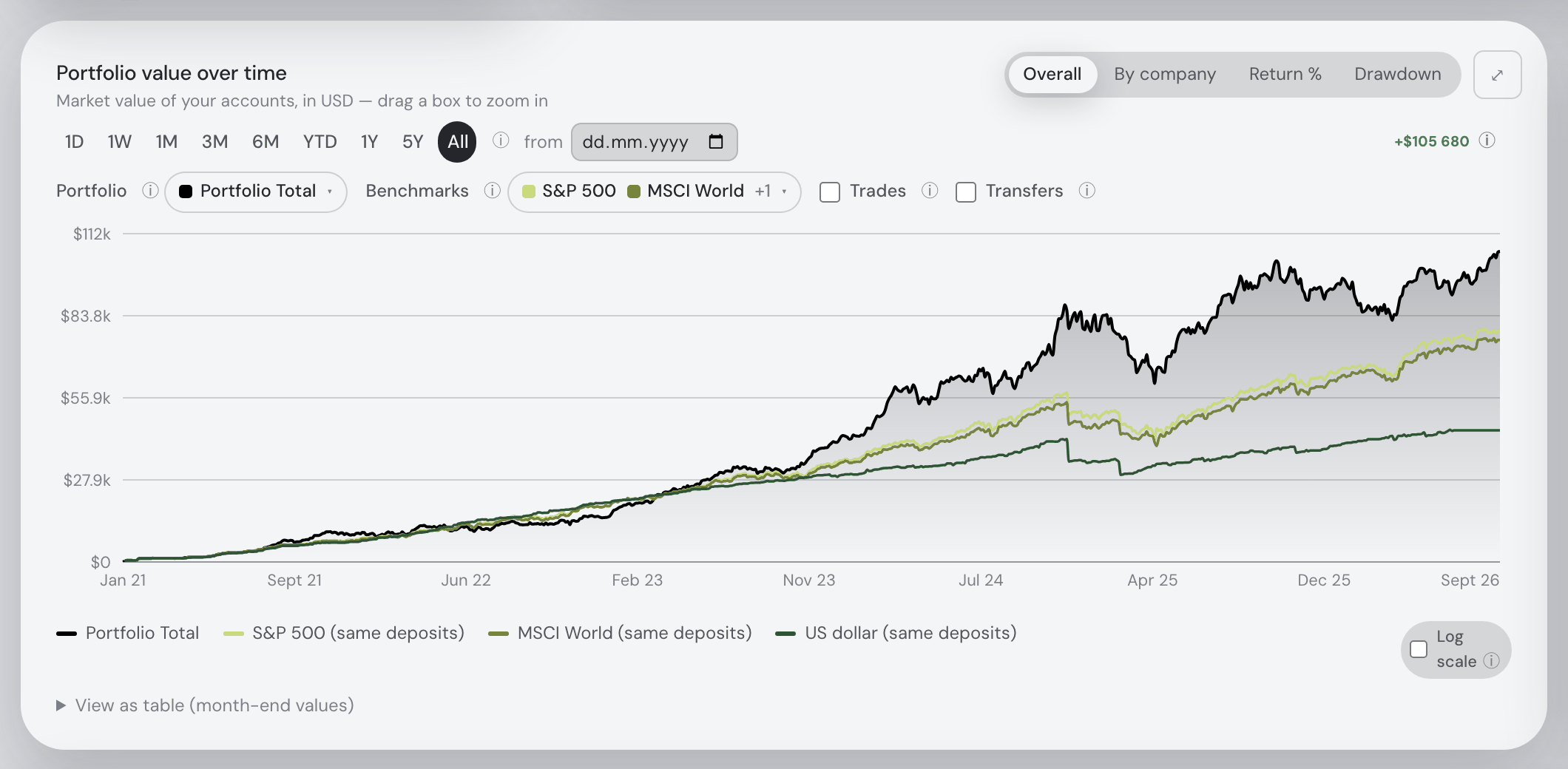
What you get out. The overlap is larger than people expect: both compute a true time-weighted return and an internal rate of return, both hold multiple currencies, both compare against an index, and both are honest about fees. Fortunest adds the risk panel — Sharpe, Sortino, beta, correlation, drawdowns — seven benchmarks flow-matched to your own deposits rather than one index rebased, value-weighted fundamentals, six fair-value models with the gap to price, the Explore market lists, a simulator with projection, DCA, goal seek and historical modes, and a Trades tab that scores candidates and builds a plan. Portfolio Performance adds semivariance and a rebalancing tool, and lets you choose where the prices come from. What it has no answer to is being asked a question: what the assistant can tell you lists what that changes in practice, and the Assistant chapter sets out what it may and may not do.
Ownership, and what it costs. This is the real decision. Portfolio Performance charges nothing and owes you nothing: the file is yours, the code is auditable, and no one can raise a price or retire a feature. Fortunest charges €69 a year for Pro and, in exchange, does the import, the currency conversion, the corporate-action handling and the analysis for you — with the desktop app as the middle path, where the engine runs locally, the database is a SQLite file on your disk while cloud AI, Pro tax calculations, sharing and hosted sync have separate outbound data flows. If ownership is the point, the free tool wins; if the point is the hours, ours does. See the Privacy chapter and the privacy-first guide for how local the local option really is.
How we compared
We read Portfolio Performance's own product site and its online manual on 7 September 2026 and took the figures and the phrasing from there, and used our 19 August 2026 check for the risk indicators its current front page does not name. Fortunest's column comes from its documentation and its plans page. Where a page says nothing about a row, the cell says "not described" — that is about the page on that date, not about the product; Portfolio Performance is community documented, so a feature may exist in the program without appearing on the site. We build Fortunest, so we are not neutral: both verdicts state where the product falls short, and the section above lists what Portfolio Performance does that we do not.
Questions people ask
Is Fortunest a good Portfolio Performance alternative?
It is, if the maintenance is what you want to stop doing. Fortunest imports 29 broker exports automatically, connects exchanges and Interactive Brokers by read-only API key and 22 brokers through SnapTrade, and adds Sharpe, Sortino, beta, fair value, a scored trade plan and an AI assistant, on a free plan with no account. The assistant reads your actual holdings and the screen, explains any metric on your own numbers, looks up any company's quote, news, earnings or SEC filing, enters assets you describe to it, runs entirely on a local model through Ollama or LM Studio, and on Pro can be driven by Claude Code, Codex or any MCP agent. It is not an alternative if you specifically want open-source software with no vendor and no service: Fortunest is neither open source nor free of a company.
Can I import my Portfolio Performance file into Fortunest?
Not directly. Portfolio Performance exports XML, CSV and JSON, but Fortunest reads broker exports rather than tracker exports — the only tracker formats it detects are Parqet, Delta and CoinTracking. The clean route is to download the CSV or Excel export from each broker again, which is what built your Portfolio Performance file in the first place, and drop the whole folder in at once. The list is in every supported platform.
Is Portfolio Performance still free in 2026?
Yes. It is open-source software licensed under the Eclipse Public License v1.0, with nothing held back, no account and no subscription, for Windows, macOS and Linux, and its site now also links a companion mobile app. You pay with your own time instead: the importing, the fixing and the backups are yours, and the manual openly says there are still many blank pages in it. Other free options are in the free trackers guide.
Which one is better for a beginner?
Fortunest, on setup time. There is nothing to install, no account to create, a demo portfolio to open first, and the assistant will explain any number on the screen or add an asset for you. Portfolio Performance rewards patience: you install it, define the accounts, learn its transaction model, and end up with a tool that does exactly what you tell it and answers to nobody.
Which keeps my data more private?
Portfolio Performance, by default: your portfolio is a file on your own disk and there is no service behind it, though price lookups still go out to data providers. Fortunest offers a local SQLite database and local AI on desktop, but cloud AI, Pro tax calculations, sharing and hosted sync send their selected inputs to online services. The hosted web app keeps guest data in a private server session with a browser mirror. Details in the Privacy chapter.
Sources
- Fortunest — plans and pricing, every supported platform, the Portfolio chapter, the Simulation chapter, the Taxes chapter and the Privacy chapter (7 September 2026).
- Portfolio Performance — product site and online manual (7 September 2026); risk indicators from our landing-page comparison, checked 19 August 2026.
Signals, analyses and assistant answers in Fortunest are informational — not financial or tax advice. This page compares features described on the vendors' own pages, not investment outcomes.