Guides · Updated 7 September 2026
The best portfolio tracker for stocks and crypto together in 2026
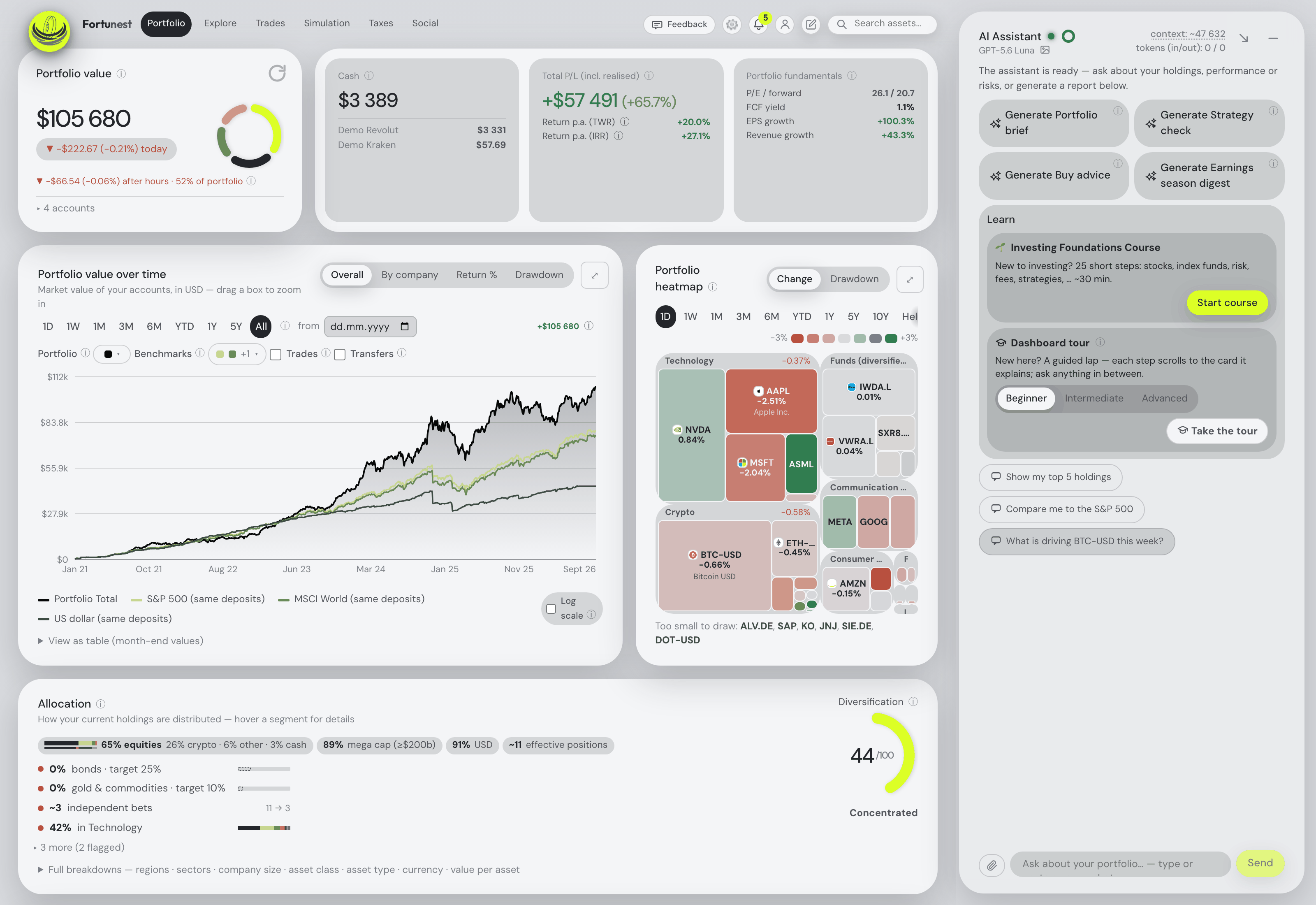
If your money sits at a broker and on an exchange, the tracker you want is the one that puts both into a single history, in one currency, with a single return figure — and matches the coins you moved between your own accounts so nothing is counted twice. That is what Fortunest is built to do, and it is our pick — with an assistant that reads the combined portfolio rather than the market: it explains any figure on your own numbers, filters the holdings table from a sentence, and adds a position from a sentence or an exchange screenshot when no clean export exists. Delta is the strongest mobile-first alternative; CoinTracking wins on crypto tax alone.
The short answer
- Our pick for one portfolio across both: Fortunest — read-only APIs for Kraken, Binance, Coinbase and Coinmate; CSV for Bitvavo, Crypto.com, CoinTracking, Trezor Suite and Delta; shares through 29 broker exports and 22 brokers on SnapTrade; transfers between your own accounts matched; TWR and IRR across the lot in one currency; and an assistant that reads the whole thing — explaining any figure on your own numbers, filtering the table from a sentence, and adding positions you describe or screenshot. Free, no account; Pro €69 a year, which also opens the same portfolio to Claude Code, Codex and other MCP agents.
- Best on a phone: Delta — “a huge range of stock brokerages, crypto exchanges, and wallets”, connections “strictly read-only”, on iOS, Android, Windows and Mac. Basic is free; PRO caps a portfolio at 40 assets and PRO+ removes that.
- Best for crypto tax: CoinTracking — “over 400 easy imports” by API, CSV and blockchain address, 11 tax methods and reports for the US, UK, Germany, France “and 100+ more countries”. Crypto only: no shares.
- Best if crypto is one slice of a wider net worth: Kubera — blockchains, exchanges and wallets beside thousands of banks and brokerages, private holdings and property, with “multi-currency … through every layer”. $250 a year, no free tier.
- Free and yours: Portfolio Performance and Ghostfolio — a local file with CoinGecko among its price sources, and a self-hosted app tracking “stocks, ETFs or cryptocurrencies”. Both import rather than connect.
Getting both kinds of asset in
Crypto and shares arrive by different roads, and a tracker has to be good at both. On the crypto side Fortunest connects four venues directly with read-only credentials: Kraken with a query-only key, Binance with a read-only key and secret from API management, Coinbase with a read-only CDP key, and Coinmate with only the Account balance and Transaction history permissions ticked. Everything else comes as a file — Bitvavo's transaction history, the Crypto.com App's export (the separate Exchange writes a different file, which is not read), a CoinTracking export, Delta's own CSV, and Trezor Suite's per-account transactions export, which is a wallet rather than a platform with an API key.
On the share side the same portfolio takes 29 broker CSV exports, 22 brokers through SnapTrade sign-in, and direct connections for Interactive Brokers and Trading 212 — 50 supported platforms in all, plus manual entry for anything with a value. You drop a folder of exports, the format is detected per file, and a failed import keeps its filename and reason with a Retry rather than vanishing. The full list is in Every supported platform.
One warning specific to this category: a tracker's export stays a tracker's export. CoinTracking, Delta and Parqet each carry several venues in one file, and every row is filed under the tracker rather than the exchange it names — otherwise one live connection would switch the whole file off. The cost is that no overlap warning appears between such a file and a connection to a venue inside it, so for any period they both cover, keep one.
The test that separates real trackers from tidy ones
Move a bitcoin from Kraken to your Trezor and a naive importer sees two events: a withdrawal that looks like a sale and a deposit that looks like a purchase. The result is a doubled cost basis, a phantom realised gain and a return figure that is simply wrong. This is the single most common way a mixed portfolio goes bad, and it is worth testing before you trust any number.
Fortunest matches transfers between your own accounts so nothing is double-counted. A Trezor Suite export's on-chain received, sent and self transfers, with their network fees, are netted against your exchange withdrawals and deposits; Crypto.com App-to-Exchange moves and lockups are netted out rather than counted as money arriving and then leaving; Coinbase Send and Receive rows import as transfers rather than trades. Where an export starts mid-history and would push a holding negative, an opening balance is assumed and flagged rather than silently invented. None of the other six products describes transfer matching on the pages we read — which is not proof they lack it, but it is the first thing to check with your own history.
One currency, one return, one tax question
Once both halves are in, the arithmetic has to treat them alike. Every position is converted at each day's real exchange rate rather than today's, into whatever display currency you pick, so a coin bought in dollars three years ago is valued in the history at the rate that applied then. Total P/L includes realised gains, and the return comes as both annualized TWR and money-weighted IRR over the whole portfolio. Seven benchmarks on the value chart are fed the same deposits you made; the simulator's own benchmark list adds Bitcoin, Gold and US bonds, so “would I have done better just holding BTC?” is a checkbox rather than a spreadsheet.
Tax is where the two asset classes stop being alike. Fortunest's Pro Taxes tab pairs every sale against the lots it consumed and shows which open lots have passed the holding-period time test — and crypto is inside that test, on the Czech default rulebook, for sales from 15 February 2025. The defaults are a three-year time test, a 100 000 CZK annual small-sale exemption on gross proceeds, a 40 000 000 CZK cap on exempt gains and a flat 15% estimate. Every one of those is a setting, so a regime shaped like the Czech one fits; there are no per-country presets, and it is orientation rather than a filing.
The comparison
Each cell is what the vendor's own pages say, in the vendor's terms, on the date in the footnote. Not described means the page does not mention it; not checked means we did not verify it. A green ✓ marks whichever product leads a row on its own terms.
| Fortunest1 | Delta2 | CoinTracking3 | Kubera4 | getquin5 | Ghostfolio6 | Portfolio Performance7 | |
|---|---|---|---|---|---|---|---|
| Crypto exchanges, direct |
|
|
|
|
|
|
|
| Crypto by file |
|
|
|
|
|
|
|
| Wallets & on-chain |
|
|
|
|
|
|
|
| Stock brokers |
|
|
|
|
|
|
|
| Transfers between your own accounts |
|
|
|
|
|
|
|
| One display currency |
|
|
|
|
|
|
|
| Returns & risk across both |
|
|
|
|
|
|
|
| Tax lots for crypto |
|
|
|
|
|
|
|
| Free plan |
|
|
|
|
|
|
|
| Paid from |
|
|
|
|
|
|
|
Cells were checked against the sources below on 7 September 2026; getquin's hosting and Ghostfolio's plan details were checked on 19 August 2026 for our landing-page comparison. Delta's site refused our direct fetch that day, so its cells come from its own pages and help centre as returned by search — treat them as one step further from the source than the rest. Prices are each vendor's list price before promotions and, for Fortunest, before VAT. "Not described" is a statement about those pages on that date, not about the product.
The verdicts
Fortunest — our pick
Best for: a broker account and an exchange account that need to become one portfolio.
Free without an account · Pro €6.99/mo or €69/yr
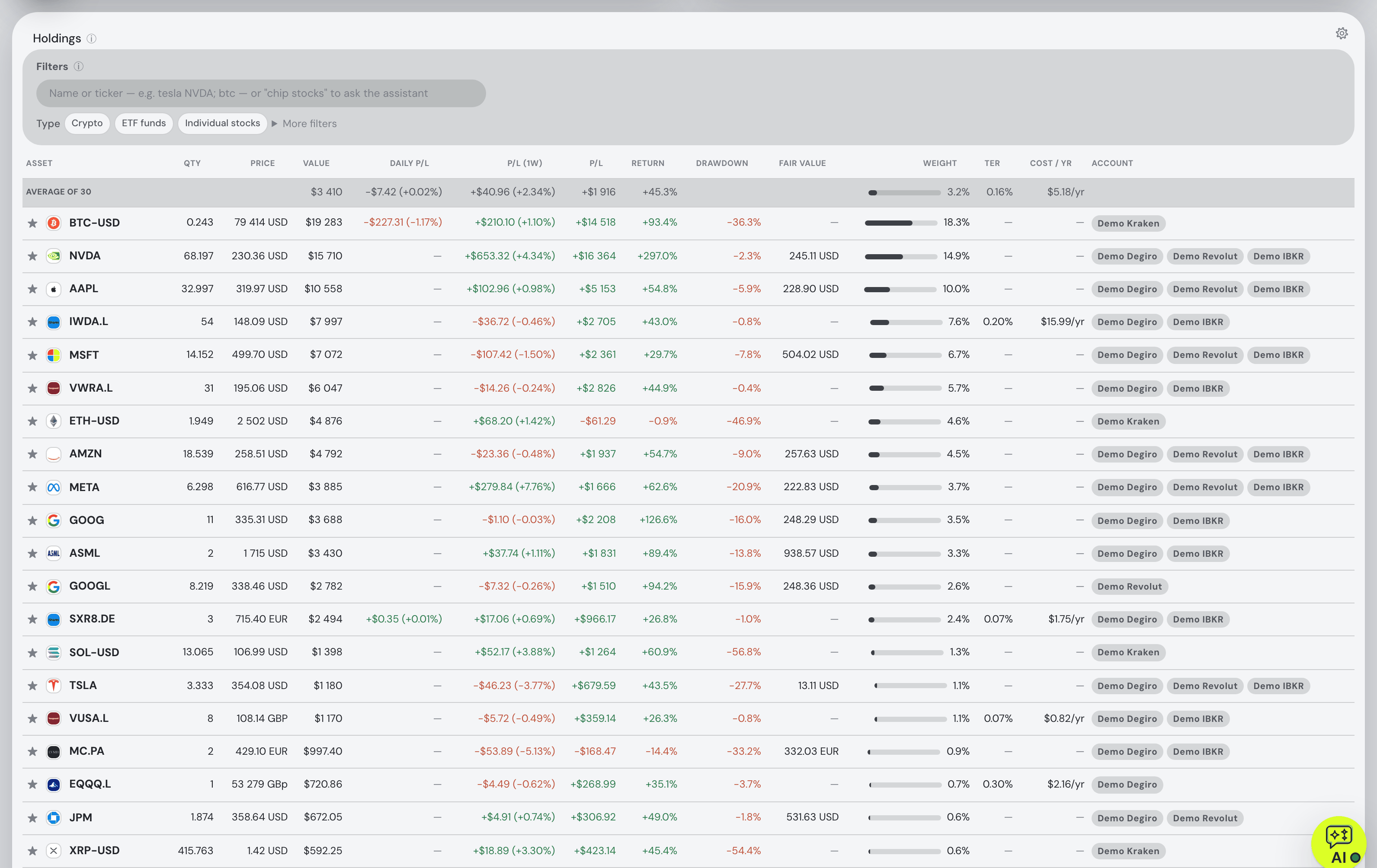
Coins are not a side panel here: they sit in the same holdings table, heatmap, allocation and return figure as the shares. Four exchanges connect with read-only keys, five more crypto sources arrive as files, and transfers between your own venues are matched instead of double-counted. Every day is converted at that day's rate into one display currency, and the Pro Taxes tab applies a holding-period test that includes crypto under the Czech default rulebook. The assistant treats the two halves alike as well: ask what your return across both is actually made of, or why the crypto sleeve moved, and the figures come from the engine rather than the model's arithmetic; ask on Pro which lots become tax-free within twelve months and it reads the same lot pairing the Taxes tab does. For a venue nobody exports cleanly, describing a position in a sentence — or pasting a screenshot of the exchange's holdings list — adds it directly. On Pro the same portfolio is reachable from Claude Code, Codex or another MCP client, with sensitive changes shown for approval before they run.
Where it falls short: no address-level blockchain sync — a wallet arrives as a Trezor Suite export, so other wallets mean manual files; no native mobile app yet, though the web app is built for phones; the tax rulebook has Czech defaults and no per-country presets; and DeFi, NFTs, staking positions and lending are not modelled as their own instruments.
Delta
Best for: watching a mixed portfolio on a phone.
Basic free · PRO and PRO+ — prices not readable on the pages we read
Delta, now owned by eToro, is the mobile-first incumbent here: “a huge range of stock brokerages, crypto exchanges, and wallets”, broker connections reaching “over 1,600 brokers and banks”, described as “strictly read-only” and mostly syncing every 24 hours, on-chain activity such as Bitcoin and Ethereum, CSV import with its own template, and apps on iOS, Android, Windows and Mac. PRO adds live prices, “realized & unrealized gains” and cost basis; PRO+ removes the 40-asset cap.
Where it falls short: its site refused our fetch, so everything above is one step removed from the source and the prices are not quotable at all. Transfer matching, the currency-conversion method and any tax report are not described on the pages we could read.
CoinTracking
Best for: crypto tax, in almost any jurisdiction.
Free — portfolio view only · Starter US$49/yr · up to Unlimited US$899/yr (euro prices on its page)
If tax is the reason you are searching, this is the specialist. “Over 400 easy imports” by API, CSV and blockchain address, covering DeFi swaps, staking rewards, NFT trades and margin positions; 11 tax methods; and reports for the US, UK, Germany, France “and 100+ more countries”, with every tax year included rather than repurchased. Paid tiers are priced by transaction count — 200 on Starter, 3,500 on Pro, 20K–100K on Expert.
Where it falls short: crypto only, so your shares live somewhere else and there is no single return figure across both. The free plan is a portfolio view with a seven-day import trial, transfer matching is not described, and a heavy history gets expensive fast.
Kubera
Best for: crypto as one slice of a whole net worth.
14-day trial · Essentials $250/yr · Black $2,500/yr
Kubera's premise is everything you own on one line: thousands of banks and brokerages, every major exchange in the US, Canada, UK, Europe and Asia, “major blockchains, exchanges, and wallets” with DeFi, NFTs, staking and lending, LP commitments with calls, distributions and IRR, and physical assets from property to watches with live price feeds and an AI appraiser. It runs multiple aggregators and picks the best connector per institution automatically.
Where it falls short: no free tier, and $250 a year is the most expensive entry point in this table by a wide margin. No tax reporting or tax-lot tracking is mentioned, transfer matching is not described, and its strength is net-worth breadth rather than trading analysis.
getquin
Best for: broker breadth and a community, if crypto is a small corner.
Free · Premium €89.99/yr · Wealth €149.99/yr
getquin's free plan carries unlimited bank and broker connections, real-time data, a net-worth overview and essential analysis, with returns as IRR and TWR against a benchmark and data stated to sit in Germany and Europe under AES-256. Premium adds AI analysis and dividend forecasting; Wealth adds planning and AI agents. For a portfolio that is mostly shares with a little crypto, the setup cost is close to zero.
Where it falls short: crypto exchange and wallet connections are not described on its pricing page, so what arrives and how is unclear before you sign up; risk metrics and tax handling are not described either; and an account is required before you see anything.
Ghostfolio
Best for: self-hosting shares and coins on your own server.
Self-hosted free — AGPL-3.0 · Cloud from US$48/yr, one-time
Ghostfolio “empowers busy people to keep track of stocks, ETFs or cryptocurrencies”, and does it as an AGPL-3.0 Docker app on hardware you control, with an anonymous token instead of an email address. Transactions arrive by CSV, JSON or its REST API; returns come as return on average investment across the usual windows, with charts and a static risk analysis.
Where it falls short: no exchange or broker connections at all, so every trade and transfer arrives by file or API and the transfer problem is yours; no crypto tax report is described; and the hosted free tier is a summary rather than the whole product.
Portfolio Performance
Best for: a free, local file that treats coins as just another security.
Free — EPL 1.0
The long-standing free desktop tool for Windows, macOS and Linux: your whole history in an XML file on your own disk, exportable as CSV or JSON, with foreign-currency accounts converted at European Central Bank rates and historical prices loaded from a long list of sources including CoinGecko. Benchmarking against an index, volatility, semivariance and maximum drawdown apply to a mixed portfolio as readily as to a share one.
Where it falls short: no exchange import is described, so coins are entered from files or by hand and transfer matching is up to you; there is no crypto tax report; and you do the importing and the maintenance yourself.
How we compared
We took the trackers people weigh against each other when a broker account and an exchange account have to live in one picture, and read each vendor's own pricing, feature and help pages rather than reviews. Where a page says nothing about a row, the cell says so — "not described" is about the page, not the product; where a site refused our fetch, the footnote says so. We build Fortunest, so we are not neutral; every product's limits are in its verdict, ours included.
Questions people ask
Which portfolio tracker handles stocks and crypto in one place?
All seven here hold both, but they mean different things by it. Fortunest connects Kraken, Binance, Coinbase and Coinmate with read-only keys and reads Bitvavo, Crypto.com, CoinTracking, Trezor Suite and Delta files, beside 29 broker CSV exports and 22 brokers through SnapTrade. Delta connects brokers, exchanges and wallets read-only. Kubera aggregates blockchains, exchanges and wallets next to banks and brokerages. CoinTracking is crypto only. Ghostfolio and Portfolio Performance track both by import.
Will moving coins between my own exchange and wallet be counted twice?
That is the failure mode to test for, because a naive importer books the withdrawal as a sale and the deposit as a purchase. Fortunest matches transfers between your own accounts so nothing is double-counted: a Trezor Suite export's on-chain sends and receives are netted against your exchange withdrawals and deposits, and Crypto.com App-to-Exchange moves are netted out rather than read as money arriving and leaving. None of the other six describes transfer matching on the pages we read.
Can I connect Kraken, Binance or Coinbase with a read-only key?
In Fortunest, yes — Kraken with a query-only key, Binance with a read-only key and secret, Coinbase with a read-only CDP key, and Coinmate with only the account-balance and transaction-history permissions ticked. Delta states its connections are strictly read-only and names Binance, Coinbase and Kraken. CoinTracking offers API imports across 400+ sources. Fortunest also reads each of those exchanges' CSV exports if you would rather not hand over a key at all.
Does any of them work out crypto tax?
CoinTracking is the specialist: 11 tax methods and reports for the US, UK, Germany, France and 100+ more countries — crypto only. Fortunest's Pro Taxes tab pairs every sale with the lots it consumed and applies a holding-period time test, with one configurable rulebook whose defaults are the Czech rules, including crypto joining the time test for sales from 15 February 2025. There are no per-country presets. Delta, Kubera, getquin, Ghostfolio and Portfolio Performance describe no crypto tax report.
Is there a free tracker for stocks and crypto together?
Three real options. Portfolio Performance is free and open source, a file on your own disk, with CoinGecko among its price sources. Ghostfolio is free when you host it yourself and tracks stocks, ETFs and cryptocurrencies. Fortunest's free plan needs no account and covers the whole dashboard, three accounts and fifty assets, with the exchange connections included. Delta's Basic plan is free; CoinTracking's free plan is portfolio view only; Kubera has no free tier.
Sources
- Fortunest — every supported platform, the direct connections section, the Taxes chapter and plans and pricing.
- Delta — Delta PRO, crypto tracker and broker, exchange & wallet connections (7 September 2026; the site refused a direct fetch, so these were read through search results).
- CoinTracking — home and pricing (7 September 2026).
- Kubera — product site and pricing (7 September 2026).
- getquin — pricing (7 September 2026) and its security page (19 August 2026).
- Ghostfolio — the source repository and README (7 September 2026) and its pricing page (19 August 2026).
- Portfolio Performance — product site (7 September 2026).
Signals, analyses and assistant answers in Fortunest are informational — not financial or tax advice.