Documentation
The Taxes tab
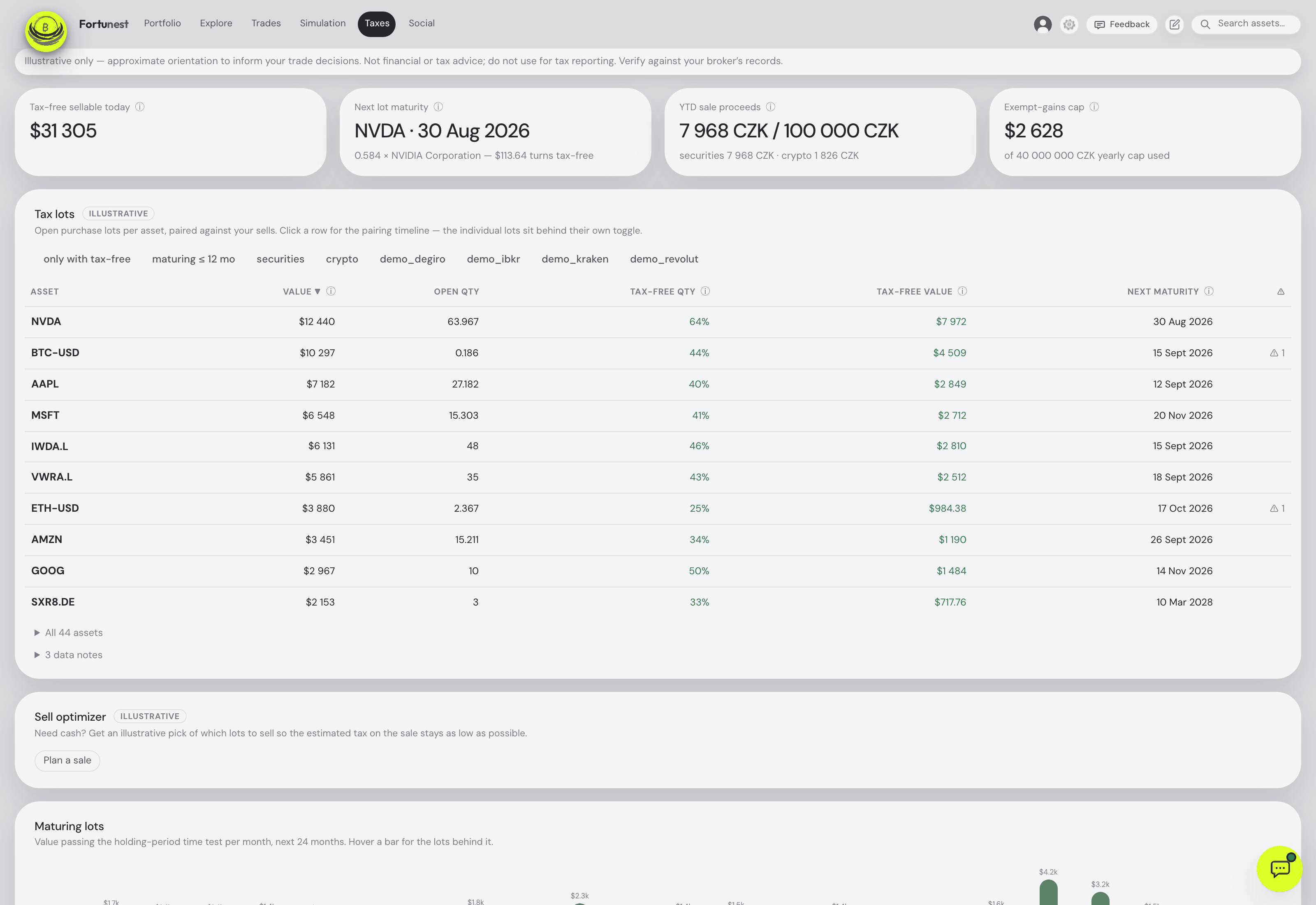
Your brokers tell you what you sold. They rarely tell you which purchase it came out of — and that is the number the tax bill turns on. This tab pairs every sell against the lots it consumed, shows which of your open positions have passed the holding-period time test, and totals the result year by year. It is a Pro feature, and it is orientation, not a filing.
A Pro feature, and what free gets
The Taxes tab is part of the Pro plan (€6.99 a month, or €69 a year — €5.75 a month, billed once; VAT is added at checkout). Any introductory offer running right now is named on the pricing section rather than here: an offer is only shown while checkout would honour it, which these pages have no way to check. On the free plan the tab stays visible and clickable, and opening it shows an explanatory panel — "Tax lots with the time test, sale pairing, the sell optimizer and the annual realized-gains summary are part of the Pro plan" — with a See plans button. ⚙ Settings → Taxes behaves the same way: the rules are readable so you can see what you would be buying, but every field is greyed out and inert.
The gate is real rather than cosmetic — the server refuses the tax endpoints independently of what the interface shows. Everything else stays free: your whole portfolio, the value chart and benchmarks, allocation and diversification, risk, dividends, Explore, the Trades tab, the simulator, the assistant and Social. Pro adds this tab and lifts the three-account limit; nothing that was free becomes paid.
This is not tax advice, and Fortunest is not a filing service. Every figure on this tab is illustrative orientation computed from the CSVs you uploaded and daily exchange rates — approximate by construction. It cannot be used as input for a tax return, it does not produce a form, and it does not send anything to a tax authority. Verify against your broker's records, and take a real filing to someone qualified to sign it.
Which country's rules
The engine implements one regime by default: the Czech one. That is what the shipped defaults model — a three-year holding-period time test, crypto joining that time test for sales from 15 February 2025, a 100 000 CZK annual small-sale exemption on gross proceeds, a 40 000 000 CZK annual cap on exempt gains, and a flat 15% rate for the estimates.
Every one of those is a setting rather than a constant. Somebody in another country can change the holding period, switch the crypto rule off, disable either threshold by setting it to zero, and put their own flat rate in — and the pairing, the maturity dates and the yearly totals all follow. What the app does not have is a second country's rulebook: there are no per-jurisdiction presets, no progressive brackets, no allowances beyond the two thresholds above, and no notion of a tax year other than the calendar year.
Read that as narrower than it may sound. If your rules are shaped like the Czech ones — a holding period that exempts a gain, a proceeds threshold, a flat rate — the settings will express them and the output will be useful. If your rules are shaped differently, this tab will give you accurate lot pairing and accurate holding periods, which is most of the hard work, and the exemption and tax columns will not describe your situation. The two CZK thresholds are quoted in CZK on purpose and stay in CZK whatever display currency you pick, because a limit defined in CZK converted to euros is no longer the limit.
The headline tiles
- Tax-free sellable today — the current value of open lots that have already passed the time test. Under the configured rules, selling exactly those today would be exempt.
- Next lot maturity — the next lot to cross the line, with its date and how much value turns tax-free when it does.
- YTD sale proceeds — this calendar year's gross sale proceeds against the small-sale limit, with securities and crypto counted separately because each class has its own limit. Staying under keeps that class's sales exempt. Both figures are stated in the limit's own currency (CZK by default), because a used figure next to a limit in another unit is not a comparison.
- Exempt-gains cap — time-test-exempt gains realized this year against the annual cap on them. Shown only when the cap is switched on.
Tax lots
One row per asset: its current value, the open quantity still held, what share of that quantity is already tax-free and what it is worth, and the next maturity date. A ⚠ column counts the data notes that row carries. Sort by any column; filter with the chips above — only with tax-free, maturing ≤ 12 mo, securities, crypto, and one chip per account so you can look at a single broker at a time.
Click a row and it opens the pairing timeline: purchases on one lane, sells on the other, connectors showing which sell consumed which lot, a dashed line where the time test falls and another for today. Behind its own toggle sits the plain list of individual lots — acquired date, source account, origin (a real trade, a lot you added by hand, or a confirmed transfer), quantity, cost and tax status (✅ already exempt, ⏳ with the date it matures, or —).
An expanded row has an address of its own: #taxes/AAPL boots the app on the Taxes tab with that symbol's detail already open — the same expand the assistant performs — and the Copy link chip under the timeline puts exactly that link on the clipboard. The address bar itself is normalised back to #taxes once the link has been followed.
Pairing happens at resolved-symbol level, so the same instrument bought through two brokers under two different broker codes is one position here. Quantities are split-adjusted to today's units, and a split never resets the holding-period clock — the acquisition date is the acquisition date.
DEGIRO’s matching old-share and new-share replacement entries around a known split are treated as bookkeeping when their quantities and offsetting cash uniquely match the split. They do not create a sale, reset the acquisition date or add extra tax-lot shares. Original source records remain unchanged.
The cost here is not the Portfolio tab's cost, and that is deliberate. Moving your own coins between your own wallets is not a purchase: for tax the original lot's date and price carry over, because valuing the arrival at market would understate the taxable gain. The Portfolio tab's P/L does the opposite on purpose. Where no purchase price exists anywhere in your data the lot is counted at zero cost and flagged ⚠ — which overstates the gain until you fix it with an opening-balance lot.
How sells are paired to buys
Which purchase a sale came out of decides both the gain and whether the time test was met, and there is more than one defensible answer. ⚙ Settings → Taxes → Pairing mode offers three:
| Mode | What it does |
|---|---|
| FIFO | Sells consume the oldest lots first. The classic, auditable answer, and what most brokers report — the default. |
| Min-tax (free) | An exact minimum-tax assignment, solved per symbol as a linear program: already-exempt pairings cost nothing, and the solver minimizes the taxable gain across all years at once. Among equally cheap answers it picks the oldest-first one, so the output stays stable and readable. |
| Min-tax (year-sealed) | The same solve, but one calendar year at a time against whatever the previous years left behind — the filer who optimizes each year as it comes and cannot go back and re-pair a year already filed. |
There is no average-cost method. Changing the mode reflows every pairing, every maturity date and every yearly total the moment you save.
The sell optimizer
Need a specific amount of cash and want it to cost the least tax? Plan a sale opens a drawer: type the amount, optionally limit it to one asset, and it returns the lots to sell — grouped by symbol, each with quantity, acquisition date, tax status and gain, plus proceeds and estimated tax per symbol and for the plan as a whole.
Enter the amount in your selected display currency, shown in the input. The plan and the Assistant’s sale-planning tool use that same currency.
Lots are consumed cheapest-tax first: already-exempt lots before taxable ones, then the lowest estimated tax per unit of cash raised. That ordering is not a heuristic — because lots are divisible, taking them in ascending cost order is provably the cheapest way to raise a given sum. If your open lots cannot cover the amount, the drawer says so and by how much rather than quietly planning a smaller sale.
The plan does not have to be retyped or re-read from the screen: Copy plan under the totals puts it on the clipboard as plain text — one line per consumed lot under its symbol, then the raised-of-requested and tax totals — and the drawer remembers the last amount and asset you planned for in this browser, so it opens pre-filled next time.
Maturing lots
A bar per month for the next 24 months, each showing how much value passes the time test in that month. Hover a bar for the individual lots behind it. It is the answer to "is it worth waiting?" in one picture — and to "what becomes free next spring?" without arithmetic.
Annual realized gains
One row per calendar year, newest first, with a ⬇ Download CSV underneath. Columns:
| Column | What it holds |
|---|---|
| Proceeds | Gross sale proceeds realized in the year, each sale converted at its own day's rate. |
| Time-test exempt gain | Gains exempt because the lot had been held long enough. |
| Small-sale exempt | Which classes — securities, crypto — stayed under the proceeds limit for the year. |
| Gross taxable | Taxable gains before offsetting the year's losses. |
| Losses | Realized losses available to offset gains within the same year. |
| Net taxable | Gross taxable minus in-year losses, floored at zero. |
| Est. tax | Net taxable times the flat rate from ⚙ Settings → Taxes. |
Losses offset gains within a year only — there is no carry-forward between years. A year with something worth knowing carries a ⚠ and a note explaining it; the notes travel into the CSV too, whose first line is itself the disclaimer.
What it will not book: a disposal it cannot see. When an exchange holds fewer units than your imported history explains — an Earn subscription, a dust conversion, a wallet transfer, a delisting swap, or a sale the API simply does not reach back far enough to show — the engine writes the units off so the remaining balance matches your account. That write-off consumes lots but books nothing: no proceeds, no gain, and above all no loss. A realized loss equal to the missing lots' cost would be a taxable event the app invented, landing in a year you may already have filed. Those years are flagged instead.
Which currency these are in. Every amount on this tab — the tiles, the lot table, the pair segments and every money column above — is in your display currency, the one set in ⚙ Settings → General. Conversion happens per event, at that event's own day's rate: a purchase carries the rate of the day you bought, the sale that closes it carries the rate of the day you sold, and the gain between them is the difference of those two — not both ends forced through today's rate, and not both through one rate for the lot. Currency movement is therefore folded into the gain rather than reported separately. Two exceptions, both deliberate: the CZK small-sale figures are koruna whatever you display in, because a limit written in CZK is not that limit in another unit; and the opening-balance lot's unit cost is euros, which its column says out loud — see below.
Transfers between accounts
A sell on one account and a matching buy on another a few days apart is usually not two trades — it is you moving your own holding. Left alone, that pair closes an old lot and opens a fresh one, resetting the holding-period clock and inventing a taxable gain. The engine flags candidates — same asset, quantities within about 2%, at most ten days apart — and asks: Confirm as transfer keeps the original acquisition date and cost, Dismiss leaves it as two trades, and either can be undone. It never decides for you.
Opening-balance lots
Broker exports go back only so far. If you sold something you bought before your earliest export, there is no lot for that sale to consume and the engine flags the gap rather than guessing a price. Add the missing purchase here — symbol, date, quantity, unit cost, optionally an account label and a note — and the sell pairs against it. The unit cost is in euros, whatever your display currency is, and the column says so: a price stored in whichever currency you happened to be displaying the day you typed it could never be read back with confidence later. The engine converts it into your display currency at the acquisition date, exactly as it does a purchase from a broker export. This is also the fix for the zero-cost ⚠ flags in the lot table.
Settings
Everything the engine follows sits in ⚙ Settings → Taxes, under the heading Tax rules — illustrative only: the pairing mode, the time test in years (0 disables it entirely), whether crypto joins the time test and from which sale date, the small-sale proceeds limit, the annual exempt-gains cap and the flat tax rate used for the estimates. Both limits switch off at zero, and each carries its own currency: the engine converts every sale's proceeds into that currency at the sale day's rate before comparing, and a year it cannot price is left outside the exemption rather than inside it. Change the display currency in the dialog and the two amounts are converted into it at the current rate; if no rate can be reached they keep the currency they had. The full panel is documented in Settings — Taxes.
Driving it from the assistant
The assistant carries your tax position in its context — the tiles, your largest lots, upcoming maturities, the yearly table and a one-line summary of your rules — so "what can I sell tax-free right now?" or "how much tax if I raise €20 000?" are ordinary questions. It can run the sell optimizer, confirm or dismiss a suspected transfer, add an opening-balance lot, open and expand any card, and change any of the tax rules for you. It is instructed to repeat that the numbers are illustrative, and it does.
What the engine does not model. Only trades enter it: dividends, interest and withholding tax are entirely out of scope, and so are trading fees — cost and proceeds are not fee-adjusted. There are no derivatives, options or short positions. Currency movement is folded into the converted figures rather than reported as a separate FX gain. Splits are handled; mergers, spin-offs and delisting swaps are not — they surface as warnings for you to resolve by hand. There is no wash-sale rule, no loss carry-forward, no joint filing and no cost-basis step-up. On the desktop app this tab computes on the Fortunest server, so your transactions are sent for the calculation and discarded immediately; the tab says so on screen, and Privacy & your data has the full picture.