Guides · Examples added 9 September 2026; comparison dates below
The best private portfolio tracker in 2026
If you want your whole portfolio on your own disk — a signed app, a local database, offline use, and an AI that runs on your machine and is still the whole assistant, reading your holdings and your screen, explaining any metric on your own numbers and driving the dashboard, without setting up a server — Fortunest's desktop app is our pick. Portfolio Performance is the best free alternative; Wealthfolio is the best open-source one.
The short answer
- Our pick: the Fortunest desktop app — a signed, notarised macOS build with a core portfolio engine that runs locally, the database is a SQLite file in your own application-support folder, cached portfolio analysis works offline, and the assistant starts on a local model — the same assistant that reads your holdings and the screen you are on, explains any figure with the numbers the card shows, filters the table from a sentence and changes the dashboard when you ask, with the whole conversation staying on the machine. Free plan; Pro €69 a year.
- Free and open source: Portfolio Performance — a Windows, macOS and Linux program with a file on your disk, no account and no service behind it. Nothing held back.
- Open source with a local AI: Wealthfolio — a local SQLite file on desktop and iPad, Ollama as the default AI provider, and an MCP server for external agents.
- If you run your own server: Ghostfolio — AGPL-licensed, built for Docker, an anonymous token instead of an email address.
- On-device encryption in a web app: Capitally — "Your financial data is encrypted on your device, we just can't read it", with an offline-capable mobile version.
What "private" has to mean before it means anything
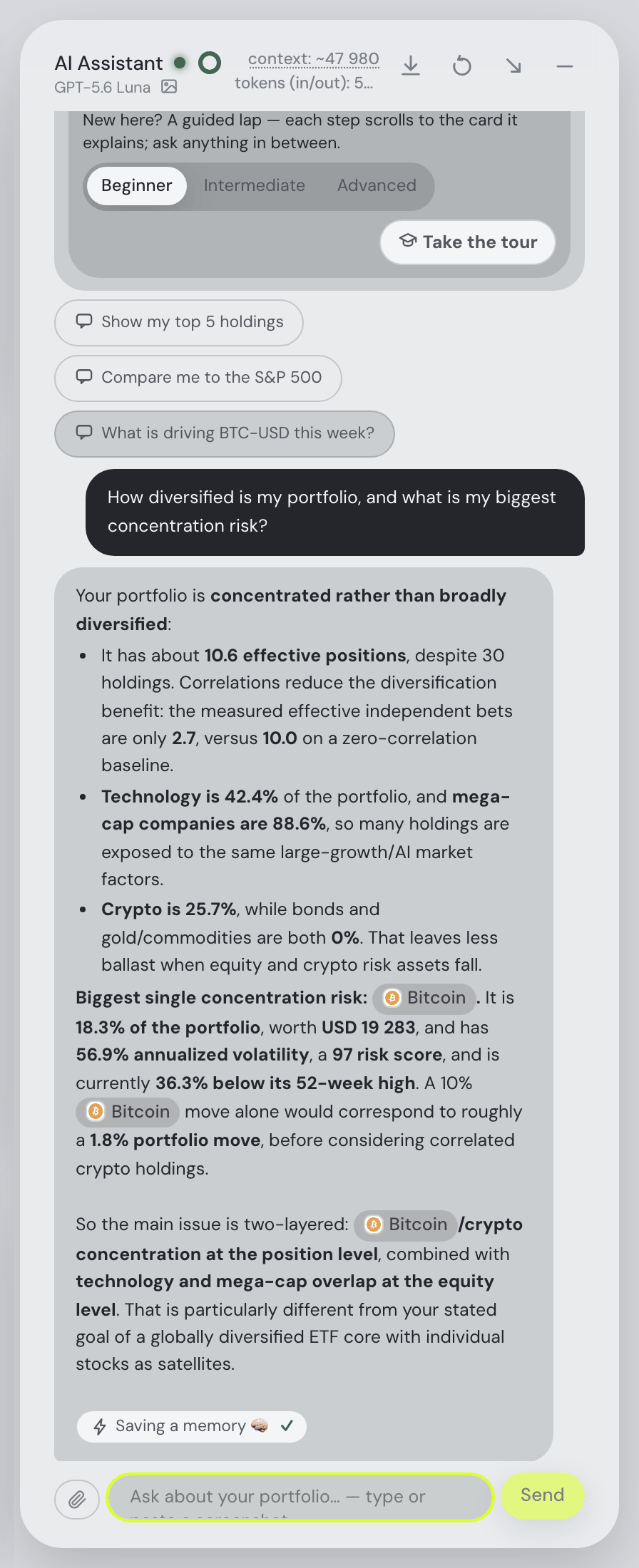
"Privacy-first" is claimed by every tracker with an encryption paragraph, so this guide uses a harsher test, in four parts. Where does the database physically sit — your disk, your server, or theirs? Does the app still work with the network off? What leaves the machine when it is on? And, now that every tracker has an assistant, can the AI run on your own hardware, or does every question you ask travel to somebody's API?
The fourth part is new and it is where most "local" apps quietly stop being local. An app can keep an immaculate on-device database and then send your holdings to a hosted model the moment you ask it a question about them. Two products here avoid that honestly: Wealthfolio, whose default AI provider is Ollama on your own machine, and Fortunest's desktop app, where a local model through Ollama or LM Studio is the starting point and there is no hosted free budget at all. The assistants themselves are compared in the AI portfolio tracker guide.
There is a fifth question people forget: what did you have to install, and did your operating system trust it? An unsigned build is not less private, but it is a worse experience and a worse habit — clicking through a Gatekeeper or SmartScreen warning is exactly the reflex you do not want around financial software. We are candid about our own position here: the macOS build is signed and notarised, and the Windows build is not yet, so Windows users see a SmartScreen warning. Wealthfolio's own FAQ carries a troubleshooting entry for the same thing.
And one distinction that decides more than any of the above: sending a ticker is not sending a portfolio. A tracker that values your holdings at today's price has to ask somebody for that price. Fortunest's desktop app asks a shared cache for quotes by symbol — those market requests carry symbols rather than portfolio quantities. Cloud AI, Pro tax calculations, sharing and hosted sync send their selected portfolio inputs separately. Portfolio Performance looks prices up at data providers. A self-hosted Ghostfolio instance fetches its own. A local database does not imply that all of its services work offline or keep every request local.
Check a local desktop workflow
- Install a supported build from the download page. In an empty desktop portfolio, choose Try with demo data; keep an existing portfolio backed up.
- Start Ollama or LM Studio on the same computer, load a suitable model, then select it under Settings → Assistant using the local-model setup.
- Ask the assistant to summarise the demo holdings and compare the answer with the dashboard. Local inference describes where this model request runs; it does not disable other online services.
- Review desktop outbound data before using cloud AI, tax calculations, Social sharing or hosted synchronization. The desktop MCP bridge requires a hosted portfolio and is not a local-only mode.
Hosted guest mode is different: its temporary server session expires after 12 hours of inactivity, while its browser backup stays subject to browser storage limits and deletion. Keep the original import files. A local model does not turn a hosted portfolio into local storage.
Worked setup: Ollama or LM Studio
These two captures show the actual Settings → Assistant provider and server fields. They are configuration examples from the hosted interface on 9 September 2026. No local model was connected, no answer was generated, and the draft settings were closed without saving. The visible “not detected” state matters: a server address alone does not mean a model is ready.

http://localhost:11434. The provider remains unavailable in this example.
http://localhost:1234. This is not evidence of local inference.- For a local workflow, run Fortunest desktop and Ollama or LM Studio on the same computer. Download a model, load it and start the model server.
- Allow a context window of roughly 32,000 tokens or more for the portfolio and conversation. In LM Studio, set the context length when loading the model; Fortunest requests 32,768 tokens from Ollama. Longer conversations and attachments need more room.
- In Settings → Assistant, select the provider. Keep the default Server address above unless you changed its port. Wait for detection, choose the conversation and fast models, then save.
- Start with “Explain the Portfolio value card using the numbers on my screen.” Compare the answer with the visible card. For the screenshot exercise, also choose a model with vision support; running locally does not give a text-only model vision.
The model and its context must fit in available RAM or GPU memory. Model size, quantisation and context length determine the requirement; a successful connection does not establish answer quality or speed. The local setup manual covers model loading and memory in more detail.
The hosted app cannot reach your computer through localhost. In a hosted session that address refers to the server running Fortunest. Remote access needs separate networking setup and does not make the hosted portfolio local. On desktop with a model on the same computer, that inference request stays on the device; market data, cloud models, Pro taxes and optional sharing or sync keep the separate outbound flows described in the manual.
The comparison
Each cell is what the vendor's own pages say, on the date in the footnote. Not described means the page does not mention it; not checked means we did not verify it. Sharesight is in the table as the deliberate contrast — a good product that makes the opposite trade.
| Fortunest desktop1 | Portfolio Performance2 | Wealthfolio3 | Ghostfolio4 | Capitally5 | Kubera6 | Sharesight7 | |
|---|---|---|---|---|---|---|---|
| Where it runs |
|
|
|
|
|
|
|
| Account required |
|
|
|
|
|
|
|
| Where the data sits |
|
|
|
|
|
|
|
| Works offline |
|
|
|
|
|
|
|
| What leaves the machine |
|
|
|
|
|
|
|
| Local AI model |
|
|
|
|
|
|
|
| Signed installer |
|
|
|
|
|
|
|
| Open source |
|
|
|
|
|
|
|
| What the vendor says it can read |
|
|
|
|
|
|
|
| Getting data in |
|
|
|
|
|
|
|
| Price |
|
|
|
|
|
|
|
Cells were checked against the sources below on 7 September 2026; Portfolio Performance's, Ghostfolio's and Sharesight's rows come from their pages as read on 19 August 2026. Prices are each vendor's list price and, for Fortunest, before VAT. "Not described" is a statement about those pages on that date, not about the product.
The verdicts
Fortunest desktop — our pick
Best for: a full analytics dashboard on your own disk, with a local AI, without running a server.
Free plan · Pro €6.99/mo or €69/yr · download
The desktop app runs the core portfolio engine on your machine and stores its data in a SQLite database under ~/Library/Application Support/Fortunest or %APPDATA%\Fortunest. Cached portfolio analysis works offline. Fresh prices need the shared market cache; cloud AI, Pro tax calculations, Social and hosted synchronization/MCP need connectivity and send the inputs described in the privacy manual. The assistant starts on a local model through Ollama or LM Studio, because there is no hosted free budget on desktop. The macOS build (v0.2.4, Apple Silicon, macOS 26+) is signed and notarised. Running locally does not make the assistant a lesser one: it still sees your holdings and the screen you are on, explains any metric with the numbers the card displays, filters the holdings table from a sentence and drives the dashboard — when you choose a local model, that inference stays on your machine. Cloud models and deliberate sharing remain separate choices. Pro adds the other half of the same idea: a standard MCP server, run from the Fortunest executable, that requires a compatible current build and a hosted portfolio synchronized with the desktop app. Claude Code, Codex or a compatible MCP client can then use authorized context and dashboard tools; sensitive changes need approval unless covered by an active permission. What is stored and what is not is set out in the Privacy chapter.
Where it falls short: the Windows build (v0.2.3) is not code-signed yet, so SmartScreen warns; the hosted web app is an ordinary cloud session — as a guest your data sits in a private server session with a mirror in your browser, which is convenient but not local; market prices are still fetched by ticker; the MCP server for external agents needs Pro; and the app is not open source, so these data-flow claims are documented product behavior rather than source you can independently audit.
Portfolio Performance
Best for: the strictest interpretation of local — a program, a file, no service.
Free — EPL 1.0
Portfolio Performance has been the European DIY reference for a decade for exactly this reason: there is no account, no server and no company holding anything. You install a desktop program on Windows, macOS or Linux, and your portfolio is a file you back up yourself. It imports CSV and PDF statements, benchmarks against an index, reports volatility, semivariance and maximum drawdown, and rebalances to your target allocation, and its exchange rates come from the European Central Bank. The feature-by-feature comparison is on the Fortunest vs Portfolio Performance page.
Where it falls short: price lookups still go out to data providers, so it is not hermetic; there is no phone app, no projection, no tax report and no assistant of any kind; and you carry the whole maintenance burden — imports, fixes, backups.
Wealthfolio
Best for: open source, local storage and a local AI in the same app.
Core app free · Connect from $3.99/mo
Wealthfolio describes itself as "a beautiful, private and open-source investing and personal finance app that runs locally on all your devices", and the description holds up: a local SQLite file, macOS, Windows, Linux, iPhone and iPad builds, plus a self-hosted Docker option. Its assistant defaults to Ollama on your own machine, API keys are "encrypted in your Wealthfolio key store", and the docs state that the raw database is never handed to a model. An MCP server exposes read-only tools to Claude Code and similar clients unless you widen the token.
Where it falls short: automatic broker imports and cross-device sync live in the paid Connect service, which is a cloud service by definition; the licence is not stated on the pages we read; and its own FAQ documents the Windows installer tripping SmartScreen.
Ghostfolio
Best for: people who already run a home server.
Self-hosted free — AGPL-3.0 · Cloud Premium from US$48/yr, one-time
Ghostfolio is the self-hosting answer: an AGPL-licensed application built for Docker, so the data sits on hardware you control and you can read the code that touches it. Sign-in is an anonymous token rather than an email address, transactions arrive as CSV, JSON or through the REST API, and you get benchmarks, an X-ray for cluster risk and fees and a FIRE calculator. Side by side with ours on the Fortunest vs Ghostfolio page.
Where it falls short: "self-hosted" is real work — a container, a database, updates and backups are yours; there are no broker connections at all; there is no in-app assistant, only an experimental prompt you copy out; and the cloud tier's free plan is a summary rather than the product.
Capitally
Best for: on-device encryption without installing anything.
14-day trial, no card · Sailor, Navigator and Captain plans
Capitally (Warsaw) is the strongest confidentiality claim among the hosted products here: "Your financial data is encrypted on your device, we just can't read it." It imports CSV, Excel, JSON and XML alongside a growing list of broker and exchange integrations, tracks FIFO cost basis, withholding tax and taxes due for a growing set of jurisdictions, offers tax-loss harvesting on its top plan, and its mobile version can be added to the home screen and used offline.
Where it falls short: it is still a web service, so you are trusting a claim rather than an architecture you can inspect; there is no free tier beyond the trial and the plan prices did not render when we fetched the pricing page; and no AI features are mentioned at all.
Kubera
Best for: aggregating everything, with unusually candid disclosure about the trade.
Essentials $250/yr · Black $2,500/yr · 14-day trial
Kubera is not a local tracker and does not pretend to be, which is why it earns a place here. Its security page says the useful things out loud: data is "encrypted at rest on AWS and encrypted in transit over HTTPS with HSTS enforced", explicitly "Not end-to-end" because the server has to read it to sync and benchmark; a small number of staff can view data, personally identifiable information masked by default, with approval, logging and audit. Bank credentials stay with the aggregators — "Our servers never see them" — and the feed is read-only.
Where it falls short: for a privacy-first shortlist, everything is on somebody else's infrastructure and readable there; the entry price is $250 a year; and the Web Sync Chrome extension, which "reads numbers straight off their website", is a broad permission to grant a browser.
How we compared
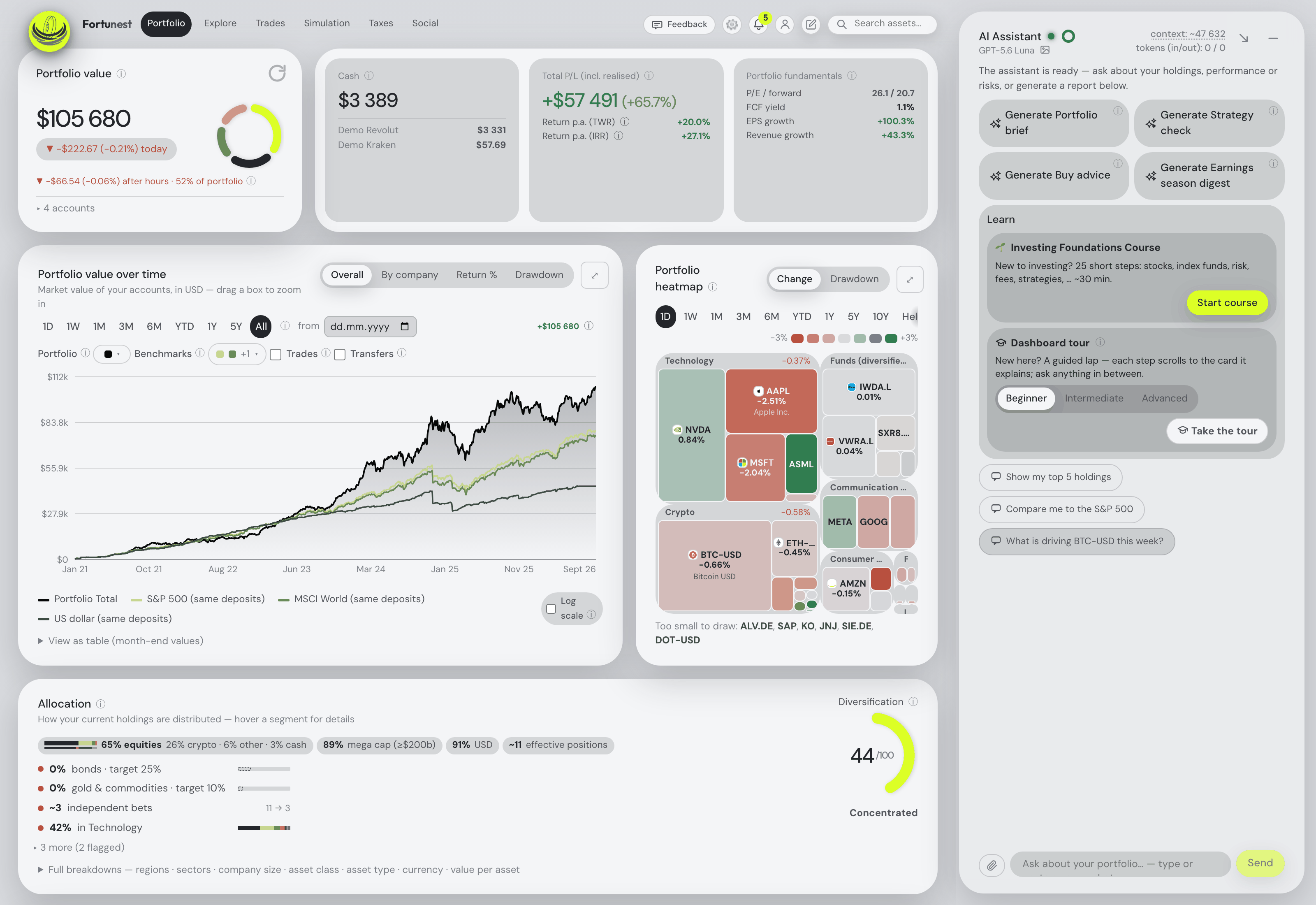
We took the trackers people name when they ask for a local or privacy-first option, plus one deliberate contrast, and read each vendor's own documentation, security and pricing pages — never a review site. The rows are the ones a sceptic would ask: where the file is, whether it runs with the network off, what goes out when it is on, whether the AI can stay home, and what the vendor states it can read. We build Fortunest, so we are not neutral, and our verdict names the two places we fall short of the strict standard: an unsigned Windows build and a hosted web app that is an ordinary cloud session.
Questions people ask
Which portfolio tracker keeps my data on my own computer?
Four of the seven. Portfolio Performance keeps a file on your disk with no service behind it. Wealthfolio keeps a local SQLite file on macOS, Windows, Linux, iPhone and iPad. Fortunest's desktop app stores a SQLite database in your application-support folder; cloud AI, Pro tax computation and optional sharing or hosted sync have separate outbound flows. Ghostfolio is self-hosted in Docker on hardware you control. Capitally encrypts on the device but is a web app; Kubera and Sharesight are ordinary cloud services.
Is there a portfolio tracker that works offline?
Fortunest's desktop app supports cached portfolio analysis and local AI offline; fresh market data, cloud AI, Pro tax calculations, Social and hosted sync/MCP need connectivity. Portfolio Performance works offline except for price lookups, which go out to data providers. Capitally states its mobile version can be added to the home screen and used offline. Anything that values your portfolio at today's price has to reach the internet for that price — the question is what it sends when it does.
Can I use a portfolio tracker without creating an account?
Portfolio Performance needs no account at all — it is a desktop program with a file. Wealthfolio's core app needs none either. Fortunest's free plan works as a guest with no account and no card, and its desktop app stores the portfolio locally, with optional hosted services and online tax calculations described below. Ghostfolio signs you in with an anonymous token rather than an email address. Capitally, Kubera and Sharesight all require an account. More in the free trackers guide.
Does a private portfolio tracker still send anything to the internet?
Almost always, for market data. Fortunest's desktop app fetches prices from a shared cache by ticker, so those market requests carry symbols rather than portfolio quantities. Cloud AI, Pro tax calculations, sharing and hosted sync send their selected portfolio inputs separately. Portfolio Performance looks prices up at data providers. Ghostfolio's instance fetches its own data. The distinction worth insisting on is between sending a list of tickers and sending your portfolio.
Which portfolio trackers say they cannot read my data?
Capitally states it plainly: your financial data is encrypted on your device, and we just can't read it. Wealthfolio states that API keys are encrypted in a local key store and the raw database is never handed to a model. Kubera is unusually candid the other way, saying encryption is not end-to-end and that a small number of staff can view masked data with approval and an audit trail. Sharesight's policy states data is stored in the United States and disclosed to analytics and advertising partners.
Sources
- Fortunest — the Privacy chapter (guest sessions, accounts, the desktop app, what reaches an LLM), the download page for build versions and signing, and the local-model setup.
- Portfolio Performance — product site and manual (19 August 2026; the currency reference re-read 7 September 2026).
- Wealthfolio — product site, FAQ, AI assistant docs and Connect (7 September 2026).
- Ghostfolio — features, pricing and the source repository (19 August 2026).
- Capitally — pricing (7 September 2026).
- Kubera — security and home and plans (7 September 2026).
- Sharesight — features (7 September 2026); privacy policy and pricing (19 August 2026).
Signals, analyses and assistant answers in Fortunest are informational — not financial or tax advice.