Guides · Updated 10 November 2026
Revolut in Claude and ChatGPT: how to ask an AI about your Revolut stocks, ETFs and crypto
Revolut has two AI stories, and neither puts your Revolut brokerage account into Claude or ChatGPT. AIR, Revolut's own assistant, answers inside the Revolut app. The connectors Revolut announced for Claude, Gemini, Codex and others are for Revolut X, its crypto exchange. What works for the stocks, ETFs and crypto in the Revolut app is one step removed: export the brokerage account statement and the crypto transactions file, import both into a tracker, and let an AI read the tracker. In Fortunest that is the in-app assistant on the free plan, or, on Pro, the Claude app, ChatGPT, Claude Code or Codex over MCP.
The short answer
- Revolut's AI connectors are for Revolut X. Its June 2026 announcement covers the crypto exchange's account, not the brokerage account's shares and ETFs.
- AIR stays in the Revolut app. It answers about what you can already see there, investments included.
- Revolut is a two-file broker. The brokerage account statement and the crypto transactions export are separate downloads with nothing in common; a tracker needs both.
- The free route: import both into Fortunest and ask its in-app assistant — no account, no card, three accounts and fifty assets on the free plan.
- The Claude and ChatGPT route: on Fortunest Pro (€6.99 a month or €69 a year plus VAT; every new account starts with a 14-day Pro trial, no card), add
https://app.fortunest.ai/mcpas a custom connector. Which other trackers and brokers run an MCP server is in portfolio apps with an MCP server. - Re-export to stay current. There is no Revolut connection in Fortunest, so new trades arrive when you drop in fresh files.
What Revolut gives an AI, and what it does not
AIR. Revolut began rolling out AIR, "AI by Revolut", to its UK customers on 9 April 2026. It is a chat inside the Revolut app — swipe down on the home screen, or Profile → Chats → AIR — that manages cards and subscriptions, answers budgeting questions and checks investments, with examples like a share price or this year's investment earnings. Revolut says AIR only accesses data you can already see in the app and asks for biometric approval before sensitive actions. It is an assistant in Revolut's app, not a connector for one you already use.
Revolut X. On 26 June 2026 Revolut announced that Revolut X now connects with your AI assistant: a Claude connector, a Gemini extension, and plugins for Cursor, Codex and OpenClaw, plus a CLI and a universal skill. The assistant can summarise the Revolut X portfolio and recent trades, watch prices and set up market and limit orders that you review and approve. Revolut X is Revolut's crypto exchange; the announcement says nothing about the stocks and ETFs in the Revolut brokerage account.
No investment API. Revolut's developer documentation lists APIs for accepting payments, for business accounts and for open banking through regulated providers; the Revolut X exchange has its own. None of them is described as access to a personal brokerage account. Fortunest's platform list accordingly has Revolut as CSV only, and it is not among the brokers SnapTrade signs you into.
Step by step: from Revolut to an answer
The exports are the same as in the Revolut section of the docs and the Revolut portfolio tracker guide. Do the brokerage statement first; the crypto file is a separate download.
- Open your Documents On invest.revolut.com click your profile icon (top right) and choose Documents.
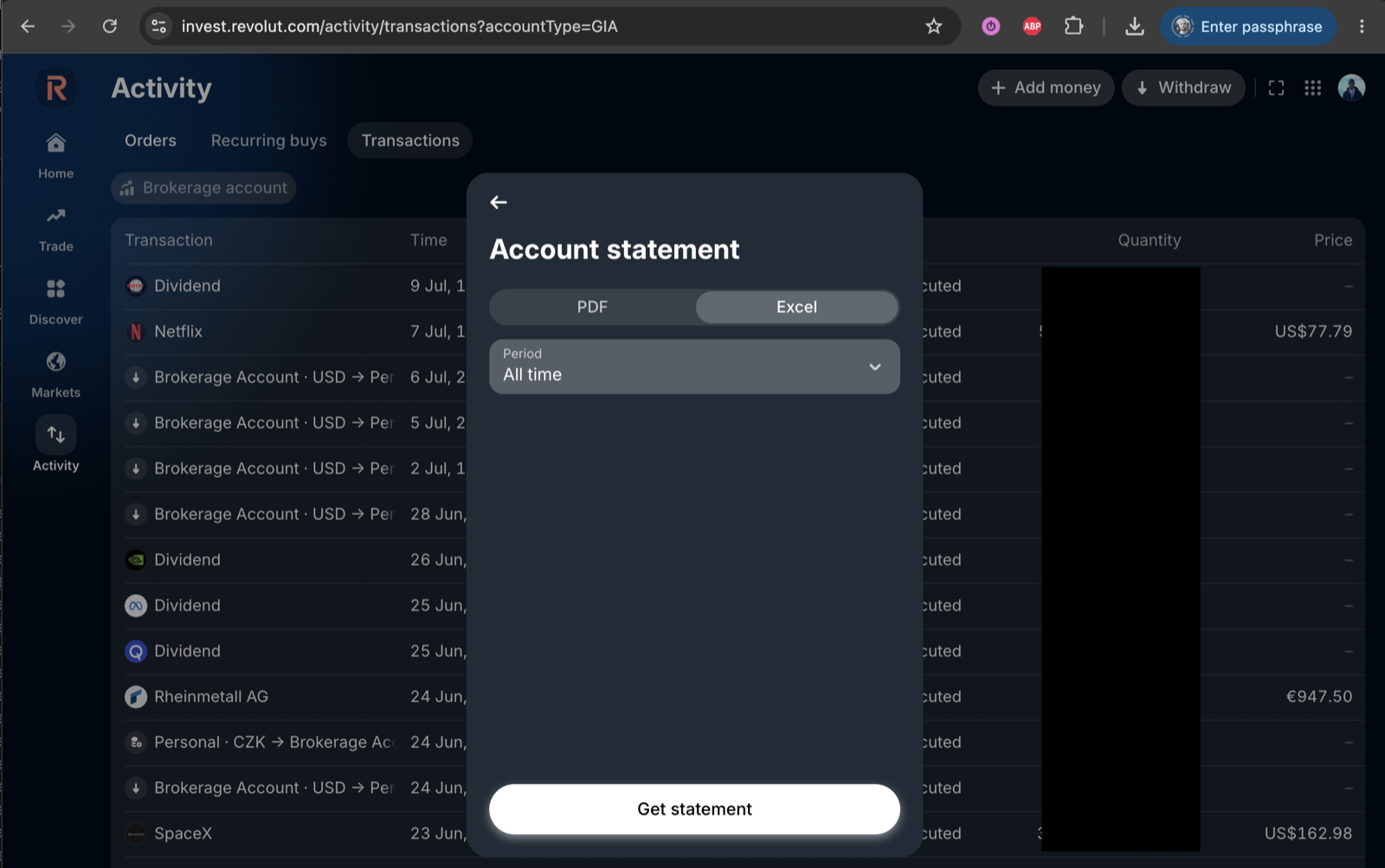
- Pick the brokerage account statement Select Brokerage account and choose Account statement under Statements. Pick the Excel format — it downloads as CSV — set Period to All time and click Get statement.
- Export the crypto transactions too Revolut's crypto wallet writes its own export: seven columns, one row per buy, sell, send, receive or staking reward. Without it, the coins are missing.
- Drop both in Drag both files onto the Portfolio value tile in the app, or into ⚙ Settings → Data. They are recognised separately and land under one Revolut account. No Fortunest account is needed.
- Ask the in-app assistant — free Open the assistant pane beside the dashboard and ask, on the small free hosted budget, on your own Anthropic, OpenAI or OpenRouter key, or on a local model through the desktop app.
-
Or connect Claude, ChatGPT, Claude Code or Codex — Pro
In Claude, Settings → Connectors → Add custom connector with
https://app.fortunest.ai/mcp; in ChatGPT, Developer mode and a new connector with the same URL and OAuth; in Codex, Settings → Plugins → MCPs. Sign in to Fortunest, review the permissions and click Allow connection. Each client's steps are in the External agents chapter.
Then check with a question that changes nothing: "Use Fortunest to list my Revolut shares and my Revolut crypto separately. Do not change anything." If both halves come back, both files are in.
What the two files bring in — and what they do not
- The brokerage statement is read for buys and sells, dividends, stock splits, custody fees, top-ups, withdrawals and transfers. It carries no running cash balance, so cash is reconstructed from those rows.
- Euro-locale statements read. A file that mixes comma decimals with dollar amounts used to fail outright; numbers are now read cell by cell, and a genuinely ambiguous one is settled by the row's own arithmetic or counted in the import notes rather than guessed.
- Several currencies over one file's life — SEK early, EUR later — each row keeping its own.
- The crypto file is read for buys, sells, sends, receives and staking rewards. Stake and Unstake rows are deliberately ignored, so no coins are invented on top of the purchase that bought them.
- Not covered: Revolut X, Revolut's crypto exchange, is not on Fortunest's list of supported platforms; and the AI reads the portfolio built from your files, not the files themselves — positions imported from them stay managed by them and are not edited by chat.
Try it on the demo portfolio — no account
Before you export anything or pay for Pro, connect Claude or ChatGPT to Fortunest's demo portfolio: four synthetic accounts — DEGIRO, Revolut, Kraken and Interactive Brokers — with made-up amounts over real tickers. No Fortunest account, no sign-in, nothing to install.
https://app.fortunest.ai/mcp/demo
In Claude
- Open Settings → Connectors and choose Add custom connector.
- Name it
Fortunest demo, paste the URL above as the Remote MCP server URL and click Add. There is no sign-in step. - In a new chat, enable Fortunest demo under + and ask: "Using Fortunest demo, what are the five largest holdings and how risky is this portfolio?"
In ChatGPT
- Turn on Developer mode under Settings → Apps & Connectors → Advanced settings.
- In Apps & Connectors choose Create: name
Fortunest demo, the URL above as the MCP server URL and Authentication: No authentication. Confirm that you trust it and click Create. - In a new chat, open + → More (or Developer mode), enable Fortunest demo and ask the same question.
In Claude Code: claude mcp add --transport http fortunest-demo https://app.fortunest.ai/mcp/demo. In Codex: codex mcp add fortunest-demo --url https://app.fortunest.ai/mcp/demo.
What the demo is. Seventeen read-only tools — portfolio summary, holdings, one position, allocation, risk, the value chart, upcoming events, recent trades, money flow, tax lots, the tax-free summary, the trade plan and its candidates, simulation inputs, data warnings and a search of the documentation — on one shared example portfolio. It cannot change anything, sees nobody's real data, and Fortunest runs no AI model for it: Claude or ChatGPT brings its own. For your own portfolio, import your exports in the app — free, with the in-app assistant; connecting an agent to it at https://app.fortunest.ai/mcp is Pro. Every endpoint and tool is listed in the Fortunest MCP server reference.
What you can ask about a Revolut portfolio
Revolut portfolios often mix a few popular shares and ETFs with some crypto, in an account that started small. Every question below is one the assistant manual or our guides document; they work in the in-app assistant and, over MCP, in a connected agent. The demo portfolio above includes a synthetic Revolut account to try them on.
| Ask | What comes back |
|---|---|
| "Summarise my top five holdings by current value and their combined portfolio weight. Make no changes." | The five largest positions — shares, ETFs and coins together — in your display currency. |
| "Show only my crypto." | The holdings table filtered to the coins from the crypto file, with a comment on what is left. |
| "What was Bitcoin worth on 1 August, and what is the change?" | The close from the same daily series the charts use, at that day's exchange rate; up to eight dates in one go. |
| "How has NVIDIA done this year?" | The year's move, quote and ratios fetched live, with the latest headlines and links. |
| "What does my diversification score mean?" | The score and its effective number of positions explained on your own holdings — a few large positions and a coin read very differently from an ETF. |
| "Explain my maximum drawdown and volatility." | The risk card's figures on your history, crypto swings included. |
| "What if I sell half my Tesla?" | A what-if on the Simulation tab, prefilled and run, with the result summarised. |
| "Compare me to the S&P 500." | The value chart switched to return mode with the benchmark fed your own top-ups. |
Which route: AIR, Revolut X's connectors, or a tracker
Each cell is what the vendor's own pages say on the date in the footnote. Not described means the pages we read do not mention it.
| AIR2 | Revolut X AI connectors2 | Fortunest over MCP1 | |
|---|---|---|---|
| Where you ask |
|
|
|
| Brokerage shares and ETFs |
|
|
|
| Crypto |
|
|
|
| Other brokers |
|
|
|
| Orders |
|
|
|
| Price |
|
|
|
Revolut's cells were checked against its AIR and Revolut X posts and its developer documentation on 10 November 2026. "Not described" is a statement about those pages on that date, not about the product.
Where this falls short
- Nothing syncs on its own. Both files are snapshots; re-download them for new trades.
- Two files, every time. Forget the crypto export and the coins are missing, not wrong.
- No Revolut X. Coins held on Revolut's exchange are not imported.
- MCP is Pro after the trial, whatever the agent reads goes to your agent's provider under their terms, ChatGPT custom connectors depend on your plan, and free Claude accounts are limited to one custom connector.
How we checked
We read Revolut's AIR post, its Revolut X announcement and its developer documentation on 10 November 2026. The Fortunest steps, what the import reads and the example questions come from our documentation, which is kept current with each release. We build Fortunest, so we are not neutral; for a quick look at one Revolut account from inside its own app, AIR is the shorter way.
Questions people ask
Can ChatGPT or Claude read my Revolut portfolio?
Not directly: Revolut's AI connectors are for Revolut X, its crypto exchange, and its own assistant AIR lives inside the Revolut app. For the stocks and ETFs in your brokerage account and the crypto in the app, export the brokerage account statement and the crypto transactions file, import both into Fortunest, then add https://app.fortunest.ai/mcp as a custom connector in Claude or, with Developer mode, in ChatGPT, sign in and allow the connection. That needs Fortunest Pro, which every new account gets free for 14 days; in ChatGPT, custom connectors depend on your plan, and free Claude accounts are limited to one custom connector.
Is there a Revolut MCP server?
Only for Revolut X. In June 2026 Revolut announced that a Revolut X account connects to Claude, Gemini, Cursor, Codex and OpenClaw, with orders you review and approve. The announcement does not mention the stocks and ETFs of the Revolut brokerage account, and Revolut's developer documentation lists APIs for merchants, business accounts and open banking rather than one for a personal investment account. For those, the export is the route.
Does Revolut's AIR answer the same questions?
Partly. AIR, which Revolut began rolling out to UK customers on 9 April 2026, answers inside the Revolut app about your money, including your investment earnings and share prices, and Revolut says it only uses data you can already see there. A tracker puts the Revolut account beside your other brokers and exchanges, in one display currency, and lets Claude or ChatGPT read the whole portfolio.
Why does Revolut need two files?
Because Revolut writes two exports that share no column name: the brokerage account statement for shares and ETFs, and the crypto wallet's own transactions file. Upload only the first and your coins are missing; only the second and your shares are. Fortunest recognises them separately and files both under one Revolut account.
Does Revolut crypto staking show up correctly?
Yes. Staking rewards are read as the coins they add. Stake and Unstake rows are read and then deliberately ignored, because staking a coin does not change how much of it you own — crediting those rows would invent coins on top of the purchase that bought them.
Can an AI trade my Revolut account through Fortunest?
No. Fortunest reads a file you exported; it has no connection to Revolut at all, and the app has no order-placing code. Changes an agent proposes inside Fortunest itself — a note, a target, a setting — need your approval there.
Sources
- Fortunest — the Revolut export walkthrough, every supported platform, the MCP server reference and its External agents chapter, the Revolut tracker guide, and the DEGIRO MCP guide, the same route for DEGIRO.
- Revolut — Ask, and AIR makes it happen (9 April 2026), Revolut X now connects with your AI assistant (26 June 2026) and the developer documentation — all read 10 November 2026.
Signals, analyses and assistant answers in Fortunest are informational — not financial or tax advice.