Guides · Updated 10 November 2026
Trade Republic in Claude and ChatGPT: how to ask an AI about your Trade Republic portfolio
Trade Republic offers no MCP server, and we found no public API on its website for one to be built on, so neither Claude nor ChatGPT can open a Trade Republic account by itself. The route that works runs through a file: pytr, a community tool, downloads your history as a CSV; Fortunest turns that CSV into a valued portfolio of your ETFs, savings plans and single stocks; and an AI reads the portfolio — the in-app assistant for free, or, on Pro, Claude, ChatGPT, Claude Code or Codex over MCP.
The short answer
- No official way in for an agent. On 10 November 2026 Trade Republic's own site showed no API, developer programme or MCP server. The tools that reach a Trade Republic account are community projects that sign in as you.
- Fortunest reads one Trade Republic file: the CSV pytr writes. pytr runs on your computer, so your Trade Republic login stays between you and Trade Republic; Fortunest only ever sees the CSV.
- The free route: import that CSV and ask Fortunest's in-app assistant — no account, no card, three accounts and fifty assets on the free plan.
- The Claude and ChatGPT route: on Fortunest Pro (€6.99 a month or €69 a year plus VAT; every new account starts with a 14-day Pro trial), add
https://app.fortunest.ai/mcpas a custom connector and the agent reads the same portfolio. In ChatGPT, custom connectors depend on your plan; free Claude accounts get one custom connector. - Nothing syncs by itself. A file is a snapshot: new savings-plan executions reach the AI when you run pytr again and drop in the fresh CSV.
Why an AI cannot read Trade Republic directly
An AI agent reaches your data through tools it is given — an MCP server, or an API someone wraps in one. Trade Republic publishes neither that we could find: its website, read on 10 November 2026, describes no developer access, and its help-centre articles on statements sent us to its support start page instead of opening. It is not among the brokers Fortunest reaches through SnapTrade either — the platform list marks Trade Republic as CSV only.
What exists instead is community software. pytr calls itself a library for Trade Republic's private API — the interface Trade Republic's own apps use, not one it documents for anybody else — and its README states that it is not affiliated with Trade Republic Bank GmbH. Unofficial Trade Republic MCP servers built the same way are listed in public MCP directories. Each of them logs in to your account as you, and each can stop working whenever Trade Republic changes its private interface. That is worth weighing before you give any of them your Trade Republic credentials, let alone an agent that runs them.
The file route keeps that risk small and in one place: pytr runs once, on your machine, and what reaches Fortunest — and through it, your AI — is a CSV of transactions, not a live session in your Trade Republic account.
 Step by step: from Trade Republic to an answer
The import itself is the one in the Trade Republic section of the docs; the pytr steps follow its own README.
-
Run pytr and sign in
pytr's README recommends running it with
uv, for exampleuvx pytr@latest login. The default web login asks for a four-digit code that arrives in the Trade Republic app (SMS is the fallback);pytr login --v2sends a push notification to confirm in the app instead. Either way your phone stays signed in, and you may have to log in again every so often. -
Export the transactions
pytr's
export_transactionscommand reads your Trade Republic timeline and writes the transactions toaccount_transactions.csv;dl_docswrites the same file while it downloads your PDF documents. The README lists the options. -
Import the CSV
Drag
account_transactions.csvonto the Portfolio value tile in the app, or open ⚙ Settings → Data and drop it on the Data sources card. The format is detected automatically and no Fortunest account is needed. If something in the result looks wrong, run pytr again rather than editing the file in a spreadsheet. - Ask the in-app assistant — free Open the assistant pane beside the dashboard and ask. It answers on a hosted model with a small free budget, on your own Anthropic, OpenAI or OpenRouter key, or on a local model through the desktop app.
-
Or connect Claude, ChatGPT, Claude Code or Codex — Pro
In Claude, Settings → Connectors → Add custom connector with the URL
https://app.fortunest.ai/mcp; in ChatGPT, Developer mode and a new connector with the same URL and OAuth; in Claude Code or Codex, the same endpoint as an MCP server. Sign in to Fortunest in the browser, review the permissions and click Allow connection. Each client's exact steps are in the External agents chapter.
Then check the connection with a question that changes nothing: "Use Fortunest to list my Trade Republic holdings by value. Do not change anything." If your ETFs and stocks come back, it works.
No pytr? A Trade Republic PDF statement or a screenshot of your portfolio can go through Read with AI instead, where you review every row before it is imported. That gives a snapshot rather than a history: a holding is booked as bought on the statement's date, so returns and tax lots start that day. Fortunest's documentation lists the pytr CSV as the one Trade Republic file format its importer reads.
What the pytr file brings in — and what it does not
Fortunest's Trade Republic reader was written against a real pytr export. What it understands, from what each CSV export contains:
| In the file | What Fortunest makes of it |
|---|---|
| Buys and sells | Trades, whether the row says Aankoop/Verkoop or Buy/Sell — pytr translates some words and passes others through, so one file can carry both. |
| Net value, fee and tax per trade | The file states what a trade cost in total, not a price, so the per-share price is reconstructed from the net value, the fee and the tax. The fee is already inside the net and is never subtracted twice. |
| Savings-plan executions | Kept, every one of them. They look exactly like a manual purchase, so identical rows are not merged — and the dashboard cannot label them as savings-plan buys. |
| Dividends, deposits, withdrawals, interest | Cash movements and income on the account. |
| Decimal commas and points, two date formats | Read row by row, because pytr leaves some values untouched while translating others. |
| Currency | There is no currency column; Trade Republic is euro-only, so euros are assumed. |
| The note column | Copied only on rows that name an instrument — on cash rows it holds the account holder's own name. |
| Anything else | A transaction type the reader does not know is counted and reported on the Portfolio tab, not guessed at. |
Try it on the demo portfolio — no account
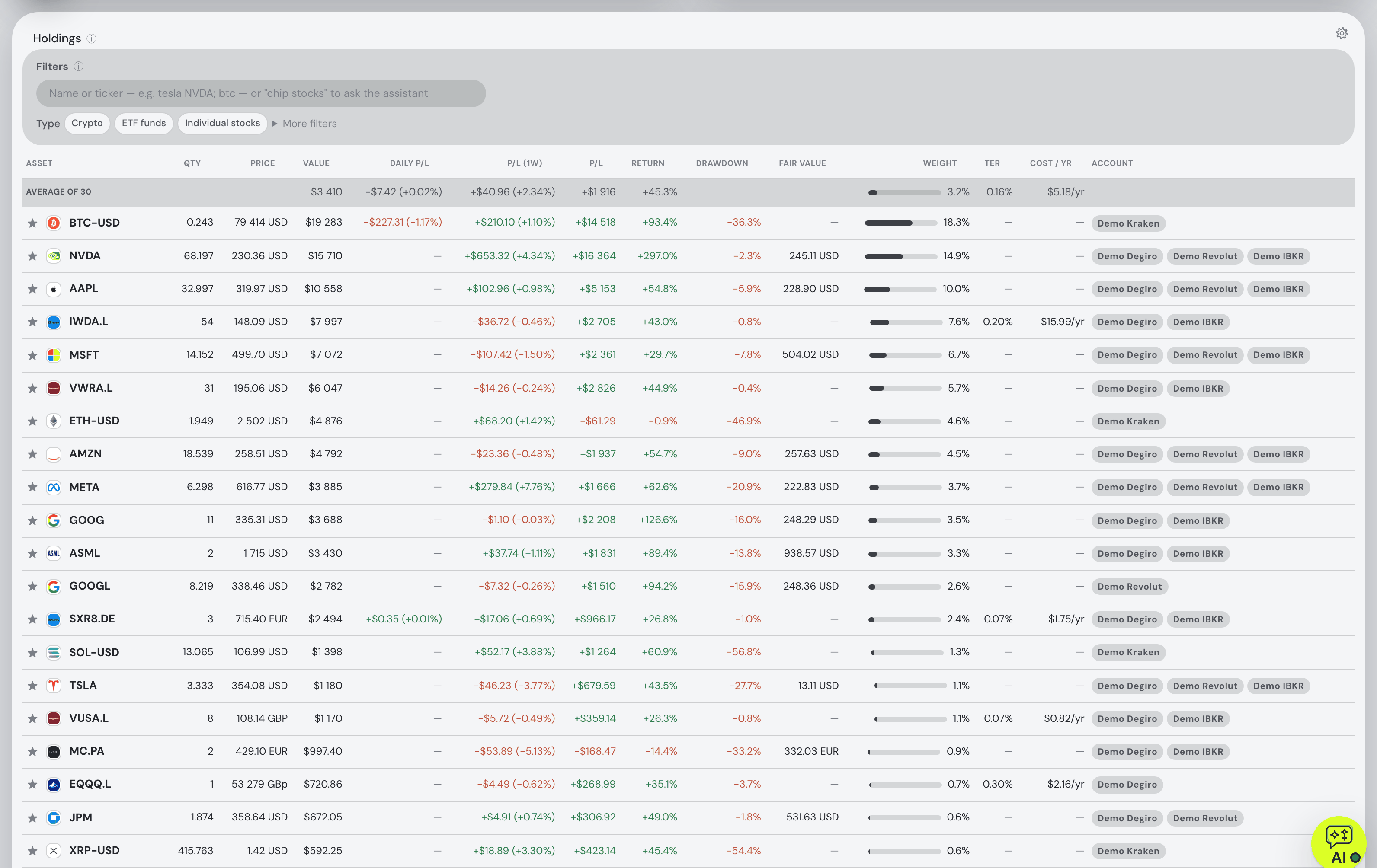
Before you export anything or pay for Pro, connect Claude or ChatGPT to Fortunest's demo portfolio: four synthetic accounts — DEGIRO, Revolut, Kraken and Interactive Brokers — with made-up amounts over real tickers. No Fortunest account, no sign-in, nothing to install.
https://app.fortunest.ai/mcp/demo
In Claude
- Open Settings → Connectors and choose Add custom connector.
- Name it
Fortunest demo, paste the URL above as the Remote MCP server URL and click Add. There is no sign-in step. - In a new chat, enable Fortunest demo under + and ask: "Using Fortunest demo, what are the five largest holdings and how risky is this portfolio?"
In ChatGPT
- Turn on Developer mode under Settings → Apps & Connectors → Advanced settings.
- In Apps & Connectors choose Create: name
Fortunest demo, the URL above as the MCP server URL and Authentication: No authentication. Confirm that you trust it and click Create. - In a new chat, open + → More (or Developer mode), enable Fortunest demo and ask the same question.
In Claude Code: claude mcp add --transport http fortunest-demo https://app.fortunest.ai/mcp/demo. In Codex: codex mcp add fortunest-demo --url https://app.fortunest.ai/mcp/demo.
What the demo is. Seventeen read-only tools — portfolio summary, holdings, one position, allocation, risk, the value chart, upcoming events, recent trades, money flow, tax lots, the tax-free summary, the trade plan and its candidates, simulation inputs, data warnings and a search of the documentation — on one shared example portfolio. It cannot change anything, sees nobody's real data, and Fortunest runs no AI model for it: Claude or ChatGPT brings its own. For your own portfolio, import your exports in the app — free, with the in-app assistant; connecting an agent to it at https://app.fortunest.ai/mcp is Pro. Every endpoint and tool is listed in the Fortunest MCP server reference.
What you can ask about a Trade Republic portfolio
A Trade Republic account is typically a few ETFs fed by monthly savings plans plus some single stocks. These questions use tools the assistant manual and the MCP reference document; they work in the in-app assistant and, over MCP, in a connected agent. Swap in your own holdings.
| Ask | What comes back |
|---|---|
| "List my Trade Republic holdings by value and weight. Make no changes." | Every ETF and stock in the account with its value and share of the portfolio — a safe first check that the import and the connection both work. |
| "I buy the same ETF every month. What does the gap between my time-weighted and money-weighted return say?" | TWR against IRR explained on your own deposits — the two part ways precisely when money keeps arriving, which is what a savings plan does. |
| "What do the TERs of my ETFs cost me a year?" | The fund fees at your position sizes, from the fee figures the dashboard shows. |
| "How much did I deposit, and how much came back as dividends and interest, this year?" | Your money flow: deposits and withdrawals against the income the file recorded. |
| "How diversified am I, and what is my biggest concentration risk?" | Effective positions, sector and size concentration and the single largest risk, from the allocation card's figures. |
| "How did Nvidia's last quarter go?" | For a single stock you hold: quote, ratios, headlines and recent earnings beats and misses. |
| "What if I sell my Tesla and put the money into my ETF?" | A what-if on the Simulation tab, prefilled and run, with the result summarised. |
| "Compare my return to the S&P 500." | The value chart in return mode, the benchmark fed your own deposits on the same days. |
The honest limits
- pytr is outside anyone's guarantee. It uses an interface Trade Republic does not document, so a Trade Republic update can break it until its maintainers catch up. Fortunest's reader follows the file pytr writes; if pytr changes its output, re-run it with a current version.
- No automatic updates. There is no connection to keep current: each new export is a new snapshot you drop in. Overlapping exports are de-duplicated, but identical savings-plan rows within one file are deliberately kept.
- Savings plans are not labelled. The file does not say which buys were savings-plan executions, so neither can the AI.
- The AI reads the portfolio, not the raw CSV. Imported files are not sent to the model as context, and positions that come from a file stay managed by that file — the assistant will not edit them by chat; re-export instead.
- Pro for Claude and ChatGPT. The MCP connection needs Fortunest Pro after the 14-day trial, and whatever the agent reads goes to its provider under that provider's terms.
If you keep a crypto exchange next to Trade Republic, stocks and crypto together covers putting both in one portfolio; the DEGIRO guide walks through the same AI route for DEGIRO's export; and portfolio apps with an MCP server lists which trackers and brokers run one at all.
Questions people ask
Can ChatGPT or Claude read my Trade Republic portfolio?
Not directly, but they can read it through a tracker. Export your Trade Republic history with pytr, the community downloader, and import the CSV into Fortunest. Then add https://app.fortunest.ai/mcp as a custom connector in Claude or, with Developer mode, in ChatGPT, sign in and allow the connection. That needs Fortunest Pro, which every new account gets free for 14 days, no card; in ChatGPT, custom connectors depend on your plan, and free Claude accounts are limited to one custom connector.
Is there a Trade Republic MCP server?
Not from Trade Republic: on 10 November 2026 we found no API, developer documentation or MCP server on its own website. Community-built, unofficial Trade Republic clients and MCP servers exist; Trade Republic neither publishes nor supports them, and they sign in to your account as you. pytr, the one Fortunest's import is written for, describes itself as a library for Trade Republic's private API and says it is not affiliated with Trade Republic Bank GmbH.
How do I get my Trade Republic transactions into Fortunest?
Run pytr on your own computer, sign in, and let it write account_transactions.csv; then drop that file on the Portfolio value tile or on the Data sources card in Settings → Data. The format is detected automatically and no Fortunest account is needed. If a file looks wrong, run pytr again rather than editing it in a spreadsheet.
Are my Trade Republic savings plan purchases counted?
Yes. A savings-plan execution and a manual purchase look identical in the pytr file, so identical rows are kept rather than merged — merging them would silently halve a year of saving. The flip side is that the file cannot tell the two apart, so Fortunest shows every execution as an ordinary buy.
Is there a free AI for my Trade Republic portfolio?
Yes. Import the pytr CSV into Fortunest and use the in-app assistant on the free plan, with no account and no card: it reads your holdings and the screen you are on and explains your returns, risk and ETF fees on your own numbers. It answers on a small free hosted budget, on your own Anthropic, OpenAI or OpenRouter key, or on a local model through the desktop app. The free plan covers three accounts and fifty assets.
Can an AI place trades in my Trade Republic account through Fortunest?
No. Fortunest is a tracker: no tool places an order with a broker or moves money, and it never holds your Trade Republic login — it only sees the file you import. Anything a connected agent wants to change in Fortunest itself, such as a note or a target weight, waits for your approval in the app.
Sources
- Fortunest — the Trade Republic import, what each CSV export contains, every supported platform, Read with AI, the MCP server reference and its External agents chapter, and the assistant manual's free budget.
- pytr — README on GitHub: what it is, its affiliation note, the two web logins,
export_transactionsanddl_docs(read 10 November 2026). - Trade Republic — support start page; we found no API, developer documentation or MCP server on its site, and its statement articles redirected to this page rather than opening (10 November 2026).
Signals, analyses and assistant answers in Fortunest are informational — not financial or tax advice.