Guides · Published 9 November 2026; other products checked the same day
A portfolio tracker that works without an account
You can track a real portfolio without giving anyone an e-mail address. Fortunest's web app opens as a guest — no sign-up, no card — with the demo, your broker exports and the AI assistant; its desktop app keeps the portfolio on your own disk. If you want no service in the picture at all, four other trackers need no account either, and we compare them below.
Quick answer
Fortunest, which we build, is the best pick if you want a full web dashboard with an AI assistant and no sign-up: open it as a guest, load the demo or your broker exports, and the server keeps the session until 12 hours pass without a visit, with a backup in your browser. Its desktop app is the local option, with the portfolio on your own disk and a local model through Ollama or LM Studio. Portfolio Performance is the best free, open-source desktop program with nothing to sign up for, Wealthfolio is the best open-source app with local storage and a local AI, and localfolio is the best fit if the whole tracker should run in your browser.
The short answer
- Our pick for a full dashboard with no sign-up: Fortunest as a guest — open app.fortunest.ai, choose Explore a demo first or upload your exports, and ask the assistant about your actual holdings. Free plan: 3 accounts, 50 assets, no card.
- Our pick for local: the Fortunest desktop app — the portfolio database on your disk, cached analysis offline and a local model through Ollama or LM Studio. The Mac app needs no account.
- Free and open source on the desktop: Portfolio Performance — Windows, macOS and Linux, a file you keep yourself.
- Open source with a local AI: Wealthfolio — its core app needs no sign-up; desktop and mobile builds keep the data on your devices.
- Entirely in the browser: localfolio — no account, data in the browser's own storage, works offline; transactions are entered by hand.
- A young open-source desktop app: Stonqs — a database on your own disk with optional password encryption and CSV layouts for 26 brokers.
What a Fortunest guest can do
Opening app.fortunest.ai gives your browser an anonymous session cookie — nothing else is asked. On the Free plan's limits (3 accounts and 50 assets in total), a guest can:
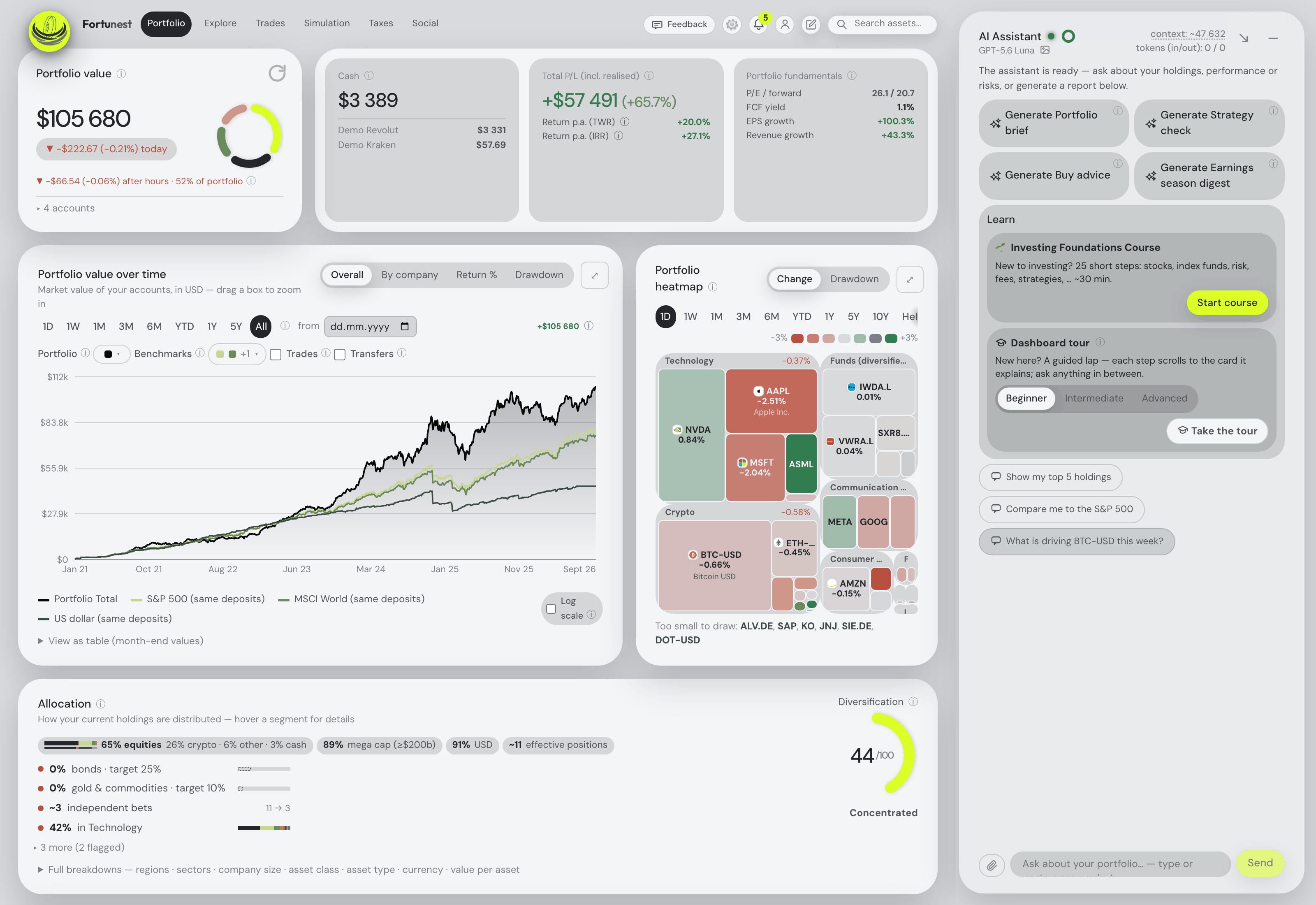
- Explore the demo. Explore a demo first on the first screen loads a synthetic four-account portfolio, so every tab has something on it before you add anything of your own.
- Upload broker exports. CSV exports from DEGIRO, XTB, Revolut, eToro, Trading 212 and the other supported brokers and exchanges, plus assets added by hand. The data chapter lists every format.
- Connect an exchange or broker by read-only API key. The direct connections — Binance, Coinbase, Kraken, Coinmate, Interactive Brokers (Flex) and Trading 212 — work as a guest too, for as long as the guest session lasts. Broker sign-ins through SnapTrade need a free account from the start, because that connection has to outlive the browser session.
- Ask the AI assistant. It reads your actual holdings and answers on a one-time hosted guest budget — roughly a hundred questions on the default model, by the assistant manual's estimate — or on your own OpenAI, Anthropic or OpenRouter key.
- Use the analytics. Performance, allocation, risk, dividends, Explore's heatmaps and watchlists, simulations, and backtesting a trade plan on your own transactions.
- Try MCP from Claude or ChatGPT. The demo endpoint
https://app.fortunest.ai/mcp/demoneeds no Fortunest account and no sign-in: add it as a connector and ask about the shared synthetic demo portfolio through seventeen read-only tools. ChatGPT custom connectors depend on your plan; Claude's free plan allows one custom connector.
What a guest cannot do: the Social tab needs a free account; Taxes, your own portfolio over MCP and investor groups need Pro.
Where guest data lives, and for how long
Guest mode is a hosted session, not browser-only processing. What you upload is stored in a private session on Fortunest's server, keyed by that anonymous cookie, so no other visitor can see it. The browser keeps a backup copy.
The server deletes a guest session after 12 hours without a visit — every row it owns, from the files to the settings. The cookie is renewed while you use the app, so only a 12-hour gap ends it.
The backup in your browser (IndexedDB) holds your uploaded files, settings, manual assets and favourites. When you return to an expired session in the same browser, the app replays that backup into a fresh one. Two limits: API keys are never copied to the browser, so a direct exchange connection has to be entered again; and the backup exists only in that browser — another device, another browser or clearing site data does not have it. Keep your original export files.
Keeping it: create an account later
When you decide to keep the portfolio, create an account — or sign in for the first time — from the same browser. If the account is still empty, everything the guest session owns (files with their transactions, settings, API keys, manual assets, favourites) moves into it in one step, all or nothing; an account that already has data of its own is never merged into. From then on the portfolio is stored under your account and follows you to any device. Every new account starts with a 14-day Pro trial, with no card; afterwards it stays on Free and keeps its data. The full sequence is in Privacy: starting as a guest, signing up later.
The local option: the Fortunest desktop app
If "without an account" really means "without anyone's server holding my portfolio", use the desktop app. Its portfolio database is a SQLite file on your own disk (~/Library/Application Support/Fortunest on a Mac). Cached analysis keeps working offline, and on the Mac an Online / Offline switch in the top bar blocks the outside services the app contacts on its own. The assistant starts on a local model through Ollama or LM Studio, so your questions and the portfolio context stay on the machine.
What it still sends: market-data requests by ticker symbol, never quantities or amounts, plus logos, SEC filings and interest rates from those public sources. The Mac app needs no account for any of that; the Windows build is older, not yet code-signed, and needs a sign-in with a free account before it fetches prices. Cloud AI, Pro tax calculations, sharing and optional hosted sync send their own inputs, described in the desktop privacy section. More local trackers are compared in the private portfolio tracker guide.
Trackers that work without an account
Each cell for another product is what its own site says, read on 9 November 2026; not stated means the page does not say.
| Fortunest guest1 | Fortunest desktop1 | Wealthfolio2 | Portfolio Performance3 | localfolio4 | Stonqs5 | |
|---|---|---|---|---|---|---|
| Where it runs |
|
|
|
|
|
|
| Account needed |
|
|
|
|
|
|
| Where the data sits |
|
|
|
|
|
|
| Getting data in |
|
|
|
|
|
|
| Works offline |
|
|
|
|
|
|
| AI assistant |
|
|
|
|
|
|
| Open source |
|
|
|
|
|
|
| Price |
|
|
|
|
|
|
Other products' cells were read on their own sites on 9 November 2026. Fortunest prices are before VAT, which is added at checkout. "Not stated" is a statement about those pages on that date, not about the product.
The others, briefly
Wealthfolio
Best for: open source, local storage and a local AI, on desktop and mobile.
Its core app needs "No account or sign-up needed" and keeps your history on your devices rather than in a cloud account. The assistant runs on Ollama, LM Studio or any OpenAI-compatible server, or on your own key, and an MCP server connects Claude, ChatGPT and other agents. Automatic broker imports and household sharing are in the paid Connect subscription.
Portfolio Performance
Best for: the strictest kind of local — a program and a file.
Open source under the EPL 1.0, for Windows, macOS and Linux, with a mobile app. The data is an XML file you back up yourself; a free Portfolio Performance ID is needed only for its built-in price feed for German and US stocks. No assistant is mentioned. The Fortunest vs Portfolio Performance page compares the two in detail.
localfolio
Best for: a tracker that runs entirely in the browser.
The site says it runs "entirely in your browser", keeps the data in the browser's storage on your device and works offline from its local cache; signing in is only for optional cloud sync. Buys and sells are entered by hand, lot by lot — the site mentions no file import — and no AI features.
Stonqs
Best for: an open-source desktop tracker with broker CSV layouts.
A free desktop app for macOS, Windows and Linux whose database sits on your own disk, encrypted if you set a password. It ships CSV layouts for 26 brokers and shows every row before saving it; its assistant is off until you enable it. Its install notes say that on macOS a Terminal command is needed after installing, or macOS reports the app as damaged.
Questions people ask
Is there a good portfolio tracker that works without creating an account?
Yes, several. Fortunest's web app works as a guest with no e-mail, no sign-up and no card: the demo, broker CSV uploads, read-only API connections and the AI assistant on a one-time guest budget, within 3 accounts and 50 assets. Wealthfolio's core app, Portfolio Performance and Stonqs are desktop programs that keep the portfolio on your disk without an account, and localfolio runs in the browser without one. Fortunest's desktop app is the local option with the full dashboard and a local AI.
How long does Fortunest keep guest data?
The server keeps a guest session until 12 hours pass without a visit, then deletes every row it owns. A backup of your uploaded files, settings, manual assets and favourites stays in the browser you used and is replayed into a fresh session when you come back. API keys are never copied to the browser, so a direct connection has to be entered again after the session ends. Another browser or device does not see the backup. Details in Privacy.
Can I keep my guest portfolio later?
Yes. Create an account, or sign in for the first time, from the same browser: if the account is still empty, everything the guest session owns moves into it in one step, all or nothing. Every new account also starts with a 14-day Pro trial, with no card. How the claim works: Starting as a guest, signing up later.
Does Fortunest's guest mode run only in my browser?
No. Guest uploads are processed in a private session on Fortunest's server, with a backup in your browser; it is not browser-only processing. For a portfolio stored on your own computer, use the Fortunest desktop app or a local program such as Portfolio Performance, Wealthfolio or Stonqs.
Can I try Fortunest's MCP connector without an account?
Yes. Add https://app.fortunest.ai/mcp/demo as a connector in the Claude or ChatGPT app: no Fortunest account and no sign-in, seventeen read-only tools on the shared synthetic demo portfolio. ChatGPT custom connectors depend on your plan; Claude's free plan allows one custom connector. Your own portfolio over MCP needs Pro, which the 14-day trial of a new account includes. The endpoints: MCP server.
Sources
- Fortunest — Privacy: using the app as a guest and signing up later, Getting your data in, the assistant's free budget, the MCP server reference and the download page.
- Wealthfolio — product site (9 November 2026).
- Portfolio Performance — product site (9 November 2026).
- localfolio — product site (9 November 2026).
- Stonqs — product site (9 November 2026).
Signals, analyses and assistant answers in Fortunest are informational — not financial or tax advice.