Guides · Updated 8 October 2026
Coinmate portfolio tracker: connect the API read-only, beside your stocks
Coinmate, the Czech exchange, is supported by few trackers — and most of the tools that name it are crypto tax calculators that do not hold shares. Fortunest connects Coinmate directly with a read-only API key and puts the coins in the same portfolio as your broker accounts, so it is our pick if Coinmate is one account among several. If all you need is a crypto tax report, Coinpanda and CoinLedger both connect Coinmate by API, and CoinTracking reads its CSV.
The short answer
- Coinmate's key comes in three parts. A Client ID, a public key and a private key, made under Account → API. Give it read permissions only — never trading, never withdrawal.
- Our pick for Coinmate beside stocks: Fortunest — a direct read-only connection that brings trades in CZK, EUR or BTC, settled deposits and withdrawals, and today's balances, in one portfolio with your broker accounts. It needs a free Fortunest account; there is no Coinmate CSV route. Pro is €69 a year.
- For a crypto tax report: Coinpanda or CoinLedger — both describe a read-only Coinmate API connection or a CSV upload. Coinpanda's free plan imports and tracks, and you pay to download the report.
- CSV only: CoinTracking — its Coinmate page has you export "CSV all" and upload it; no Coinmate API import is described.
- Czech tax tool: Taxomat — lists Coinmate among its crypto platforms and calculates crypto income including the time test, but does not say how Coinmate data gets in.
How to connect Coinmate
These are the steps the connect form in the app shows, and the requirements listed for Coinmate in every supported platform.
- Create a key on coinmate.io Open Account → API and create an API key. Tick only the read permissions — Account balance and Transaction history — and leave every trading and withdrawal permission off. (Some other trackers' guides call the read box Account Info; the rule is the same whatever your screen calls it.)
- Restrict it, if the form allows If Coinmate's key form offers an IP restriction, limit the key to the IP address Fortunest shows you, so a leaked key is useless anywhere else.
- Paste the three values into Fortunest Signed in to the app, open ⚙ Settings → Data → Connect an account, pick Coinmate and paste the Client ID, public key and private key. The balance and the trade history are both tested before anything is kept, and nothing is stored unless it works.
The first sync walks your trade history and your deposits and withdrawals from the beginning; later ones are incremental and run in the background. The key is encrypted at rest, never sent to your browser and never logged, and the connected row shows only the public half. The app has no code that places an order or moves money.
What comes in, and what it becomes
Coinmate's trade history is broker-shaped: each row carries the amount, the price and a fee charged in the quote currency, so a buy for crowns is one trade that costs exactly the crowns that left your account, fee included. Pairs quoted in CZK or EUR come in priced; a pair quoted in BTC moves no cash, so the trade is valued through the bitcoin it was swapped against. Deposits and withdrawals of crowns and euros become cash movements, those of coins change the coin balance — and only settled ones count, so a pending withdrawal waits until it completes. Today's balances come in too: CZK and EUR as cash, coins as holdings.
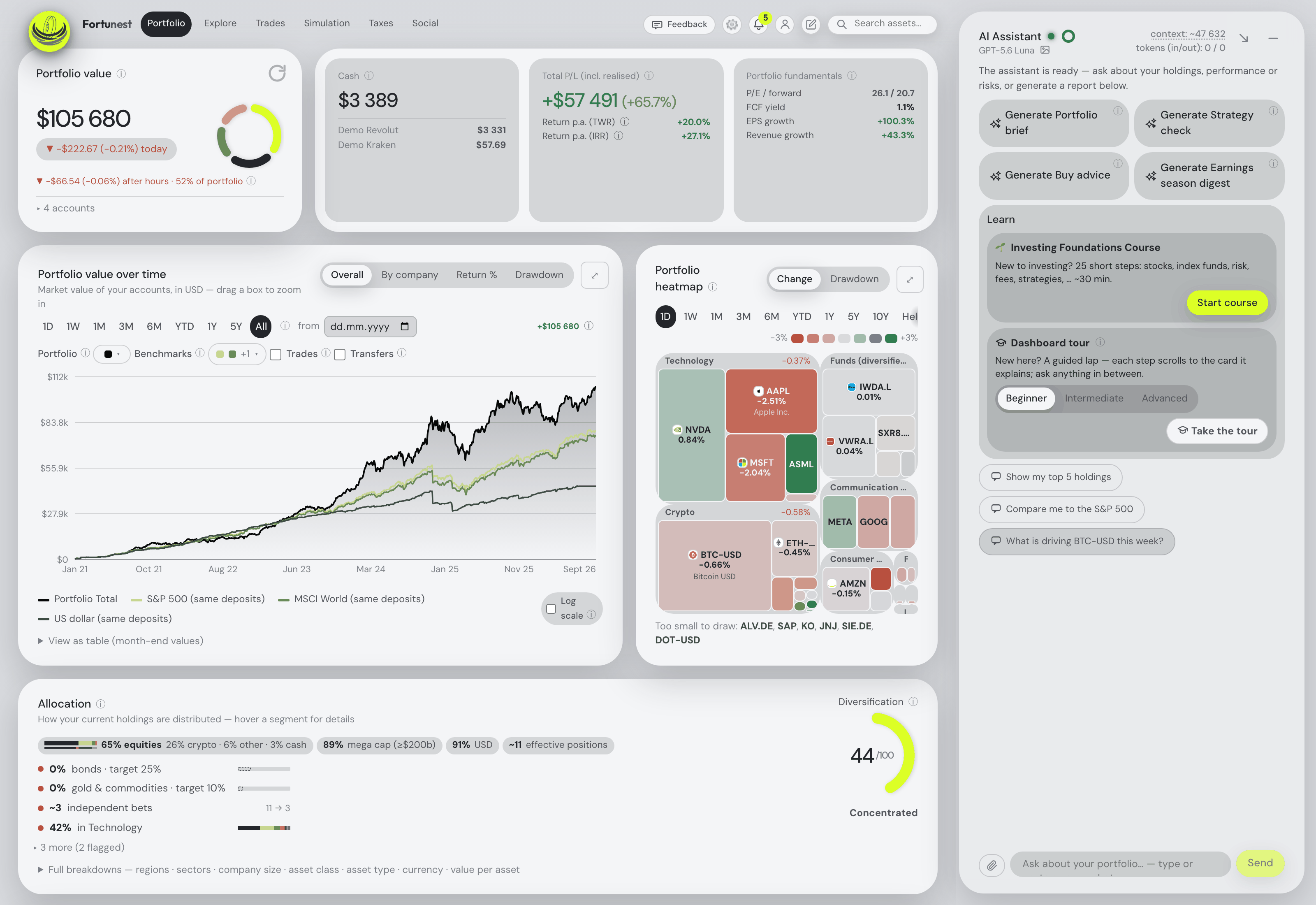
Then it is one portfolio with the rest of what you own: Patria Finance in Excel, a Czech-locale DEGIRO file, an XTB export, a Trading 212 or Interactive Brokers connection — every supported platform — in one display currency converted at each day's rate, with TWR and IRR across the lot, transfers between your own accounts matched rather than double-counted, and the assistant answering about the actual holdings.
Czech tax and the time test
Most Coinmate clients are Czech or Slovak, and for Czech tax the question is usually which coins have passed the three-year time test. Fortunest's Taxes tab (Pro) pairs every sale with the lots it consumed and, on its Czech default rulebook, includes crypto in the time test for sales from 15 February 2025, with the 100,000 CZK annual small-sale limit counted for crypto separately from securities. It is orientation, not a filing. For the rules themselves in Czech, read our Czech guide to taxes and the time test.
The tools that read a Coinmate account
Each cell is what the vendor's own pages say, checked in October 2026. Not described means the page we read does not mention it. A green ✓ marks whichever product leads a row on that row's own terms.
| Fortunest1 | Coinpanda2 | CoinLedger3 | CoinTracking4 | Taxomat5 | |
|---|---|---|---|---|---|
| How Coinmate gets in |
|
|
|
|
|
| What the pages say comes in |
|
|
|
|
|
| Stocks in the same place |
|
|
|
|
|
| Czech time test |
|
|
|
|
|
| Free plan |
|
|
|
|
|
| Paid from |
|
|
|
|
|
Cells were checked against the sources below in October 2026. Prices are list prices before promotions and, for Fortunest, before VAT. "Not described" and "not checked" are statements about those pages on that date, not about the product.
The verdicts
Fortunest — our pick for Coinmate beside stocks
Best for: a Coinmate account that belongs in one portfolio with your broker accounts.
Free account · Pro €6.99/mo or €69/yr
It is the only tool in this table that holds shares as well as the coins and connects Coinmate directly: trades with their fees, settled deposits and withdrawals, and balances, synced in the background with a key that can only read. The Czech default tax rulebook already includes crypto in the time test.
Where it falls short: there is no Coinmate CSV importer, so you need a Fortunest account and a key; a portfolio holds one Coinmate connection; whether Coinmate's key form offers an IP restriction is something to check on your screen; there is no native mobile app yet; and the Taxes tab is Pro and orientation rather than a filing.
Coinpanda
Best for: a crypto tax report with Coinmate in it.
Free to import and track · Hodler US$79/yr
Coinpanda's Coinmate page offers an API connection — "We are only requesting view permissions" — or the "CSV all" export, and lists deposits, withdrawals, trades, quick buy/sell and affiliate rewards as supported by both.
Where it falls short: crypto only; the tax report is what you pay for, priced by transaction count.
CoinLedger
Best for: a crypto tax report filed through tax software.
Free preview report · prices not on the Coinmate page
CoinLedger's Coinmate page offers to "automatically sync your Coinmate account with CoinLedger via read-only API", or a CSV drag-and-drop, and describes itself as cryptocurrency tax software.
Where it falls short: crypto only; the page does not say which Coinmate transactions it reads, and no prices are listed on it.
CoinTracking
Best for: a crypto tax report across many exchanges, from files.
Free portfolio view · Starter US$49/yr
CoinTracking's Coinmate page has you click "CSV all", save the file and upload it, and its German page says Coinmate transactions are imported "per CSV-Export".
Where it falls short: no Coinmate API import is described, so every update is a fresh export; and after the 7-day trial the free plan only views what is already there.
Taxomat
Best for: Czech tax-return documents across brokers and crypto platforms.
Free trial · prices on a separate page
Taxomat lists Coinmate, Anycoin, Coinbase and Kraken among its crypto platforms beside 27+ brokers, calculates crypto income and expenses including the time test, and prepares the XML for the MOJE daně portal.
Where it falls short: its home page shows Coinmate as a logo only, without saying whether it connects by API or reads a file; it is a tax tool rather than a day-to-day portfolio view.
Koinly, and the trackers that do not name Coinmate
Koinly's Coinmate guide, as returned by search, describes both an API key and a CSV upload; its site refused our direct fetch, so it is not in the table. CoinStats, which connects Kraken, has no Coinmate connection page. If you hold Kraken or Binance too, the Kraken guide and the stocks-and-crypto guide compare the trackers for those.
How we compared
We searched for every tool that names Coinmate and read each one's own Coinmate, home and pricing pages rather than a review site. Where a page says nothing about a row, the cell says so. We build Fortunest, so we are not neutral: the table is meant to be checkable rather than impartial, and every product's limits are in its verdict, ours included.
Questions people ask
Does Coinmate have an API for portfolio trackers?
Yes. Under Account and API on coinmate.io you create a key that comes as three values — a Client ID, a public key and a private key — and choose its permissions. For a tracker, tick only the read permissions and leave trading and withdrawal off. Fortunest, Coinpanda and CoinLedger describe connecting Coinmate this way; CoinTracking describes a CSV import instead.
Which permissions should a Coinmate key have?
Read permissions only. Fortunest's connect form asks for Account balance and Transaction history and tests both when you connect, so a key missing one is refused at once. Some other trackers' guides name the read box Account Info; whatever the labels on your screen, leave every trading and withdrawal permission off.
Can I track Coinmate without a Fortunest account?
No. Fortunest reads Coinmate only through the API key, and a key has to outlive the browser session, so connecting needs a signed-in account; a free one works and the connection uses one of its three account slots. Fortunest has no Coinmate CSV importer. The desktop app connects directly too, keeping the key in its local database.
Can I track Coinmate together with my stocks?
Yes. In Fortunest the Coinmate connection sits in the same portfolio as broker exports such as DEGIRO, XTB or Patria Finance and direct Interactive Brokers and Trading 212 connections, in one display currency converted at each day's rate. Most other tools that name Coinmate are crypto tax calculators and do not hold shares.
Does the Czech time test apply to Coinmate crypto?
Fortunest's Taxes tab (Pro) uses a Czech default rulebook in which crypto joins the three-year holding-period time test for sales from 15 February 2025, with the 100,000 CZK small-sale limit counted for crypto separately from securities. It is orientation rather than a filing; every rule is a setting, and Czech readers will find more in our Czech guide to taxes and the time test.
Sources
- Fortunest — every supported platform (the Coinmate row), how the three methods work, connecting an account, the Taxes chapter and the Privacy chapter.
- Coinpanda — Coinmate integration and pricing (October 2026).
- CoinLedger — Coinmate integration (October 2026).
- CoinTracking — Coinmate import, Coinmate Steuern and pricing (October 2026).
- Taxomat — taxomat.cz (October 2026). Koinly — CoinMate integration, as returned by search; direct fetch refused (October 2026). CoinStats — Kraken connection; no Coinmate page found (October 2026).
Signals, analyses and assistant answers in Fortunest are informational — not financial or tax advice.