Guides · Updated 10 November 2026
Parqet MCP server: what it does, and how Fortunest's differs
Yes — Parqet has an MCP server of its own. It is hosted at mcp.parqet.com, you sign in to it with your Parqet account, and Parqet's AI page says it powers every one of its AI integrations: ChatGPT through Parqet's own app, Claude, Perplexity, Le Chat and Grok. It is in every Parqet plan, with two integrations on the free Basis plan. If you searched for it, that is the answer. This page sets it beside Fortunest's MCP server at https://app.fortunest.ai/mcp — what an agent can read and do on each, who approves a change, which brokers and crypto exchanges each covers, tax views and price — and says plainly where Parqet is the better choice. Both vendors' pages were read on 10 November 2026.
The short answer
- Parqet has one, on every plan. Hosted at
mcp.parqet.com, Streamable HTTP, OAuth 2.0 sign-in through Parqet Connect. Its developer docs list twelve tools over portfolios, holdings, activities and performance. You pick the portfolios to share and whether the assistant may only read or also add activities. - Fortunest's gives the agent the analysis and the dashboard. The full endpoint carries 95 tools — holdings, performance, risk, tax lots, the trade plan, what-ifs and backtests — and lets the agent drive a live dashboard. Every write and dashboard action waits for your approval in Fortunest.
- Neither places orders or moves money. Parqet says its AI can neither trade nor move money; Fortunest never places orders or moves money either.
- Coverage differs. Parqet reads PDF statements and syncs Trade Republic, Scalable Capital and others automatically. Fortunest reads broker CSV and Excel exports, read-only API keys for Kraken, Binance, Coinbase and Coinmate, and 22 brokers through SnapTrade — but no PDFs and no German broker sync.
- Price. Parqet: Basis €0 with two integrations, Plus €11.99/mo with five, Investor €29.99/mo with twenty. Fortunest: MCP is Pro, €6.99/mo or €69/yr plus VAT; every new account starts with a 14-day Pro trial, no card; the demo endpoint is free without an account.
- Moving from Parqet: Fortunest imports Parqet's own Export → CSV.
Parqet's MCP server today
Parqet's AI page describes one server behind all of its integrations. ChatGPT gets a ready-made Parqet app from ChatGPT's app directory; Claude, Perplexity, Le Chat (Mistral) and Grok are named beside it, Gemini is marked as coming soon, and Claude Code, Cursor and your own agents are listed as working with it. Any assistant that accepts a custom MCP server can be pointed at the URL. Parqet says you need an account with your AI provider that supports connectors or apps.
When you connect, you choose the scope — the whole account or only selected portfolios — and the permission: read only, or read and add activities. Parqet's page says the AI can neither trade nor move money, that nobody has write access to your brokerage account, and that you revoke a connection under Integrations in your profile, on the web or in the mobile app.
The developer documentation fills in the detail: Streamable HTTP, OAuth 2.0 through Parqet Connect, a portfolio:read scope for portfolio metadata, holdings, activities and performance, and a separate portfolio:write scope whose tools create portfolios and holdings and add or delete activities. It warns that a deletion cannot be undone and asks client builders to run write tools only after the user has confirmed the final inputs — so the confirmation step is the assistant's, not Parqet's. Its Claude walkthrough adds Parqet as a custom connector on claude.ai, or with one command in Claude Code.
How Fortunest's MCP server differs
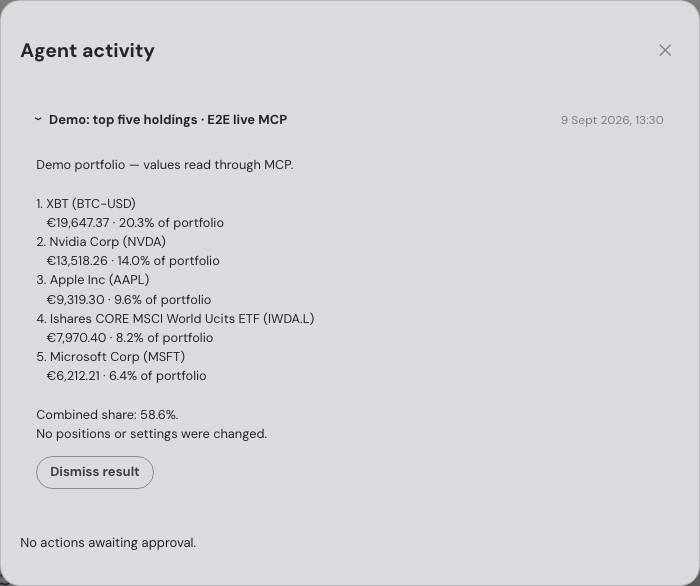
Fortunest runs a standard MCP server at https://app.fortunest.ai/mcp over Streamable HTTP, with a browser sign-in in which you review the permissions before you click Allow connection. The External agents chapter sets it up step by step in the Claude app (web, Desktop, mobile and Cowork), the ChatGPT app through Developer mode, Claude Code, the Codex app and Codex CLI, and the MCP Agent iPhone app for Siri. ChatGPT custom connectors need Developer mode and depend on your ChatGPT plan; free Claude accounts get one custom connector.
What the agent can read. The same tools, calculations and context as the in-app assistant: holdings and performance in your currency, risk, allocation, tax lots, the trade plan and its candidates, what-ifs and backtests, notes and reports. The full endpoint carries 95 tools.
What it can do, and who approves. Reading is all a connection does on its own. Every write and dashboard action waits for your approval in Fortunest — a card in the assistant chat and in Agent activity, with the exact arguments under Details. You approve once, reject, allow matching actions for up to 8 hours, or allow all actions from that connection for 1 or 8 hours. Agent activity keeps Details and Undo for 7 days. The grant expires after 30 days and can be revoked earlier under Settings → Assistant → External agents. Fortunest never places orders or moves money.
What it covers. One portfolio across brokers and exchanges: six direct read-only API connections, among them Kraken, Binance, Coinbase and Coinmate, 22 brokers through SnapTrade and the CSV or Excel exports of 29 platforms, with every day converted at that day's rate. On Pro the tax views — tax lots, the holding-period time test, sale pairing, the sell optimiser and annual realised gains — are tools the agent can read too; the rulebook is configurable and ships with Czech defaults.
Try it on the demo portfolio — no account
Before you export anything or pay for Pro, connect Claude or ChatGPT to Fortunest's demo portfolio: four synthetic accounts — DEGIRO, Revolut, Kraken and Interactive Brokers — with made-up amounts over real tickers. No Fortunest account, no sign-in, nothing to install.
https://app.fortunest.ai/mcp/demo
In Claude
- Open Settings → Connectors and choose Add custom connector.
- Name it
Fortunest demo, paste the URL above as the Remote MCP server URL and click Add. There is no sign-in step. - In a new chat, enable Fortunest demo under + and ask: "Using Fortunest demo, what are the five largest holdings and how risky is this portfolio?"
In ChatGPT
- Turn on Developer mode under Settings → Apps & Connectors → Advanced settings.
- In Apps & Connectors choose Create: name
Fortunest demo, the URL above as the MCP server URL and Authentication: No authentication. Confirm that you trust it and click Create. - In a new chat, open + → More (or Developer mode), enable Fortunest demo and ask the same question.
In Claude Code: claude mcp add --transport http fortunest-demo https://app.fortunest.ai/mcp/demo. In Codex: codex mcp add fortunest-demo --url https://app.fortunest.ai/mcp/demo.
What the demo is. Seventeen read-only tools — portfolio summary, holdings, one position, allocation, risk, the value chart, upcoming events, recent trades, money flow, tax lots, the tax-free summary, the trade plan and its candidates, simulation inputs, data warnings and a search of the documentation — on one shared example portfolio. It cannot change anything, sees nobody's real data, and Fortunest runs no AI model for it: Claude or ChatGPT brings its own. For your own portfolio, import your exports in the app — free, with the in-app assistant; connecting an agent to it at https://app.fortunest.ai/mcp is Pro. Every endpoint and tool is listed in the Fortunest MCP server reference.
Parqet's and Fortunest's MCP servers compared
Each cell is what the vendor's own pages say on the date in the footnote. Not described means the page does not mention it. A green ✓ marks whichever product leads a row on that row's own terms.
| Parqet1 | Fortunest2 | |
|---|---|---|
| MCP server |
|
|
| ChatGPT |
|
|
| Claude app |
|
|
| Other clients named |
|
|
| What the agent can read |
|
|
| What the agent can change |
|
|
| Approval of changes |
|
|
| Orders and money |
|
|
| Brokers and crypto |
|
|
| Tax |
|
|
| Price for MCP |
|
|
| Where the data is kept |
|
|
Cells were checked against the sources below on 10 November 2026. Prices are list prices before promotions and, for Fortunest, before VAT. "Not described" and quoted phrases describe those pages on that date, not the product.
The verdicts
Where Parqet is the better choice
Best for: an investor at Trade Republic or Scalable Capital who wants the portfolio in ChatGPT or Claude without paying.
Basis €0 · Plus €11.99/mo · Investor €29.99/mo
Parqet is the better choice when your brokers are ones it syncs automatically or your records arrive as PDF statements, when you want a ready-made app inside ChatGPT rather than a Developer-mode connector, when you use Perplexity, Le Chat or Grok, and when a free plan with MCP matters more than what the agent can analyse. Its read-or-write choice and portfolio-by-portfolio sharing are a clean, simple permission model.
Where it falls short: two integrations on the free plan; Codex is not among the clients it names; and its pages describe no approval step inside Parqet for each change — the confirmation is left to the assistant.
Where Fortunest is the better choice
Best for: a portfolio spread across brokers and crypto exchanges, where the agent should analyse it and work the dashboard, with you approving each change.
Free without an account · MCP on Pro, €6.99/mo or €69/yr · 14-day Pro trial for every new account
Fortunest is the better choice when the agent should answer with risk, tax lots, a trade plan or a backtest rather than holdings alone, when every change should wait for your approval in the tracker itself, when your accounts include Kraken, Binance, Coinbase or a non-German broker, and when you use Codex. You can try the server on the demo portfolio before you sign up.
Where it falls short: MCP is Pro-only after the 14-day trial; there is no ChatGPT directory app, so ChatGPT needs Developer mode; no PDF statements and no German broker sync; and no native mobile app yet.
Moving from Parqet to Fortunest
Fortunest reads a Parqet export directly. Take it from your portfolio's Export → CSV and drop it on the Portfolio value tile or under ⚙ Settings → Data. Buys and sells, dividends, deposits, withdrawals and interest come across; the cash is worked out from the gross value, the fee and the tax on each row. In-kind transfers in and out are counted and reported rather than imported, because their amount is a book value, not money. Rows are filed under Parqet rather than under each broker the file names — the Parqet import notes have the detail.
How we compared
We started from the query people type — "parqet mcp server" — and read Parqet's own AI page, MCP developer docs, Claude walkthrough, pricing page and home page on 10 November 2026. We did not sign up for a paid Parqet plan, so its cells describe what the pages say, not what we tested. Fortunest's cells come from its own documentation. We build Fortunest, so we are not neutral: the table is meant to be checkable rather than impartial, and Parqet is the better answer on price and on a ready-made ChatGPT app. The wider field of trackers with an MCP server is in portfolio apps with an MCP server; the whole product comparison is Fortunest vs Parqet; getquin and MCP covers getquin.
Questions people ask
Does Parqet have an MCP server?
Yes, Parqet runs its own hosted MCP server at mcp.parqet.com, included in every plan, with two integrations on the free Basis plan. You sign in with your Parqet account over OAuth, choose which portfolios to share and whether the assistant may only read or also add activities. Parqet names Claude, ChatGPT (through its own app), Perplexity, Le Chat and Grok, and says the AI can neither trade nor move money.
How is Fortunest's MCP server different from Parqet's?
Fortunest's server at https://app.fortunest.ai/mcp gives an agent the in-app assistant's tools — holdings, performance, risk, tax lots, the trade plan, what-ifs and backtests — and control of a live dashboard. Every write and dashboard action waits for your approval in Fortunest. It is a Pro feature at €6.99 a month or €69 a year, every new account starts with a 14-day Pro trial with no card, and a demo endpoint at https://app.fortunest.ai/mcp/demo is free without an account.
Can the AI change my portfolio through Parqet's MCP server?
Only if you allow it. Parqet's permission screen separates reading from adding activities, and its developer docs list write tools that create portfolios and holdings and add or delete activities. Parqet says the AI cannot write to your brokerage account, trade or move money.
Can I move my Parqet portfolio to Fortunest?
Yes. Fortunest imports the Export → CSV of a Parqet portfolio: buys and sells, dividends, deposits, withdrawals and interest. In-kind transfers in and out are counted and reported rather than imported, because their amount is a book value, not money.
Does Fortunest's MCP server work in ChatGPT and the Claude app?
Yes. In ChatGPT it is a custom connector, which needs Developer mode and depends on your ChatGPT plan. In the Claude app it is a custom connector on the web, Desktop and mobile; free Claude accounts get one custom connector, so on a free Claude account Parqet and Fortunest compete for that one slot. Claude Code and Codex connect to the same URL.
Sources
- Parqet — AI integrations, the developer docs' Parqet MCP and connecting Claude, pricing and the home page (10 November 2026).
- Fortunest — the MCP server reference with its External agents and What you share and approve sections, every supported platform and the Parqet import (10 November 2026).
Signals, analyses and assistant answers in Fortunest are informational — not financial or tax advice.