Guides · Updated 21 October 2026
Free stock market heatmap, watchlists and charts — no sign-up
The whole market as one picture: the largest listed companies, sized by market value, grouped by sector and coloured by how they moved — today, this year or over ten. Next to it, watchlists, sortable market tables, a macro dashboard and, one click away, any stock's chart, fundamentals and news. It is the Explore tab of Fortunest, it runs in the browser, and it is free without an account.
The short answer
- A market heatmap with eight grids. Market (the largest NASDAQ and NYSE companies), Most active today, the S&P 500, NASDAQ 100, Dow Jones, FTSE 100, DAX 40 and Nikkei 225 — every tile one company, scaled by market capitalisation and grouped by sector.
- Any window, two colours. 1D, 1W, 1M, 3M, 6M, YTD, 1Y, 5Y or 10Y, coloured by price change or by drawdown from the window's high.
- Watchlists. Star anything, sort it into named lists, and see each list as its own heatmap and table. Free: three lists and 20 assets; Pro: unlimited.
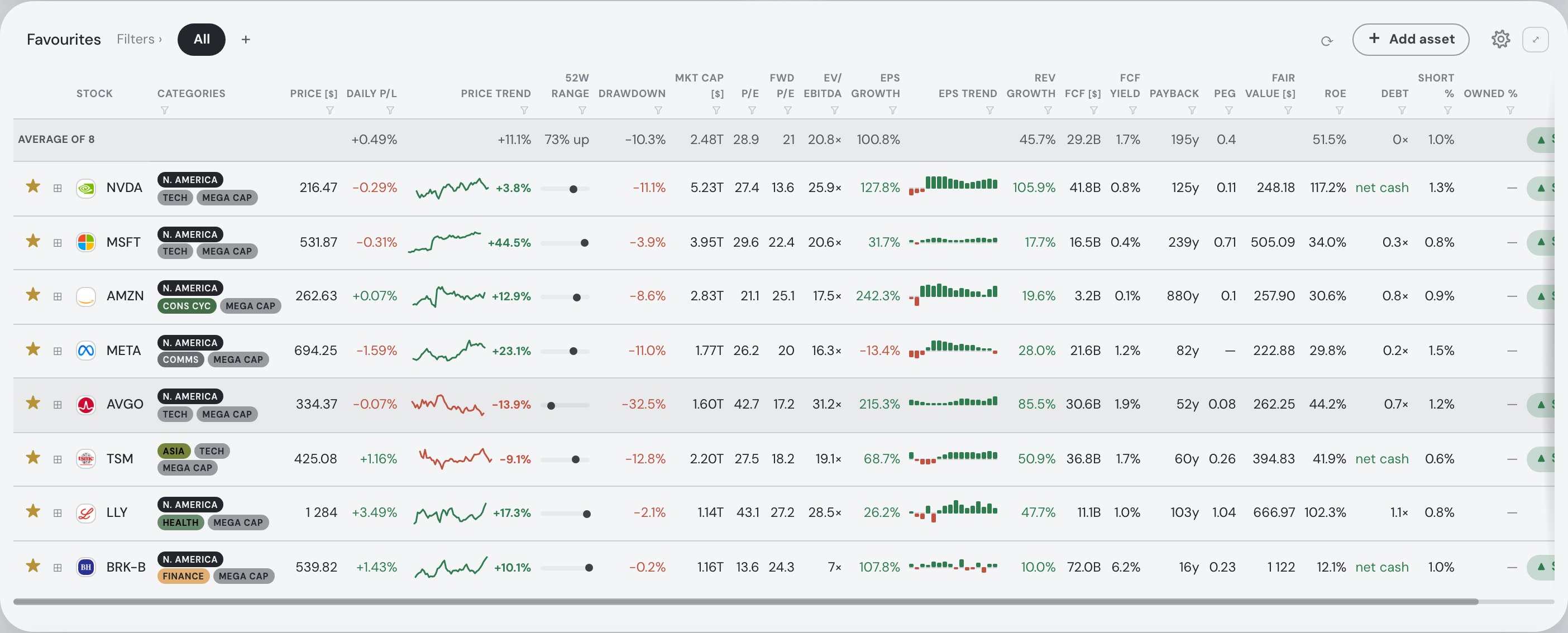
- Market tables. The same lists as sortable, filterable tables — price, trend, 52-week range, drawdown, market cap, P/E, forward P/E, EV/EBITDA, growth, free cash flow, PEG, ROE, debt, short interest and a fair-value estimate.
- Every asset in detail. Search any stock, ETF, fund, crypto, index, future or currency pair and open its chart, drawdown, fundamentals, insider trades and news.
The heatmap: how did the market do?
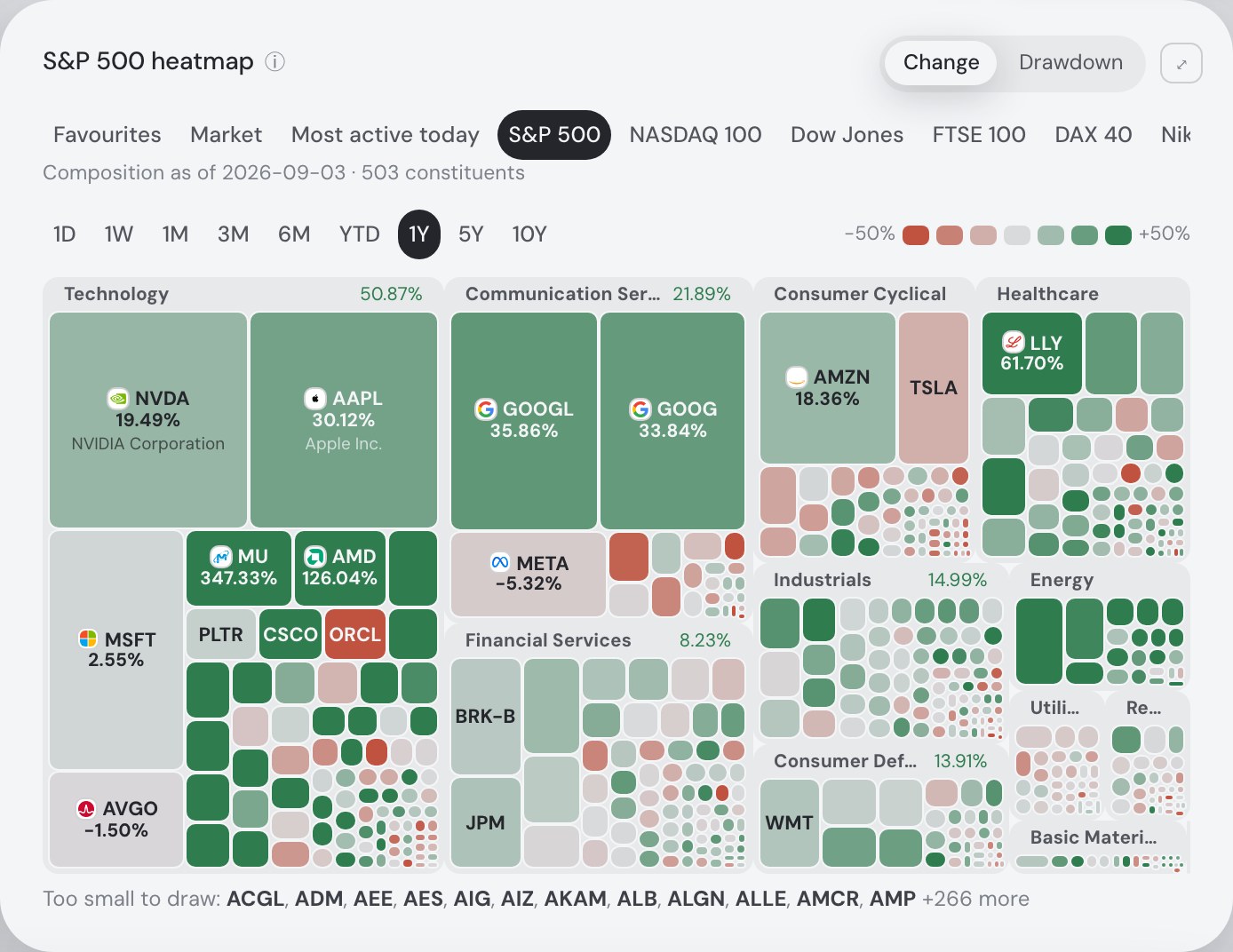
Each rectangle is one company, scaled by its market capitalisation, and the rectangles sit in labelled sector boxes, so a tile's neighbours mean something. The sector box carries its own move beside its name; click a sector label to fill the map with that sector, and All sectors to go back. Point at a tile for the company, its move over the window, its sector, its share price in the listing's own currency and its market cap; click it to open the asset.
The grid strip switches what is drawn: Market is the 100 largest NASDAQ and NYSE companies by market capitalisation; Most active today is the day's most traded names; the six index grids are the S&P 500, NASDAQ 100, Dow Jones, FTSE 100, DAX 40 and Nikkei 225, each with the date of its composition. The windows run from 1D to 10Y, and the colour scale adapts to them — a quiet day reads on ±3%, a ten-year window on what actually happened — with the scale printed in the legend.
Drawdown swaps the question: instead of how far a price moved, how far it now sits below its own highest point in the window. The map loses its green — red deepens with the fall, neutral means "at its peak" — which makes the stocks still well off their highs easy to spot.
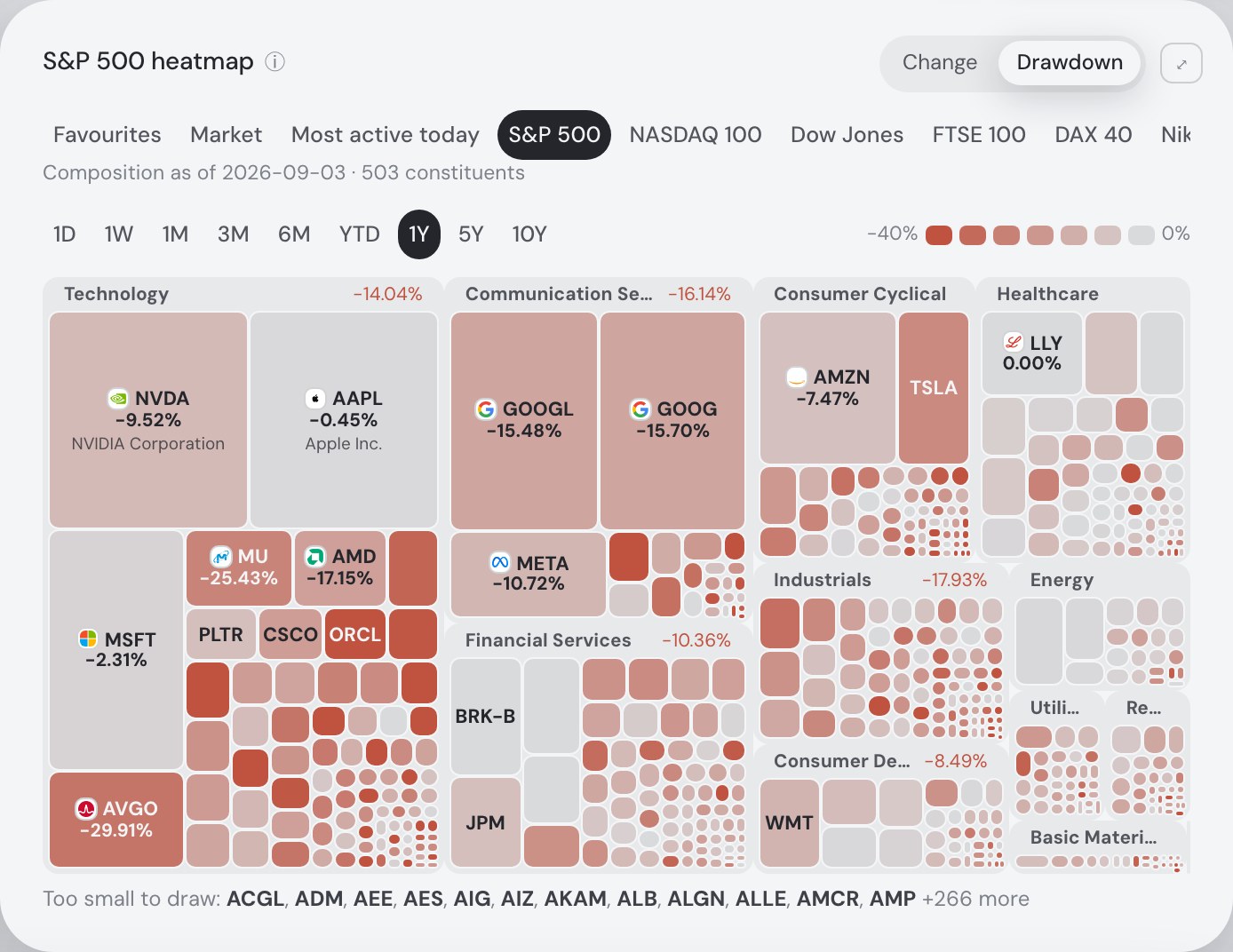
Nothing is hidden in silence: a company too small to draw at its true size, or with no market data to draw from, is named in a fine-print line under the map, and every name there opens the asset too. The ⤢ button gives the map the whole window.
The Macro card beside it
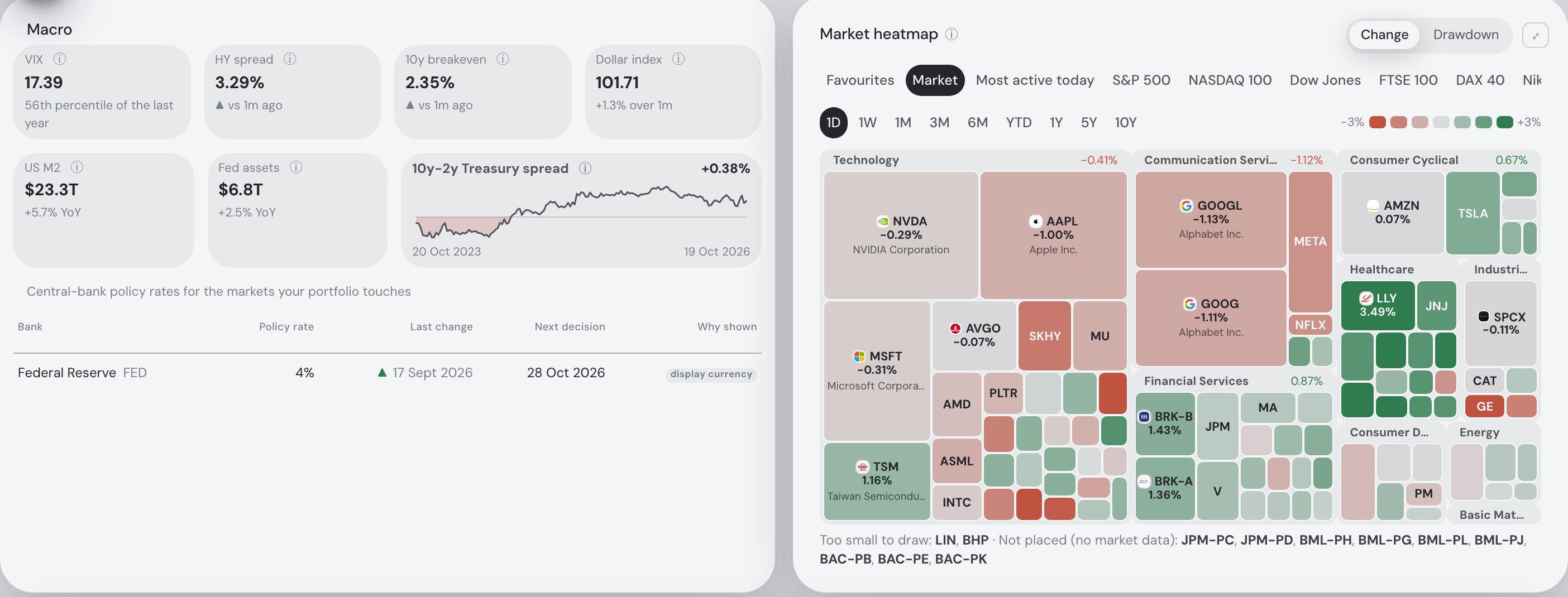
On a wide screen the heatmap shares its row with the Macro card — the dials a market watcher glances at first: the VIX with its percentile over the last year, the high-yield credit spread, the 10-year inflation breakeven, the dollar index, US M2 and the Fed's balance sheet, each with a plain-language ⓘ. Under them, the US Treasury yield spread with inverted stretches shaded, and the central-bank policy rates that matter for you: the current rate, the last change and the next scheduled decision.
Market tables to sort and filter
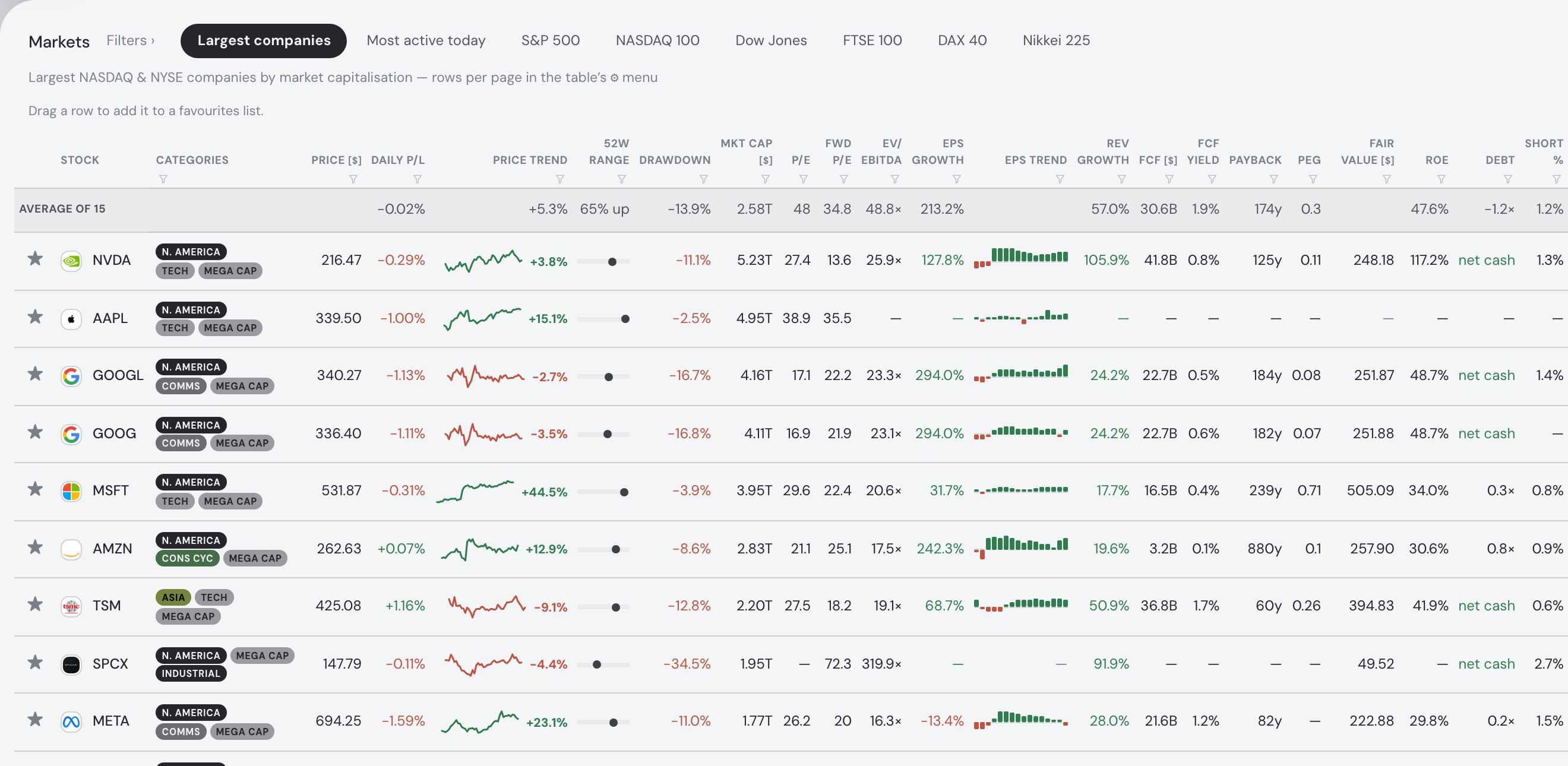
Below, the Markets card shows the same lists as tables — Largest companies (up to 500 rows), Most active today (up to 100) and the six index lists — one row per company, with logo, region, sector and size chips. The columns cover price and the daily move, a price-trend sparkline, the 52-week range, drawdown, market cap, P/E and forward P/E, EV/EBITDA, EPS and revenue growth, free cash flow and its yield, payback, PEG, a fair-value estimate, ROE, debt, short interest and the app's own signal. Sort any column; filter by type (stocks, ETFs, crypto, commodities), sector, region, size, signal or a minimum and maximum on any number column; choose 10 to 100 rows per page; and read the averages row on top, which summarises whatever the filters keep.
Watchlists that are also heatmaps
The ★ on any row, search result or detail panel adds the asset to your favourites; the + beside All starts a named list ("AI plays", "Dividend candidates"), and a row dragged onto a list's tab files it there. Each list is a table with the same columns as the market — and a grid of its own in the heatmap's strip, so "how did my watchlist do this month?" is one click. The free plan keeps three named lists and 20 watched assets between them; Pro removes both limits.
As a guest, your stars are kept in this browser, and they come back when you return on it. A free account keeps them on the server instead, on every device you sign in on.
Every stock's chart, fundamentals and news
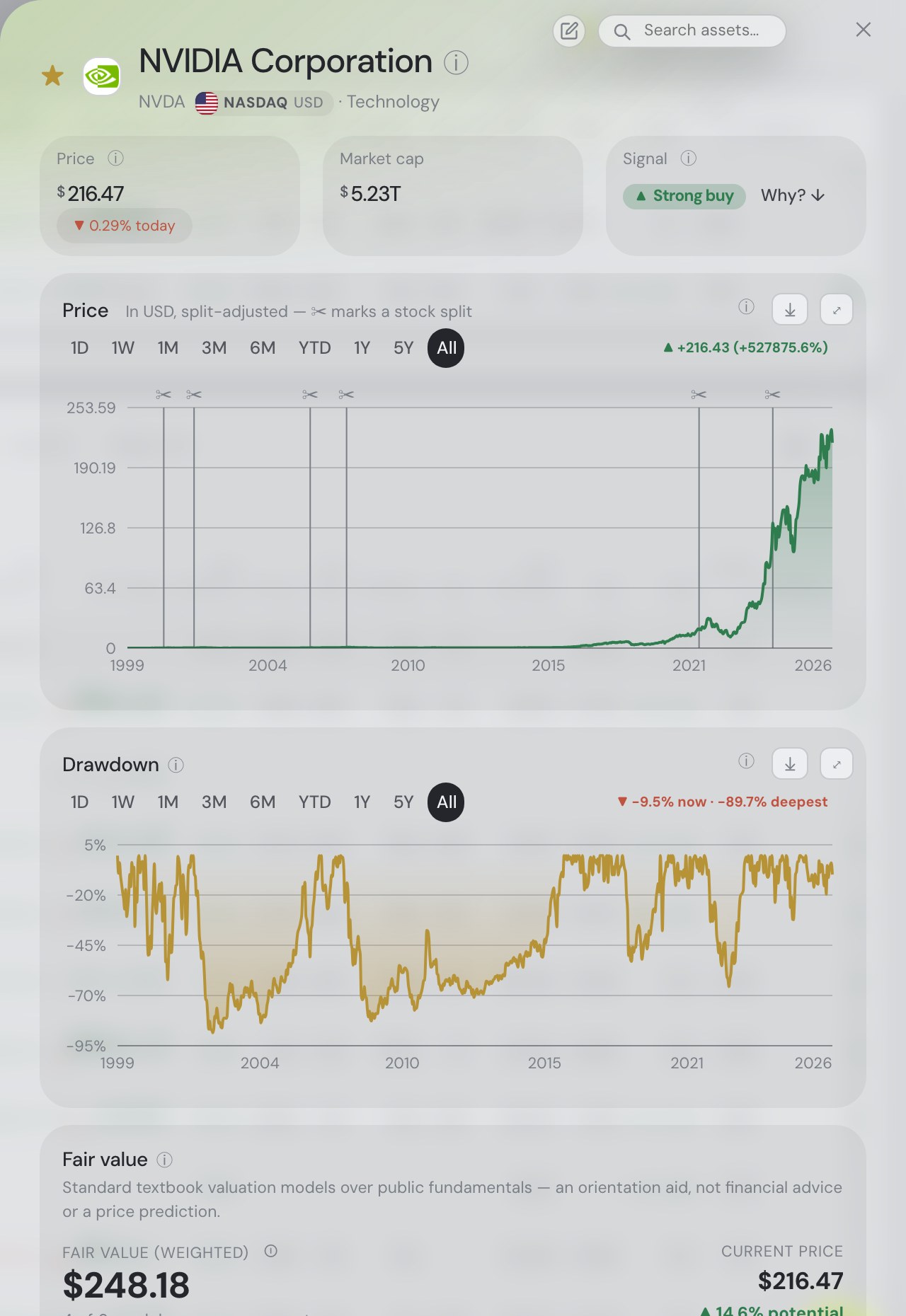
The asset finder at the top right of every tab — ⌘K, Ctrl K or / — finds shares, ETFs, mutual funds, cryptocurrencies, indices, futures and currency pairs on every exchange the market-data feed covers, each result with its exchange, price and one-week move. Clicking a result, a heatmap tile or a table row opens the asset's detail panel:
- Price, market cap and the app's signal, with the reasons behind it.
- The price chart — 1D, 1W, 1M, 3M, 6M, YTD, 1Y, 5Y or the full history, split-adjusted with splits marked — and a drawdown chart over the same windows.
- Fair value from several textbook valuation models (DCF, Graham, Lynch and others), weighted, with how far they agree.
- Fundamentals: trailing and forward P/E, EV/EBITDA, earnings and revenue growth, free cash flow, FCF yield and payback, PEG, ROE, net debt/EBITDA, dividend yield, short interest and days to cover, and the analyst mean target.
- Insider activity from SEC Form 4 filings, strengths and things to watch, the company's description and recent news.
ETFs and coins skip the company-only cards. Nothing here is advice: the signal and the fair-value models are automated heuristics on public data.
How it compares with dedicated screeners and charting sites
Honestly: if you want a screener with dozens of technical filters, Finviz is built for that; if you want charts with indicators and drawing tools, TradingView goes much further than this. Fortunest's charts have no indicators or drawing tools, and its heatmap covers US mega caps and six index lists rather than every exchange. What Explore offers instead is the quick look in one place — the market's map, the macro backdrop, the valuation columns and your watchlists side by side, without an account — and, if you want it, your own portfolio in the same app.
Track your own portfolio too
Explore is one tab of a portfolio tracker. Drop in a broker export (DEGIRO, Trading 212, IBKR, XTB, Revolut and more) — or, with a free account, connect a broker or exchange read-only — and your holdings get a heatmap of their own on the Portfolio tab — sized by what each position is worth — next to performance, allocation, dividends, risk and an AI assistant that reads your numbers. The free plan covers 3 accounts and 50 assets, and a file import needs no account.
Questions people ask
Is the stock market heatmap free?
Yes. The Explore tab — the heatmap, the market tables, the Macro card and every asset's detail panel — is part of Fortunest's free plan. It opens in the browser without an account, an email address or a card.
Which markets does the heatmap cover?
Eight grids: Market (the largest NASDAQ and NYSE companies by market capitalisation), Most active today, the S&P 500, NASDAQ 100, Dow Jones, FTSE 100, DAX 40 and Nikkei 225 — plus one grid for your favourites and one for each named watchlist. There is no crypto grid; individual cryptocurrencies, ETFs, indices and currency pairs are reachable through the asset finder.
What time ranges and colours does it support?
1D, 1W, 1M, 3M, 6M, YTD, 1Y, 5Y and 10Y. Each tile is coloured either by its price change over that window or by its drawdown — how far it sits below its own highest point within the window. Each grid remembers its own window and colour.
How many watchlists can I keep for free?
Three named lists and 20 watched assets between them on the free plan; Pro (€6.99 a month or €69 a year) removes both limits. As a guest, your watchlists are kept in that browser; a free account keeps them on the server and on every device you sign in on.
Can I see charts, fundamentals and news for a single stock?
Yes. Search any name or ticker with the asset finder (⌘K, Ctrl K or /), or click a heatmap tile or table row. The detail panel shows the price chart from one day to the full history, a drawdown chart, fair-value models, fundamentals such as P/E, EV/EBITDA, growth, free cash flow, ROE, short interest and the analyst mean target, SEC Form 4 insider activity, and recent news.
Sources
- Fortunest — Search & Explore (the asset finder, the Macro card, the heatmap, the market tables, favourites and lists), The Portfolio tab and Privacy & your data — read 21 October 2026. Screenshots: the live app at app.fortunest.ai as a new guest, 21 October 2026.
Signals, fair values and analyses in Fortunest are informational — not financial advice.