Guides · Updated 7 September 2026
DEGIRO portfolio tracker: how to see your whole DEGIRO history in one dashboard
DEGIRO has no API for private accounts and is not on SnapTrade, so every portfolio tracker reads the same thing — a file you export yourself. What separates them is how much of that file they understand. Fortunest reads both DEGIRO exports, Czech-locale files included, and it is our pick; Parqet and Sharesight read DEGIRO too.
The short answer
- There is no live DEGIRO connection to make. No API for private accounts, no brokerage aggregator, so a file you export yourself is the only route into any tracker. Treat "syncs with DEGIRO" as a claim to check.
- Our pick: Fortunest — it reads both DEGIRO exports, the seventeen-column Transactions blotter and the twelve-column Account statement, Czech-locale files included. Free without an account; Pro is €69 a year.
- PDF instead of CSV: Parqet — its DEGIRO import takes Transactions.pdf and Account.pdf, not the CSV.
- Reports for an accountant: Sharesight — bulk-imports the CSV from Inbox → Transactions, and takes DEGIRO trade-confirmation emails as they arrive.
- Free and local: Portfolio Performance — a generic CSV wizard in which you map the columns yourself; its manual names no DEGIRO template.
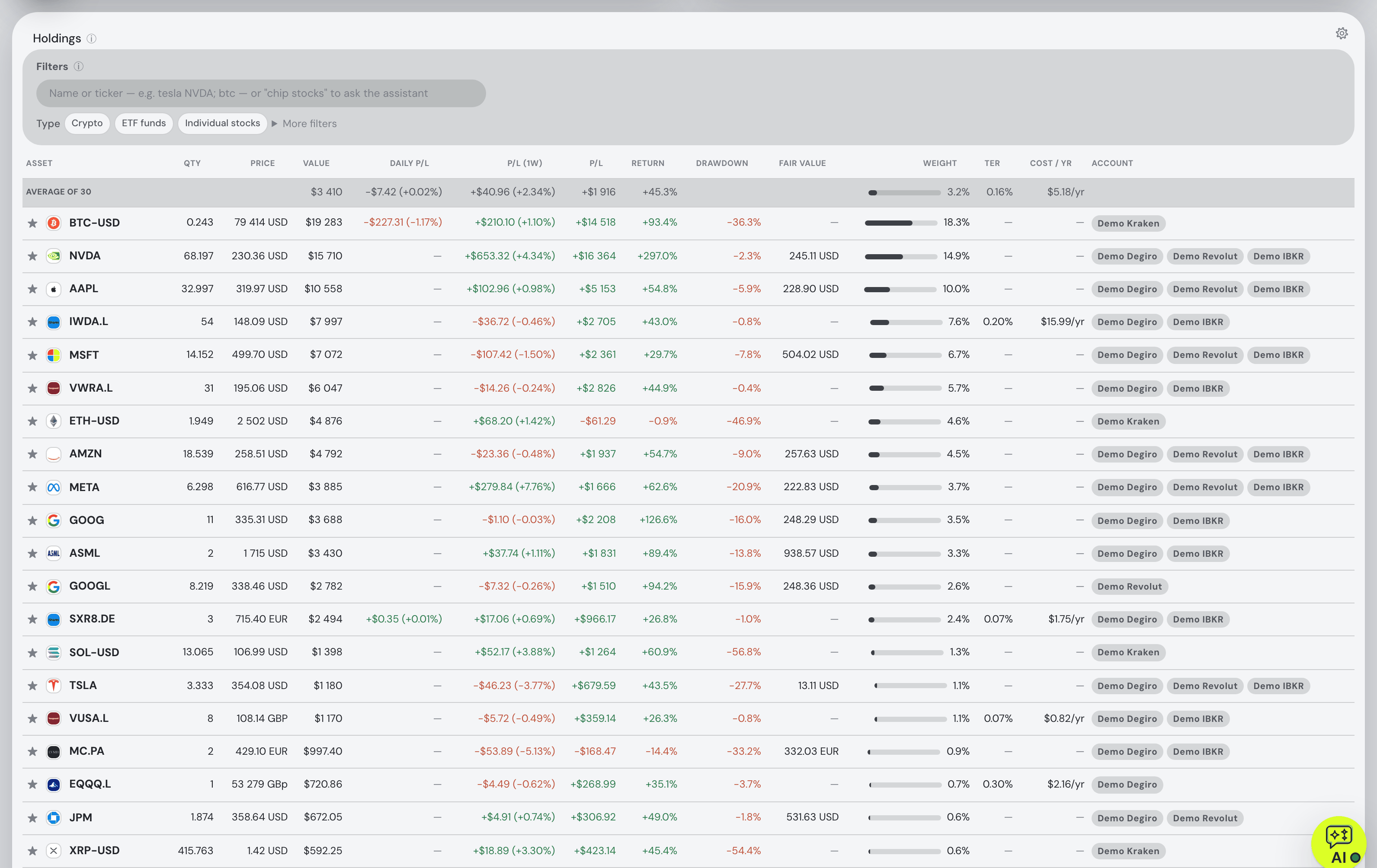
How to export your DEGIRO history
Both DEGIRO reports live in the same place, and both are worth taking — the blotter is the cleaner record of what you bought, the statement is the only one of the two that contains cash. The wording below is the same as in the DEGIRO section of the docs.
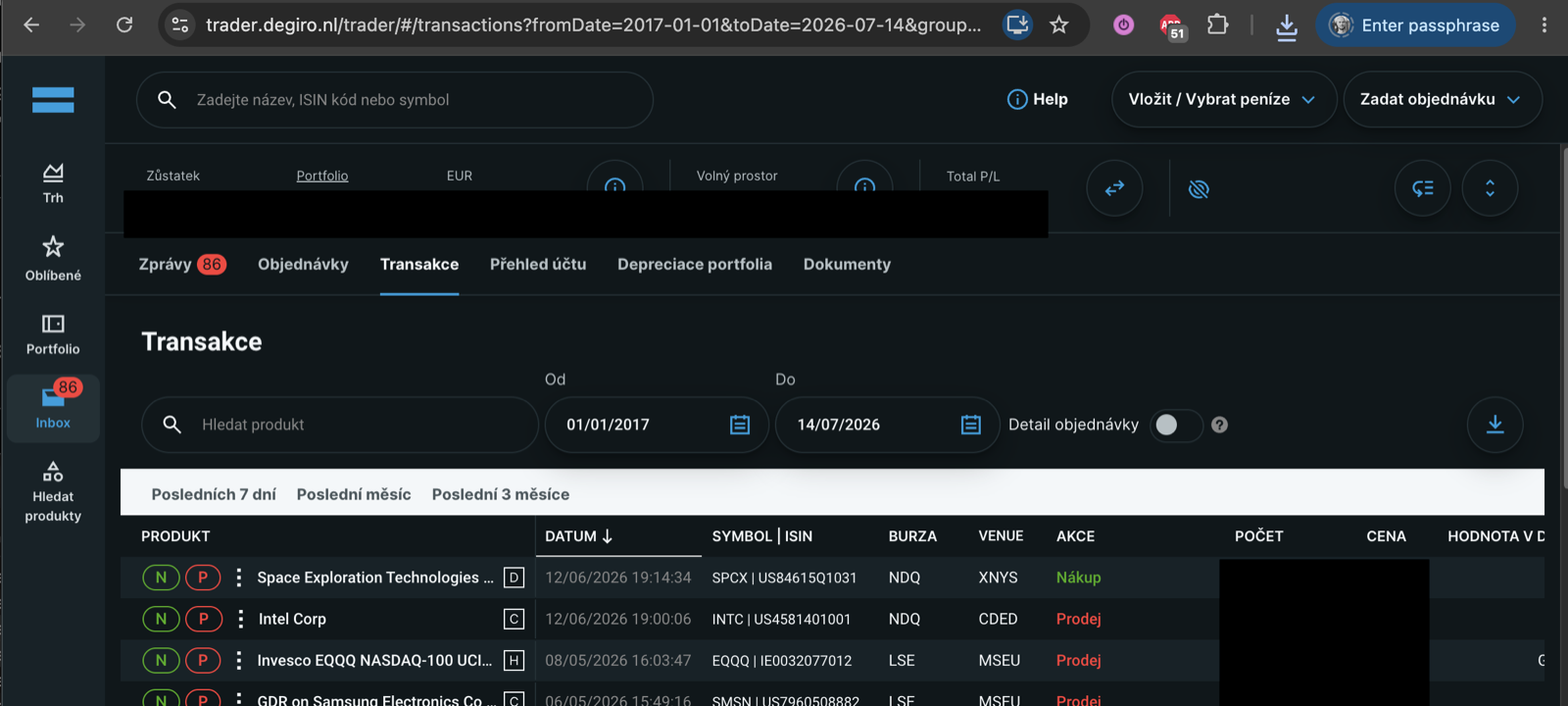
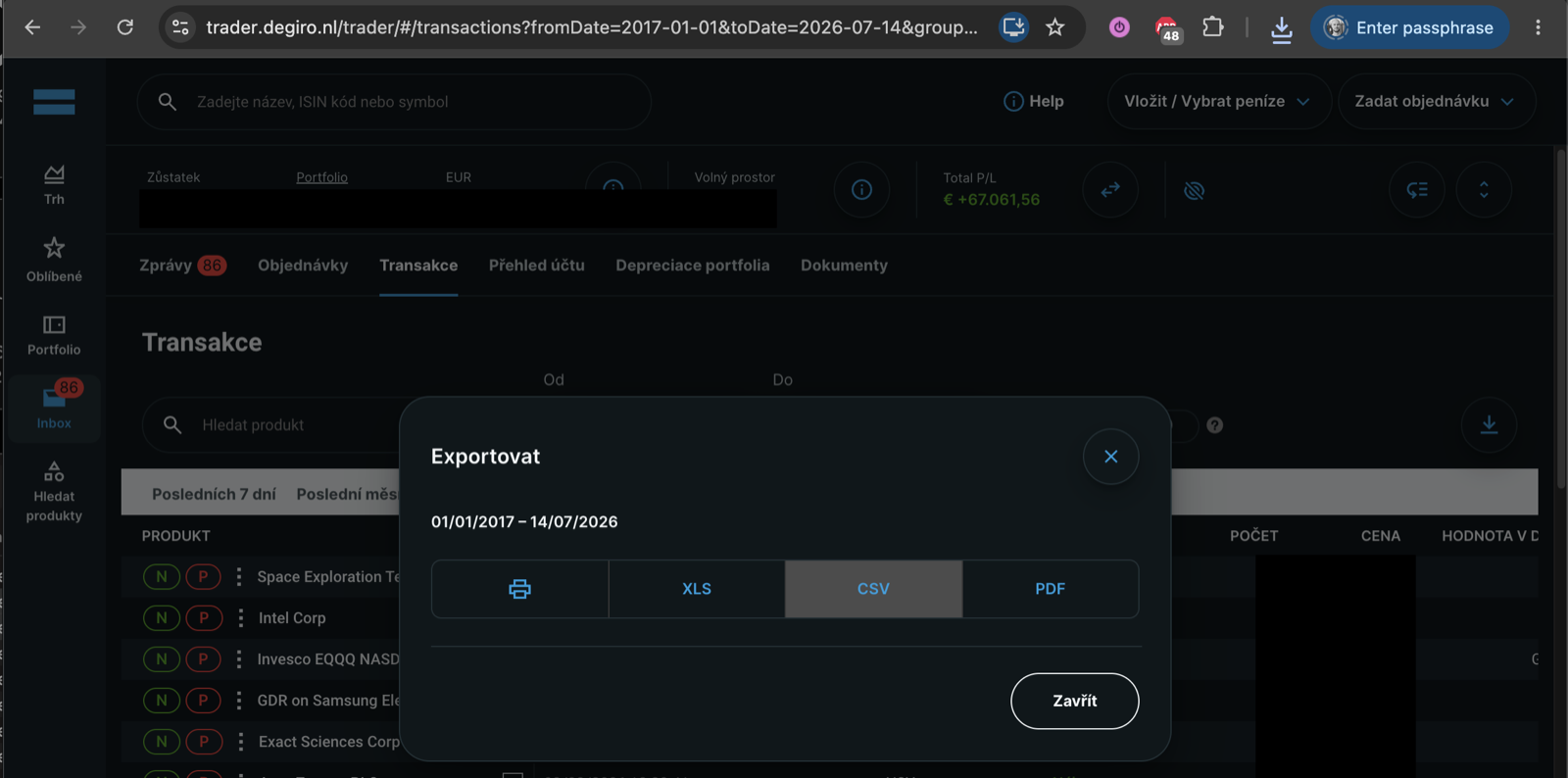
- Open Inbox → Transactions On trader.degiro.nl open Inbox → Transactions, set the from/to dates to cover your whole history and click the download icon on the right.
- Choose CSV in the Export dialog Not XLS and not PDF — the CSV is the file Fortunest reads.
-
Take the Account statement as well
Back in the Inbox, open Account statement for the same period and export it as CSV too: the twelve-column
Account.csv, which carries the cash side of every trade, the dividends and the fees. - Drop both files into the dashboard Drag them onto the Portfolio value tile in the app, or open ⚙ Settings → Data and drop them on the Data sources card. The format is detected automatically, and a whole folder works.
Either file works on its own and you can upload both. The Account statement used to be the awkward one — accepted and then silently importing nothing — and it is now read properly: fills are recovered from the description sentence in five languages, London prices quoted in pence are converted to the pounds they settle in, dividends arrive with the tax withheld from them, fees become their own flagged cash rows, and a prefix in front of the verb (PRODUCTWIJZIGING, STOCK DIVIDEND) is kept as the corporate action it names.
What the dashboard does with it
A DEGIRO blotter is a list of fills. Turning it into a portfolio means valuing every line at today's price, adjusting the ones that split, and converting each historical amount at the rate that applied on its own day rather than today's. The Portfolio tab then shows total value and today's change, total P/L including realised gains, and both annualized TWR and money-weighted IRR — the two numbers that disagree when you kept adding money, which is exactly when a broker's own overview stops being useful.
The value chart carries seven benchmarks fed the same deposits on the same dates you made them, so "would an S&P 500 tracker have done better" is answered against your real cash flow rather than a lump sum. Risk is volatility, Sharpe, Sortino, beta, correlation and drawdowns; fee totals per account show the TER and the cost per year of every fund. Splits, ISIN changes and exchange moves net out instead of appearing as phantom buys.
Because a DEGIRO account is rarely the whole picture, the same portfolio takes the exports of 28 other platforms and read-only keys for Kraken, Binance, Coinbase, Coinmate, Interactive Brokers and Trading 212, with transfers between your own accounts matched. The assistant answers about the holdings it can see and can change the dashboard when you ask. On the Taxes tab (Pro) each sale is paired against the lots it consumed — orientation, not a filing.
The trackers that read a DEGIRO file
Each cell is what the vendor's own pages say, on the date in the footnote. Not described means the page does not mention it. A green ✓ marks whichever product leads a row on that row's own terms.
| Fortunest1 | Parqet2 | Sharesight3 | Portfolio Performance4 | getquin5 | |
|---|---|---|---|---|---|
| How DEGIRO gets in |
|
|
|
|
|
| Cash, dividends and fees |
|
|
|
|
|
| Free plan |
|
|
|
|
|
| Paid from |
|
|
|
|
|
| Where your data lives |
|
|
|
|
|
| Tax on a DEGIRO sale |
|
|
|
|
|
| AI assistant |
|
|
|
|
|
Cells were checked against the sources below on 7 September 2026, except Portfolio Performance's product site, Sharesight's pricing and privacy pages and getquin's security page, checked 19 August 2026 as on our landing-page comparison. Prices are list prices before promotions and, for Fortunest, before VAT. "Not described" is a statement about those pages on that date, not about the product.
The verdicts
Fortunest — our pick
Best for: a DEGIRO account plus anything else, in one currency, with the analysis and an assistant on the same screen.
Free without an account · Pro €6.99/mo or €69/yr
It is the only tracker here that reads both DEGIRO reports, and the only one whose documentation says what it does with the awkward parts: Czech-locale files, the description sentence in five languages, London pence converted to the pounds they settle in, dividends with the tax withheld, fees as their own rows. Add a Trading 212 or Kraken key and transfers between your own accounts are matched instead of counted twice, with every day converted at that day's rate.
Where it falls short: there is no native mobile app yet — the web app is built for phones and an app is in development; the Taxes tab is Pro and its default rulebook is the Czech one, configurable but with no per-country presets; and it connects to brokers and exchanges, not to banks. The Windows desktop build is not yet code-signed.
Parqet
Best for: German-speaking investors who would rather drag a PDF than a CSV.
Basis €0 · Plus €11.99/mo · Investor €29.99/mo
Parqet's DEGIRO route is unusual and, if you dislike spreadsheets, pleasant: export Transactions.pdf for the activity and Account.pdf for the dividends, drag both in, and its zero-click import reads security, price, shares and date out of the documents. It supports 40+ currencies; Plus adds an X-Ray, dividend forecasting and a German tax dashboard.
Where it falls short: the DEGIRO import is PDF-only, so the CSV you may already have is the wrong file; the free tier is one portfolio with five extra assets and two integrations; the tax dashboard is German; and where the data is hosted is not stated on the pricing page.
Portfolio Performance
Best for: free, open source, and a file that never leaves your disk.
Free — EPL 1.0
The reference desktop tool for European DIY investors: Windows, macOS and Linux, no account, no service, your portfolio in a file you back up yourself. Its CSV wizard lets you set the delimiter and the decimal separator and map each column by hand, and it ships built-in configurations for some banks — comDirect and Consorsbank are its manual's examples. Benchmarks, volatility, semivariance and maximum drawdown are there.
Where it falls short: no DEGIRO template is named in the manual, so the mapping is yours to get right and to redo when the export changes; there is no phone app, no projection, no tax report beyond tax and fees per transaction, and no assistant of any kind.
getquin
Best for: a mostly-connected portfolio with a community attached.
Free €0 · Premium €89.99/yr · Wealth €149.99/yr
getquin describes three ways in: an open-banking connection where you log in to your broker through getquin, manual entry — "available for all brokers worldwide" — and a CSV upload. Its free plan advertises unlimited bank and broker connections, the data is stated to sit in Germany and Europe under AES-256, and there are apps on both phone platforms plus a feed where you follow other investors.
Where it falls short: for DEGIRO specifically its pages name no broker at all, so whether your file imports cleanly is something you find out after signing up; AI analysis starts at €89.99 a year; and risk metrics and tax reporting are not described on its pages.
How we compared
We took the trackers a DEGIRO investor actually ends up choosing between and read each vendor's own import, pricing and privacy pages rather than a review site. Where a page says nothing about a row, the cell says so. We build Fortunest, so we are not neutral: the table is meant to be checkable rather than impartial, and every product's limits are in its verdict, ours included.
Questions people ask
Does DEGIRO have an API for portfolio trackers?
No. DEGIRO offers no API for private accounts, and it is not one of the brokers SnapTrade signs you into, so no portfolio tracker syncs a DEGIRO account live. Every one of them reads a file you export yourself: Fortunest and Sharesight read the CSV, Parqet reads the PDF of the same two reports. Anything that claims a live DEGIRO connection is either scraping your login or describing a different broker.
Are transfers between my DEGIRO account and other accounts double-counted?
Not in Fortunest. Both files record the move — once leaving, once arriving — and the import matches the two sides so the pair nets out instead of showing as a deposit and a withdrawal. That matters most if you moved a position from DEGIRO to another broker, because a naive import books the arrival as a purchase at the transfer date and loses the original cost. The details are in the data chapter.
Can I track DEGIRO together with crypto exchanges?
Yes. Fortunest puts the DEGIRO file and a read-only Kraken, Binance, Coinbase or Coinmate key into the same portfolio, in one display currency, converted at each day's real rate. Shares, ETFs and coins share the same holdings table, the same benchmarks and the same risk figures, and the Czech default tax rulebook applies the holding-period test to crypto sold from 15 February 2025 onwards. The stocks-and-crypto guide covers the alternatives.
Is there a free DEGIRO portfolio tracker?
Portfolio Performance is free and open source, and holds nothing back — you map the CSV columns yourself. Fortunest's free plan needs no account and no card: the whole dashboard, the assistant, three accounts and fifty assets, which covers one DEGIRO file plus a second broker. getquin has a free plan too. Parqet's free tier is one portfolio with five extra assets, and Sharesight's stops at ten holdings. More in the free trackers guide.
Sources
- Fortunest — the DEGIRO export walkthrough, every supported platform, the Taxes chapter, the Assistant chapter and the Privacy chapter.
- Parqet — Degiro import and Preise & Pläne (7 September 2026).
- Sharesight — Degiro partner page and partners list (7 September 2026); pricing and privacy policy (19 August 2026).
- Portfolio Performance — File → Import and Importing a CSV file (7 September 2026); product site (19 August 2026).
- getquin — pricing and portfolio tracker (7 September 2026); security (19 August 2026).
Signals, analyses and assistant answers in Fortunest are informational — not financial or tax advice.