Guides · Updated 9 September 2026
What the AI in Fortunest can tell you about your portfolio
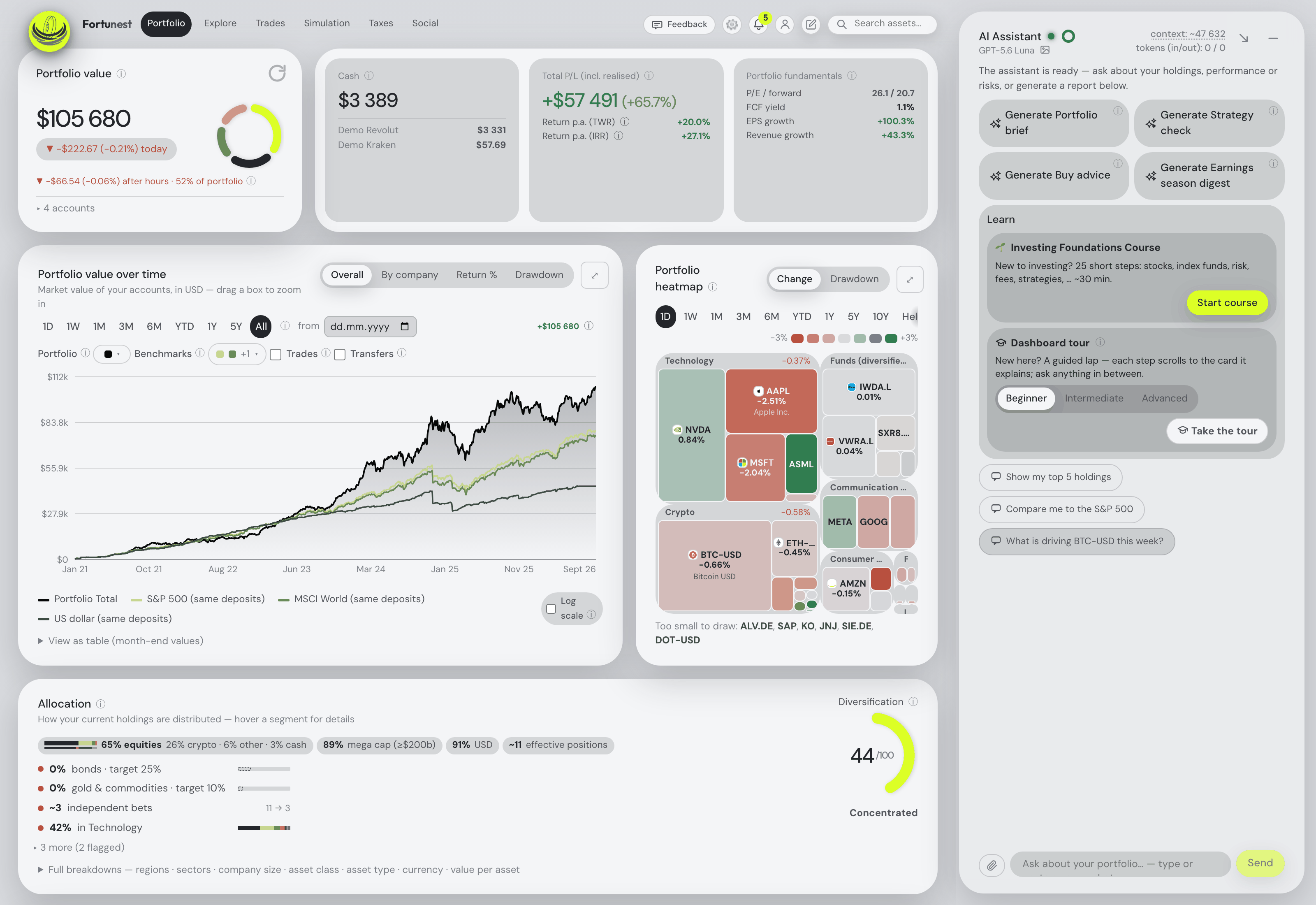
Most "AI" in portfolio trackers is a chat box that knows the market in general. Fortunest's assistant reads your portfolio and your screen: it explains any metric on your own numbers, filters and ranks your holdings from a sentence, looks up any company's quote, news, earnings and SEC filing, interprets the trade recommendations and the simulations, adds assets from a sentence or a screenshot, and drives the dashboard when you ask. On the free plan, on a cloud model or a local one — and, on Pro, open to Claude Code, Codex or any MCP agent through the same tools.
The short answer
- It knows what you hold and what you are looking at. Holdings, performance, allocation, insights, events, dividends, recent news, your strategy and watchlist, benchmark returns and per-holding fundamentals travel with every question — plus your live view (tab, currency, filters, the open drawer) and your last fifty actions. "Is this position too big?" needs no further context.
- Every number explained on your numbers. TWR against IRR, Sharpe, Sortino, beta, drawdown, the diversification score, the fair-value gap, what a fund's fee costs you a year — asked about any card, it answers with the very figures that card shows.
- Any company, held or not. Quote and ratios, the app's own score with its reasons, the latest headlines with links, upcoming earnings and dividend dates, the last quarters' beats and misses, and the company's own results filing from the SEC — quoted as the company wrote it.
- Data in, by conversation. A flat, a gold position, ten shares of something, or a whole brokerage screenshot — added as assets, editable and switchable by chat, one recalculation per batch.
- It acts, with guarantees. Forty-six typed dashboard actions behind plain English: navigate, filter, chart, simulate, set targets, change settings — each answered with the real result, marked ✓ or ✗ with the reason, and undoable where it edited data.
It reads your portfolio, not the market in general
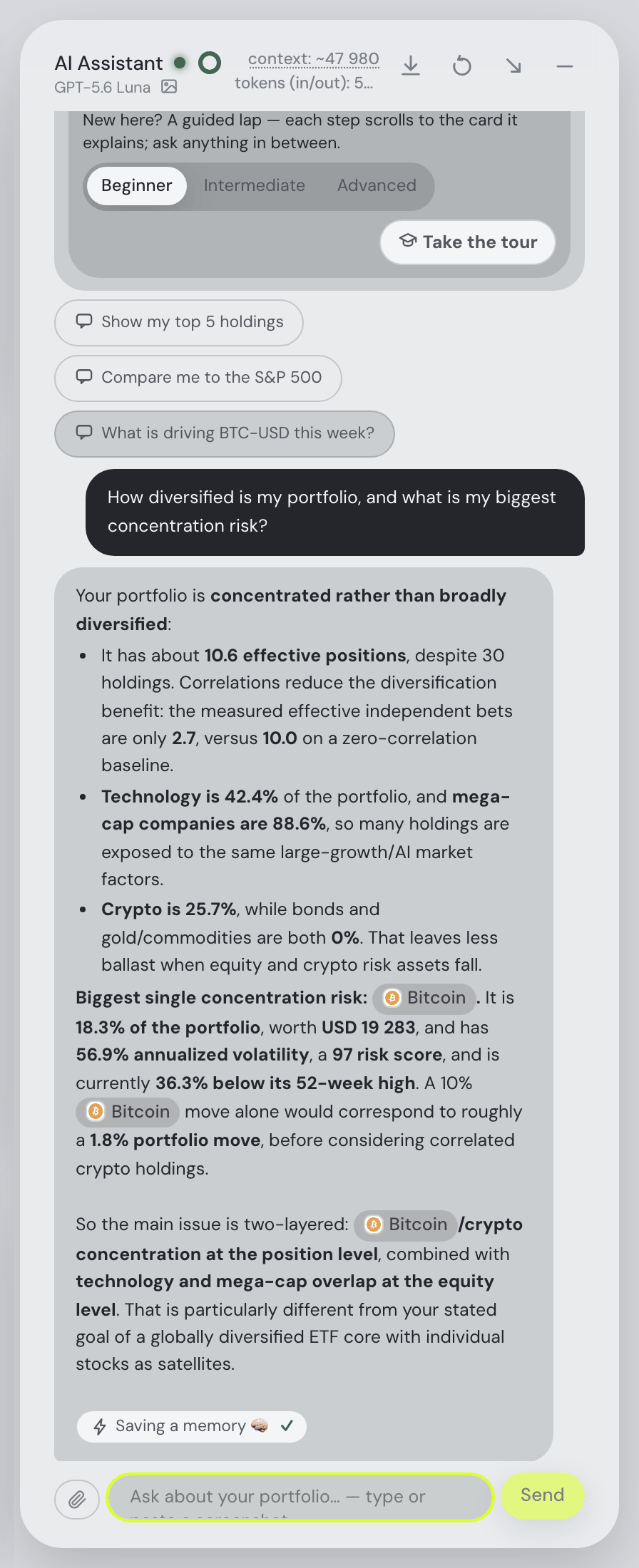
The assistant is a chat pane docked beside the dashboard on every tab. What makes it different from a chatbot is what arrives with each message: the whole Portfolio tab — holdings, performance, allocation, insights, events, dividends, recent news, your written strategy and your watchlist, benchmark returns and the fundamentals of every holding — together with what you are doing right now: the tab you are on, the display currency, any filter, whatever drawer or dialog is open, the simulation you just ran, and a log of your last fifty actions. So "this position", "that chart" and "the sell you just suggested" all resolve without you spelling them out.
You can see exactly what it knows. The context: figure in the pane's header opens the Context window — every section it sends, live view, strategy, recent actions, portfolio snapshot, favourites, simulations, news, events, instructions, each with its token estimate. Nothing hidden, nothing guessed: the documentation's standing guarantee is that the chat commentary always comes from the same data the card on screen displays.
Answers come back as markdown with real tables when structure helps, inline interactive charts that expand and download, and live ticker chips — click one to open the asset, hover it for a one-week mini chart, the price in your display currency and, for something you hold, your units, value and portfolio share. Company names resolve as well as tickers, in your questions and in the replies.
Every metric, explained on your own numbers
The dashboard shows a great many numbers, and the assistant's first job is to make each of them mean something for you. Ask what the difference between your time-weighted and money-weighted return says about your timing, why the Sharpe ratio is what it is, what a 44/100 diversification score with "11 effective positions" implies, how the fair-value gap on a holding was built from its six models, or what the TER on a fund costs you a year at your position size — and it answers with the card's own figures, in the currency you display, and with the conversation so far in mind. Because what you are looking at travels with the question, "explain this card" is a complete question.
It also answers the question the snapshot cannot: what was something worth on a date. "What was Bitcoin worth on 1 August, and what is the change?" reads the close off the same daily series the charts are drawn from, converts it at that day's exchange rate rather than today's, handles up to eight dates in one go, and, where a split has happened since, gives both the split-adjusted price and what the share actually traded at.
Filtering and ranking your holdings by a sentence
"Which are my top 5 holdings", "my best PEG holdings", "7 of my highest free-cash-flow holdings", "show only my tech stocks", "my worst performers this year", "most beaten down" — the assistant scrolls to the holdings table, sets its smart filter and comments on what is left. Top-N and metric filters are answered locally and come back ordered, without a model call; semantic ones ("tech stocks") run on the fast model. The same understanding sits in the holdings table's own filter box (quoted text is a semantic filter) and in the topbar finder and the Explore tab, where a quoted idea — "ai stocks" — proposes matching tickers market-wide.
News, earnings and quarterly reports
Ask about any company, held or not — "Is Palantir expensive?", "What's the news on Novo Nordisk?", "How did ASML's last quarter go?" — and the assistant fetches the figures live rather than answering from memory: the quote, market cap, the valuation, growth, quality and debt ratios, the 52-week range, the analyst target and the app's own score with its reasons (the same row the Explore table shows); the latest headlines with links; and the earnings picture — upcoming earnings and dividend dates, the last reported quarters with their EPS beat or miss, and the company's own results filing downloaded from the SEC: the earnings press release or shareholder letter inside the 8-K, a 6-K for foreign issuers, the 10-Q otherwise. An answer about a quarter therefore quotes revenue, margins and guidance as the company wrote them. Where a source is missing it says so and why — "the SEC only covers companies that file with it" — rather than guessing. Ask about eight companies in one question and all eight come back, with the headline numbers guaranteed and the bulky filing text trimmed first if the batch would not fit.
Two summaries run on their own, on the fast model, marked ✨ wherever they appear: the news summary above a stock's headlines on its detail panel, and the filing summaries on the Events card's filed reports. News summaries are pooled — the same headlines get one summary served to every reader, so they appear instantly and cost your budget nothing; filing summaries, insights, briefs and the chat itself are generated for you alone. Once an earnings season wraps, a seasonal report card appears: beat, miss or in-line verdicts from reported-against-expected EPS, guidance changes read from the SEC filings, biggest surprises first, weighed by position size.
Trade recommendations and simulations, interpreted
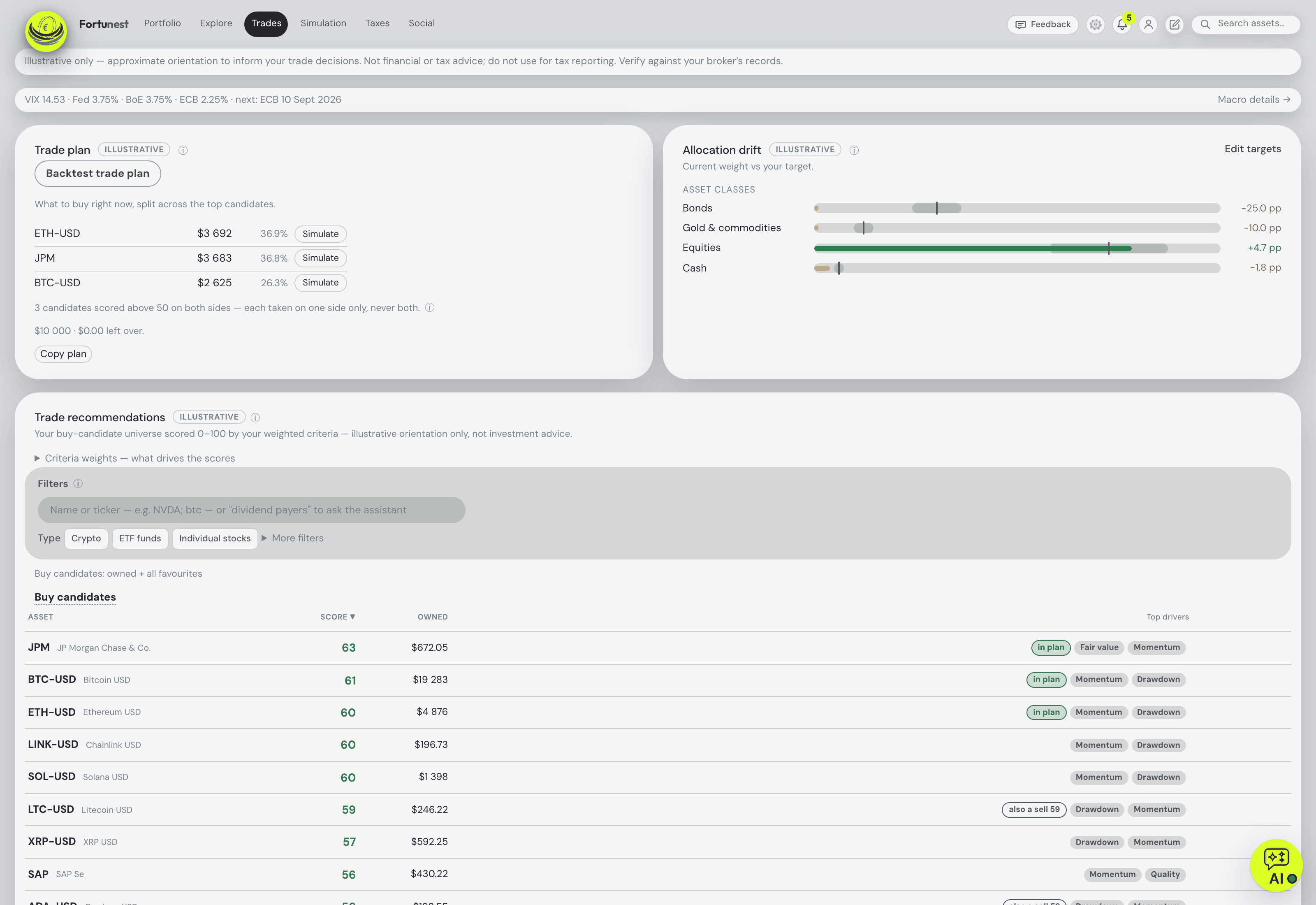
The Trades tab scores every holding and watched asset from 0 to 100 on fifteen criteria you weight yourself, and turns the result into a sized trade plan. The assistant explains it: "Why is the top buy candidate scored that way?" walks through the criteria and your weights; it names what limited the plan — a small eligible holding, a budget that cannot fund the number of orders you asked for, too few candidates — and it considers the buy and the sell side together, as the plan does. "Recommend good companies that just sold off" is two criterion weights turned up at once, and it can do that for you. On the Simulation tab it prefills and runs what-if trades ("what if I sell half my Tesla?"), fills the goal seek ("how much do I need monthly to have 500k in 2040?"), summarises the real simulation output and, for projections, the assumptions behind it. "Backtest the recommended trades over the last year" opens the historical replay, and the assistant describes its coverage honestly — what was reconstructed, what was excluded, and why a reconstruction is not an archive of past output.
On Pro, the Taxes tab answers through the same chat: the tax-free sellable value, the next time-test maturity, this year's proceeds against the small-sale limit, "which lots become tax-free within 12 months?", and a sell plan for the lowest estimated tax on an amount you name — orientation, never tax advice.
One-click reports
Four ✨ report cards sit under the assistant's opening message. Each posts its exact server-side prompt as your side of the conversation — expandable, so what you read is literally what the model received — and streams the report into the chat, where follow-up questions build on it.
| Report | What you get |
|---|---|
| Portfolio brief | State of the portfolio, today's moves tied to actual news headlines, events ahead, major risks and watch items. |
| Strategy check | Your portfolio evaluated against your saved thesis, horizon and risk tolerance — an alignment score, what fits, what diverges, concrete sized moves to consider. |
| Buy advice | Explains the current buy and sell orders, amounts and limits. Fewer orders and unspent money keep their plan reasons. |
| Earnings season digest | Appears as a season wraps: beat, miss or in-line from reported-vs-expected EPS, guidance changes from the SEC filings, biggest surprises first, weighed by position size. |
Alongside the reports, up to four ✨ AI insights join the rule-based observations in the Insights & alerts bell — model-found patterns such as correlated exposures or event-risk clustering — and proactive tips comment as you work: star a stock and the assistant may flag your existing concentration in that sector. A three-step slider (Off, Minimal, Active) decides how talkative it is.
Getting data in from the chat
Your broker exports go in through Settings, but everything else can be added by talking. "Add my apartment in Prague, bought 2019 for 200k EUR" — the assistant collects whatever is still missing (name, purchase date, price, currency, an optional yearly appreciation) and creates the asset, which then appears under Settings → Data exactly like a manually added one: part of your allocation and history, toggleable, editable. "Add 2 oz of gold futures" or "add 10 shares of RHM.DE" resolves your words through the same symbol search the Settings bar uses and adds a live-priced position; where several listings match, it lists the candidates and asks. It also reads positions out of an attached file or a screenshot — paste a brokerage position list and each line becomes its own asset, with a single recalculation for the batch. What was added can be edited by conversation too ("change the buy date for SOL and AAVE to 2021-09-01"), excluded or included ("exclude my Prague flat", "turn my Kraken account back on"), and a connected exchange can be synced now ("sync Kraken"). Positions imported from broker files stay managed by their files — the assistant says so rather than guessing at them.
Attachments are ordinary: 📎, paste from the clipboard, or drag files onto the question box. Images go to multimodal models; PDFs (up to 20 MB and no more than 200 pages) and text files travel as extracted text to any model; a paste from a spreadsheet keeps the cells. Ask the assistant how something works — "how do I export my Revolut history?" — and it looks up or full-text-searches the documentation before answering, with real links and the manual's screenshots under the reply.
Try a screenshot and a PDF attachment
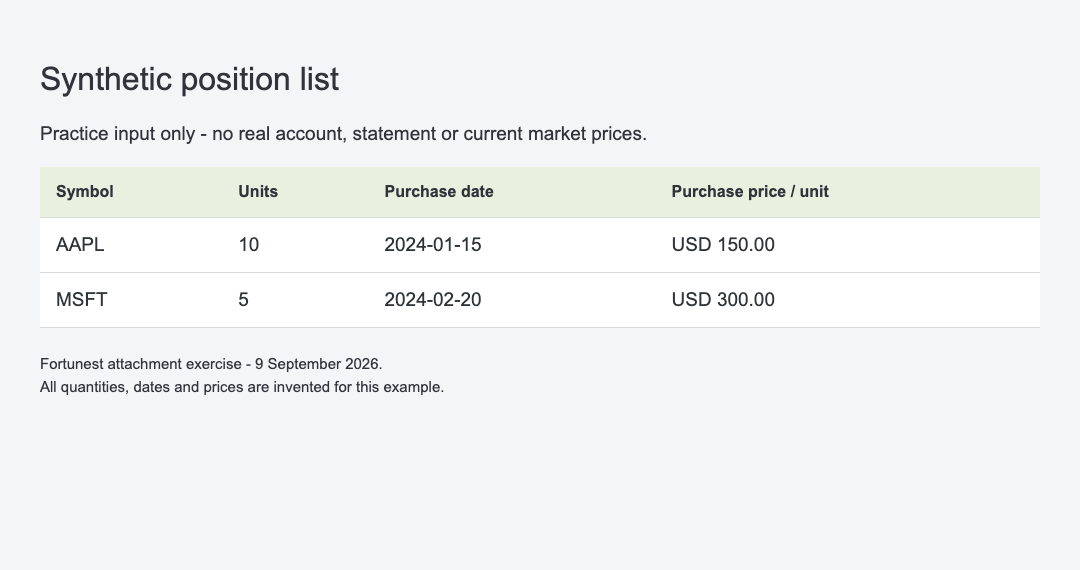
This practice pair makes the input visible before you ask anything. Download the synthetic position-list screenshot and the one-page fictional research note (PDF). The screenshot contains 10 AAPL units bought at USD 150 and 5 MSFT units bought at USD 300; all quantities, prices and dates are invented. The PDF describes fictional Example Solar Ltd, with revenue of EUR 10 million followed by EUR 12 million, and explicitly missing cash, debt and reporting dates.
- Open the assistant and choose a vision-capable model for the screenshot. A text-only model can read the PDF's extracted text, but cannot interpret the image.
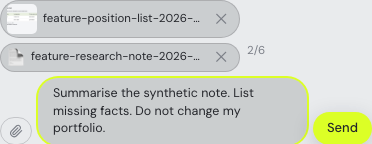
- Use Attach files (the paperclip) to choose the two files. Check that both filenames appear above the question box.
- For a reading exercise, ask: “Summarise the synthetic note. List missing facts. Do not change my portfolio.” Compare any answer with the PDF: the cash, debt and reporting dates are missing, so a supported answer should say so.
- To practise screenshot reading separately, ask: “Read this synthetic position list into a table. Do not add the positions.” Check every quantity, currency and purchase date against the image before asking for an import.
Attachment limits: documents may be up to 20 MB; PDFs over 200 pages are rejected. A scanned PDF without a text layer cannot be extracted here. Choose a readable text PDF or use a screenshot with a vision-capable model. Deliberately attached text and images go to your selected provider when you send the message; uploading ordinary broker exports through Settings → Data is a separate workflow.
Driving the dashboard
Everything above runs on a fixed vocabulary of forty-six typed dashboard actions — a request that maps onto none of them is answered in plain text rather than guessed at. In practice you type English: "Go to allocation" switches tab, scrolls to the card, expands it and comments on the numbers; "Compare me to the S&P 500" switches the value chart to return mode and turns the benchmark on; "Heatmap my AI plays list over the year" opens the heatmap on that list and window; "Add ASML to my favourites", "Switch to dark mode", "Show values in USD"; "Set my strategy to dividend growth, 15-year horizon", "Set quote refresh to 30 minutes", "Only recommend from my WannaBuy list" — settings change through the very same staged-save path as the Settings dialog, several at once and all-or-nothing, out-of-range values refused with the valid range named. Typing / in an empty question box lists every verb with its parameters, read from the assistant's own instructions so the list can never disagree with what the model was told.
The guarantees are the point. If an action cannot be performed, the assistant says so and answers textually — never a silent failure. Every action chip shows ✓ when it ran and ✗ with the reason when it was refused, the card it drove flashes once, edits to existing data carry an inline Undo, and every performed action lands in the recent-actions log so the next question knows what is on screen.
It remembers, and it follows your rules
Three things persist across conversations. Investing notes are yours — up to twenty short, timestamped reminders ("sell X before earnings") that travel with every message, proactive tip and report, and that Buy advice weighs when drafting the plan. Assistant memory is its own notebook — after a non-trivial answer it files a concise line ("worst PEG: INTC 3.1; advised trim"), stamped with the date, the loaded accounts and the portfolio value at that moment, up to fifty entries you can review, edit, delete or switch off. Skills are Markdown standing instructions — output formats, focus areas, opening routines — that can target the chat, the tips, the reports or the first reply of a session, and can name dashboard actions to perform; four ready-made ones cover dividend focus, value discipline, risk guardrails and an opening check-in. Skills customise behaviour and can never override the assistant's grounding rules or make it present financial advice.
For someone who has never invested, the Learn card carries a 25-step Investing Foundations course with real thirty-year charts and a three-level dashboard tour; both are pregenerated and run with no model connected. And "what should I buy?" is answered according to what the assistant knows about you: grounded in your data and your written strategy where there is one, by first reading your own trading pattern back to you where there is not, and with no tickers at all on an empty portfolio — a decision framework and a few profiling questions instead.
Which model, and where your data goes
Out of the box the hosted app answers on gpt-5.6-luna with a small free budget on Fortunest's own key — roughly a hundred questions as a guest, twice that once you confirm a free account, around four hundred a month, refilling, on Pro. Paste your own OpenAI, Anthropic or OpenRouter key (Claude Opus 5, Fable 5.1, Sonnet 5 and Haiku 4.5 are offered on Anthropic's side; OpenRouter opens 300-plus models) and nothing is metered. With Fortunest desktop and Ollama or LM Studio on the same computer, a running server is auto-detected and installed models appear in a dropdown; that inference request stays on the device. The desktop app starts with a local provider. The hosted app cannot reach your computer through localhost; see the worked configuration example for the distinction. A second, subordinate fast model runs the tips, insights, smart search and summaries; both choices are yours. Hosted API keys are encrypted server-side and never mirrored to browser storage. Ordinary broker imports contribute derived portfolio context; deliberately attached text and images are sent to the chosen provider with your message. Enabled assistant features include automatic summaries and proactive comments as well as questions you send.
Beyond the chat: your own agent
On Pro, the same tools, calculations and context are available to an agent you already use. Fortunest runs a standard MCP server — Streamable HTTP for the hosted portfolio, a STDIO bridge for the desktop app — documented step by step for Claude Code and Codex and usable from any other agent or model runtime that speaks MCP over those transports. The agent reads the live dashboard and can drive it; sensitive changes come with their exact inputs and an approval you give once, reject, or grant within bounds for a limited time. The MCP guide covers the consent model, what the agent sees, and how five trackers compare on agent access.
How this page was written
Every capability above is stated in the Assistant chapter of the documentation, which is kept current with each release; the screenshots identify their data and capture date in the captions. The attachment exercise uses downloadable synthetic inputs, verifies the real PDF extraction and attachment controls, and does not claim a generated answer. We build Fortunest, so we are not neutral — which is why the page lists what the assistant does rather than scoring it, and why its limits are here too: it is not financial or tax advice, broker-imported holdings are not editable by chat, the MCP server needs Pro, and a local model needs a machine that can hold a 32,000-token context.
Questions people ask
Does the Fortunest AI give financial advice?
No. It explains, computes and compares on your own numbers, and every recommendation-shaped answer — the Buy advice report, a what-if, a sell plan — is framed as a scenario to research, never as advice. With no strategy saved it first reads your own trading pattern back to you; on an empty portfolio it recommends no tickers at all and sketches the decision framework instead. Signals, analyses and assistant answers are informational.
Can the assistant read my broker statements and add positions?
Yes. Attach a file or paste a brokerage screenshot and it reads the positions out and adds each line as its own asset, in one recalculation; say "add my apartment in Prague, bought 2019 for 200k EUR" and it asks for whatever is missing, then creates a manually tracked asset; "add 10 shares of RHM.DE" adds a live-priced position. Broker exports themselves still go in through Settings → Data; positions imported from files stay managed by their files.
Do I need my own API key to use the AI?
Not on the hosted app: a new session starts answering on gpt-5.6-luna with a small free budget on Fortunest's own key — roughly a hundred questions as a guest, twice that once you confirm a free account, and about four hundred a month, refilling, on Pro. Paste your own OpenAI, Anthropic or OpenRouter key and it is never metered; with Fortunest desktop and Ollama or LM Studio on the same computer, that model request stays on the device. Hosted access and other online services have separate data flows. The desktop app starts on a local model.
Can the AI run fully locally, without any cloud model?
Yes, with Fortunest desktop and Ollama or LM Studio on the same computer: a running server is auto-detected on localhost, installed models appear in a dropdown, and that conversation — portfolio snapshot included — uses the local model. The hosted app cannot reach your machine through localhost; hosted portfolios and other online services have separate data flows. The model needs a context window of roughly 32,000 tokens or more, because every question carries your portfolio snapshot, the action vocabulary and the conversation so far. On the desktop app, local is the default.
What exactly is sent to OpenAI or Anthropic when I ask something?
Your question plus the portfolio context the answer needs — holdings with weights and values, performance and risk figures, recent trades, your strategy text and what is on your screen — to the provider behind the model you picked, under your key or, on the free budget, under Fortunest's. Ordinary broker imports supply derived portfolio context; text and images you deliberately attach to a chat are also sent when you submit the message. Assistant features can include automatic summaries or proactive comments when enabled. The Context window in the chat header lists every section it sends, with a token estimate.
Sources
- Fortunest — The Assistant (providers, budget, context, actions reference, reports, notes, memory, skills, external agents), The Trades tab, Investment Simulation, The Taxes tab, Getting your data in and Privacy & your data — read 7 September 2026.
Signals, analyses and assistant answers in Fortunest are informational — not financial or tax advice.