Guides · Updated 10 November 2026
Bitvavo in Claude and ChatGPT: how to ask an AI about your Bitvavo crypto
Bitvavo has an API but no MCP server, and neither Claude nor ChatGPT comes with a Bitvavo connector, so an AI assistant cannot look at your Bitvavo balance on its own. What works is one step removed: export Bitvavo's Transaction history CSV, import it into a tracker, and let the AI read the tracker. In Fortunest that is the in-app assistant on the free plan, or, on Pro, Claude, ChatGPT, Claude Code or Codex connected over MCP — with your coins in the same portfolio as your shares.
The short answer
- Bitvavo publishes an API, not an MCP server. Its developer documentation covers REST and WebSocket access with API keys and, on 10 November 2026, said nothing about MCP or AI agents.
- Fortunest reads Bitvavo by file only. There is no direct Bitvavo connection: you export the Transaction history CSV and drop it in. No key, and no Fortunest account needed.
- The free route: ask Fortunest's in-app assistant about the imported file — no account, no card, three accounts and fifty assets on the free plan.
- The Claude and ChatGPT route: on Fortunest Pro (€6.99 a month or €69 a year plus VAT; every new account starts with a 14-day Pro trial), add
https://app.fortunest.ai/mcpas a custom connector. In ChatGPT, custom connectors depend on your plan; free Claude accounts get one custom connector. - Re-export to stay current. A file does not update itself; new Bitvavo trades and staking payouts reach the AI when you drop in a fresh export.
Why an AI cannot simply read Bitvavo
Unlike some brokers, Bitvavo does publish an interface: its developer documentation explains how to create an API key in your account settings, with permissions for viewing balances and transactions, trading and withdrawals, and an optional IP whitelist. Its transaction-history endpoint returns buys, sells, staking, deposits, withdrawals, conversions and more. But an API is not an MCP server: something has to sit between it and your assistant, and Bitvavo does not ship one — none of those pages mentions MCP or AI agents.
Community-built, unofficial Bitvavo MCP servers do exist in public package registries. They run on your own machine with a Bitvavo API key you hand them, and Bitvavo neither publishes nor supports them. If you ever try one, note what Bitvavo's own documentation says about keys: withdrawals made through the API need neither two-factor authentication nor e-mail confirmation, so a key for reading should never carry the withdrawal permission.
Fortunest does not connect to Bitvavo's API at all. It reads the export Bitvavo already gives every customer, and the file route has a real upside: the full history is in it, which is what returns, realised gains and tax lots are computed from.
 Step by step: from Bitvavo to an answer
The import is the one in the Bitvavo section of the docs.
- Export the Transaction history Sign in to Bitvavo in a browser, open Transaction history and use Export; choose the full history rather than one year. Bitvavo's help centre describes this route (its page refused our direct fetch, so this step is as its article appears in search).
- Import it as it downloads Drag the CSV onto the Portfolio value tile in the app, or open ⚙ Settings → Data and drop it on the Data sources card. Do not re-sort or edit it first; the format is detected automatically and no Fortunest account is needed.
- Check what was imported The Portfolio tab says what came in. Rows Bitvavo marks as anything other than Completed or Distributed — pending, cancelled, failed — are counted and reported there, never imported.
- Ask the in-app assistant — free Open the assistant pane beside the dashboard and ask. It answers on a hosted model with a small free budget, on your own Anthropic, OpenAI or OpenRouter key, or on a local model through the desktop app.
-
Or connect Claude, ChatGPT, Claude Code or Codex — Pro
In Claude, Settings → Connectors → Add custom connector with the URL
https://app.fortunest.ai/mcp; in ChatGPT, Developer mode and a new connector with the same URL and OAuth; in Claude Code or Codex, the same endpoint as an MCP server. Sign in to Fortunest in the browser, review the permissions and click Allow connection. Each client's exact steps are in the External agents chapter.
Then check the connection with a question that changes nothing: "Use Fortunest to list my Bitvavo coins by value in euros. Do not change anything."
What the Bitvavo export brings in — and what it does not
From what each CSV export contains and the Bitvavo walkthrough:
| In the file | What Fortunest makes of it |
|---|---|
| Buys and sells | Trades with their fiat leg, so each coin's cost is in euros from the start. |
| Deposits and withdrawals | Transfers in and out of the account. |
| Staking payouts | Income on the coin that was paid out. |
| Fees | Already inside the amounts — Bitvavo's figures are changes in your balance — so the fee is reported and never taken off a second time. A fee charged in a coin is recorded but not valued, because the file carries no price for that coin. |
| Row order | The file runs newest first, and rows from one day only make sense in clock order, so it is re-sorted on date and time together. Left alone, a buy and a withdrawal on the same day could read as a withdrawal from nothing. |
| Pending, cancelled and failed rows | Counted and reported, not imported — only Completed and Distributed rows become transactions. |
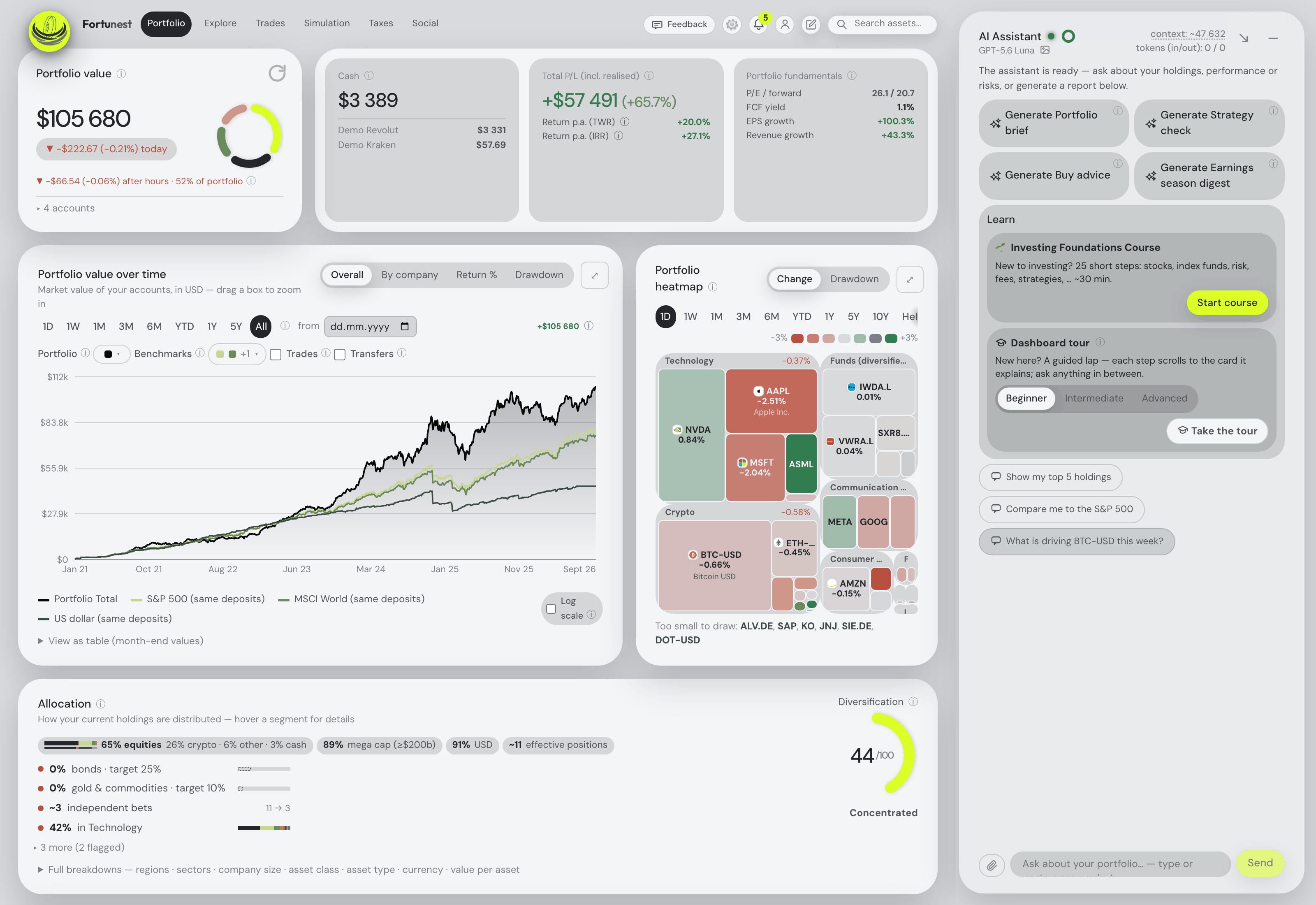
Try it on the demo portfolio — no account
Before you export anything or pay for Pro, connect Claude or ChatGPT to Fortunest's demo portfolio: four synthetic accounts — DEGIRO, Revolut, Kraken and Interactive Brokers — with made-up amounts over real tickers. No Fortunest account, no sign-in, nothing to install.
https://app.fortunest.ai/mcp/demo
In Claude
- Open Settings → Connectors and choose Add custom connector.
- Name it
Fortunest demo, paste the URL above as the Remote MCP server URL and click Add. There is no sign-in step. - In a new chat, enable Fortunest demo under + and ask: "Using Fortunest demo, what are the five largest holdings and how risky is this portfolio?"
In ChatGPT
- Turn on Developer mode under Settings → Apps & Connectors → Advanced settings.
- In Apps & Connectors choose Create: name
Fortunest demo, the URL above as the MCP server URL and Authentication: No authentication. Confirm that you trust it and click Create. - In a new chat, open + → More (or Developer mode), enable Fortunest demo and ask the same question.
In Claude Code: claude mcp add --transport http fortunest-demo https://app.fortunest.ai/mcp/demo. In Codex: codex mcp add fortunest-demo --url https://app.fortunest.ai/mcp/demo.
What the demo is. Seventeen read-only tools — portfolio summary, holdings, one position, allocation, risk, the value chart, upcoming events, recent trades, money flow, tax lots, the tax-free summary, the trade plan and its candidates, simulation inputs, data warnings and a search of the documentation — on one shared example portfolio. It cannot change anything, sees nobody's real data, and Fortunest runs no AI model for it: Claude or ChatGPT brings its own. For your own portfolio, import your exports in the app — free, with the in-app assistant; connecting an agent to it at https://app.fortunest.ai/mcp is Pro. Every endpoint and tool is listed in the Fortunest MCP server reference.
What you can ask about a Bitvavo portfolio
These questions use tools the assistant manual and the MCP reference document; they work in the in-app assistant and, over MCP, in a connected agent. Swap in your own coins.
| Ask | What comes back |
|---|---|
| "List my Bitvavo coins by value in euros and their share of my portfolio. Make no changes." | Each coin's value and weight in your display currency — the read-only first check. |
| "How much have my staking payouts brought in?" | The staking income the export recorded, from your money flow. |
| "How much of my whole portfolio is crypto, and how much is shares?" | The allocation split across asset types, Bitvavo next to your broker accounts. |
| "How risky is my portfolio with the crypto in it?" | Volatility per year, how far the portfolio stands below its last peak, and beta against the benchmarks — measured on your actual mix. |
| "What was bitcoin worth on 1 August, and what has my position done since?" | The close from the same daily series the charts use, at that day's exchange rate. |
| "What if I sell half my ETH?" | A what-if on the Simulation tab, prefilled and run, with the result summarised. |
| "Which of my coin lots pass the holding-period test within 12 months?" — Pro | From the Taxes tab's lots; the default rulebook is the Czech one, which includes crypto in the time test for sales from 15 February 2025, and every threshold is a setting. Orientation, not tax advice. |
The honest limits
- File only. There is no Bitvavo connection to keep current, so the AI knows what your last export knew. Overlapping exports are de-duplicated, so dropping in a newer full export is safe.
- Coin-denominated fees are not valued. They are recorded, but without the coin's price in the file they add nothing to your fee totals.
- What Bitvavo leaves out, Fortunest cannot add. Fortunest does not review exchanges; it reads what the export records, and a row type it does not recognise is reported rather than guessed.
- The AI reads the portfolio, not the raw CSV. Imported files are not sent to the model as context, and positions from a file stay managed by that file — the assistant will not edit them by chat; re-export instead.
- Pro for Claude and ChatGPT. The MCP connection needs Fortunest Pro after the 14-day trial, and whatever the agent reads goes to its provider under that provider's terms.
For crypto exchanges Fortunest can connect directly, see the Kraken guide; for coins and shares in one tracker, stocks and crypto together; for the same AI route from a broker's export, the DEGIRO guide; and for which apps run an MCP server at all, portfolio apps with an MCP server.
Questions people ask
Can ChatGPT or Claude read my Bitvavo portfolio?
Not directly, but they can read it through a tracker. Export Bitvavo's Transaction history CSV and import it into Fortunest, then add https://app.fortunest.ai/mcp as a custom connector in Claude or, with Developer mode, in ChatGPT, sign in and allow the connection. That needs Fortunest Pro, which every new account gets free for 14 days, no card; in ChatGPT, custom connectors depend on your plan, and free Claude accounts are limited to one custom connector.
Is there a Bitvavo MCP server?
Not from Bitvavo. Its developer documentation, read on 10 November 2026, describes REST and WebSocket APIs and API keys but does not mention MCP or AI agents. Community-built, unofficial Bitvavo MCP servers are published in public package registries; Bitvavo does not publish or document them, and they run on a Bitvavo API key you give them. Fortunest takes the file route instead.
Can I connect Bitvavo to Fortunest with an API key?
No. Fortunest has no direct Bitvavo connection — Bitvavo comes in as its Transaction history CSV, which needs no Fortunest account. A file is a snapshot you repeat by hand: export again when you want newer trades in.
Are my Bitvavo staking rewards included?
Yes. Staking payouts in the Transaction history arrive as income, beside buys and sells with their fiat leg and deposits and withdrawals as transfers. Rows that are pending, cancelled or failed are counted and reported, never imported.
Is there a free AI for my Bitvavo portfolio?
Yes. Import the Bitvavo export into Fortunest and use the in-app assistant on the free plan, with no account and no card: it reads your holdings and the screen you are on and explains your returns and risk on your own numbers. It answers on a small free hosted budget, on your own Anthropic, OpenAI or OpenRouter key, or on a local model through the desktop app. The free plan covers three accounts and fifty assets.
Can one AI answer about my Bitvavo crypto and my stocks together?
Yes. In Fortunest the Bitvavo file sits in one portfolio beside broker exports and connections, in one holdings table and one display currency, so the in-app assistant — or, on Pro, Claude or ChatGPT over MCP — answers about all of it at once.
Sources
- Fortunest — the Bitvavo import, what each CSV export contains, every supported platform, the MCP server reference and its External agents chapter, and the assistant manual's free budget.
- Bitvavo — developer documentation, Get started (API keys, permissions, IP whitelist, withdrawals without 2FA) and Get transaction history (read 10 November 2026).
- Bitvavo — help centre, How can I view and download my transaction history and balance statement?, as returned by search; direct fetch refused (10 November 2026).
Signals, analyses and assistant answers in Fortunest are informational — not financial or tax advice.