Guides · Updated 10 November 2026
Interactive Brokers in Claude and ChatGPT: IBKR's own MCP server, or a tracker's
Interactive Brokers is the broker in this series that answers the question itself: its AI Integration makes IBKR an MCP server, and ChatGPT, Claude, Grok and Perplexity connect to your account through it after you log in at IBKR. So the real question for an IBKR client is a different one — when is a tracker's MCP server worth having beside IBKR's? When IBKR is one account among several, when you want returns, risk and tax lots computed across all of them, and when you would rather the agent could not trade at all. In Fortunest that means the Activity Statement, a Flex Query or a read-only Flex token, then the in-app assistant on the free plan or, on Pro, the Claude app, ChatGPT, Claude Code or Codex over MCP.
The short answer
- IBKR has its own MCP server. Its AI Integration connects ChatGPT, Claude, Grok, Perplexity and any other MCP client to the account data you authorize, at no extra IBKR fee. The AI prepares trade instructions; you review and submit each order — unless you add IBKR's separate Autonomous Trading.
- A tracker's MCP server answers a different question: IBKR beside DEGIRO, Trading 212, a crypto exchange and whatever else you hold, in one display currency — and with no way to trade.
- The free route: import the Activity Statements or a Flex Query into Fortunest and ask its in-app assistant — no account, no card for files; three accounts and fifty assets on the free plan.
- The Claude and ChatGPT route: on Fortunest Pro (€6.99 a month or €69 a year plus VAT; every new account starts with a 14-day Pro trial, no card), add
https://app.fortunest.ai/mcpas a custom connector. Which other trackers and brokers run an MCP server is in portfolio apps with an MCP server. - They do not exclude each other. IBKR's connector and Fortunest's are separate; connect both and name the one you mean in a question.
What Interactive Brokers gives an AI
IBKR's AI Integration page describes Interactive Brokers acting as an MCP server: connected AI platforms get a defined set of tools — retrieving portfolio data, checking order status and the like — only after you authorize them, IBKR keeps the login, and your credentials never reach the AI platform. In ChatGPT, Claude, Grok or Perplexity you search the connector directory for Interactive Brokers, log in on IBKR's own screen and authorize the account; other MCP clients, Claude Code, Codex and Cursor among them, add the address IBKR publishes for them. You revoke access in Client Portal. IBKR charges no extra fee for the connection, though your AI provider's subscription and the usual IBKR charges still apply.
What the AI can do there is research, portfolio analysis, monitoring and preparing trade instructions: IBKR's examples range from summarising your largest positions, sector exposures and cash currencies to drafting sell instructions that trim a position. With the standard integration, the page says, you review and submit every order yourself. Eligible clients — individual, non-margin accounts that have first approved enough AI orders by hand — can add Autonomous Trading, where the AI executes supported trades without a confirmation per order, inside a separate AI Partition funded with cash from the parent account. The page's disclosures warn that AI can make errors and submit orders you did not intend, and that the integration is not available in India or Japan.
The older, narrower door is the Flex Web Service: a token that downloads a Flex report you designed in Client Portal. It cannot trade — it has no trading scope — which is why it is what Fortunest connects with.
IBKR's MCP server or a tracker's: the difference
Each cell is what the vendor's own pages say on the date in the footnote. Not described means the page we read does not mention it.
| IBKR AI Integration2 | Fortunest over MCP1 | |
|---|---|---|
| What the agent sees |
|
|
| Orders |
|
|
| Calculations described |
|
|
| Clients |
|
|
| Sign-in and revoking |
|
|
| Price |
|
|
IBKR's column was checked against its AI Integration page on 10 November 2026. Fortunest's column is our own documentation. Neither column is a statement about features a page does not mention.
Step by step: from IBKR into Fortunest, then to an answer
The steps follow the Interactive Brokers section of the docs and the Interactive Brokers portfolio tracker guide. All of them start in Client Portal, the same one Lynx clients use.
- Download the yearly Activity Statements Open Performance & Reports → Statements, choose the Activity statement, set the period to Annual and the format to CSV, and download every year you want in the dashboard. A consolidated statement over several accounts works too; rows two files share are counted once.
- Or a Flex Query, if trades are all you need Under Performance & Reports → Flex Queries create an Activity Flex Query with the Trades section over your whole history, run it and download it as CSV. Use either the statements or the Flex file for a given stretch of time, not both.
- Drop the files in Drag them onto the Portfolio value tile in the app or into ⚙ Settings → Data. No account is needed for files; each year is its own file, and the free plan holds three.
- Keep it current with a Flex token — optional Save an Activity Flex Query with Trades (executions), Open Positions (summary), Cash Transactions and Cash Report, period Last 365 Calendar Days, format XML, and note its ID. In Flex Web Service Configuration turn the service on, generate a token with a long expiry and set IBKR's IP restriction. Then ⚙ Settings → Data → Connect an account → IBKR / Lynx (Flex) takes the token and the query ID; they are checked live and the token is encrypted at rest. A free Fortunest account keeps the connection. Upload the statements first: the connection then takes over the day after the newest row they cover.
- Ask the in-app assistant — free Open the assistant pane beside the dashboard and ask, on the small free hosted budget, your own Anthropic, OpenAI or OpenRouter key, or a local model through the desktop app.
-
Or connect Claude, ChatGPT, Claude Code or Codex — Pro
Add
https://app.fortunest.ai/mcpas a custom connector in Claude (Settings → Connectors → Add custom connector) or, with Developer mode on, in ChatGPT; in Codex, Settings → Plugins → MCPs with the same URL. Sign in to Fortunest, review the permissions and click Allow connection. The External agents chapter has every client's steps.
If IBKR's own connector is enabled in the same chat, name the one you mean: "Use Fortunest to compare my IBKR account with the rest of my portfolio. Do not change anything."
What the IBKR files and token bring in — and what they do not
- The Activity Statement brings stock and ETF trades keyed by ISIN — an older statement's CUSIPs converted using the listing exchange — currency conversions as the two cash movements they are, dividends and payments in lieu, the withholding tax on them, fees and commission adjustments, interest including borrow fees, deposits and withdrawals, splits, reverse splits, ISIN changes, mergers and shares transferred in or out.
- A move to a new account number — upload both accounts' statements, or one consolidated statement — is read as your own shares changing account: each lot keeps its original purchase date, so a three-year holding test still runs from the day you bought.
- The Flex Query brings equity and ETF trades keyed by ISIN, with commissions folded into the cash amounts; exports with several detail levels are de-duplicated.
- The Flex token sees only the query's own window — 365 days. Older years arrive as opening positions unless the statements cover them, and a new or idle account may have no statement until IBKR's overnight run.
- Not imported: options, futures, bonds and CFDs — counted and reported on the Portfolio tab instead — and the statement's own summaries such as net asset value. A short position is not modelled, and the running cash balance is not tracked from the statement file.
Try it on the demo portfolio — no account
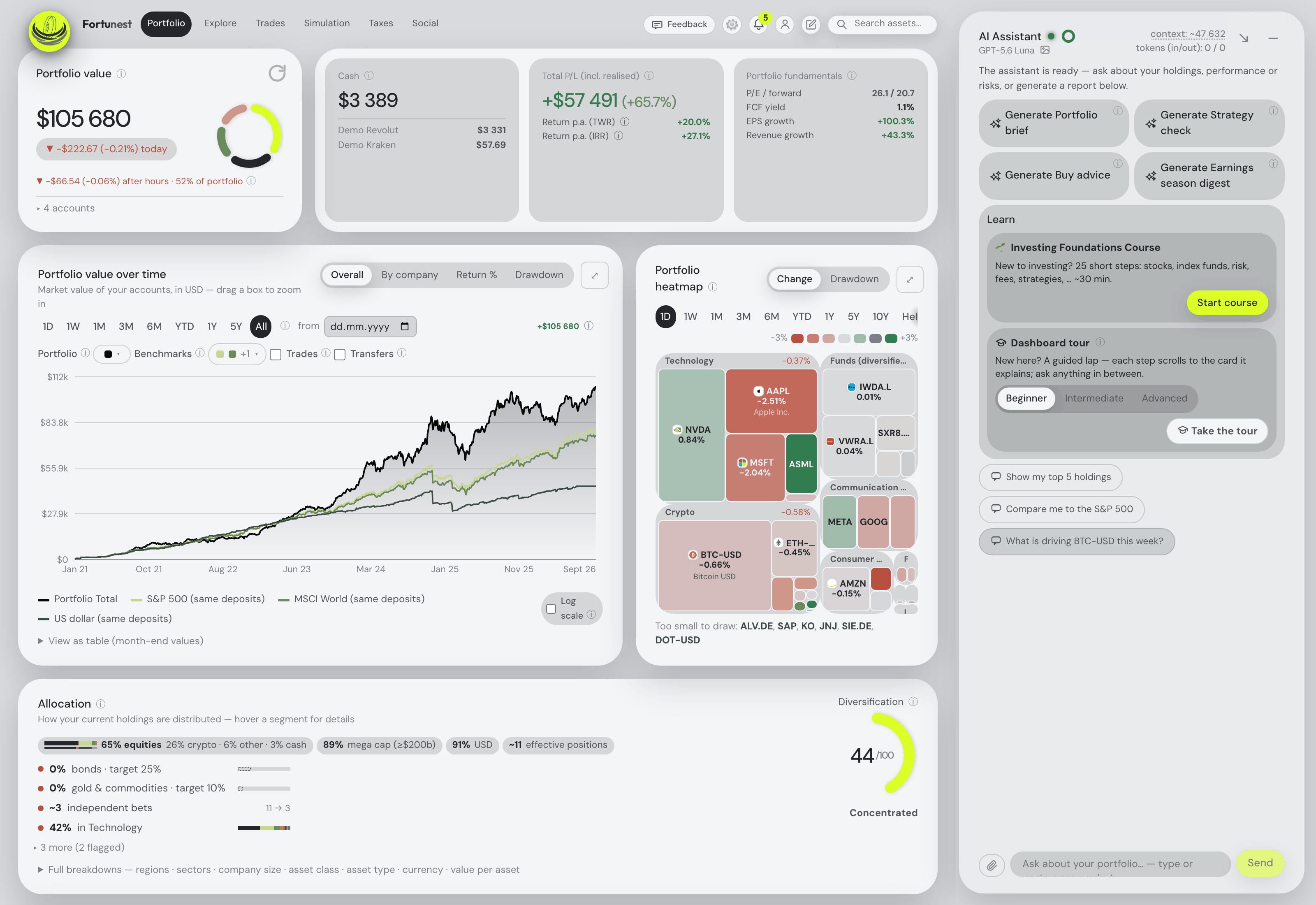
Before you export anything or pay for Pro, connect Claude or ChatGPT to Fortunest's demo portfolio: four synthetic accounts — DEGIRO, Revolut, Kraken and Interactive Brokers — with made-up amounts over real tickers. No Fortunest account, no sign-in, nothing to install.
https://app.fortunest.ai/mcp/demo
In Claude
- Open Settings → Connectors and choose Add custom connector.
- Name it
Fortunest demo, paste the URL above as the Remote MCP server URL and click Add. There is no sign-in step. - In a new chat, enable Fortunest demo under + and ask: "Using Fortunest demo, what are the five largest holdings and how risky is this portfolio?"
In ChatGPT
- Turn on Developer mode under Settings → Apps & Connectors → Advanced settings.
- In Apps & Connectors choose Create: name
Fortunest demo, the URL above as the MCP server URL and Authentication: No authentication. Confirm that you trust it and click Create. - In a new chat, open + → More (or Developer mode), enable Fortunest demo and ask the same question.
In Claude Code: claude mcp add --transport http fortunest-demo https://app.fortunest.ai/mcp/demo. In Codex: codex mcp add fortunest-demo --url https://app.fortunest.ai/mcp/demo.
What the demo is. Seventeen read-only tools — portfolio summary, holdings, one position, allocation, risk, the value chart, upcoming events, recent trades, money flow, tax lots, the tax-free summary, the trade plan and its candidates, simulation inputs, data warnings and a search of the documentation — on one shared example portfolio. It cannot change anything, sees nobody's real data, and Fortunest runs no AI model for it: Claude or ChatGPT brings its own. For your own portfolio, import your exports in the app — free, with the in-app assistant; connecting an agent to it at https://app.fortunest.ai/mcp is Pro. Every endpoint and tool is listed in the Fortunest MCP server reference.
What you can ask about an IBKR portfolio
IBKR accounts tend to hold shares from several exchanges, cash in several currencies and a long history. Every question below is one the assistant manual or our guides document; they work in the in-app assistant and, over MCP, in a connected agent. Swap in your own holdings.
| Ask | What comes back |
|---|---|
| "Use Fortunest to summarise my top five holdings across all accounts. Make no changes." | The five largest positions in your display currency, wherever they are held — IBKR, another broker or an exchange. |
| "How diversified is my portfolio, and what is my biggest concentration risk?" | Effective positions, sector and size concentration and the single largest risk, from the allocation card's own figures. |
| "Explain my Sharpe ratio, beta and maximum drawdown." | The risk card's figures on your own history, explained against the benchmark you chose. |
| "How much did I deposit and withdraw this year?" | The money flowing in and out of each account, so a return is never confused with a transfer. |
| "What was ASML worth in euros on 1 August, and what is the change?" | The close from the same daily series the charts use, converted at that day's exchange rate; up to eight dates in one go. |
| "Is Palantir expensive?" | Quote, valuation, growth and quality ratios, the analyst target and the app's own score with its reasons. |
| "What if I sell half my Microsoft?" | A what-if on the Simulation tab, prefilled and run, with the result summarised — a scenario, not an order. |
| "Which lots become tax-free within 12 months?" — Pro | From the Taxes tab's lots and holding-period test, with moved accounts keeping their purchase dates; the default rulebook is the Czech one, every threshold a setting. Orientation, not tax advice. |
Where this falls short
- No options, futures or bonds. An IBKR account that is mostly derivatives is better served by IBKR's own connector, whose page covers stocks, options and ETFs.
- The Flex token sees a rolling 365 days. The full history has to come from statements you download once.
- It is one step removed. The agent reads Fortunest's copy, current as of the last sync or file — not IBKR's live order book.
- MCP is Pro after the trial, whatever the agent reads goes to your agent's provider under their terms, ChatGPT custom connectors depend on your plan, and free Claude accounts are limited to one custom connector.
How we checked
We read Interactive Brokers' AI Integration page, its FAQ and disclosures on 10 November 2026. The Fortunest steps, what the import reads and the example questions come from our documentation, which is kept current with each release. We build Fortunest, so we are not neutral; for an IBKR-only account, IBKR's own connector reaches further — live orders, options, IBKR's market data — and the table says so.
Questions people ask
Can ChatGPT or Claude read my Interactive Brokers portfolio?
Yes: Interactive Brokers runs its own MCP server, which ChatGPT, Claude, Grok and Perplexity reach through a connector once you sign in at IBKR. Its page says the AI sees the positions, balances and activity you authorize, prepares trade instructions you review and submit yourself, and costs no extra IBKR fee; it is not available in India or Japan. A tracker's MCP server is the other route, for IBKR beside your other accounts: import the Activity Statement or connect a Flex token in Fortunest, then add https://app.fortunest.ai/mcp as a custom connector. That needs Fortunest Pro, which every new account gets free for 14 days; in ChatGPT, custom connectors depend on your plan, and free Claude accounts are limited to one custom connector.
Is there an official Interactive Brokers MCP server?
Yes. IBKR's AI Integration makes Interactive Brokers an MCP server: in ChatGPT, Claude, Grok or Perplexity you pick the Interactive Brokers connector from the directory and log in on IBKR's own screen, and other MCP clients such as Claude Code, Codex or Cursor add https://api.ibkr.com/v1/api/mcp-public. Access is revoked in Client Portal. A separate Autonomous Trading option lets eligible clients have the AI execute trades within a dedicated, funded AI Partition.
When does a tracker's MCP server make sense next to IBKR's own?
When Interactive Brokers is not your only account, and when you want an agent that cannot trade. IBKR's server answers about the IBKR account; a tracker answers about IBKR beside your other brokers and exchanges in one display currency, with time- and money-weighted returns against benchmarks fed your own deposits, risk figures and, on Pro, tax lots. Fortunest's connection to IBKR is read-only — there is no order-placing code in the app.
Activity Statement or Flex Query — which file does a tracker need?
For a complete history, the yearly Activity Statements: one CSV per year, with trades, dividends, withholding tax, fees, interest, currency conversions, splits and share transfers. A Flex Query brings the trades. Pick one of the two for any stretch of time rather than both, because a Flex query exported per execution lists every fill on its own line while the statement adds an order's fills up.
Can an AI place trades in my IBKR account through Fortunest?
No. The Flex Web Service token Fortunest connects with can only download reports, and every Fortunest connection is read-only: it cannot place, change or cancel an order or move money. Changes an agent proposes inside Fortunest itself need your approval there.
Does it work for Lynx accounts?
Yes, in Fortunest. Lynx clients log into the same IBKR Client Portal, so the Activity Statement, the Flex Query and the Flex token are the same files and token, read the same way. IBKR's AI Integration page does not say whether Lynx accounts can use its MCP connector.
Sources
- Fortunest — the Interactive Brokers walkthrough with the Activity Statement and the Flex Query, how the three methods work, the MCP server reference and its External agents chapter, the Interactive Brokers tracker guide for the Flex token steps, and the DEGIRO MCP guide for a broker with no API at all.
- Interactive Brokers — AI Integration: Your Portfolio. Your AI. Connected., including its FAQ and disclosures (read 10 November 2026).
Signals, analyses and assistant answers in Fortunest are informational — not financial or tax advice.