Guides · Updated 8 October 2026
Kraken portfolio tracker: a read-only API key, or the ledger CSV
Kraken lets you mint an API key with exactly the permissions you choose, so a tracker can keep your account current without being able to trade or withdraw — and its Spot ledger export is the complete record if you would rather hand over a file. Fortunest takes either, needs only two read permissions, and puts the coins in the same portfolio as your shares; it is our pick for tracking Kraken and stocks together. For a crypto-only tax report, CoinTracking is built for the job; for a phone-first view, Delta.
The short answer
- Grant reading, nothing else. Kraken's own documentation maps Query Funds to the balance endpoints and Query Ledger Entries to the ledger. Those two are a complete history; anything a tracker asks for beyond them is worth a second look.
- Our pick for Kraken beside stocks: Fortunest — a query-only key restricted to one IP address, or the Spot ledger CSV, in one portfolio with your broker accounts, one currency and one return figure. The CSV works without an account; the key needs a free Fortunest account. Pro is €69 a year.
- Crypto-only and mobile: CoinStats — a Kraken API connection on a free Basic plan of 10 portfolios and 20,000 transactions, but it asks for more permissions, including Deposit, and for API-key two-factor to be off.
- For crypto tax: CoinTracking — a Kraken sign-in, an API key or a CSV, with tax reports from its Starter plan; the free plan is a portfolio view only after a 7-day trial.
- On a phone, with brokers too: Delta — a read-only Kraken key stored on your device, per its help centre; its site refused our direct fetch, so treat those cells as one step removed.
How to connect Kraken, or export its ledger
The key steps are the ones the connect form in the app shows; the file steps are the Kraken section of the docs.
- Create a key in Kraken In Kraken's settings open the API section and create a new key. Under permissions tick only Query Funds and Query Ledger Entries — leave every trade, deposit and withdrawal permission off. The key can then only read.
- Pin it to one address Under the key's security settings, restrict it to the IP address Fortunest shows you, so a leaked key is useless anywhere else. Copy the API key and the private key — Kraken shows the private key only once.
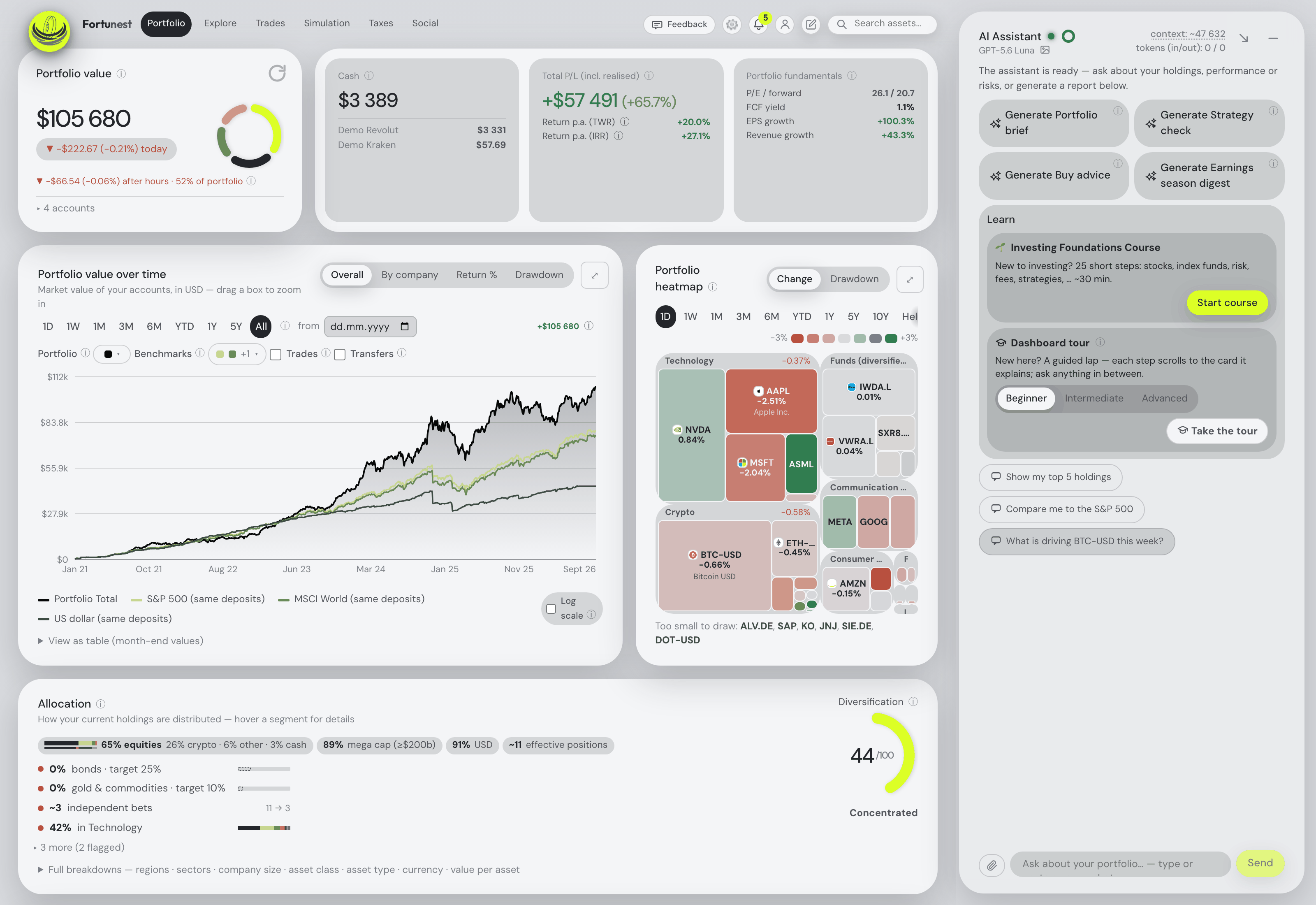
- Paste both into Fortunest Signed in to the app, open ⚙ Settings → Data → Connect an account and pick Kraken. Both permissions are tested at connect time, so a half-permissioned key is refused there rather than failing days later, and nothing is stored unless it works.
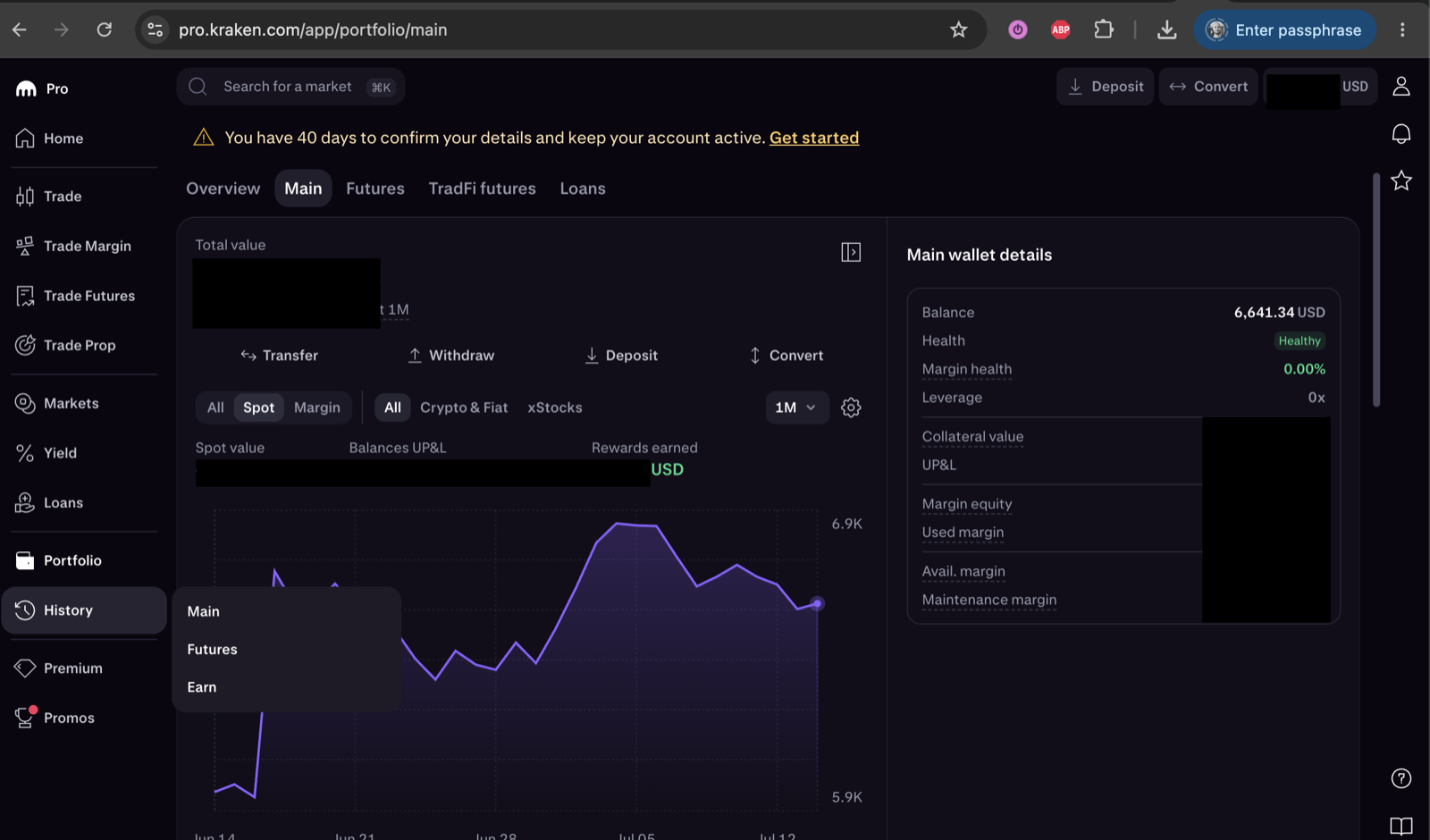
- Or export the ledger instead On pro.kraken.com open History → Main, use Export to create a Spot ledger statement for all time, download the CSV and drop it on the Portfolio value tile — no account needed.
Why the ledger, and what comes in
Kraken's trade list only knows trades. Its ledger knows every balance change — trades, deposits, withdrawals, staking and Earn rewards, conversions — which is why both Fortunest routes read the ledger rather than the trades. A trade is two ledger rows sharing one reference: the coin that came in and the money that went out, each with its own fee. Paired, they become one priced trade; a fiat row becomes one cash movement; a reward becomes income. The export also carries wallet auto-allocations and delisting conversions such as MATIC→POL.
Kraken's classic asset codes are normalised to the spelling its own CSV exports use (XBT for bitcoin, EUR for euros), so the same trade read from the key and from a file is recognised as the same row. If you upload files and then connect, the connection's first sync sees those files and takes over from the day after the newest row they cover. Later syncs are incremental and run in the background. The key is encrypted at rest, never sent to your browser and never logged; the app has no code that places an order or moves money. Kraken Futures is not read — this is the Spot account.
From there it is one portfolio: every day converted at that day's rate into your display currency, TWR and IRR across coins and shares, and the assistant answering about the actual holdings. On Pro, the Taxes tab pairs each sale with the lots it consumed; its Czech default rulebook includes crypto in the holding-period time test for sales from 15 February 2025, and every rule is a setting.
The trackers that read a Kraken account
Each cell is what the vendor's own pages say, checked in October 2026. Not described means the page we read does not mention it. A green ✓ marks whichever product leads a row on that row's own terms.
| Fortunest1 | CoinStats2 | CoinTracking3 | Delta4 | |
|---|---|---|---|---|
| How Kraken gets in |
|
|
|
|
| Permissions the key gets |
|
|
|
|
| Stocks in the same portfolio |
|
|
|
|
| Free plan |
|
|
|
|
| Paid from |
|
|
|
|
| Tax |
|
|
|
|
Cells were checked against the sources below in October 2026. Delta's help centre refused our direct fetch, so its cells come from its own help articles as returned by search — one step further from the source than the rest. CoinStats' pricing page shows one after-trial price without naming the plan. Prices are list prices before promotions and, for Fortunest, before VAT.
The verdicts
Fortunest — our pick for Kraken beside stocks
Best for: a Kraken account that belongs in the same portfolio as your broker accounts.
Free without an account (CSV) · free account for the key · Pro €6.99/mo or €69/yr
It asks the least of your key — two query permissions and one IP address — and reads the ledger, so staking and Earn rewards, deposits, withdrawals and conversions arrive with the trades. The coins then sit in the same holdings table, heatmap, allocation and return figure as the shares from your brokers, with transfers between your own accounts matched rather than counted as a sale and a purchase.
Where it falls short: Kraken Futures is not read; a portfolio holds one Kraken connection; there is no native mobile app yet, only the web app built for phones; and the Taxes tab is Pro with a Czech-default rulebook and no per-country presets — not a filing-ready report the way a crypto tax tool's is.
CoinStats
Best for: many crypto portfolios on a generous free plan.
Basic free — 10 portfolios, 20,000 transactions · "$13.99/mo after trial"
CoinStats' Kraken page walks you through a key with a fixed IP block and a custom nonce window, then a paste or a QR scan in its app, and states the integration "has read-only access and cannot make changes to your account or move funds". Kraken Futures has its own connection.
Where it falls short: the permission list includes Deposit and both order-and-trade query permissions on top of the ledger, and two-factor authentication for API keys has to be set to "No method"; stocks are not described on the pages we read.
CoinTracking
Best for: a crypto tax report built from many exchanges.
Free portfolio view · Starter US$49/yr · Pro US$169/yr
CoinTracking offers all three routes for Kraken — a sign-in you approve at Kraken, a read-only API key, and a CSV upload as the fallback — and states that trades, staking rewards, deposits and fees sync automatically, with a separate Kraken Futures importer.
Where it falls short: crypto only; after the 7-day trial the free plan only views what is already there, new imports and tax reports need a paid plan, and auto-sync starts on Pro.
Delta
Best for: watching crypto and broker accounts together on a phone.
Basic free · paid prices not readable
Delta's Kraken article, as returned by search, has you create a key with the query and Export Data permissions and paste the API key and private key into the app; its help centre says the keys are stored on your device and never sent to Delta's servers, and its pages describe stock brokerages beside exchanges and wallets.
Where it falls short: the guide says to leave IP whitelisting off, past transactions import only if you choose that when adding the connection, and its site refused our fetch, so nothing here is quoted first-hand.
Koinly and getquin
Koinly is crypto tax software rather than a portfolio tracker. Its Kraken pages, as returned by search, describe single sign-on, an API key and a CSV upload; its site refused our fetch, so we kept it out of the table. getquin's pricing page names no crypto exchange, and we found no Kraken connection described on its own pages. If Kraken is one account among several brokers, the stocks-and-crypto guide compares the trackers built for that.
How we compared
We read each vendor's own Kraken, help and pricing pages — and Kraken's own API documentation for what each permission unlocks — rather than a review site. Where a page says nothing about a row, the cell says so. We build Fortunest, so we are not neutral: the table is meant to be checkable rather than impartial, and every product's limits are in its verdict, ours included.
Questions people ask
Which Kraken API permissions does a portfolio tracker need?
For Fortunest, two: Query Funds for the balances and Query Ledger Entries for the history. Every trading, deposit and withdrawal permission stays off, and the key is restricted to the IP address the connect form shows. Other trackers ask for more: CoinStats lists Query, Deposit, both order-and-trade query permissions and Query Ledger Entries, and Delta's guide adds Export Data.
Can I track Kraken and stocks together?
Yes. In Fortunest the Kraken key or ledger file sits in the same portfolio as broker exports and direct Interactive Brokers and Trading 212 connections, in one holdings table and one display currency converted at each day's rate, with TWR and IRR across the lot. On the free plan that is three accounts and fifty assets in total.
Do I need a Fortunest account to connect Kraken?
For the API key, yes: a key has to outlive the browser session, so connecting needs a signed-in account, and a free one works. The Spot ledger CSV needs no account at all. The desktop app also connects directly, keeping the key in its local database.
Will a Kraken key and a ledger file count my trades twice?
Not in Fortunest. Upload the files first and then connect: on its first sync the connection sees your Kraken files and takes over only from the day after the newest row they cover. The key and the file also spell assets the same way, so the same ledger row is recognised from either route.
Is Koinly a Kraken portfolio tracker?
Koinly is crypto tax software: its Kraken pages, as returned by search, describe single sign-on, API and CSV imports for building a tax report. Its site refused our direct fetch, so we left it out of the table. If the tax report is the goal, it and CoinTracking are the tools built for it; if the goal is one portfolio with your shares, it is not.
Sources
- Fortunest — the Kraken walkthrough, what each CSV export contains, connecting an account, the Taxes chapter and the Privacy chapter.
- CoinStats — Kraken connection and pricing (October 2026).
- CoinTracking — Kraken import, Kraken API import and pricing (October 2026).
- Delta — Kraken and where API keys are stored, as returned by search; direct fetch refused (October 2026).
- Kraken — API key permissions (October 2026). Koinly — Kraken integration, as returned by search; direct fetch refused (October 2026). getquin — pricing (October 2026).
Signals, analyses and assistant answers in Fortunest are informational — not financial or tax advice.