Guides · Updated 10 November 2026
Looking for a Portfolio Genius alternative? Fortunest vs Portfolio Genius in 2026
Portfolio Genius is a US-focused AI analyst: it syncs US brokerages through Plaid, reviews your holdings on a schedule, suggests specific trades and, on Premium, describes an AI agent trading in a connected Alpaca account. Fortunest is a read-only portfolio tracker with a free plan: it rebuilds your broker history into a daily-rate record, measures it, and gives you an assistant that reads your actual holdings and the screen in front of you, explains any metric on your own numbers and never places an order — and on Pro opens the same tools to the Claude app, Claude Code, Codex or any MCP-capable agent. Pick Portfolio Genius for US account sync and an AI that proposes trades; pick Fortunest for brokers beyond the US, the measured history, and an assistant you can ask without paying.
The short answer
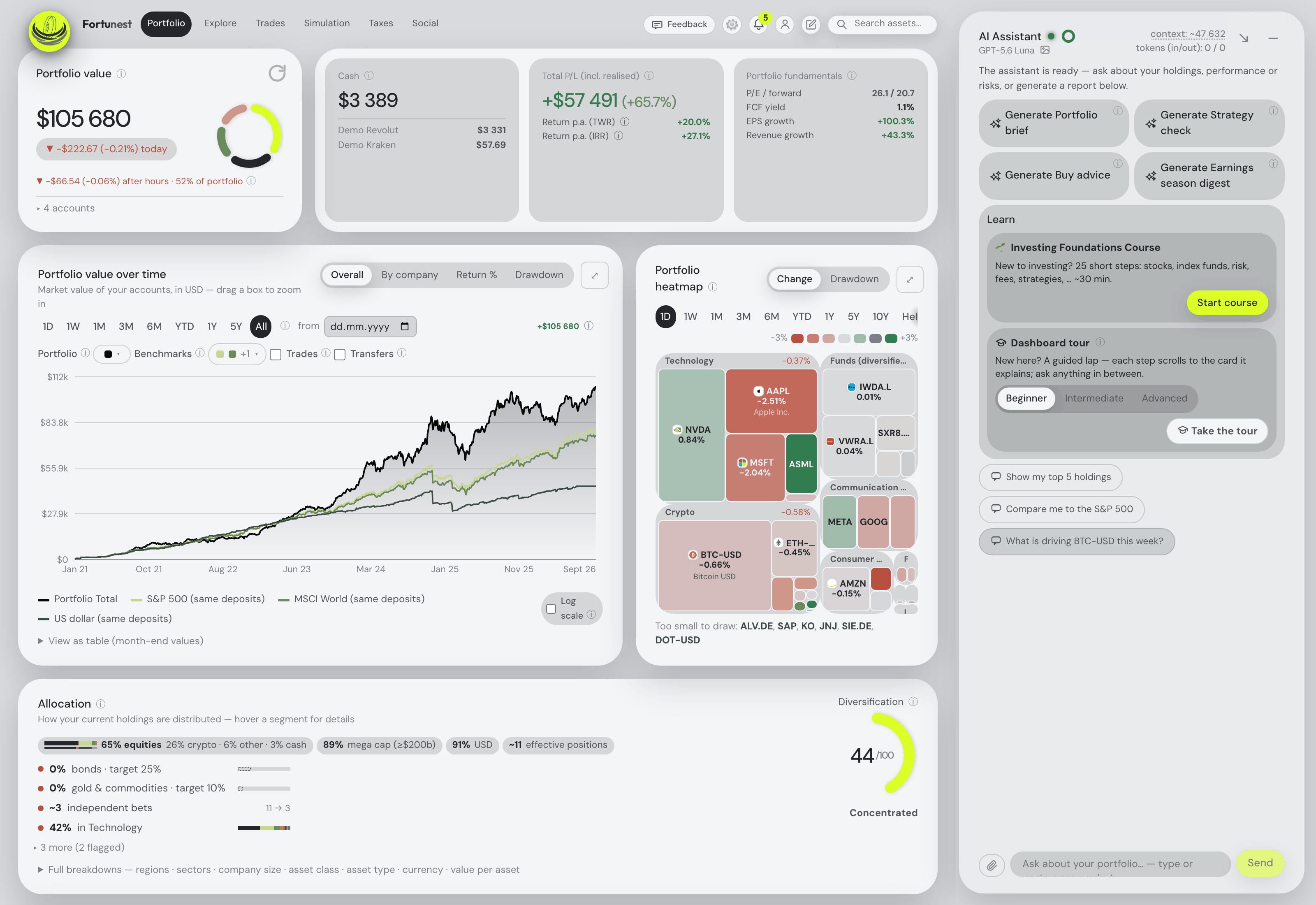
- Pick Fortunest if you want to understand the portfolio you have: 50 supported platforms including DEGIRO, XTB, Trading 212 and Interactive Brokers, every day of history converted at that day's rate, returns as TWR and IRR with volatility, Sharpe, Sortino, beta and drawdowns, tax lots with a holding-period test on Pro — and an assistant that answers about your portfolio on the free plan, without an account: it reads the holdings and the live screen, explains any metric on your own numbers, looks up any company's quote, news, earnings or SEC filing, and changes the dashboard when you ask. Pro is €6.99 a month or €69 a year and adds an MCP server, so the Claude app, Claude Code, Codex or any MCP-capable agent can use the same tools.
- Pick Portfolio Genius if your accounts are at US brokerages and you want them synced through Plaid, an AI that reviews the portfolio weekly or daily and proposes specific trades, models from several AI providers, public leaderboards, and bot portfolios that trade simulated money. If you want an AI to place orders in a brokerage account for you, its Premium plan describes that through Alpaca; Fortunest never will.
The comparison
Each cell is what the vendor's own pages say, in the vendor's terms, on the date in the footnote. Not stated means the pages do not say — a statement about the pages, not about the product. A green ✓ marks whichever product leads a row on that row's own terms; three of the thirteen rows below go to Portfolio Genius.
| Fortunest1 | Portfolio Genius2 | |
|---|---|---|
| Runs on |
|
|
| Account required |
|
|
| Free plan |
|
|
| Paid from |
|
|
| Getting your accounts in |
|
|
| Markets & currencies |
|
|
| Returns & risk |
|
|
| AI assistant |
|
|
| Your own AI agent (MCP) |
|
|
| Placing trades |
|
|
| Social & paper portfolios |
|
|
| Tax |
|
|
| Where your data lives |
|
|
Portfolio Genius's cells were checked on its own home, pricing, features, FAQ, free-tracker, Alpaca-guide, privacy and terms pages on 10 November 2026; quotations are its wording. Its pricing page shows the annual prices as $12.50 and $25 a month billed yearly; the monthly prices are from its FAQ. Fortunest's cells come from its documentation. Prices are list prices before promotions — Portfolio Genius's in US dollars, Fortunest's in euros and before VAT. Both products ship continuously.
When to pick which
Most people asking this question already know which half of the trade-off they care about. Seven situations, and the honest answer for each:
| Your situation | Pick | Why |
|---|---|---|
| Your accounts are at Vanguard or Merrill | Portfolio Genius | Its FAQ has a CSV guide for Vanguard and names Merrill among the 2,400+ institutions Plaid syncs on Premium. Fortunest's US route is a SnapTrade sign-in for seventeen platforms; neither of these two connects. |
| You hold DEGIRO, XTB, Trading 212 or a European broker | Fortunest | Fortunest reads those brokers' own exports and adds read-only keys for Binance, Coinbase, Kraken and Coinmate. Portfolio Genius describes NYSE and NASDAQ coverage, with other markets on its roadmap. |
| You want an AI to propose trades and place them | Portfolio Genius | Its Premium plan describes one-click execution and a bot mode through Alpaca, though its features page and terms say otherwise — read both before relying on it. Fortunest is read-only by design and never places an order. |
| You want an AI that explains your own holdings without paying | Fortunest | The assistant is on the free plan, without an account, and can run on a local model; Portfolio Genius has no free plan, only a 7-day trial. |
| You want your own AI agent — the Claude app, Claude Code, Codex or any MCP client — to read and act on the portfolio | Fortunest, Pro | Pro exposes an MCP server your agent signs into, so it can read the live dashboard and act on it, with sensitive changes reviewed unless covered by an active permission. Portfolio Genius's pages describe no MCP server or public API. |
| You want to test strategies with simulated money in public | Portfolio Genius | Bot portfolios trade virtual money and can be shown on public leaderboards. Fortunest backtests a trade plan against history and runs what-if trades, but has no live paper bots. |
| You want local storage and local AI | Fortunest | The desktop app keeps the database on your disk and can run the assistant locally; review the separate online-service exceptions. Portfolio Genius is a hosted web service on Google Cloud. |
The verdicts
Fortunest — our pick, if the criterion is understanding what you hold
Best for: several brokers and an exchange, inside or outside the US, wanting the numbers and an AI that reads them on one screen.
Free without an account · Pro €6.99/mo or €69/yr
You drop the CSV exports your brokers already give you, sign in to a US broker through SnapTrade, connect Kraken, Binance or Coinbase with a read-only key, and the engine rebuilds one history: transfers between your own accounts matched so nothing is counted twice, every day converted at that day's rate, returns as both TWR and IRR, seven benchmarks fed the same deposits you made. Risk arrives as volatility, Sharpe, Sortino, beta and drawdowns, and the assistant sits beside every tab — answering about your holdings, and changing the dashboard when you ask it to.
The assistant is on the free plan. It reads the holdings and the live screen rather than a summary, so "why is this position down?" needs no further context; it explains any metric on your own numbers, filters the holdings table from a sentence, looks up any company held or not — quote, valuation ratios, news, the next earnings and dividend dates, and the company's own results filing from the SEC — and it takes instructions: run a what-if trade, launch a backtest, change a setting, read the positions out of a brokerage screenshot. Every action reports ✓ or ✗ with a reason and data edits keep an Undo. It explains and analyses; the decisions and the orders stay yours. On Pro the same tools are exposed over MCP, so the Claude app, Claude Code, Codex or any MCP-capable client can read the dashboard and act on it with sensitive changes reviewed unless covered by an active permission within the connection’s existing scopes, and revoke when you like.
Where it falls short: no native mobile app yet; no bank connections and no Plaid, so Vanguard and many US bank brokerages are a statement, a screenshot or a manual entry; prices are in euros; the Taxes tab's default rulebook is the Czech one, with no US tax forms; there are no paper-trading bots; and the MCP server that lets your own agent in is a Pro feature, not a free one.
Portfolio Genius
Best for: US brokerage accounts synced automatically, with an AI that reviews them on a schedule and proposes trades.
Lite $15/mo or $150/yr · Premium $30/mo or $300/yr · 7-day trial
Portfolio Genius's strength is the proactive analyst. Its AI, Atlas, reviews the portfolio weekly on Lite and daily on Premium, flags concentration, sector exposure, overlap and allocation drift, and proposes specific trades with its reasoning, drawing on models from OpenAI, Google, Anthropic and xAI that it picks for you. Premium syncs holdings through Plaid from more than 2,400 institutions, read-only, with SnapTrade as a fallback, and Lite reads a CSV or a screenshot from any US brokerage. Bot portfolios trade simulated money, portfolios can be made public on leaderboards, and its pages state AES-256 encryption at rest and in transit and that it does not sell personal information.
Where it falls short: no free plan, only a 7-day trial, and the cheaper plan caps you at 10 trade suggestions a month; its coverage is NYSE and NASDAQ, with other markets on the roadmap; the return method, benchmarks and tax reporting are not stated on its pages; there is no MCP server or public API for your own agent; and its pages disagree on whether it executes trades, so check before you connect a funded account.
What Portfolio Genius does that Fortunest doesn't
This is the part a comparison page usually leaves out, so here it is plainly. If any of these matter to you, Portfolio Genius is the better choice and we would rather you knew now:
- Plaid sync with US institutions. More than 2,400 of them on Premium, with Merrill, Wells Fargo and Chase among those its FAQ names, plus CSV guides for the big US brokers including Vanguard. Fortunest has no Plaid and no bank connections; its US route is a SnapTrade sign-in for seventeen platforms, and Vanguard and Merrill do not connect.
- Trade suggestions on a schedule. AI reviews weekly on Lite or daily on Premium that end in specific trade suggestions with their reasoning. Fortunest's assistant and its reports are built around explaining the portfolio you hold, not around a running stream of trade ideas.
- Placing trades through Alpaca. Premium describes one-click execution and a bot mode in a connected Alpaca account. Fortunest has no order-placing code and never will.
- Bot portfolios and public leaderboards. Strategies run with simulated money and shown in public. Fortunest's Social tab is friends you accept, sharing only relative figures, and its strategy testing is a backtest against history.
How the two differ in practice
Getting the data in. Portfolio Genius's answer for US accounts is Plaid: on Premium you pick your institution, approve read-only access, and the holdings keep themselves current; on Lite you upload a CSV or a screenshot. Fortunest's answer is a file, a key or a sign-in: you drop the exports your brokers already offer — DEGIRO's Transactions file, XTB's statement, Schwab's Transactions export — sign in to Robinhood or Fidelity through SnapTrade, and connect Interactive Brokers and the crypto exchanges with read-only tokens. Plaid is less work for a US investor; Fortunest's files reach brokers far outside the US, and they carry a transaction history rather than today's positions, which is what every number below depends on.
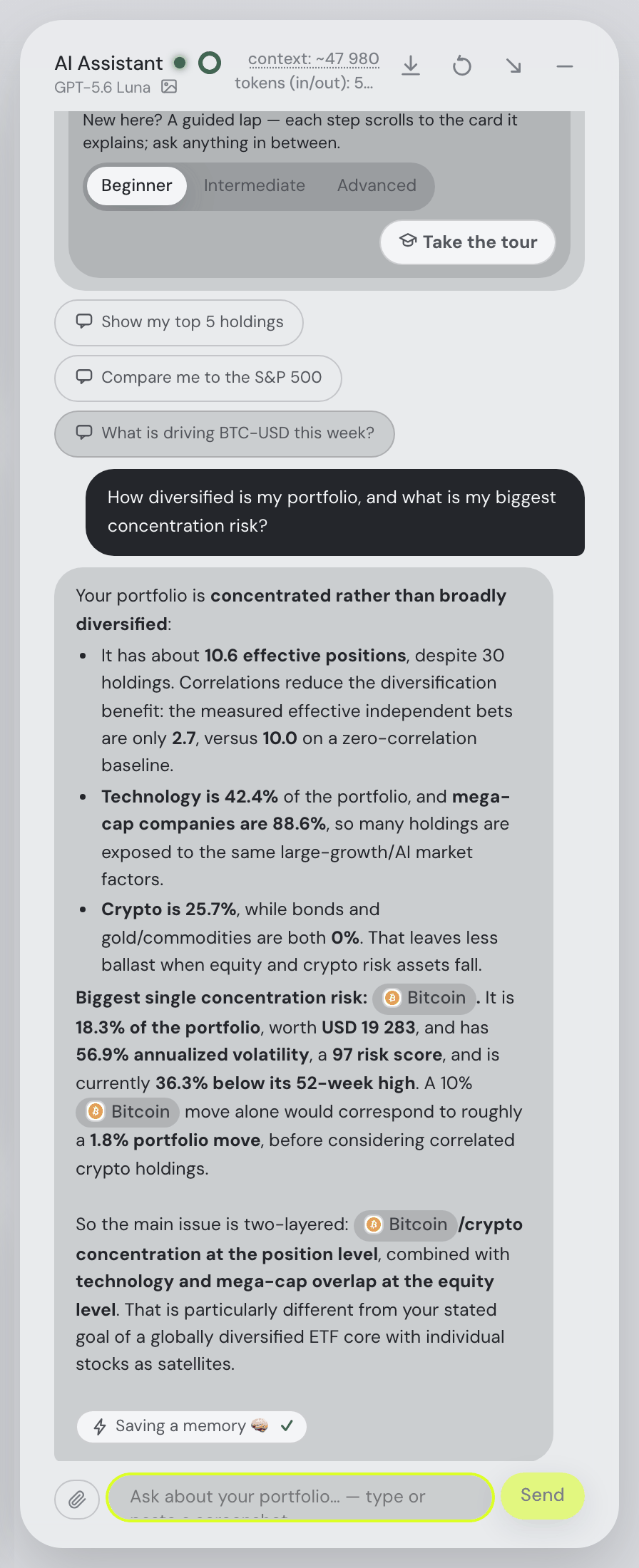
What the AI does. Portfolio Genius's Atlas is an analyst that comes to you: on a schedule it reviews the portfolio and proposes trades, and on Premium, its homepage says, an agent can carry them out in Alpaca. Fortunest's assistant is an explainer you ask: it sees the holdings and the screen, answers with your figures — as in the capture beside this paragraph — and will switch tabs, run a what-if trade, launch a backtest or change a setting when you ask. It cannot place an order. It can also run entirely on your own machine through Ollama or LM Studio, and on the desktop app that is the default, so local inference stays on your machine. Cloud AI, Pro tax calculations, sharing and hosted sync have separate outbound data flows. Imported CSVs are not automatically sent as AI context, but deliberate chat attachments reach the selected provider.
Your own agent. On Pro, Fortunest is also an MCP server: the Claude app, Claude Code, Codex or any MCP client signs in and gets the same tools as the in-app assistant, and a free demo endpoint lets you try it on the demo portfolio without an account. Free Claude accounts get one custom connector; ChatGPT custom connectors need Developer mode and depend on your ChatGPT plan. The MCP chapter has the setup for each client, the Assistant chapter lists what the assistant may and may not do, and the Privacy chapter what is stored where.
How we compared
We read Portfolio Genius's own home, pricing, features, FAQ, free-tracker, Alpaca-guide, privacy and terms pages on 10 November 2026 and took the numbers and the phrasing from there, quoting where the wording matters. The Portfolio Genius compared here is the AI portfolio tracker at portfoliogenius.ai, run by Teralyt Software LLC; the same name is used by an investment-accounting system for financial institutions, which this page does not cover. Where its pages disagree — on whether it executes trades, and on monthly against annual prices — the table says so rather than picking one. Fortunest's column comes from its documentation and its plans page. Where a vendor page says nothing about a row, the cell says "not stated" — a statement about the pages on that date, not a claim about the product. We build Fortunest, so we are not neutral: the table is meant to be checkable rather than impartial, both verdicts state where the product falls short, and the section above lists what Portfolio Genius does that we do not. Check anything that would decide your choice; both products change often.
Questions people ask
What is a good Portfolio Genius alternative?
Fortunest is a good Portfolio Genius alternative if you want a free plan, an AI that explains your own holdings, and broker files from beyond the US. Its whole dashboard and its assistant work on the free plan without an account, for up to three accounts and fifty assets; Pro is 6.99 euros a month or 69 euros a year, and every new account gets a 14-day Pro trial with no card. On Pro, the Claude app, Claude Code, Codex or any MCP client can read the portfolio through Fortunest's MCP server. Portfolio Genius is the better choice if you want Plaid sync with thousands of US institutions, AI reviews and trade suggestions on a schedule, or trades placed for you in an Alpaca account: Fortunest is read-only and never places an order.
Is Portfolio Genius free?
Not beyond a trial. Its pricing page lists no free plan: Lite costs 150 dollars a year and Premium 300 dollars a year, or 15 and 30 dollars billed monthly according to its FAQ, each with a 7-day free trial and a 7-day money-back guarantee. A model-portfolio demo and a holdings check work without signing up. Fortunest's free plan has no end date: three accounts and fifty assets with the assistant included, no account and no card; Pro is 6.99 euros a month or 69 euros a year before VAT. The free trackers guide compares the wider field.
Does Portfolio Genius place trades for you?
Its own pages differ. The homepage and its Alpaca guide of January 2026 describe one-click execution and a bot mode in which the AI places trades in a connected Alpaca account on Premium, live or paper, without approval for each trade; its features page says it has read-only access and cannot execute trades, and its terms say the same. Fortunest cannot place, change or cancel an order or move money: every connection is read-only, and its trade plan, what-if trades and backtests leave the decision and the order with you, at your broker.
Does Fortunest work for US investors?
Yes, with limits. Robinhood, Fidelity, Charles Schwab, E*Trade, Webull US and a dozen more connect through a read-only SnapTrade sign-in, and Interactive Brokers through its own read-only Flex token, both with a free account; the Schwab Transactions CSV needs no account at all. Vanguard does not connect, so its holdings come in from a statement PDF or a screenshot read with AI, or by hand. Prices are in euros before VAT, and the Taxes tab follows one configurable rulebook with Czech defaults rather than US tax forms. The US investors guide compares nine trackers.
Can I move my Portfolio Genius portfolio to Fortunest?
Not as a Portfolio Genius file. Fortunest reads the exports of the brokers themselves, plus read-only connections, and the only tracker exports it detects are Parqet, Delta and CoinTracking. So the move means connecting each broker or downloading its transaction export, which also gives Fortunest the history its returns are built from. A screenshot of your positions can be read with AI as a starting point, but it carries today's holdings, not their history. The full list is in every supported platform.
Sources
- Fortunest — plans and pricing, every supported platform, the Portfolio chapter, the Taxes chapter, the Assistant chapter, the MCP chapter and the Privacy chapter (10 November 2026).
- Portfolio Genius — home, pricing, features, FAQ, free AI portfolio tracker, Alpaca guide, privacy policy and terms of use pages (10 November 2026).
Signals, analyses and assistant answers in Fortunest are informational — not financial or tax advice. This page compares features described on the vendors' own pages, not investment outcomes.