Guides · Updated 8 October 2026
Binance portfolio tracker: the read-only API key, the CSV, and your stocks beside them
A Binance account gets into a tracker one of two ways: a read-only API key that keeps it current, or the Transaction History export you download yourself. The key cannot see trades older than Binance's API still serves, and the file cannot see coins parked in Earn — so for an account with a few years behind it, the honest answer is often both. Fortunest takes either or both, with a cutover date so nothing is counted twice, and puts the result in the same portfolio as your shares. It is our pick when Binance is one account among several; CoinTracking is the stronger choice if crypto tax is the whole job.
The short answer
- Two routes, and they see different things. The API key reads what you hold right now — Earn included — and keeps itself up to date; the CSV is a record you re-export by hand, and it reaches back further than the API's trade history does.
- Our pick: Fortunest — your own read-only Binance key (it needs a free Fortunest account) or the Transaction History CSV (no account at all), in one portfolio with your broker accounts, one currency and one return figure. Free plan: three accounts, fifty assets; Pro is €69 a year.
- Crypto tax: CoinTracking — Binance spot, Earn and staking by API or CSV, and gains and losses worked into a tax report. Crypto only, so the shares live elsewhere.
- Crypto and DeFi wallets: CoinStats — a read-only Binance key pasted or scanned by QR, with Futures and Margin added as separate connections. Its pages describe crypto, DeFi and NFTs, not shares.
- Shares too, on a phone: Delta; a whole net worth: Kubera; a broker-first app with crypto on the side: getquin — each covered below with what we could and could not read on its own pages.
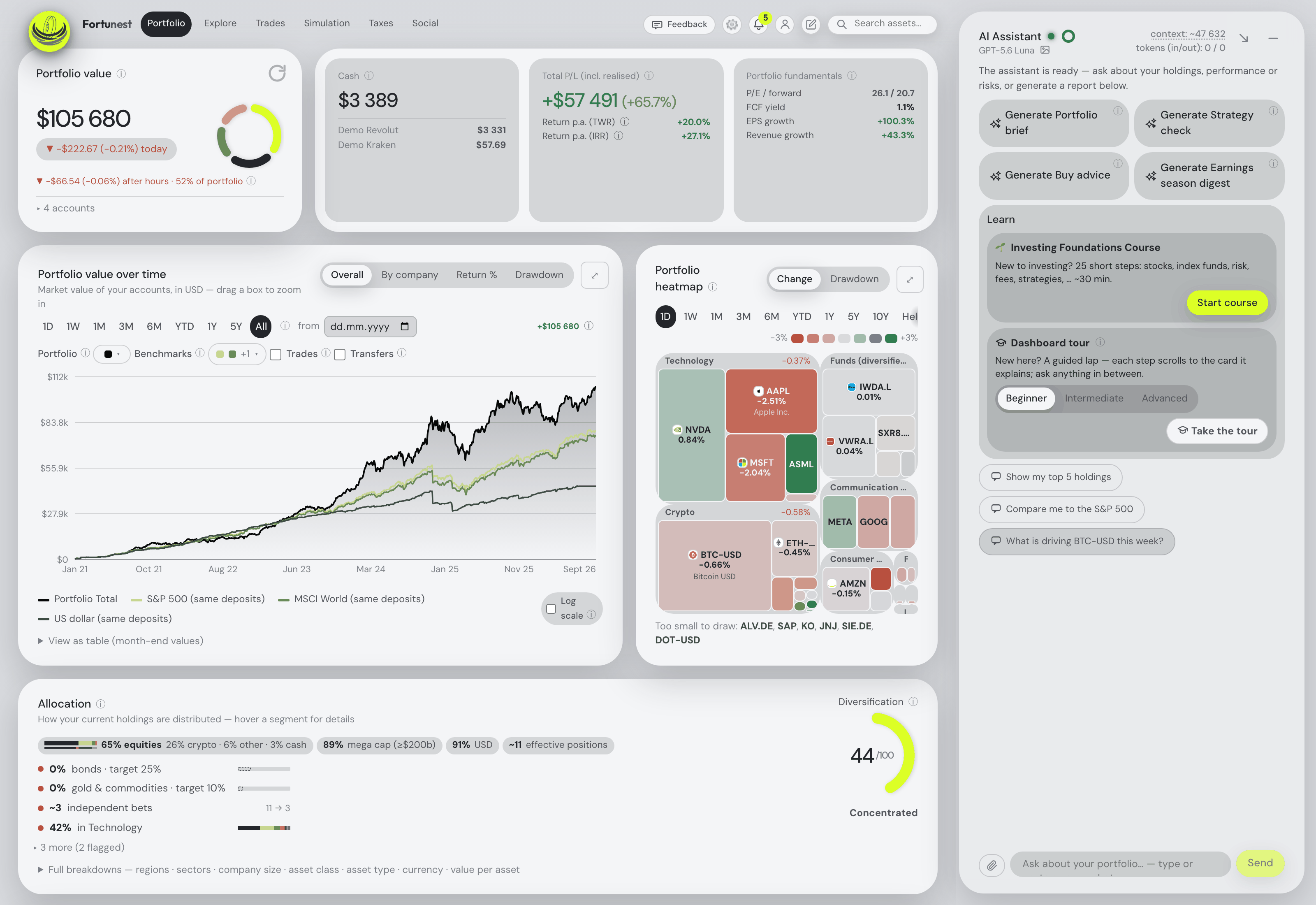
How to connect Binance, or export its history
The steps for the key are the ones the connect form in the app walks you through; the export is the same as in the Binance section of the docs.
- Create a read-only key On binance.com open Account → API Management → Create API. Leave the key on Enable Reading only — do not enable spot trading, margin, futures or withdrawals. A tracker never needs more than reading, and a key that can only read cannot move a coin.
- Restrict it to one IP Under IP access restrictions choose Restrict access to trusted IPs only and add the address the Fortunest form shows you. Besides keeping a leaked key useless, it keeps the key alive: Binance's own security guidance says a key that is not IP-whitelisted and sits inactive for 30 days is deleted.
- Paste both halves In the app, signed in, open ⚙ Settings → Data → Connect an account, pick Binance and paste the API key and the secret key — Binance shows the secret only once. The key is checked live and nothing is stored unless it works; a refusal appears in red under the Connect button, saying what went wrong.
- Or export the history instead Open the Data Download Center (profile icon → Export data), set Data Type to Asset History → Transaction History, Coin All, Account All, choose the range and generate the CSV. A long history takes a while to prepare, and Binance emails you the link. Each statement covers up to twelve months, so an old account is several files.
- Drop the file in Drag it onto the Portfolio value tile, or onto the Data sources card under ⚙ Settings → Data. No Fortunest account is needed for a file, and overlapping exports are de-duplicated.
Doing both is the usual answer for an account from before 2022, and it is safe. A connection made while a Binance file is already loaded starts on files first: the file covers its period and the connection takes over the day after the file's newest transaction. You can switch it to files only or connection only later — the latter turns the overlapping files off rather than deleting them.
What the key reads, and where it stops
Everything below comes from what the Binance connector actually requests. It is worth knowing in detail, because the gaps are Binance's, and every tracker that uses the same API meets them.
- Holdings: spot balances, Simple Earn flexible and locked positions, and Cross Margin at its net value — a borrowed coin reads as the debt it is. Binance reports a subscribed Earn position twice, once as itself and once as an LD-prefixed wrapper token in the spot balances (LDDOGE); the wrapper is folded back into the real coin rather than counted again. Isolated margin and futures are not read.
- History: deposits and withdrawals, Convert trades, distributions — airdrops and the token swaps Binance performs when a coin is renamed or migrated — and spot trades. Partial fills of one order are folded into one row at the order's average fill price.
- The sweep: Binance has no "all my trades" call; trades are asked for one trading pair at a time, for every listed pair whose two coins the account has ever held, deposited, withdrawn or converted. A first sync can therefore take minutes, and the connected row shows how far it has got. A coin bought and fully sold again without ever appearing in any of those lists can be missed — the CSV covers it.
- How far back: that is Binance's choice. On one real account opened in 2017, the trade endpoints returned nothing before 14 September 2022, while deposits and withdrawals reached back to the first day. Before the trade window the chart is built from money in and out, an approximation rather than a record, and a coin with no purchase in the data is dated as late as the evidence allows, never earlier — the dating rules explain why.
The file closes most of that. The Transaction History statement carries deposits, withdrawals, trades, Earn and staking rows, airdrops, token swaps and redenominations, and margin transfers, and the Spot trade-history format reads too. The Portfolio warnings name the years still missing in twelve-month windows, because that is what one Binance statement answers. What no file can close is a coin sitting in Earn or a locked product: a spot statement never mentions it, so only the connection sees it. Where you know a purchase the data does not, the Opening-balance lots card on the Taxes tab takes it by hand.
Pricing follows the same rules as every crypto source: stablecoins are valued 1:1 in US dollars, a crypto-for-crypto trade is valued at the counter-coin's price that day, and renamed tokens — LUNA to LUNC, MATIC to POL — keep an old price from landing on a new quantity.
Binance and your stocks, as one portfolio
Most people who search for a Binance tracker already have a crypto app; what they lack is one view that also holds the broker account. That is the part Fortunest is built for, and the stocks-and-crypto guide covers it across every source. In short: the Binance connection or file lands in the same holdings table as the CSV exports of 29 platforms, 22 brokers through SnapTrade, and direct connections for Trading 212 and Interactive Brokers. Every day is converted at that day's rate into one display currency, and the Portfolio tab reports total P/L, annualized TWR and money-weighted IRR over the whole lot against benchmarks fed your own deposits. Staking rewards, Earn interest and airdrops count as profit, because nobody paid for them.
Coins you move off Binance to a wallet are the classic trap: a naive importer books the withdrawal as a sale. Here transfers between your own accounts are matched, and a Trezor Suite export's on-chain moves are netted against your exchange withdrawals and deposits. The Taxes tab (Pro) pairs every sale with the lots it consumed and applies a holding-period test that includes crypto — one configurable rulebook with Czech defaults, no per-country presets. And the assistant reads the same combined portfolio: ask what your crypto sleeve did to this year's return, or tell it to sync Binance and it pulls fresh data the way the Sync button does.
The trackers people use for Binance
Each cell is what the vendor's own pages say, in the vendor's terms, on the date in the footnote. Not described means the page does not mention it; not checked means we did not verify it. A green ✓ marks whichever product leads a row on its own terms.
| Fortunest1 | CoinTracking3 | CoinStats4 | Delta5 | Kubera6 | getquin7 | |
|---|---|---|---|---|---|---|
| How Binance gets in |
|
|
|
|
|
|
| Binance products read |
|
|
|
|
|
|
| Stocks in the same portfolio |
|
|
|
|
|
|
| Where the key lives |
|
|
|
|
|
|
| Free plan |
|
|
|
|
|
|
| Paid from |
|
|
|
|
|
|
| Tax |
|
|
|
|
|
|
Cells were checked against the sources below on 8 October 2026. Delta's site and help centre, and getquin's help centre, refused our direct fetch that day, so those cells come from their own pages as returned by search — treat them as one step further from the source than the rest; getquin's pricing page was read directly. CoinStats' pricing page gives different portfolio and transaction limits in different sections, so we quote none of them. Prices are list prices before promotions and, for Fortunest, before VAT. Footnote 2 is Binance's own documentation, used in the steps above.
The verdicts
Fortunest — our pick
Best for: a Binance account that has to sit in one portfolio with a broker account.
Free (the API key needs a free account) · Pro €6.99/mo or €69/yr
It takes your own read-only Binance key or the Transaction History file, or both with a cutover date, and reads more of the account than a spot-only sync would: Simple Earn flexible and locked positions, the LD wrapper tokens folded back into their coins, Cross Margin at its net value, Converts, and the airdrops and token swaps Binance makes on your behalf. Then the coins stop being a separate app: one holdings table with the shares, one currency at each day's rate, one TWR and IRR, transfers to your own wallet matched rather than booked as sales, and an assistant that reads all of it.
Where it falls short: isolated margin and futures are not read; the API connection needs a signed-in account (the file does not); a portfolio holds one Binance connection; the free plan's fifty assets count every coin your history names, sold ones included, so a busy trading account can pass it — the portfolio still loads in full, only the next addition is refused; there is no native mobile app, only the web app built for phones; and the Taxes tab is Pro with Czech defaults and no per-country presets.
CoinTracking
Best for: a crypto tax report from a Binance history.
Free — portfolio view only · Starter US$49/yr · up to Unlimited US$899/yr
CoinTracking lists Binance "Spot, Earn, Staking" with "automatic sync via API or manual CSV upload", says it "syncs all your transactions automatically in read-only mode" and "can import multi-year Binance history", and turns the result into gains, losses and a tax report, with a validation report that flags missing cost basis and duplicate imports. Prices are by transaction count.
Where it falls short: crypto only, so there is no single figure across your coins and your shares; the free plan is a portfolio view after a seven-day trial; a heavy trading history climbs the price tiers quickly; and whatever "multi-year" means for your account, the trade window is Binance's to set, not the tracker's — check the early years against a CSV.
CoinStats
Best for: Binance next to on-chain wallets and DeFi.
Basic free · Premium "$13.99/mo after trial"
CoinStats connects Binance with a system-generated API key, pasted or scanned by QR in its mobile app, and states the integration "has read-only access and cannot make changes to your account or move funds". Futures and Margin are added as separate Binance connections once ticked on the key. Its portfolio page describes crypto, DeFi and NFTs across "300+ wallets, exchanges" and 50+ blockchains.
Where it falls short: no shares or brokerages are described, so it is a second app beside your broker; its pricing page gives conflicting limits between sections, so read the plan inside the app before relying on one; and how the key is stored is not something we checked.
Delta
Best for: Binance and shares on a phone.
Free tier · PRO and PRO+ — prices not readable
Delta, now owned by eToro, covers stock brokerages as well as exchanges and wallets. Its help centre describes a Binance key pasted or scanned by QR, refuses keys with trading permission, and keeps the keys on your device only. Two exchange connections are free; PRO unlocks unlimited.
Where it falls short: its site refused our fetch, so all of this is one step removed. As returned by search, its Binance guide says Savings Interest, Liquid Swap and futures are not covered and full trade history imports only from 2021 onwards. Transfer matching and tax reports are not described.
Kubera
Best for: Binance as one line in a whole net worth.
14-day trial · Essentials $250/yr · Black $2,500/yr
Kubera "can connect to 20+ popular crypto exchanges (Coinbase, Binance, Kraken, etc.)" beside thousands of banks and brokerages, property and private assets, asks for read-only access on API-key connections, and states data is encrypted at rest on AWS.
Where it falls short: no free tier, and the most expensive entry here; its exchange help page does not say whether trades and cost basis come in or only balances; no tax reporting is described.
getquin
Best for: a share portfolio with a little Binance on the side.
Free €0 · Premium €89.99/yr · Wealth €149.99/yr
getquin's free plan carries "unlimited bank and broker connections", and its help centre describes a Binance API connection that records buys, sells, sends, receives and staking rewards.
Where it falls short: its pricing page does not mention crypto at all, and the help centre refused our fetch, so the Binance detail is from search results: margin trades are not supported, and a move from an exchange to your own wallet can be recorded as a sale, which it says it is working on.
How we compared
We read each vendor's own connection, help and pricing pages rather than review sites, and say so where a site refused us. For Fortunest we read the Binance connector's code as well as our docs, so the limits in its verdict are the ones the code has. We build Fortunest, so we are not neutral; the table is meant to be checkable rather than impartial, and every product's limits are in its verdict, ours included.
Questions people ask
Is it safe to give a portfolio tracker my Binance API key?
It is as safe as the permissions you tick. Create the key with Enable Reading only — no spot trading, margin, futures or withdrawals — and restrict it to the IP address the tracker gives you, so a leaked key cannot move money and cannot be used from anywhere else. In Fortunest the key is checked live before anything is kept, then encrypted at rest, never sent to your browser and never logged; disconnecting deletes it. If you would rather hand over no key at all, the Transaction History CSV gets the same account in.
Why are my older Binance trades missing from the API?
Because Binance decides how far back its API answers. On one real account opened in 2017, the trade endpoints returned nothing before 14 September 2022, while deposits and withdrawals reached back to 2017. A tracker cannot fetch what the exchange no longer serves. Upload the Transaction History export for the earlier years — Binance generates it in windows of up to twelve months, and Fortunest's Portfolio warnings name the windows still missing — or enter an opening lot by hand on the Taxes tab.
Can I track Binance and my stocks in one portfolio?
Yes. In Fortunest the Binance connection or file sits beside broker CSV exports, SnapTrade brokers and direct connections for Interactive Brokers and Trading 212 in one holdings table, in one display currency converted at each day's rate, with one TWR and IRR over the lot. CoinTracking and CoinStats are crypto trackers; Delta, Kubera and getquin also hold shares.
Do I need a Fortunest account to track Binance?
Only for the API key. Uploading the Transaction History CSV works without an account, as a guest. A direct connection needs a signed-in account, because the key has to outlive the browser session; creating one is free. On the free plan a connection or a file each takes one of three account slots, with up to fifty assets across all of them.
Does a tracker see Binance Earn, staking and futures?
It depends on the tracker and the route. Fortunest's connection reads spot balances, Simple Earn flexible and locked positions, and Cross Margin at its net value; isolated margin and futures are not read. The CSV carries Earn and staking rewards as rows, but coins sitting in Earn or locked products never appear in a spot statement, so only the connection sees those positions.
Sources
- Fortunest — the Binance walkthrough, connecting an account, when your history doesn't reach back far enough, every supported platform, the Portfolio chapter and the Taxes chapter.
- Binance — How to use an API key securely and How to generate transaction history (October 2026).
- CoinTracking — Binance import and pricing (October 2026).
- CoinStats — connect Binance, connecting different Binance accounts, portfolio tracker and pricing (October 2026).
- Delta — Binance connection guide and connecting an exchange account, as returned by search (October 2026; the pages refused a direct fetch).
- Kubera — crypto exchanges & wallets, home page and plans and security (October 2026).
- getquin — pricing (October 2026); connect your Binance account, as returned by search (October 2026; the page refused a direct fetch).
Signals, analyses and assistant answers in Fortunest are informational — not financial or tax advice.