Guides · Updated 21 October 2026
Fidelity portfolio tracker: a read-only sign-in at Fidelity, and one view with everything else
Since September 2024 Fidelity has been closing the door on apps that log in with your password; data now leaves Fidelity through access you approve at Fidelity itself. Fortunest connects that way, through SnapTrade: you sign in at Fidelity's own site, approve read-only access, and the positions and transaction history of the accounts it shares come in — then sit in one dollar-denominated portfolio with your other brokers and crypto exchanges, with time-weighted and money-weighted returns, dividends, risk and an assistant that reads it all. Empower, Sharesight, Snowball, Stock Rover, Kubera and Ghostfolio read Fidelity in their own ways; the table below says how.
The short answer
- How it connects: a SnapTrade sign-in at Fidelity, approved there, read-only. It needs a free Fortunest account and is not part of the desktop app.
- What comes over: each account the approval shares, holdings first and then the transaction history SnapTrade collects — buys, sells, dividends and reinvestments, interest, fees, transfers and splits. Options are skipped.
- A 401(k)? Only if Fidelity's approval shares it, which we have not verified for NetBenefits workplace plans — see the FAQ.
- Free, then Pro if you outgrow it. The free plan is the whole dashboard and the assistant for up to 3 accounts and 50 assets, no card. Pro is €6.99 a month or €69 a year, VAT added at checkout — unlimited accounts and assets, the Taxes tab and MCP access for external AI agents.
How to connect Fidelity
The steps follow how a SnapTrade connection works in the docs; Fidelity's row is in the Supported platforms table. Fidelity says a connection like this never needs your Fidelity username and password handed to a third party, and lists every app you have approved on its data-sharing dashboard, where you can revoke one.
- Make a free Fortunest account Open the app and sign up with an email or Google — no card. A broker link has to outlive a browser session, so SnapTrade brokers are greyed out for a guest; everything else in the app works without an account.
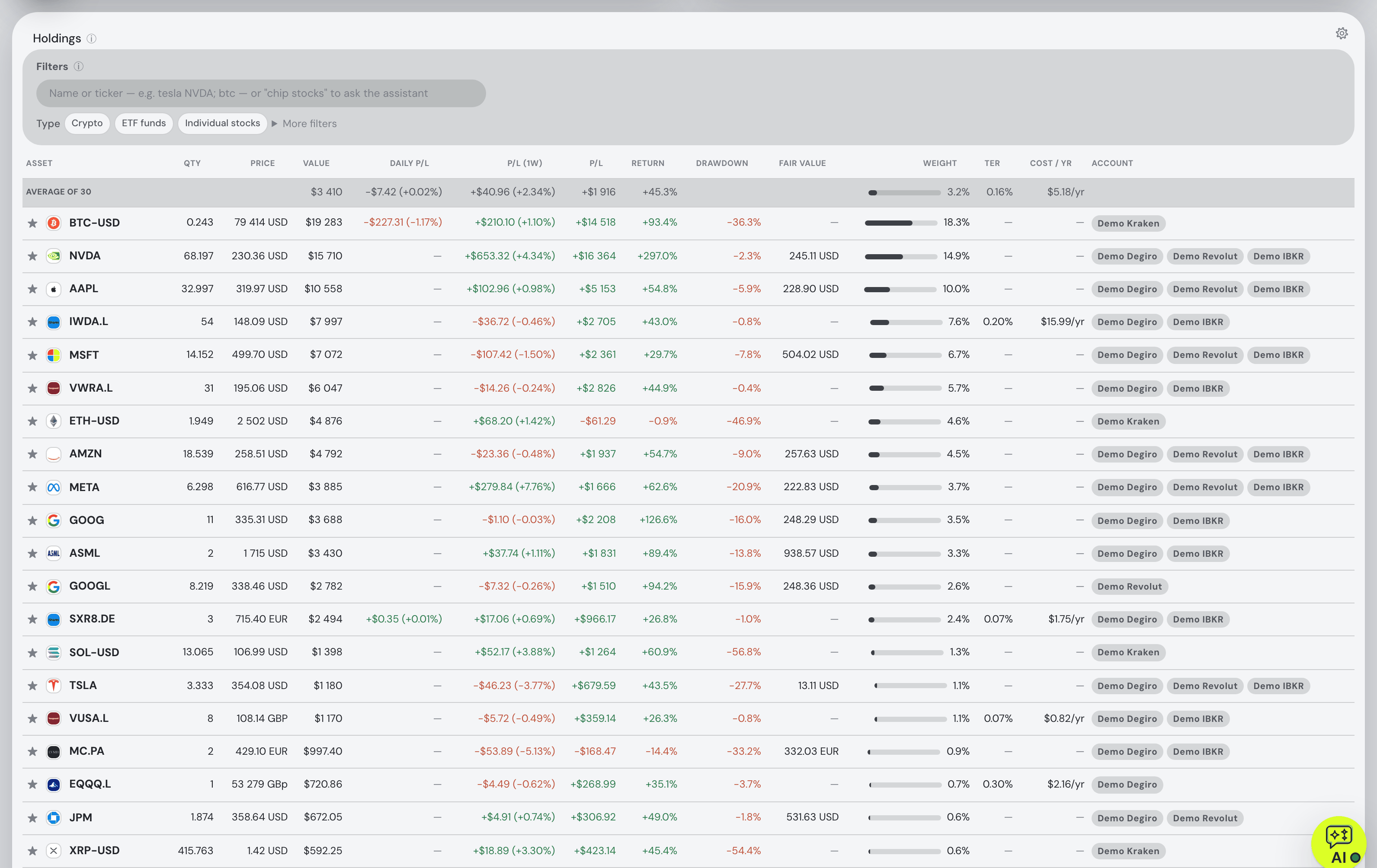
- Pick Fidelity in the connect list Open ⚙ Settings → Data → Connect an account and type Fidelity. Its row carries the SnapTrade sign-in mark, and the app says before anything opens that you are about to sign in at Fidelity, not in Fortunest.
- Sign in at Fidelity's own site and approve read-only access SnapTrade's portal opens with Connect with read-only access on its first screen, then hands you to Fidelity's own login and consent page. Your Fidelity password and two-factor code go to Fidelity only — never to Fortunest or SnapTrade — and the approval can be revoked from your Fidelity account at any time.
- Holdings first, history behind them You come back to the dashboard and each account the approval covers becomes its own account in Fortunest, named after Fidelity and numbered (rename it from its row). Positions arrive first; the transaction history SnapTrade collects for the connection follows in the background and is imported when it lands.
How far back. SnapTrade's own documentation says a connection's activity record “often has years of history” and sometimes reaches the account's opening, refreshed once a day; how far it goes for a given Fidelity account is up to Fidelity's side of the integration. Fortunest takes whatever arrives and never invents the rest: when the history starts after you bought something, the holding is still there at the quantity Fidelity reports, and the gap is written as a flagged correction on the Portfolio tab instead of a made-up trade. Options are skipped — the app has no model for a contract — while dividends, reinvested dividends, interest, fees, transfers, splits and spin-offs come in as what they are.
What you get once Fidelity is in
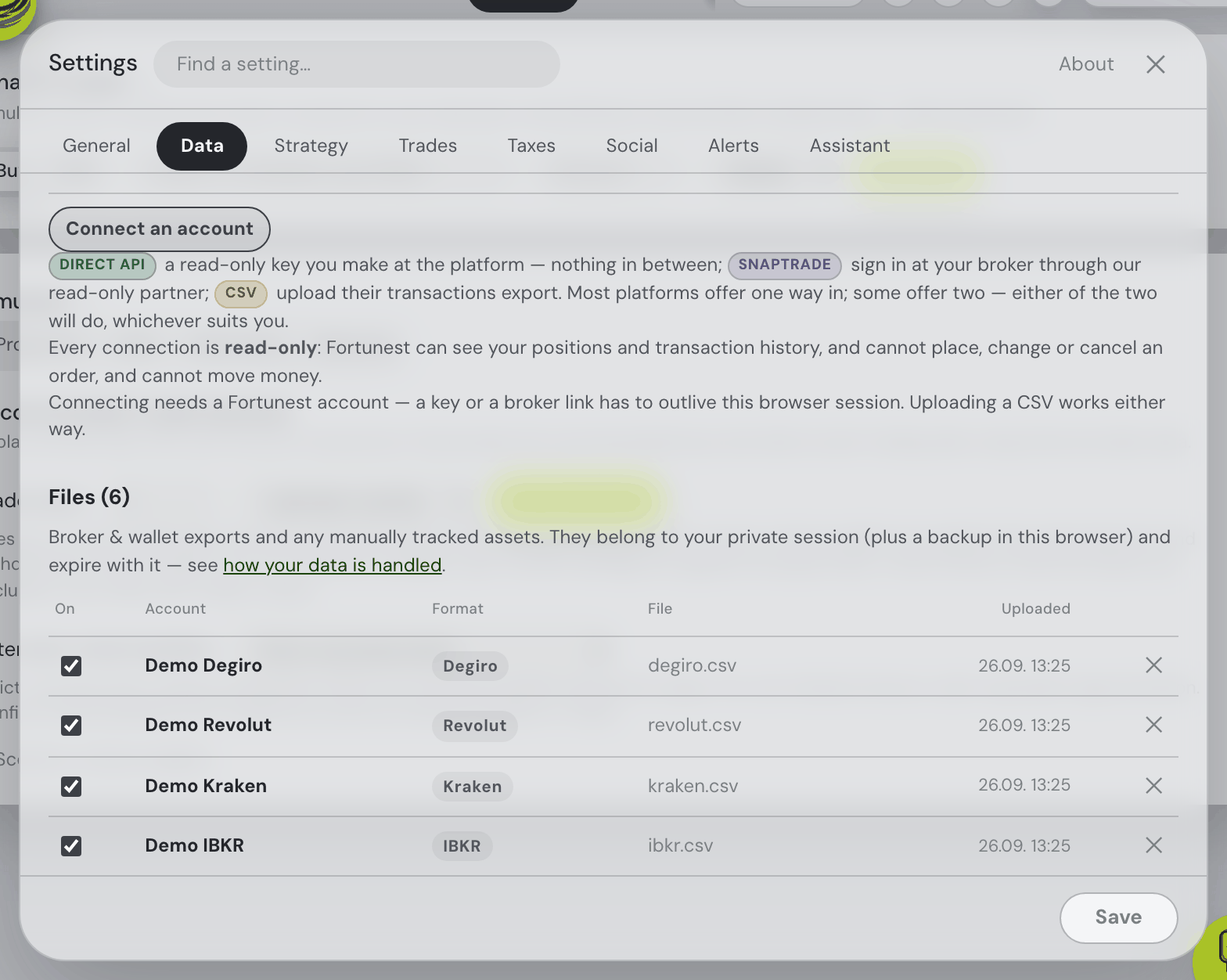
Once Fidelity is in, it is one account among the others rather than a separate app to check:
- One view across brokers and exchanges. Add another broker the same way, upload the CSV of a broker that exports one, or connect Coinbase or Kraken directly with a read-only key — every position lands in one holdings table with the account it belongs to as a badge, and transfers between your own accounts are matched so nothing is counted twice.
- In dollars. US dollars are the default display currency; anything you hold in another currency is converted every day at that day's rate, and 29 other display currencies are a setting away.
- Returns that ignore your deposits. Time-weighted return (TWR) and money-weighted return (IRR) side by side, against the S&P 500, the Nasdaq 100, MSCI World, US bonds, gold, the dollar or Bitcoin — each benchmark fed the same deposits on the same dates, so the comparison is like for like.
- Dividends and risk. A monthly income chart with a forward projection per holding (Dividends & income), and volatility, Sharpe, Sortino, max drawdown, beta and correlations on the Risk card.
- An assistant that reads the portfolio. Ask what your Sharpe ratio means, which holdings dragged this year or what a company reported last quarter, and the assistant answers from your own numbers — on the free plan. On Pro the same portfolio opens to Claude Code, Codex or another MCP agent; the MCP guide has the setup.
Fidelity accounts tend to be fund-heavy, which is where two more cards earn their place: index funds are split into what they hold for the sector, region and size breakdowns, so a portfolio of three index funds is not reported as three undiversified bets, and every fund's expense ratio sits beside its return in the holdings table.
Read-only, and what that means
Every connection in the app is read-only: Fortunest can see your positions and transaction history, and cannot place, change or cancel an order, and cannot move money. That is the sentence the connect panel shows, and it is built in twice — Fortunest asks SnapTrade for a read connection, and the app has no code that places a trade. Your Fidelity login never reaches Fortunest; what is stored is SnapTrade's per-user secret, encrypted at rest and never sent to your browser. Disconnecting a SnapTrade brokerage leaves the transactions it already brought in place, so you keep the history; revoking the approval at Fidelity ends the access itself. Where everything else lives is in the Privacy chapter.
What it does not do (yet)
- No Fidelity CSV. Fidelity's history download is not one of the 29 exports Fortunest reads, so a Fidelity account without the sign-in is a statement or screenshot read with AI — holdings as of that date, without the trades behind them — or positions added by hand.
- Workplace plans are not promised. A 401(k) or 403(b) on NetBenefits comes in only if Fidelity's approval shares it.
- Options are not modelled. Option trades are skipped; the shares and cash around them come in.
- Not on the desktop app. SnapTrade is part of the web app only.
- No US tax forms. The Taxes tab (Pro) pairs sales with lots under one configurable rulebook whose defaults are Czech; it does not produce a Form 8949 or reconcile a 1099-B.
How other trackers read a Fidelity account
Each cell is what the vendor's own help or product pages say, checked on 21 October 2026. Not described means the page we read does not say. Prices and free tiers for all of them are in the US comparison.
| Fortunest1 | Empower2 | Sharesight3 | Snowball4 | Stock Rover5 | Kubera6 | Ghostfolio7 | |
|---|---|---|---|---|---|---|---|
| How Fidelity gets in |
|
|
|
|
|
|
|
| What the page says about history and limits |
|
|
|
|
|
|
|
Checked against the sources below on 21 October 2026. Empower's help center and Fidelity's own FAQ pages could only be read through search results that day, so those cells are the least certain here — check them there. "Not described" is a statement about those pages on that date, not about the product.
How we compared
We read each vendor's own help, import and pricing pages rather than a review site; where a page says nothing about a row, the cell says so. We build Fortunest, so we are not neutral: the table is meant to be checkable rather than impartial, and our own limits are listed above — including that Empower names the 401(k) we cannot promise.
Questions people ask
Does Fortunest work with Fidelity?
Yes. Fidelity connects through SnapTrade, a read-only brokerage partner: you sign in at Fidelity's own site and approve read-only access there, and the holdings and transaction history of the accounts you approve come into Fortunest. It needs a free Fortunest account, and it is not part of the desktop app.
Can it see my Fidelity 401(k)?
Possibly, but we do not promise it. Fortunest imports every account the Fidelity approval shares; SnapTrade does not list which Fidelity account types its integration covers, and we have not verified a NetBenefits workplace plan coming through. If yours does not appear, add the funds by hand or read a plan statement PDF with AI. Empower and TIAA, two large 401(k) and 403(b) recordkeepers, are separate sign-ins in the same connect list (SnapTrade marks its TIAA integration as alpha).
Is it free?
Yes, up to 3 accounts and 50 assets: the free plan is the whole dashboard and the AI assistant, with no card. Each Fidelity account the approval shares becomes its own account in Fortunest; the connection lands whole even if that crosses the limit, and only the next thing you add is refused. Pro is €6.99 a month or €69 a year, VAT added at checkout, and lifts both limits.
Can Fortunest trade or move money at Fidelity?
No. The connection is read-only: Fortunest can see your positions and transaction history, and cannot place, change or cancel an order, and cannot move money. Your Fidelity password goes to Fidelity only, and you can revoke the approval from Fidelity's data-sharing settings.
Can I upload Fidelity's history CSV instead?
Not yet — Fidelity's download is not one of the CSV formats Fortunest reads, so the sign-in is the route. A statement PDF or a positions screenshot can go through Read with AI, which adds the holdings as of that date without the trades behind them.
Does it work with Vanguard too?
Vanguard is not on the list: SnapTrade reaches Vanguard only by having you type your Vanguard password into its portal, and Fortunest offers only connections you approve at the broker's own site. A Vanguard statement PDF can go through Read with AI, or you add the funds by hand; Schwab, Robinhood, E*Trade and the other SnapTrade brokers connect the same way as Fidelity.
Sources
- Fortunest — every supported platform, how a SnapTrade connection works, history gaps, the Portfolio chapter and the Privacy chapter.
- Empower — financial tools, terms of use and linking Fidelity accounts (21 October 2026).
- Sharesight — Fidelity partner page (21 October 2026).
- Snowball Analytics — reconnecting your Fidelity accounts and pricing (21 October 2026).
- Stock Rover — connecting to brokerage houses, Brokerage Connect basics and portfolio management and plans (21 October 2026).
- Kubera — security (21 October 2026).
- Ghostfolio — project page on GitHub (21 October 2026).
- Fidelity — update on secure data sharing (13 September 2024) and Fidelity Access; SnapTrade — Fidelity integration, Vanguard integration and account data (21 October 2026).
Signals, analyses and assistant answers in Fortunest are informational — not financial or tax advice.