Guides · Updated 8 October 2026
Coinbase portfolio tracker: the read-only API key, the Transaction history CSV, and your stocks
Coinbase can reach a tracker through a read-only CDP API key that keeps the account current, or through the retail Transaction history CSV you download yourself. The file is where trackers go wrong: a retail buy's total includes Coinbase's spread, a Convert names what you received only in a free-text note, and some downloads open with a title block that makes the file unreadable. Fortunest handles all three, takes the key and the file together with a cutover date so nothing is counted twice, and puts Coinbase in the same portfolio as your shares. It is our pick for that; CoinTracking is the specialist if crypto tax is all you need.
The short answer
- Two routes. The API key reads your balances and trade fills and keeps itself up to date; the CSV is a record you re-export by hand, and it is where sends, receives, Converts and rewards are spelled out row by row.
- Our pick: Fortunest — your own read-only CDP key (it needs a free Fortunest account) or the Transaction history CSV (no account at all), imported at the spot price rather than total ÷ quantity, in one portfolio with your broker accounts. Free plan: three accounts, fifty assets; Pro is €69 a year.
- Crypto tax: CoinTracking — Coinbase by API key, CSV or its legacy imports, spot, staking and Earn, worked into a tax report. Crypto only.
- Crypto and DeFi wallets: CoinStats — Coinbase listed with OAuth, API sync and CSV, read-only. Its pages describe crypto, DeFi and NFTs, not shares.
- Shares too: Delta, Kubera and getquin — a phone app, a whole-net-worth tracker and a broker-first app, each with what we could and could not read on its own pages below.
How to connect Coinbase, or export its history
The key steps are the ones the connect form in the app walks you through; the file details are in the Coinbase section of the docs.
- Create a read-only CDP key On portal.cdp.coinbase.com open API keys → Create API key. Give it the View permission only — no trade, no transfer. Coinbase's own guide says to choose ECDSA as the signature algorithm; Fortunest reads that PEM block, and an Ed25519 secret too.
- Allowlist one IP Add the address the Fortunest form shows you to the key's IP allowlist, so a leaked key is useless anywhere else. Coinbase calls the allowlist recommended rather than required; take the recommendation.
-
Paste the key name and the private key
In the app, signed in, open ⚙ Settings → Data → Connect an account, pick Coinbase and paste the key name (organizations/…/apiKeys/…) and the private key — the whole block,
-----BEGINand-----ENDlines included. Coinbase no longer downloads the key file automatically, so copy both from the dialog or press its download button before you close it. The key is checked live and nothing is stored unless it works. - Or export the history instead Coinbase's help centre puts it under Statements in your account settings: generate a custom statement — every asset, every transaction type, the whole period — as CSV. Statements reach back to when the account was opened.
- Strip the title block, then drop it in If the file opens with a Transactions title block above the column headings, delete those lines first, or it is refused as unrecognised. Then drag it onto the Portfolio value tile, or onto the Data sources card under ⚙ Settings → Data. No Fortunest account is needed for a file.
Using both is safe. A connection made while a Coinbase file is already loaded starts on files first: the file covers its period and the connection takes over the day after the file's newest transaction, so the same fills are never counted twice. You can switch it to files only or connection only later — the latter turns the overlapping files off rather than deleting them.
What a tracker has to get right with Coinbase
Four details decide whether the numbers come out right, and they are worth testing in whatever you choose.
- The spread. On a retail buy the Total includes fees and Coinbase's spread, so total ÷ quantity is not the price you were quoted. Fortunest imports the trade at the spot price the file states and books the total as the cash that moved, so the spread is a cost you can see rather than a price that never existed.
- Convert rows. The file names only the coin you gave up in its columns; the one you received sits in the note — “Converted 0.5 ETH to 1 200 USDC”. Both legs are read out of that note. It is prose, and only read in English: a localised export still imports the sold leg, and the received one is counted and reported rather than guessed.
- The currency. Amounts are printed with a glyph, and a
$names half a dozen currencies. The currency comes from the file's own Price Currency column; where the glyph disagrees, the column wins and the disagreement is kept for audit. - Transfers and rewards. Send and Receive are transfers, not trades; staking, rewards, interest, Learning and Earn payouts are income at zero cost, so all of their value counts as profit. Older exports spell four of the columns differently and read the same way.
The key route works differently. It reads your balances and the trade fills Coinbase's Advanced Trade API reports: a fill quoted in euros, dollars or pounds is the cash movement itself, a fill quoted in USDC or another dollar stablecoin is valued 1:1 in US dollars, and a crypto-for-crypto fill is valued at the counter-coin's price that day. Sends, receives and rewards are not part of what the key fetches; the balances still come out exact, because the history is forced to end on what the exchange says you hold, and a coin with no purchase in the record is dated as late as the evidence allows. That is why the file and the key together are the fullest picture.
Coinbase and your stocks, as one portfolio
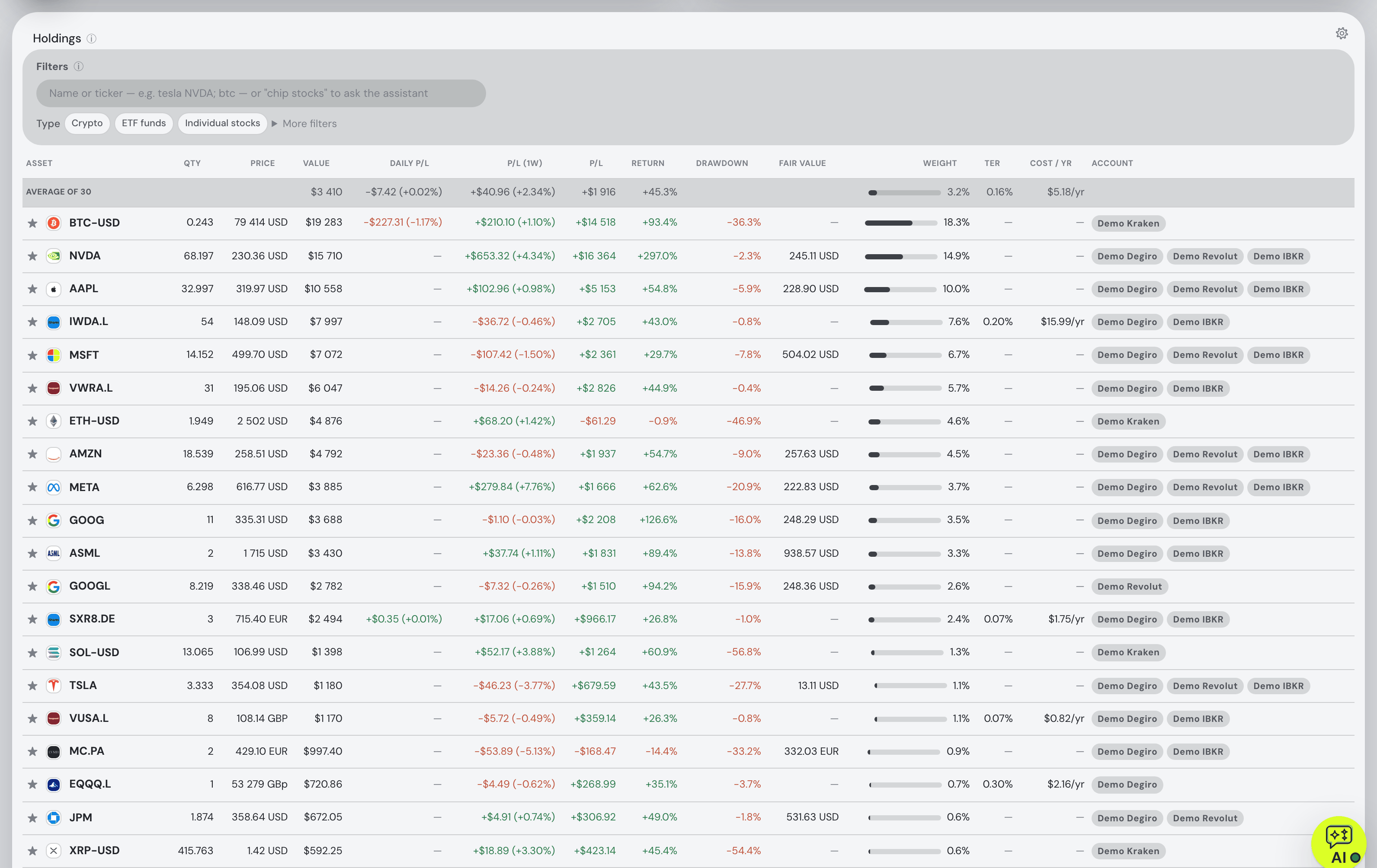
A Coinbase app already shows your coins. What it cannot show is the broker account beside them, and that is what Fortunest is for — the stocks-and-crypto guide covers it across every source. The Coinbase connection or file lands in the same holdings table as the CSV exports of 29 platforms, 22 brokers through SnapTrade, and direct connections for Trading 212 and Interactive Brokers. Every day is converted at that day's rate into one display currency, and the Portfolio tab reports total P/L, annualized TWR and money-weighted IRR over the whole lot against benchmarks fed your own deposits.
Coins sent from Coinbase to your own wallet are matched as transfers rather than booked as a sale — a Trezor Suite export's on-chain moves are netted against your exchange withdrawals and deposits. The Taxes tab (Pro) pairs every sale with the lots it consumed and applies a holding-period test that includes crypto — one configurable rulebook with Czech defaults, no per-country presets. And the assistant reads the same combined portfolio: ask what share of your return came from crypto, or tell it to sync Coinbase and it pulls fresh data the way the Sync button does.
The trackers people use for Coinbase
Each cell is what the vendor's own pages say, in the vendor's terms, on the date in the footnote. Not described means the page does not mention it; not checked means we did not verify it. A green ✓ marks whichever product leads a row on its own terms.
| Fortunest1 | CoinTracking3 | CoinStats4 | Delta5 | Kubera6 | getquin7 | |
|---|---|---|---|---|---|---|
| How Coinbase gets in |
|
|
|
|
|
|
| What comes through |
|
|
|
|
|
|
| Stocks in the same portfolio |
|
|
|
|
|
|
| Where the key lives |
|
|
|
|
|
|
| Free plan |
|
|
|
|
|
|
| Paid from |
|
|
|
|
|
|
| Tax |
|
|
|
|
|
|
Cells were checked against the sources below on 8 October 2026. Delta's site and help centre, getquin's help centre and Coinbase's statements help page refused our direct fetch that day, so those details come from their own pages as returned by search — treat them as one step further from the source than the rest; getquin's pricing page was read directly. CoinStats' pricing page gives different portfolio and transaction limits in different sections, so we quote none of them. Prices are list prices before promotions and, for Fortunest, before VAT. Footnote 2 is Coinbase's own documentation, used in the steps above.
The verdicts
Fortunest — our pick
Best for: a Coinbase account that has to sit in one portfolio with a broker account.
Free (the API key needs a free account) · Pro €6.99/mo or €69/yr
It takes your own read-only CDP key or the Transaction history file, or both with a cutover date, and reads the file the way it is actually written: the spot price rather than a spread-inflated one, both legs of a Convert out of its note, the currency from the ISO column rather than the glyph, transfers as transfers and rewards as zero-cost income. Then Coinbase stops being a separate app: one holdings table with your shares, one currency at each day's rate, one TWR and IRR, and an assistant that reads all of it.
Where it falls short: the key brings balances and trade fills only, so the CSV is what carries sends, receives and rewards; a localised export loses the received half of a Convert; the title block has to be deleted by hand; the API connection needs a signed-in account and a portfolio holds one Coinbase connection; there is no native mobile app, only the web app built for phones; and the Taxes tab is Pro with Czech defaults and no per-country presets.
CoinTracking
Best for: a crypto tax report from a Coinbase history.
Free — portfolio view only · Starter US$49/yr · up to Unlimited US$899/yr
CoinTracking lists Coinbase spot, staking and Earn, connected "automatically via API Key and Secret", by CSV, or through its legacy API imports, with separate imports for Coinbase Exchange, Prime and Wallet. Its setup tells you to "enable only the View (read-only) permission", and it says trades, Earn rewards, staking income, deposits and fees sync automatically into gains, losses and a tax report.
Where it falls short: crypto only, so there is no single figure across your coins and your shares; the free plan is a portfolio view after a seven-day trial; and prices climb with your transaction count.
CoinStats
Best for: Coinbase next to on-chain wallets and DeFi.
Basic free · Premium "$13.99/mo after trial"
CoinStats' Coinbase page lists OAuth, API sync and CSV as routes and states the integration "has read-only access and cannot make changes to your account or move funds". Its portfolio page describes crypto, DeFi and NFTs across "300+ wallets, exchanges" and 50+ blockchains.
Where it falls short: the Coinbase page does not say which of its three routes it uses or what comes through; no shares or brokerages are described; and its pricing page gives conflicting limits between sections.
Delta
Best for: Coinbase and shares on a phone.
Free tier · PRO and PRO+ — prices not readable
Delta, now owned by eToro, covers stock brokerages as well as exchanges and wallets. Its help centre describes Coinbase as a direct authorization login, with an older guide for legacy read-only API keys, says the old Coinbase Pro connection is no longer supported, and gives every user two exchange connections free, unlimited on PRO.
Where it falls short: its site refused our fetch, so all of this is one step removed; the help centre's own troubleshooting notes a Coinbase-only connection can show a zero balance after coins move to a wallet you have not also connected; and no tax report is described.
Kubera
Best for: Coinbase as one line in a whole net worth.
14-day trial · Essentials $250/yr · Black $2,500/yr
Kubera "can connect to 20+ popular crypto exchanges (Coinbase, Binance, Kraken, etc.)" beside thousands of banks and brokerages, property and private assets, asks for read-only access on API-key connections, and states data is encrypted at rest on AWS.
Where it falls short: no free tier, and the most expensive entry here; its exchange help page does not say whether trades and cost basis come in or only balances; no tax reporting is described.
getquin
Best for: a share portfolio with a little Coinbase on the side.
Free €0 · Premium €89.99/yr · Wealth €149.99/yr
getquin's free plan carries "unlimited bank and broker connections", and its help centre describes a "Continue with Coinbase" login that records buys, sells, sends, receives and staking rewards.
Where it falls short: its pricing page does not mention crypto, and the help centre refused our fetch, so the detail is from search results: it warns the portfolio may not exactly match the Coinbase account because the API discloses limited detail, and that a move to your own wallet can be recorded as a sale.
How we compared
We read each vendor's own connection, help and pricing pages rather than review sites, and say so where a site refused us. For Fortunest we read the Coinbase connector's and importer's code as well as our docs, so the limits in its verdict are the ones the code has. We build Fortunest, so we are not neutral; the table is meant to be checkable rather than impartial, and every product's limits are in its verdict, ours included.
Questions people ask
How do I create a Coinbase API key for a portfolio tracker?
On the Coinbase Developer Platform (portal.cdp.coinbase.com) open API keys and create a key. Give it the View permission only — no trade, no transfer — and add the IP address the tracker shows you to the key's IP allowlist. Coinbase's own guide says to choose ECDSA as the signature algorithm. Copy the key name, which looks like organizations/…/apiKeys/…, and the private key, including its BEGIN and END lines. Fortunest checks the key live and stores nothing unless it works.
Why is my Coinbase transaction history CSV not recognised?
Some Coinbase downloads put a Transactions title block above the column headings. A format is recognised from its header, so delete those lines above the header row and upload the file again. Older exports that spell four of the columns differently are read the same way, and a localised export imports too, except that the received half of a Convert is only read from an English note.
Why does the cost in my tracker differ from the Coinbase total?
Because a retail Coinbase buy includes a spread. The Transaction history CSV states the spot price and a total inclusive of fees and spread; dividing the total by the quantity would hide the spread inside the price. Fortunest imports the trade at the spot price and books the cash that actually moved, so the spread shows as the cost it was.
Can I track Coinbase and my stocks in one portfolio?
Yes. In Fortunest the Coinbase connection or file sits beside broker CSV exports, SnapTrade brokers and direct connections for Interactive Brokers and Trading 212 in one holdings table, in one display currency converted at each day's rate, with one TWR and IRR. CoinTracking and CoinStats are crypto trackers; Delta, Kubera and getquin also hold shares.
Do I need a Fortunest account to track Coinbase?
Only for the API key. The Transaction history CSV uploads without an account, as a guest. A direct connection needs a signed-in account, because the key has to outlive the browser session; creating one is free. On the free plan a connection or a file each takes one of three account slots, with up to fifty assets across all of them.
Sources
- Fortunest — the Coinbase walkthrough, connecting an account, when your history doesn't reach back far enough, every supported platform, the Portfolio chapter and the Taxes chapter.
- Coinbase — API key authentication and getting started (October 2026); account statements, as returned by search (October 2026; the page refused a direct fetch).
- CoinTracking — Coinbase import and pricing (October 2026).
- CoinStats — connect Coinbase, portfolio tracker and pricing (October 2026).
- Delta — connecting an exchange account, Coinbase Pro and wrong or negative balance, as returned by search (October 2026; the pages refused a direct fetch).
- Kubera — crypto exchanges & wallets, home page and plans and security (October 2026).
- getquin — pricing (October 2026); connect your Coinbase account, as returned by search (October 2026; the page refused a direct fetch).
Signals, analyses and assistant answers in Fortunest are informational — not financial or tax advice.