Guides · Updated 10 November 2026
Kraken in Claude and ChatGPT: Kraken's own MCP server, or your whole portfolio over MCP
Kraken is one of the few platforms an AI agent can reach on its own terms: it publishes an API and an official MCP server, kraken-mcp, that runs locally with its command-line tool. That server sees Kraken and nothing else. If you want Claude or ChatGPT to answer about your coins next to your shares — or to read without any tool that can trade — Fortunest reads Kraken through a query-only key or the Spot ledger CSV and serves the whole portfolio over its own MCP server. Both routes are below, with what each one can and cannot do.
The short answer
- Kraken has its own MCP server. Kraken's documentation describes
kraken-mcp: installed withkraken-cli, run locally over stdio, listed for clients such as Claude Code, Claude Desktop, Cursor and VS Code. With the trade or funding groups enabled it can place orders and move funds. - Fortunest reads Kraken two ways: a read-only API key with two query permissions, pinned to one IP address, or the Spot ledger CSV. The CSV needs no account; a free account keeps a key connected.
- The free route: ask Fortunest's in-app assistant — three accounts and fifty assets on the free plan, no card.
- The Claude and ChatGPT route: on Fortunest Pro (€6.99 a month or €69 a year plus VAT; every new account starts with a 14-day Pro trial), add
https://app.fortunest.ai/mcpas a custom connector. In ChatGPT, custom connectors depend on your plan; free Claude accounts get one custom connector. - Fortunest never trades. No tool places an order or moves money; a change an agent asks for inside Fortunest waits for your approval.
What Kraken's own MCP server does
Kraken's MCP documentation, read on 10 November 2026, describes kraken-mcp as part of the kraken-cli install. It runs on your computer over stdio and, in Kraken's words, is not exposed as a network service — so it suits clients that start local servers, and the page lists Claude Code, Claude Desktop, Cursor, VS Code with Copilot, Windsurf and Gemini CLI. It serves 152 of the CLI's commands as tools, in service groups you choose: market data, account, paper trading and a few more by default; live Spot orders in a trade group and withdrawals and transfers in a funding group that you add yourself. Tools Kraken marks as dangerous ask for approval through the client — and the page warns that a client without that prompt runs them once the model acknowledges, so Kraken recommends minimum-permission keys scoped to what the agent needs.
That makes it the tool for working on Kraken from an agent. It is not built to answer about money held anywhere else, and the page we read does not list the ChatGPT app among its clients.
| Kraken's kraken-mcp2 | Fortunest over MCP1 | |
|---|---|---|
| Where it runs |
|
|
| Clients named |
|
|
| What it sees |
|
|
| Orders and withdrawals |
|
|
| Kraken key |
|
|
| Price |
|
|
Kraken's column is what its MCP page says on 10 November 2026; Fortunest's is from its own documentation. "Not stated" is a statement about that page on that date, not about the product.
 Step by step: Kraken into Fortunest, then into your AI
The key steps are the ones the connect form in the app shows; the file steps are the Kraken section of the docs. More detail on both is in the Kraken portfolio tracker guide.
- Either: create a query-only key in Kraken In Kraken's settings open the API section and create a key with only Query Funds and Query Ledger Entries ticked — no trading, deposit or withdrawal permission. Restrict it to the IP address Fortunest shows you, and copy the API key and the private key; Kraken shows the private key only once.
- …and paste it into Fortunest Signed in to the app, open ⚙ Settings → Data → Connect an account and pick Kraken. Both permissions are tested at connect time, and nothing is stored unless the key works; the key is then encrypted at rest and never sent to your browser.
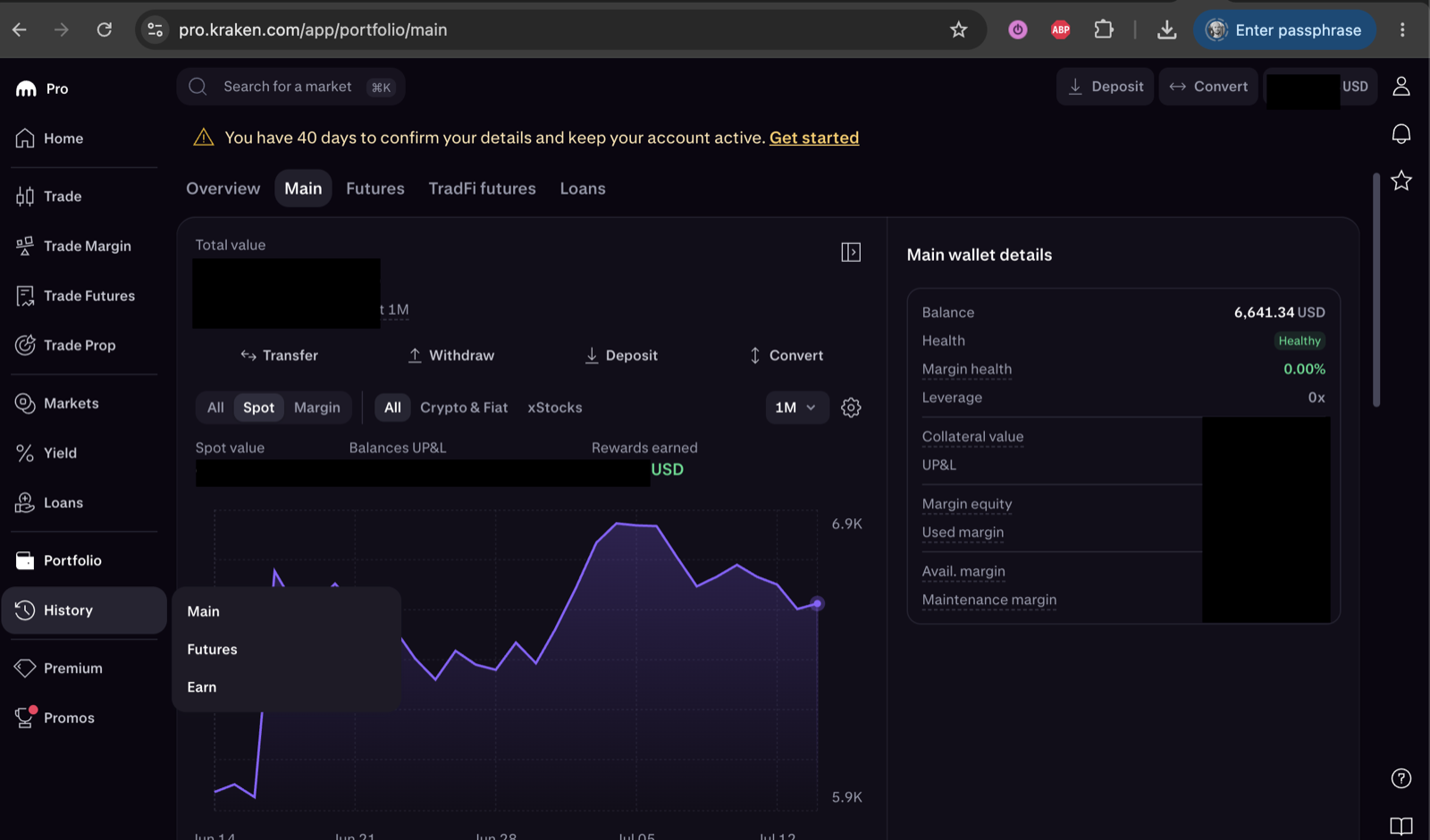
- Or: export the Spot ledger On pro.kraken.com open History → Main, use Export to create a Spot ledger statement for all time, download the CSV and drop it on the Portfolio value tile — no account needed.
- Ask the in-app assistant — free Open the assistant pane beside the dashboard and ask. It answers on a hosted model with a small free budget, on your own Anthropic, OpenAI or OpenRouter key, or on a local model through the desktop app.
-
Or connect Claude, ChatGPT, Claude Code or Codex — Pro
In Claude, Settings → Connectors → Add custom connector with the URL
https://app.fortunest.ai/mcp; in ChatGPT, Developer mode and a new connector with the same URL and OAuth; in Claude Code or Codex, the same endpoint as an MCP server. Sign in to Fortunest in the browser, review the permissions and click Allow connection. Each client's exact steps are in the External agents chapter.
Then check the connection with a question that changes nothing: "Use Fortunest to list my Kraken balances by value. Do not change anything."
What reaches the AI from Kraken — and what does not
Both routes read the same thing: Kraken's ledger, which records every balance change rather than only trades. From what each CSV export contains and the Kraken guide:
| In the ledger | What Fortunest makes of it |
|---|---|
| Trades | Two ledger rows share one reference — the coin in and the money out, each with its own fee — and are paired into one priced trade. |
| Staking and Earn rewards | Income, net of fees. |
| Deposits and withdrawals | Cash movements and transfers; a transfer between your own accounts is matched rather than counted as a sale and a purchase. |
| Wallet auto-allocations and delisting conversions | Read too — a delisting conversion such as MATIC to POL included. |
| Kraken's asset codes | Normalised to the spelling Kraken's own CSV uses (XBT for bitcoin), so the same row from the key and from a file is recognised as one. |
| Kraken Futures | Not read — this is the Spot account. |
A connected key keeps itself current: while the dashboard is open, every direct connection syncs on its own at the quote-refresh cadence, 15 minutes by default (details). A connected agent can also ask Fortunest to sync the connection — sync_connector is a write action, so it waits for your approval like every other change.
Try it on the demo portfolio — no account
Before you export anything or pay for Pro, connect Claude or ChatGPT to Fortunest's demo portfolio: four synthetic accounts — DEGIRO, Revolut, Kraken and Interactive Brokers — with made-up amounts over real tickers. No Fortunest account, no sign-in, nothing to install.
https://app.fortunest.ai/mcp/demo
In Claude
- Open Settings → Connectors and choose Add custom connector.
- Name it
Fortunest demo, paste the URL above as the Remote MCP server URL and click Add. There is no sign-in step. - In a new chat, enable Fortunest demo under + and ask: "Using Fortunest demo, what are the five largest holdings and how risky is this portfolio?"
In ChatGPT
- Turn on Developer mode under Settings → Apps & Connectors → Advanced settings.
- In Apps & Connectors choose Create: name
Fortunest demo, the URL above as the MCP server URL and Authentication: No authentication. Confirm that you trust it and click Create. - In a new chat, open + → More (or Developer mode), enable Fortunest demo and ask the same question.
In Claude Code: claude mcp add --transport http fortunest-demo https://app.fortunest.ai/mcp/demo. In Codex: codex mcp add fortunest-demo --url https://app.fortunest.ai/mcp/demo.
What the demo is. Seventeen read-only tools — portfolio summary, holdings, one position, allocation, risk, the value chart, upcoming events, recent trades, money flow, tax lots, the tax-free summary, the trade plan and its candidates, simulation inputs, data warnings and a search of the documentation — on one shared example portfolio. It cannot change anything, sees nobody's real data, and Fortunest runs no AI model for it: Claude or ChatGPT brings its own. For your own portfolio, import your exports in the app — free, with the in-app assistant; connecting an agent to it at https://app.fortunest.ai/mcp is Pro. Every endpoint and tool is listed in the Fortunest MCP server reference.
What you can ask about a Kraken portfolio
These questions use tools the assistant manual and the MCP reference document; they work in the in-app assistant and, over MCP, in a connected agent. Swap in your own coins.
| Ask | What comes back |
|---|---|
| "List my Kraken balances by value in euros and their share of my portfolio. Make no changes." | Each coin and the account's cash, in your display currency — the read-only first check. |
| "How much did staking and Earn rewards pay me this year?" | The rewards the ledger recorded, from your money flow. |
| "Sync my Kraken connection, then show my last ten trades." | A sync request you approve in the app, then the recent trades from the refreshed ledger. |
| "How much of my portfolio is crypto, and how much is shares?" | The allocation by asset type, Kraken next to your broker accounts. |
| "What is my return across coins and shares, time-weighted and money-weighted?" | One TWR and one IRR across every account, with what the gap between them says about your timing. |
| "What if I sell a tenth of my bitcoin?" | A what-if on the Simulation tab, prefilled and run, with the result summarised. |
| "Which of my coin lots become tax-free within 12 months?" — Pro | From the Taxes tab's lots; the default rulebook is the Czech one, which includes crypto in the time test for sales from 15 February 2025, and every threshold is a setting. Orientation, not tax advice. |
The honest limits
- Spot only. Kraken Futures is not read by either Fortunest route.
- A key wants a free account. A guest can try the key, but a guest session and its key are deleted after 12 idle hours; the ledger CSV needs no account at all, but does not update itself.
- Fortunest reads; it does not trade. If you want an agent to place Kraken orders, that is Kraken's own server's job, under Kraken's own approval rules — not Fortunest's.
- The AI reads the portfolio, not the raw CSV. Imported files are not sent to the model as context, and positions from a file stay managed by that file — the assistant will not edit them by chat.
- Pro for Claude and ChatGPT. The MCP connection needs Fortunest Pro after the 14-day trial, and whatever the agent reads goes to its provider under that provider's terms.
For other crypto exchanges, see the Bitvavo guide; for coins and shares in one tracker, stocks and crypto together; for the same AI route from a broker that has no API, the DEGIRO guide; and for which apps run an MCP server at all, portfolio apps with an MCP server.
Questions people ask
Can ChatGPT or Claude read my Kraken portfolio?
Yes: Kraken's own MCP server runs locally in clients such as Claude Code and Claude Desktop, and Fortunest's hosted one works in Claude and ChatGPT. Kraken's kraken-mcp ships with its kraken-cli and talks to the Kraken account itself. Fortunest reads Kraken through a read-only API key or the Spot ledger CSV and puts it beside your other accounts: add https://app.fortunest.ai/mcp as a custom connector in Claude or, with Developer mode, in ChatGPT. That needs Fortunest Pro, which every new account gets free for 14 days, no card; in ChatGPT, custom connectors depend on your plan, and free Claude accounts are limited to one custom connector.
Is there an official Kraken MCP server?
Yes. Kraken's documentation describes kraken-mcp, which comes with kraken-cli, runs on your own computer over stdio rather than as a network service, and serves 152 of the CLI's commands as tools in service groups you pick. Live order tools and withdrawal or transfer tools sit in their own groups, and tools Kraken marks as dangerous ask for approval in clients that support it.
Should I use Kraken's MCP server or Fortunest's?
It depends on the job. Kraken's server is built for working with the Kraken account itself — market data, and orders or funding if you enable those groups — from a local client. Fortunest's cannot place orders or move money, runs as a hosted connector in the ChatGPT and Claude apps, and answers about Kraken together with your broker accounts, in one currency and one return figure.
Which Kraken API permissions does Fortunest need?
Two: Query Funds for the balances and Query Ledger Entries for the history. Every trading, deposit and withdrawal permission stays off, and the key is restricted to the IP address the connect form shows. Both permissions are tested when you connect, and nothing is stored unless the key works.
Does the AI see my Kraken staking rewards?
Yes. Both Fortunest routes read Kraken's ledger, so staking and Earn rewards arrive as income beside trades, deposits, withdrawals, wallet auto-allocations and delisting conversions such as MATIC to POL. Kraken Futures is not read — this is the Spot account.
Is there a free AI for my Kraken portfolio?
Yes. Import the Spot ledger CSV into Fortunest and use the in-app assistant on the free plan, with no account and no card; a read-only key can be tried as a guest, and a free account is what keeps it connected. The assistant answers on a small free hosted budget, on your own Anthropic, OpenAI or OpenRouter key, or on a local model through the desktop app. The free plan covers three accounts and fifty assets.
Sources
- Fortunest — the Kraken walkthrough, what each CSV export contains, connecting an account, the Kraken portfolio tracker guide, the MCP server reference with its tool catalogue and External agents chapter, and the assistant manual's free budget.
- Kraken — MCP server and API key permissions (read 10 November 2026).
Signals, analyses and assistant answers in Fortunest are informational — not financial or tax advice.