Guides · Updated 8 October 2026
getquin and MCP: how to get your portfolio into Claude or ChatGPT
getquin does not offer an MCP server, a public API or a Claude or ChatGPT integration — none of those appears anywhere on its pricing page, its getquin AI page or its help centre as we read them on 8 October 2026. Its AI stays inside the getquin app: AI portfolio analysis on Premium, AI financial agents on Wealth. If you want the same portfolio inside Claude or ChatGPT, it has to live in a tracker that exposes one. Parqet does, on every plan; Fortunest does on Pro; Wealthfolio does locally. Fortunest has no getquin importer, so the move goes through your brokers' own exports and keys.
The short answer
- getquin has no MCP server today. Its pricing page lists "AI-Powered portfolio analysis" on Premium (€89.99 a year) and "Unlimited access to AI financial agents" on Wealth (€149.99 a year). Nothing on its pages connects an assistant you already use — Claude, ChatGPT, Claude Code — to your getquin portfolio, and no data export is described in its help centre.
- The cheapest way in: Parqet — its own MCP server at
mcp.parqet.com, with Claude, ChatGPT, Perplexity and Mistral's Le Chat named, included in every plan (two integrations on the free Basis plan). - An agent that can also drive the dashboard: Fortunest — a standard MCP server for the Claude app, ChatGPT, Claude Code and Codex, with a consent and approval model for anything it changes. Pro, €6.99 a month or €69 a year. Without Pro, the in-app assistant answers about the same portfolio on the free plan.
- Local and free: Wealthfolio — an open-source app whose desktop MCP server binds to
127.0.0.1, behind scoped tokens you create. - Self-hosted and experimental: Ghostfolio — an MCP endpoint in the open-source server, off by default.
- Moving from getquin: there is no getquin file to bring. You re-download each broker's own export (DEGIRO, Trading 212, Revolut, Trade Republic…) or connect its read-only key. Scalable Capital, a common getquin broker, is one Fortunest does not read.
What getquin offers for AI today
We read getquin's own pages rather than review sites. The pricing page has three plans: Free with "Unlimited bank and broker connections", Premium at €89.99 a year adding "AI-Powered portfolio analysis", and Wealth at €149.99 a year adding financial planning and "Unlimited access to AI financial agents". The getquin AI page describes an agent you ask about your returns, risks, upcoming dividends and the news that matters to your holdings — inside getquin. The home page says accounts connect "via secure API integration with thousands of providers"; that is getquin reading your banks and brokers, not a developer API for you.
None of those pages, nor the help-centre collections we checked, mentions MCP, a public API, Claude or ChatGPT. The help centre's file-import article is the one place an outside model appears: when getquin cannot read an uploaded statement locally, its AI support steps in and the document is sent to OpenAI for analysis. That is an import helper, not a way to put your portfolio in front of your own assistant.
So the honest answer to "getquin MCP" is that it does not exist as of this page's date. If getquin ships one, the comparison below changes — and its AI agents remain a perfectly good answer if what you want is AI analysis without wiring anything up.
What an MCP connection to a portfolio gives you
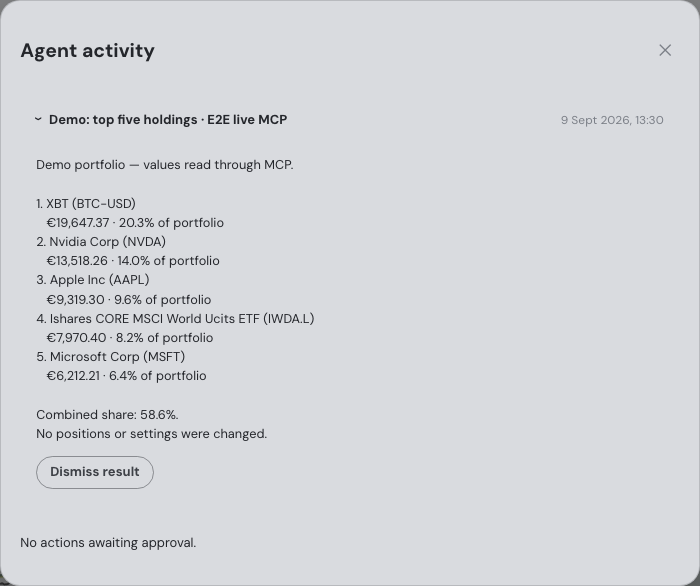
MCP — the Model Context Protocol — is the open connection standard that Claude, ChatGPT, Claude Code and Codex all speak. A portfolio tracker with an MCP server lets the assistant you already use call the tracker's own tools instead of guessing: what you hold, what it is worth in your currency, how it performed, where the concentration sits. No pasted screenshots, no stale spreadsheet.
The difference between trackers is in the second half: what the agent may do, and who says yes. Some servers are read-only. Some let the agent add transactions. Fortunest's lets it drive a live dashboard — but anything sensitive is shown with its exact inputs for you to approve once, reject, or allow within bounds for a limited time. Read the consent model before you connect anything that holds your money's history; the MCP guide goes through it in detail.
One caveat applies to every tracker here: whatever the agent reads travels to your agent's provider — Anthropic, OpenAI or whoever runs the model — under their terms.
How Fortunest's MCP connection works
Fortunest runs a standard MCP server at https://app.fortunest.ai/mcp over Streamable HTTP. The External agents chapter documents, step by step, the Claude app (Claude on the web, Claude Desktop, Claude mobile and Cowork share one connector setup), the ChatGPT app through its Developer mode, Claude Code, the Codex app and Codex CLI, and the MCP Agent iPhone app for Siri. Any other client that speaks MCP over the same transport can be pointed at the same endpoint.
- Get your holdings in Import your brokers' exports or connect their read-only keys — the migration section below lists the route for each common getquin broker.
-
Add the connector
In Claude, open Settings → Connectors (on Pro and Max: Customize → Connectors → +), choose Add custom connector, name it Fortunest and enter
https://app.fortunest.ai/mcpexactly, without a trailing slash. No API key, client secret or header is needed. In ChatGPT, turn on Developer mode and create the connector with the same URL and OAuth. - Sign in and review the permissions Fortunest's sign-in opens in the browser; sign in to your Pro account, review what the connection may do and click Allow connection. The grant expires after 30 days and can be revoked earlier under Settings → Assistant → External agents.
- Check it with a read-only question Ask: "Use Fortunest to summarize my top five holdings. Do not change anything." If it returns your real positions, the connection works — a saved connector on its own does not prove it.
The full endpoint carries 88 tools. A small edition at /mcp/mini carries nine read-only ones — summary, top holdings, one holding, trade plan, allocation, risk, upcoming events, recent trades and watchlist — for on-device models such as the one behind Siri in the MCP Agent app. Connecting an agent never exposes your provider API keys or your Fortunest login, and agent result text cannot execute actions.
Moving from getquin: the honest route
Fortunest cannot read a getquin export — there is no getquin importer, and we found no data export described in getquin's help centre anyway. The only tracker exports Fortunest reads are Parqet's, Delta's and CoinTracking's. So the route is the one that gives the cleanest history: go back to each broker or exchange you linked in getquin and take its own export, or its read-only API key.
| Broker in getquin | Into Fortunest |
|---|---|
| DEGIRO | CSV — the Transactions export or the Account statement. DEGIRO has no API for private accounts. Step by step in the DEGIRO guide. |
| Trading 212 | Your own read-only API key, live or practice, or the History CSV. |
| Trade Republic | A CSV written by pytr, the community downloader — Trade Republic itself has no export button. |
| Interactive Brokers | A Flex Web Service token and Activity Flex Query, or the yearly Activity Statement as CSV. |
| Revolut | The brokerage account statement and, separately, the crypto transactions export. |
| Binance | A read-only API key and secret, or the Transaction History export. |
| Scalable Capital | Not supported — no importer, no connection. |
| Bank accounts | Not connected — Fortunest connects to brokers and exchanges, not banks. Cash can be added as a manual Cash asset. |
Each platform holds one direct API connection per portfolio; a second key for the same platform replaces the first. The full list of supported platforms has the rest — six direct API connections, 22 brokers through SnapTrade and the exports of 29 platforms. Drop the files on the Portfolio value tile or under ⚙ Settings → Data; a whole folder works, and transfers between your own accounts are matched rather than counted twice.
The free alternative: Fortunest's in-app assistant
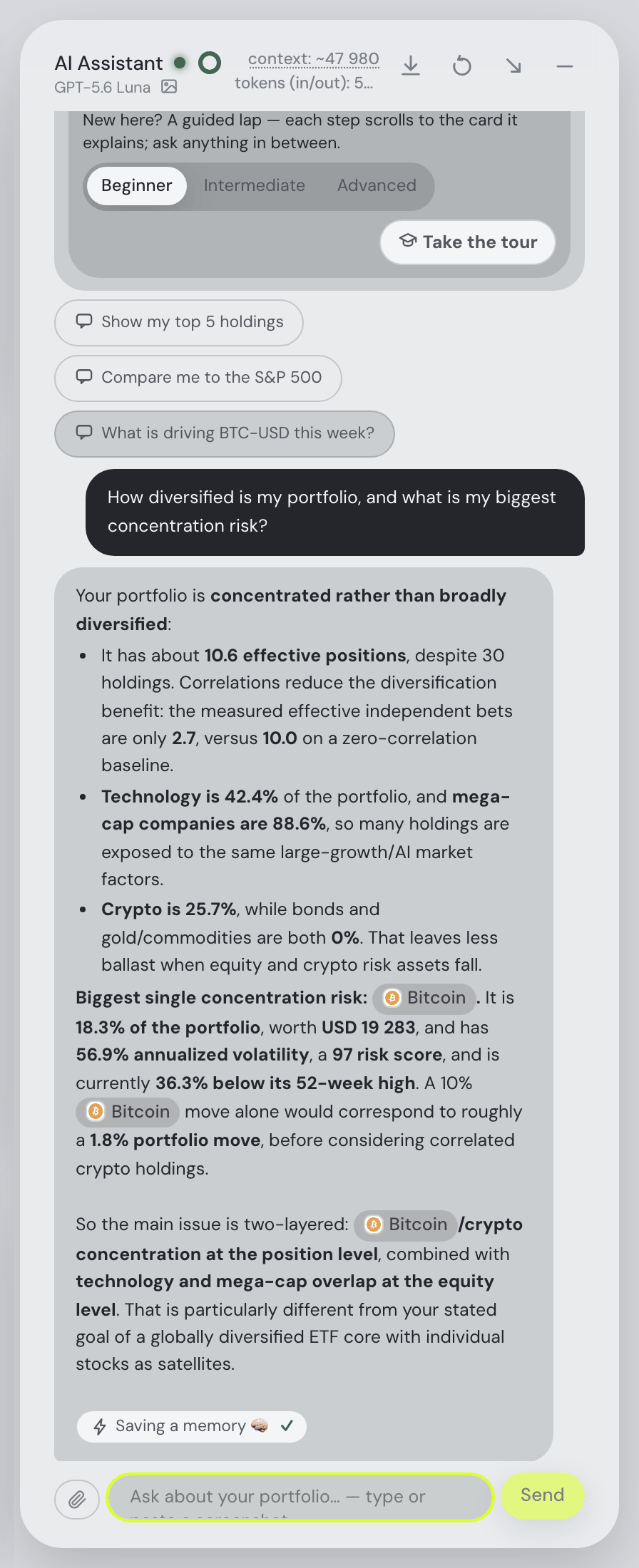
If what you want is to ask your portfolio questions rather than to use one particular chat app, you do not need MCP or a paid plan. Fortunest's assistant is a chat pane beside the dashboard on every tab, on the free plan, with no account needed to start. It reads your actual holdings and the screen you are on, explains any metric on your own numbers, looks up any company's news, earnings and SEC filing, and can drive the dashboard when you ask.
It answers on a hosted model with a small free budget — roughly a hundred questions as a guest, about twice that once you confirm a free account. Paste your own Anthropic, OpenAI or OpenRouter key and the budget no longer applies, which is also how you get a Claude model answering about your portfolio without a Claude connector. On the desktop app it can run on Ollama or LM Studio, so the model request stays on your machine. The free plan covers three accounts and fifty assets. More in what the AI can tell you about your portfolio.
getquin, Parqet, Ghostfolio, Wealthfolio and Fortunest compared
Each cell is what the vendor's own pages say on the date in the footnote. Not described means the page does not mention it. A green ✓ marks whichever product leads a row on that row's own terms.
| getquin1 | Parqet2 | Ghostfolio3 | Wealthfolio4 | Fortunest5 | |
|---|---|---|---|---|---|
| MCP server |
|
|
|
|
|
| Assistants named |
|
|
|
|
|
| What the agent can do |
|
|
|
|
|
| Access control |
|
|
|
|
|
| AI inside the app |
|
|
|
|
|
| Price for agent access |
|
|
|
|
|
| Imports a getquin portfolio |
|
|
|
|
|
Cells were checked against the sources below on 8 October 2026. Prices are list prices before promotions and, for Fortunest, before VAT. "Not described" is a statement about those pages on that date, not about the product.
The verdicts
Parqet — the cheapest way into Claude or ChatGPT
Best for: a German-speaking investor who wants the portfolio in Claude, ChatGPT or Perplexity on a free plan.
Basis €0 · Plus €11.99/mo · Investor €29.99/mo
Parqet runs its own MCP server and its AI page names more assistants than anyone else here. You choose what to share — the whole account, one depot or selected portfolios — and whether the assistant may only read or also create activities; its FAQ says the AI can neither trade nor move money, and the connection is revocable. The integrations are included in every plan.
Where it falls short: the free Basis plan allows two integrations in total; the pages describe what the assistant may read and create, not an approval step for each change; and we did not check whether it can import anything from getquin.
Fortunest — when the agent should work the dashboard too
Best for: an investor who wants Claude, ChatGPT, Claude Code or Codex to read and act on a full dashboard — or a free assistant that answers without any of that.
Free without an account · MCP on Pro, €6.99/mo or €69/yr
An agent connected to Fortunest gets the same tools, calculations and context as the in-app assistant: holdings, performance, risk, tax lots, trade candidates, what-ifs and backtests, plus control of one live dashboard. Sensitive changes come with their exact inputs and need your approval unless a bounded permission covers them. The same portfolio answers on the free plan in the app's own assistant, on a hosted model, your own key or a local one.
Where it falls short: MCP is Pro-only; there is no getquin importer, so moving means re-exporting from each broker; there are no bank connections; Scalable Capital is not supported; and there is no native mobile app yet.
Wealthfolio
Best for: keeping the data and the agent on your own computer.
Free and open source · optional Connect sync from US$2.99/mo
Its MCP page is careful security writing: scoped tokens with presets from read-only to read-and-write, expiry from seven days to none, a desktop server bound to 127.0.0.1, and every tool call in an audit log.
Where it falls short: a server on your own machine suits desktop clients such as Claude Desktop and Claude Code rather than a phone; automatic broker sync is the paid Connect add-on; and we did not check its importers here.
Ghostfolio
Best for: a technical owner who already self-hosts it.
Self-hosted, free — AGPLv3
Ghostfolio's README documents an experimental MCP endpoint that lets an AI client read the portfolio and, with the "Restricted view and manage" permission, import activities. You switch it on with a server flag and create an MCP-type access for the token. A separate community project, ghostfolio-mcp, wraps the same instance in an unofficial server with a read-only mode.
Where it falls short: experimental and off by default; the README says the MCP access uses restricted read scopes that leave out monetary values; transactions come in by import or its public API; and you run the server yourself.
getquin
Best for: AI analysis you do not have to wire up — inside getquin.
Free €0 · Premium €89.99/yr · Wealth €149.99/yr
getquin's strength is reach: unlimited bank and broker connections on the free plan, a social network for investors, and data its security page says is stored on servers in Germany and Europe under AES-256 with read-only API connections. Its AI agents answer about returns, risk, dividends and news without any setup.
Where it falls short: no MCP server, no public API and no Claude or ChatGPT integration are described, so the portfolio cannot reach an assistant you already use; the AI is the paid half of the product; and no data export is described in its help centre.
How we compared
We started from the questions people actually search — "getquin mcp", "can I track my crypto portfolio using Claude" — and read each vendor's own pricing, AI, security and developer pages, plus getquin's help centre, on 8 October 2026. We did not sign up for paid plans, so the cells describe what the pages say, not what we tested. We build Fortunest, so we are not neutral: the table is meant to be checkable rather than impartial, and Parqet is the better answer on price.
Questions people ask
Does getquin have an MCP server?
No, not as of 8 October 2026. getquin's pricing page, its getquin AI page and its help centre describe no MCP server, no public API and no Claude or ChatGPT integration. Its AI lives inside the app: AI-powered portfolio analysis on Premium at €89.99 a year and unlimited access to AI financial agents on Wealth at €149.99 a year. To use your portfolio in Claude or ChatGPT you need a tracker with an MCP server, such as Parqet, Fortunest, Wealthfolio or a self-hosted Ghostfolio.
Can I track my crypto portfolio using Claude or an AI assistant?
Yes, through a tracker — Claude and ChatGPT cannot read an exchange account on their own. In Fortunest you connect a read-only API key for Kraken, Binance, Coinbase or Coinmate (one connection per exchange) or drop the CSV export of Bitvavo, Crypto.com, CoinTracking, Delta, Relai or Trezor Suite. The free in-app assistant then answers about the coins beside your stocks; on Pro, the Claude app, ChatGPT, Claude Code or Codex can read the same portfolio over MCP.
Can I import my getquin portfolio into Fortunest?
Not as a getquin file. Fortunest has no getquin importer, and we found no data export described in getquin's help centre. The route is your brokers' own exports and keys: DEGIRO's Transactions CSV, Trading 212's read-only key or History CSV, a pytr CSV for Trade Republic, an Interactive Brokers Flex token, Revolut's statement and Binance's key. Scalable Capital is not supported.
Is there a free AI portfolio assistant that reads my actual holdings?
Yes. Fortunest's in-app assistant is on the free plan with no account needed to start: it reads your holdings and the screen you are on, explains any metric on your own numbers and drives the dashboard when asked. It answers on a small free hosted budget, on your own Anthropic, OpenAI or OpenRouter key, or on a local model through the desktop app. Only connecting an external agent over MCP needs Pro. Parqet's AI integrations are also in its free Basis plan, limited to two integrations.
Can AI write a summary of my portfolio?
Yes. In Fortunest, the Portfolio brief report card writes the state of the portfolio, today's moves tied to actual news headlines, events ahead, major risks and watch items, from your own holdings. A connected agent can do the same on request — the first check after connecting is to ask it to summarize your top five holdings without changing anything.
Sources
- getquin — pricing, getquin AI, home page, security, and the help centre's Portfolio Import and General collections and file import article (October 2026).
- Parqet — KI-Integrationen, Preise & Pläne and the developer docs (October 2026).
- Ghostfolio — the source repository and README, and the community ghostfolio-mcp project (October 2026).
- Wealthfolio — product site, MCP Server and Connect plans (October 2026).
- Fortunest — the assistant manual's External agents and What you share and approve sections, the free budget, every supported platform and the Privacy chapter.
Signals, analyses and assistant answers in Fortunest are informational — not financial or tax advice.