Guides · Fortunest facts reviewed 8 September 2026
Fortunest vs getquin: which portfolio tracker fits you in 2026
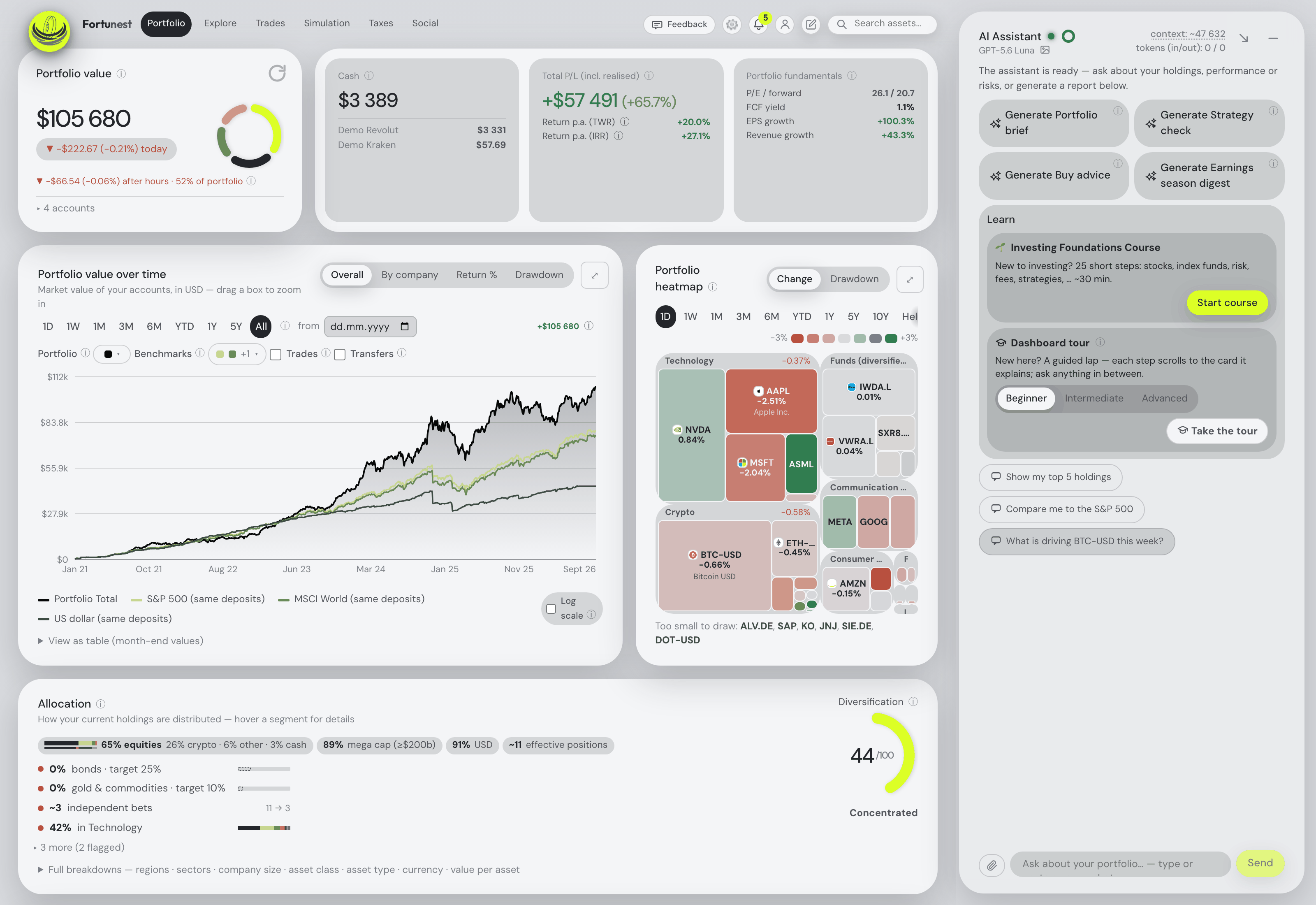
getquin is the bigger network — connections to thousands of banks and brokers, native apps on both phones, and a community to argue with; Fortunest is the deeper instrument — broker exports rebuilt into a daily-rate history, risk and tax numbers, and an AI assistant that is not an add-on: on the free plan it reads your actual holdings and the screen in front of you, explains any metric on your own figures, looks up any company's quote, news, earnings or SEC filing, and on Pro opens the same tools to Claude Code, Codex or any MCP-capable agent. Pick getquin to have everything linked; pick Fortunest to have everything measured — and to ask it questions without paying.
The short answer
- Pick Fortunest if you want the analysis: returns as TWR and IRR, volatility, Sharpe, Sortino, beta and drawdowns, seven benchmarks fed the same deposits you made, every day converted at that day's rate, tax lots with a holding-period test on Pro — and an assistant that answers about your portfolio on the free plan, without an account: it reads the holdings and the live screen, explains any metric on your own numbers, filters the table from a sentence, looks up any company's quote, news, earnings or SEC filing, adds an asset from a sentence or a brokerage screenshot, and changes the dashboard when you ask. Pro is €69 a year and adds an MCP server, so Claude Code, Codex or any MCP-capable agent can use the same tools.
- Pick getquin if you want the connections and the crowd: bank as well as broker links through open banking, native iOS and Android apps, a stock forum and other investors' portfolios to follow, and a company that states its servers are in Germany and Europe. Its AI analysis and its long-term dividend forecasting are paid features, from €89.99 a year.
The comparison
Each cell is what the vendor's own pages say, in the vendor's terms, on the date in the footnote. Not described means the page does not mention it — a statement about the page, not about the product. A green ✓ marks whichever product leads a row on that row's own terms; three of the twelve rows below go to getquin.
| Fortunest1 | getquin2 | |
|---|---|---|
| Runs on |
|
|
| Account required |
|
|
| Free plan |
|
|
| Paid from |
|
|
| Broker imports for EU investors |
|
|
| Currencies |
|
|
| Returns & risk |
|
|
| Tax |
|
|
| AI assistant |
|
|
| Social & community |
|
|
| Where your data lives |
|
|
| Open source |
|
|
getquin's cells were checked on its own pricing, security, portfolio-tracker, portfolio-performance and AI pages on 7 September 2026; the "2,000+ connections" figure is from our landing-page comparison, checked 19 August 2026 — getquin's current pages say "thousands of providers" and "unlimited" rather than a number. Fortunest's cells come from its documentation. Prices are list prices before promotions and, for Fortunest, before VAT. Both products ship continuously.
When to pick which
Most people asking this question already know which half of the trade-off they care about. Seven situations, and the honest answer for each:
| Your situation | Pick | Why |
|---|---|---|
| You hold DEGIRO plus a crypto exchange | Fortunest | DEGIRO is a CSV either way, and Fortunest adds read-only API keys for Binance, Coinbase, Kraken and Coinmate so the exchange side stays live. |
| You want your bank accounts in the same picture | getquin | Open banking connections are its core. Fortunest connects to brokers and exchanges only and has no bank links at all. |
| You check your portfolio on a phone every day | getquin | Native iOS and Android apps. Fortunest's web app is built for phones and adds to the Home Screen, but the native app is still in development. |
| You want Sharpe, Sortino, beta and drawdowns | Fortunest | getquin's pages describe IRR, TTWROR and AI risk ratings; the classic risk statistics are not described there. |
| You want an AI that answers about your own holdings without paying | Fortunest | The assistant is on the free plan and can run on a local model; getquin's AI analysis starts at €89.99 a year. |
| You want your own AI agent — Claude Code, Codex or any MCP client — to read and act on the portfolio | Fortunest, Pro | Pro exposes an MCP server your agent signs into, so it can read the live dashboard and act on it, with sensitive changes reviewed unless covered by an active permission. getquin describes unlimited AI financial agents of its own on the €149.99 Wealth plan, but no way to point your agent at your portfolio. |
| You want local storage and local AI | Fortunest | The desktop app keeps the database on your disk and can run the assistant locally; review the separate online-service exceptions. getquin is a hosted service — in Germany, but hosted. |
The verdicts
Fortunest — our pick, if the criterion is depth per euro
Best for: several brokers and an exchange, wanting the numbers and an AI that reads them on one screen.
Free without an account · Pro €6.99/mo or €69/yr
You drop the CSV exports your brokers already give you, connect Kraken, Binance or Coinbase with a read-only key, and the engine rebuilds one history: transfers between your own accounts matched so nothing is counted twice, every day converted at that day's rate, returns as both TWR and IRR, seven benchmarks fed the same deposits you made. Risk arrives as volatility, Sharpe, Sortino, beta and drawdowns rather than as a rating, the Trades tab scores candidates on fifteen criteria you weight yourself, and the assistant sits beside every tab — answering about your holdings, and changing the dashboard when you ask it to.
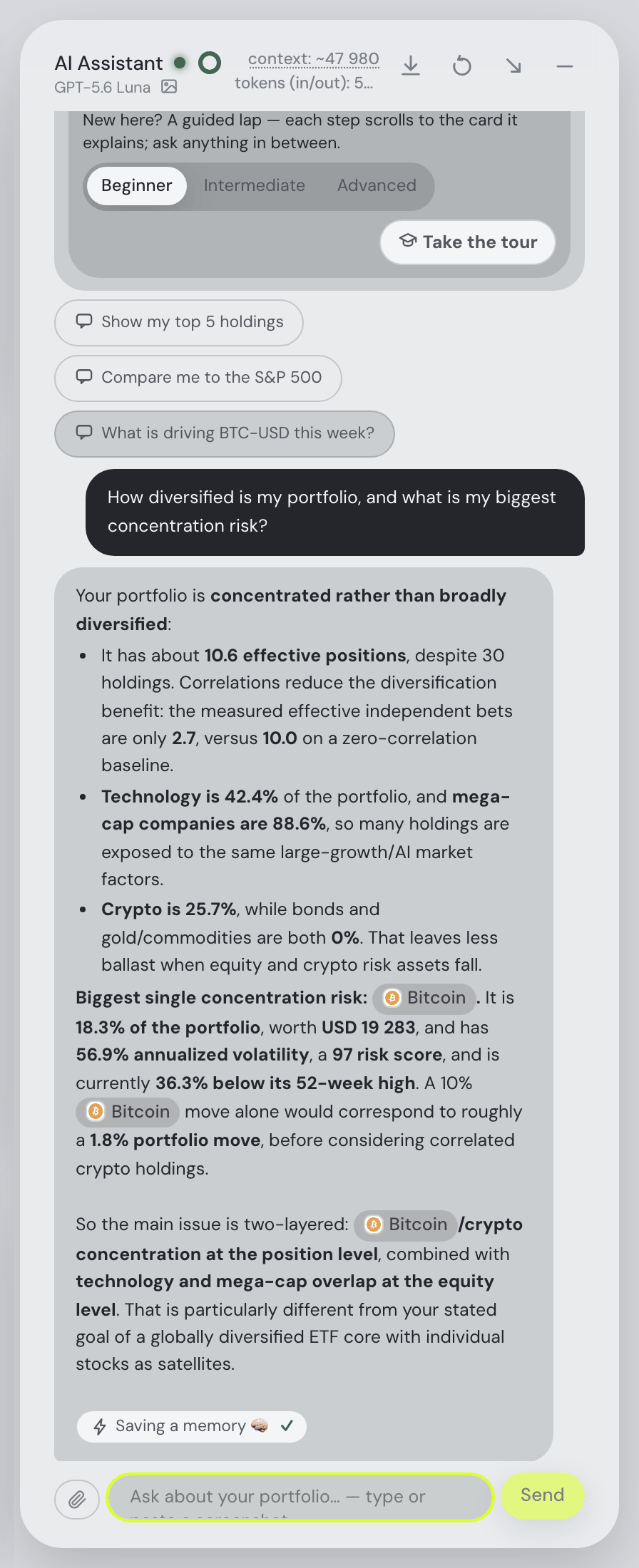
The assistant is the part getquin charges for, and here it is the free part. It reads the holdings and the live screen rather than a summary, so "why is this position down?" needs no further context; it explains any metric on your own numbers, filters the holdings table from a sentence, looks up any company held or not — quote, valuation ratios, analyst target, news, the next earnings and dividend dates, and the company's own results filing from the SEC — and it takes instructions: run a what-if trade, launch a backtest, change a setting, add the flat you bought in 2019, read the positions out of a brokerage screenshot. Every action reports ✓ or ✗ with a reason and data edits keep an Undo. On Pro the same tools are exposed over MCP, so Claude Code, Codex or any MCP-capable client can read the dashboard and act on it with sensitive changes reviewed unless covered by an active permission within the connection’s existing scopes, and revoke when you like — and the in-app assistant can use Ollama or LM Studio for local inference. External-agent context goes to your chosen agent provider; the desktop MCP bridge needs a synchronized hosted portfolio.
Where it falls short: no native mobile app yet; no bank connections, so a current account is a manual entry; the Taxes tab's default rulebook is the Czech one — every threshold is a setting, but there are no per-country presets; the community is a friends-and-feed Social tab, not a public forum with half a million people in it; and the MCP server that lets your own agent in is a Pro feature, not a free one.
getquin
Best for: linking everything you own automatically, on a phone, with a community attached.
Free · Premium €89.99/yr · Wealth €149.99/yr
getquin's strength is reach. Its free plan already includes unlimited bank and broker connections through open banking, so a portfolio spread over a broker, a neobank and a current account assembles itself without a single file; the iOS and Android apps are native; and the feed, the stock forum and other people's public portfolios make it somewhere you visit rather than a report you run. Returns come as IRR and TTWROR against a benchmark, there is a dividend calendar and a monthly cash-flow view, and the security page states servers in Germany and Europe, AES-256 in transit and at rest, and read-only API access. Premium adds AI portfolio analysis and long-term dividend forecasting; Wealth adds financial planning, goals and unlimited AI agents.
Where it falls short: the AI and the deeper analytics are paid, from €89.99 a year — more than Fortunest's Pro; TTWROR and benchmarking are listed as Premium features in the mobile app; tax reporting, the currency-conversion method and the classic risk statistics are not described on its pages; and an account is required before you see anything at all.
What getquin does that Fortunest doesn't
This is the part a comparison page usually leaves out, so here it is plainly. If any of these matter to you, getquin is the better buy and we would rather you knew now:
- Bank connections. getquin links current accounts and banks through open banking. Fortunest has no bank connections of any kind — brokers and exchanges only, and cash sits in the accounts you import.
- Native phone apps. Real iOS and Android apps on the device. Fortunest's web app is built for phones and installs to the Home Screen, but a native app is still in development.
- Automatic connections at that scale. "Thousands of providers", stated as unlimited even on the free plan, against Fortunest's 50 supported platforms, of which 28 connect automatically and the rest arrive as files.
- A public community. A stock forum, followable investors and public portfolios, with "500k+ users" stated on its site. Fortunest's Social tab is friends you accept, and it shares only relative figures.
- Cash-flow analysis. "Analyze your monthly cash flow — what's coming in, what's going out", which follows from having the bank accounts in the first place.
- Long-term dividend forecasting and personal dividend KPIs, an explicit Premium feature. Fortunest shows dividends received and an events calendar, and does not project a dividend stream years out.
- Financial planning and a retirement plan on the Wealth tier. Fortunest's Simulation tab does projections, DCA, goal seek and historical replays, but it is a simulator, not a plan.
How the two differ in practice
Getting the data in. getquin's answer is a connection: you sign in at your bank or broker, it reads the positions, and the portfolio maintains itself. Fortunest's answer is a file plus a key: you download the export your broker already offers — DEGIRO's Transactions file, XTB's statement, Revolut's, Trade Republic's — drop the whole folder in at once and let the format detection sort them out, while crypto exchanges and Interactive Brokers come in through read-only API keys and twenty-two more brokers through a SnapTrade sign-in. The connection route is less work; the file route reaches brokers no aggregator covers, and it gives you a transaction history rather than a snapshot of today's positions, which is what every number below depends on.
What you get out. Both show value, allocation and a return against a benchmark. The difference is what stands behind the return. Fortunest computes annualised TWR and money-weighted IRR side by side, converts each historical day at that day's exchange rate rather than today's, matches each benchmark to the deposits you actually made, and reports volatility, Sharpe, Sortino, beta, correlation and drawdowns; on top of that sit fair-value estimates from six models, a fee total per account, and a Trades tab that scores candidates on criteria you weight. getquin's pages describe IRR and TTWROR, benchmarking and an AI risk rating, and are quiet about the rest — which is why those cells say "not described" rather than "no".
The assistant, and where the data sits. getquin's AI is a paid analyst: it knows your data, explains returns, risks and dividends, and on Wealth becomes an agent you can ask anything. Fortunest's is a free operator: it sees the holdings and the screen, answers with your figures — as in the capture beside this paragraph — and will switch tabs, run a what-if trade, launch a backtest or change a setting when you ask. It can also run entirely on your own machine through Ollama or LM Studio, and on the desktop app that is the default, so local inference stays on your machine. Cloud AI, Pro tax calculations, sharing and hosted sync have separate outbound data flows. Imported CSVs are not automatically sent as AI context, but deliberate chat attachments reach the selected provider. The Assistant chapter lists what it may and may not do, and the Privacy chapter what is stored where; a worked list of the questions it answers is in what the assistant can tell you.
How we compared
We read getquin's own pricing, security, portfolio-tracker, portfolio-performance and AI pages on 7 September 2026 and took the numbers and the phrasing from there, quoting where the wording matters. Fortunest's column comes from its documentation and its plans page. Where a vendor page says nothing about a row, the cell says "not described" — a statement about the page on that date, not a claim about the product. We build Fortunest, so we are not neutral: the table is meant to be checkable rather than impartial, both verdicts state where the product falls short, and the section above lists what getquin does that we do not. Check anything that would decide your choice; both products change often.
Questions people ask
Is Fortunest a good getquin alternative?
It is the right alternative if what you want from getquin is the analysis rather than the network. Fortunest gives you the whole dashboard, the trade plan and an AI assistant on the free plan without an account — one that reads your actual holdings and the screen, explains any metric on your own numbers, looks up any company's quote, news, earnings or SEC filing, and on Pro can be driven by Claude Code, Codex or any MCP agent — converts every day at that day's rate, and adds tax lots on Pro at 69 euros a year. It is the wrong alternative if you rely on getquin's bank connections or its phone apps: Fortunest connects to brokers and exchanges, not banks, and has no native mobile app yet.
Can I import my getquin export into Fortunest?
Not as a getquin file. Fortunest reads exports from the brokers and exchanges themselves — DEGIRO, XTB, Revolut, eToro, Trading 212, Trade Republic, Saxo and about two dozen more — plus read-only API keys and SnapTrade sign-ins. The only tracker exports it detects are Parqet, Delta and CoinTracking. So the move from getquin means re-downloading the CSV files from your brokers, which takes a few minutes and gives you a cleaner history than a re-export would. The full list is in every supported platform.
Which is cheaper, Fortunest or getquin?
Both have a free plan, and they hold back different things. getquin's free tier includes unlimited bank and broker connections; its AI portfolio analysis starts at Premium, 89.99 euros a year, and AI agents at Wealth, 149.99 euros a year. Fortunest's free plan includes the assistant but caps you at three accounts and fifty assets; Pro is 6.99 euros a month or 69 euros a year and adds the Taxes tab and unlimited accounts. For an AI assistant Fortunest is cheaper; for automatic connections getquin's free plan is.
Does getquin have an AI assistant?
Yes. getquin describes AI-powered portfolio analysis and AI-powered risk ratings, with unlimited access to AI financial agents on the Wealth plan. It is a paid feature: analysis from Premium at 89.99 euros a year. Fortunest's assistant is on the free plan, can drive the dashboard rather than only describe it, and can run on a local model through Ollama or LM Studio for local inference on desktop. Cloud AI, Pro tax calculations, sharing and hosted sync have separate outbound data flows. The AI tracker guide compares the wider field.
Which one is better for DEGIRO and XTB?
Neither syncs them live, because DEGIRO has no API for private accounts and is not on SnapTrade, and XTB's public API for private accounts was withdrawn in 2025. Both products therefore take files: getquin offers manual import and CSV upload for brokers it cannot link, while Fortunest detects the DEGIRO Transactions export and Account statement and the XTB statement directly, matches transfers between your own accounts, and keeps failed rows with a reason and a retry. Step by step in the DEGIRO guide.
Sources
- Fortunest — plans and pricing, every supported platform, the Portfolio chapter, the Taxes chapter, the Assistant chapter and the Privacy chapter (7 September 2026).
- getquin — pricing, home, security, portfolio tracker, portfolio performance and getquin AI pages (7 September 2026); the 2,000+ connections figure checked 19 August 2026.
Signals, analyses and assistant answers in Fortunest are informational — not financial or tax advice. This page compares features described on the vendors' own pages, not investment outcomes.