Guides · Updated 8 October 2026
DEGIRO in Claude and ChatGPT: how to ask an AI about your DEGIRO portfolio
There is no DEGIRO MCP server and no DEGIRO API to build one on: DEGIRO's own helpdesk answers "No, currently, we don't offer an API". So neither Claude nor ChatGPT can read a DEGIRO account directly. What works is one step removed — export DEGIRO's Transactions and Account statement CSVs, import them into a tracker, and let an AI read the tracker. In Fortunest that is the in-app assistant on the free plan, or, on Pro, the Claude app, ChatGPT, Claude Code or Codex connected over MCP.
The short answer
- DEGIRO has no API for private investors. Its helpdesk says so and adds that you cannot connect your account to another application. It is not offered by SnapTrade either. A file you export yourself is the only official route out.
- The free route: import the DEGIRO CSVs into Fortunest and ask its in-app assistant — no account, no card, three accounts and fifty assets on the free plan.
- The Claude and ChatGPT route: on Fortunest Pro (€6.99 a month or €69 a year), add
https://app.fortunest.ai/mcpas a custom connector in Claude or ChatGPT, or as an MCP server in Claude Code or Codex, and the agent reads the same portfolio. - Re-export to stay current. Without an API nothing syncs on its own: new DEGIRO trades reach the AI when you drop a fresh export in.
Why an AI cannot read DEGIRO directly
An AI agent reaches outside data through tools — an MCP server, an API. DEGIRO publishes neither: its helpdesk says it does not currently offer an API and that a DEGIRO account cannot be connected to another application. Fortunest's platform list notes that DEGIRO is not on SnapTrade, the aggregator that reaches twenty-two other brokers.
Community-built, unofficial DEGIRO clients do exist on GitHub. They are not an interface DEGIRO publishes or supports, and they work with your DEGIRO login — weigh that before handing one to an agent. getquin describes an "Automatic connection" for DEGIRO through open banking, in which you enter your access data in getquin; its AI, though, stays inside getquin and does not reach Claude or ChatGPT.
The file route has one real advantage: the export is the complete history, every fill and every dividend since the account opened, which is what returns, realised gains and tax lots are computed from.
Step by step: from DEGIRO to an answer
The export steps are the same as in the DEGIRO section of the docs and the DEGIRO portfolio tracker guide.
- Export the Transactions CSV On trader.degiro.nl open Inbox → Transactions, set the from/to dates to cover your whole history, click the download icon on the right and choose CSV — not XLS, not PDF.
- Export the Account statement Back in the Inbox, open Account statement for the same period and export it as CSV too. It is the one of the two that contains cash — the cash side of every trade, dividends with the tax withheld, and fees. Either file works alone; both together is the fuller record.
- Import them Drag both onto the Portfolio value tile in the app, or open ⚙ Settings → Data and drop them on the Data sources card. The format is detected automatically, Czech-locale files included.
- Ask the in-app assistant — free Open the assistant pane beside the dashboard and ask. It answers on a hosted model with a small free budget, on your own Anthropic, OpenAI or OpenRouter key, or on a local model through the desktop app.
-
Or connect Claude, ChatGPT, Claude Code or Codex — Pro
In Claude, Settings → Connectors → Add custom connector with the URL
https://app.fortunest.ai/mcp; in ChatGPT, Developer mode and a new connector with the same URL and OAuth; in Claude Code,claude mcp add --transport http --scope user --callback-port 49310 fortunest https://app.fortunest.ai/mcp. Sign in to Fortunest in the browser, review the permissions and click Allow connection. Each client's exact steps are in the External agents chapter.
Then check the connection with a question that changes nothing: "Use Fortunest to summarize my top five holdings. Do not change anything." If your DEGIRO positions come back, it works.
What you can ask about a DEGIRO portfolio
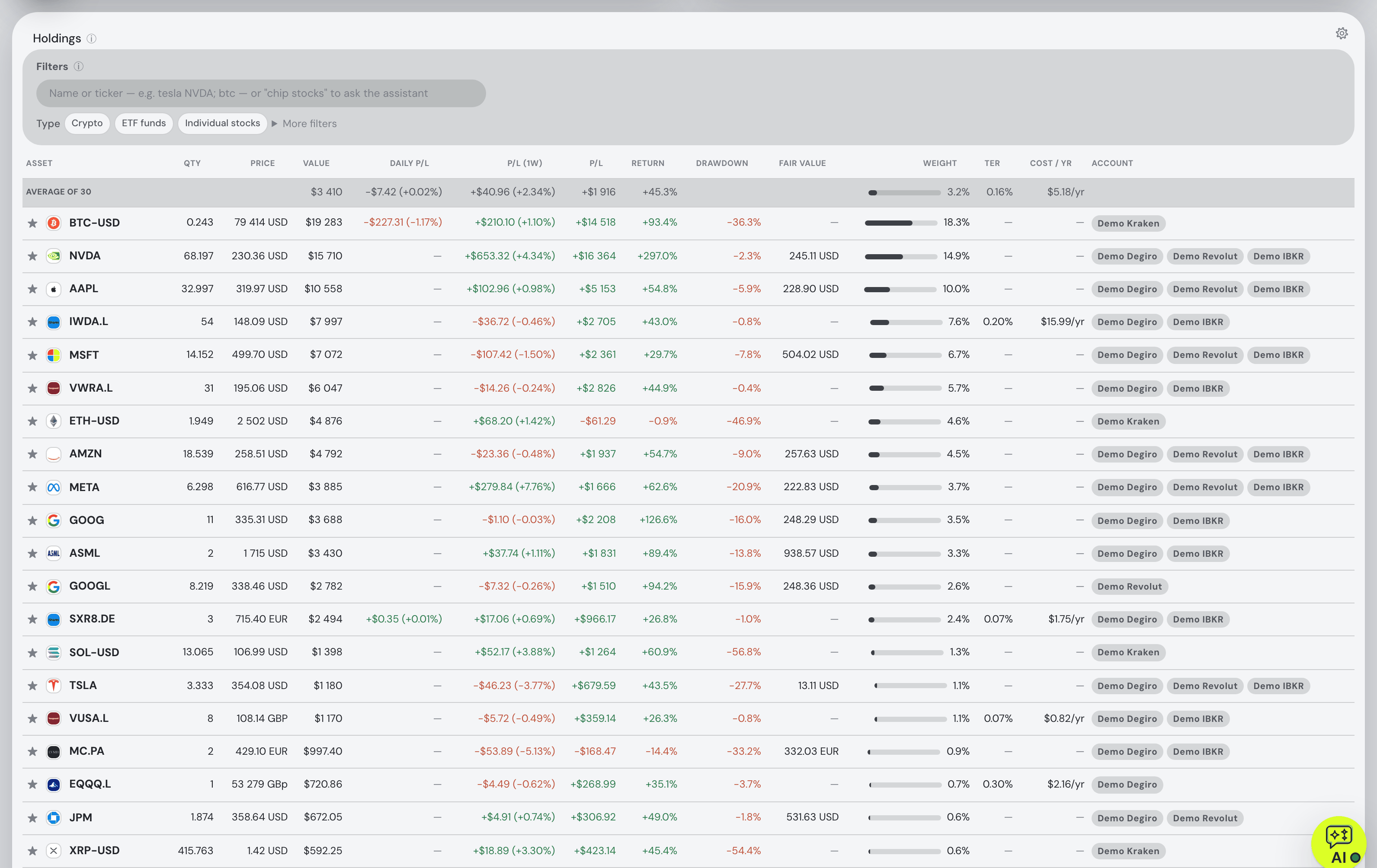
Every question below is one the assistant manual or our guides document. They work in the in-app assistant and, over MCP, in a connected agent, which uses the same tools and context. Swap in your own holdings.
| Ask | What comes back |
|---|---|
| "Summarise my top five holdings by current value and their combined portfolio weight. Make no changes." | The five largest positions in your display currency and their share of the whole portfolio — the read-only check the MCP guide recommends. |
| "How diversified is my portfolio, and what is my biggest concentration risk?" | Effective positions, sector and size concentration and the single largest risk, from the allocation card's own figures. |
| "What does the gap between my time-weighted and money-weighted return say about my timing?" | TWR against IRR explained on your numbers — the two disagree when you kept adding money, which most DEGIRO savers did. |
| "What does the TER on my ETFs cost me a year?" | The fund fees at your position sizes, from the fee figures the dashboard shows. |
| "What was ASML worth on 1 August, and what is the change?" | The close from the same daily series the charts use, converted at that day's exchange rate; up to eight dates in one go. |
| "How did ASML's last quarter go?" | Quote, ratios, headlines, the last quarters' EPS beats and misses, and the company's own results filing from the SEC where it files there. |
| "What if I sell half my Tesla?" | A what-if on the Simulation tab, prefilled and run, with the result summarised. |
| "Compare me to the S&P 500." | The value chart switched to return mode with the benchmark fed your own deposits. |
| "Which lots become tax-free within 12 months?" — Pro | From the Taxes tab's lots and holding-period test; the default rulebook is the Czech one, every threshold a setting. Orientation, not tax advice. |
Two limits worth knowing. The AI reads the portfolio built from your files, not the raw CSV — imported files are not automatically sent as context. And positions imported from a DEGIRO file stay managed by that file: the assistant will not edit them by chat; re-export instead.
Which route: in-app assistant, MCP agent, or another tracker
Each cell is what the vendor's own pages say on the date in the footnote. Not described means the page does not mention it. A green ✓ marks whichever option leads a row on that row's own terms.
| Fortunest assistant1 | Fortunest over MCP1 | Parqet2 | getquin3 | |
|---|---|---|---|---|
| How DEGIRO gets in |
|
|
|
|
| Where you ask |
|
|
|
|
| What it can do |
|
|
|
|
| Price |
|
|
|
|
| Model choice |
|
|
|
|
Cells were checked against the sources below on 8 October 2026. Prices are list prices before promotions and, for Fortunest, before VAT. "Not described" is a statement about those pages on that date, not about the product.
The verdicts
Fortunest's in-app assistant — start here
Best for: asking questions about a DEGIRO portfolio today, without paying or wiring anything.
Free without an account
Both DEGIRO exports import, and the assistant reads the result with the dashboard beside it: it explains any figure on your own numbers, looks up any company you hold, runs what-ifs and changes the view when you ask, each action marked ✓ or ✗ with the reason. Bring your own Anthropic key and a Claude model answers, unmetered.
Where it falls short: it lives inside Fortunest, not in the Claude or ChatGPT app you already use; the free budget is small unless you add a key; and three accounts and fifty assets is the free-plan limit.
Fortunest over MCP — for Claude, ChatGPT, Claude Code or Codex
Best for: keeping your DEGIRO portfolio inside the agent you already work in.
Pro, €6.99/mo or €69/yr
The agent gets the assistant's tools, calculations and context and can drive one live dashboard. Grants are made in a browser sign-in, expire after 30 days, and are revocable; sensitive changes show their exact inputs for you to approve once, reject, or allow within bounds for a limited time. The MCP guide covers the consent model in full.
Where it falls short: Pro-only; whatever the agent reads goes to your agent's provider under their terms; and in Claude or ChatGPT a custom connector depends on what your own plan there allows.
Parqet
Best for: German-speaking investors who would rather drag a PDF and use Perplexity or Le Chat too.
Basis €0 · Plus €11.99/mo · Investor €29.99/mo
Parqet's DEGIRO import reads the PDF versions of the same two reports, and its own MCP server connects the portfolio to Claude, ChatGPT, Perplexity and Mistral's Le Chat, with the integrations included in every plan.
Where it falls short: the CSV you may already have is the wrong file for its DEGIRO import; the free Basis plan allows two integrations in total; and the pages describe read or create-activity access rather than an approval step per change.
getquin
Best for: a DEGIRO account linked without files, with AI kept inside the app.
Free €0 · Premium €89.99/yr · Wealth €149.99/yr
getquin's help centre describes DEGIRO through an open-banking "Automatic connection" where you enter your access data, so new trades arrive without exports. Its AI agents answer about returns, risk, dividends and news.
Where it falls short: no MCP server, public API or Claude and ChatGPT integration is described, so the portfolio cannot reach an assistant you already use — the getquin and MCP guide goes into that — and the AI is on the paid plans.
How we compared
We checked DEGIRO's own helpdesk for the API question and read each vendor's import, AI and pricing pages on 8 October 2026. The Fortunest steps and example questions come from our documentation, which is kept current with each release. We build Fortunest, so we are not neutral; where getquin's linked connection or Parqet's broader list of assistants is the better fit, the verdicts say so.
Questions people ask
Does DEGIRO have an API?
No. DEGIRO's own helpdesk says it does not currently offer an API and that you cannot connect your DEGIRO account to another application. It is not offered through SnapTrade either. The official way to get your data out is the export in the Inbox: the Transactions report and the Account statement, both available as CSV.
Is there a DEGIRO MCP server?
Not from DEGIRO, which offers no API to build one on. Community-built, unofficial DEGIRO clients exist, but DEGIRO neither publishes nor supports them and they work with your DEGIRO login. The supported route is to import DEGIRO's CSV export into a tracker that has an MCP server — Fortunest on Pro, for example — and connect your agent to the tracker.
Can ChatGPT or Claude read my DEGIRO portfolio?
Not directly, but they can read it through a tracker. Import the DEGIRO Transactions or Account statement CSV into Fortunest, then add https://app.fortunest.ai/mcp as a custom connector in Claude or, with Developer mode, in ChatGPT, sign in and allow the connection. That needs Fortunest Pro, and whether you can add a custom connector depends on your Claude or ChatGPT plan. Claude Code and Codex connect to the same endpoint.
Is there a free AI for my DEGIRO portfolio?
Yes. Import the DEGIRO export into Fortunest and use the in-app assistant on the free plan, with no account and no card: it reads your holdings and the screen you are on, explains your returns, risk and fees on your own numbers, and runs what-ifs. It answers on a small free hosted budget, on your own Anthropic, OpenAI or OpenRouter key, or on a local model through the desktop app. The free plan covers three accounts and fifty assets.
Can I track my crypto portfolio using Claude or an AI assistant together with DEGIRO?
Yes. Fortunest puts the DEGIRO file beside a read-only API key for Kraken, Binance, Coinbase or Coinmate — one connection per exchange — or a CSV from Bitvavo, Crypto.com and others, in one holdings table and one display currency. The in-app assistant answers about all of it on the free plan; on Pro, Claude, ChatGPT, Claude Code or Codex can read the same portfolio over MCP.
Sources
- Fortunest — the DEGIRO export walkthrough, every supported platform, the assistant manual's External agents and free budget sections, the assistant guide and the MCP guide.
- Parqet — DEGIRO import, KI-Integrationen and Preise & Pläne (October 2026).
- getquin — help centre Degiro and Open-Banking articles, pricing and getquin AI (October 2026).
- DEGIRO — helpdesk, Does DEGIRO offer an API? (October 2026).
Signals, analyses and assistant answers in Fortunest are informational — not financial or tax advice.