Guides · Updated 7 September 2026
The best multi-currency portfolio tracker in 2026
If you hold dollars, euros and a London listing in one portfolio, the tracker that gets your history right is the one that converts every day at that day's rate. Fortunest does, handles pence listings, and lets you switch the display currency — from the topbar or by asking the assistant, which reads the portfolio itself, explains on your own numbers what a return in one currency is actually made of, and will tell you what any holding was worth on a given date, converted at that day's rate. That is why it is our pick. Sharesight and Portfolio Performance are the strongest alternatives.
The short answer
- Our pick: Fortunest — every day of the history converted at that day's real rate, London pence handled, the display currency switchable from the topbar, and TWR and IRR computed in that one currency against seven flow-matched benchmarks — with an assistant that reads the portfolio itself, explains any of those figures on your own numbers, prices a holding on a past date at that day's rate, and changes the display currency when you ask. Free plan; Pro €69 a year, which also opens the same portfolio to Claude Code, Codex and other MCP agents.
- The formal report: Sharesight — a multi-currency valuation report over "67 different currencies" using intraday rates from Open Exchange Rates, plus the option to enter your own rate on a trade.
- Rates you can audit: Portfolio Performance — the European Central Bank's reference rates back to 1999, in a file on your own disk, free and open source.
- Most currencies on a free plan: Parqet — "40+ Währungen", converted automatically to your home currency, on every tier including the €0 Basis plan.
- Cross-border net worth: Kubera — "Multi-currency runs through every layer of Kubera", over property and private holdings as well as listed ones. From $250 a year.
The arithmetic: why today's rate is the wrong rate
Suppose you bought $10,000 of a US share in March 2022, when a euro bought roughly a dollar, and you read your portfolio in euro today. There are two ways a tracker can show that history, and they disagree by real money.
The wrong way is to hold today's rate constant. The app takes each historical value in dollars and multiplies all of them by one number — the rate this morning. Your March 2022 cost is restated as something you never paid; the chart's shape is preserved, but its level is a fiction, and any currency movement since then is quietly folded into what looks like an investment return. The line goes up because the dollar strengthened, and nothing on the screen says so.
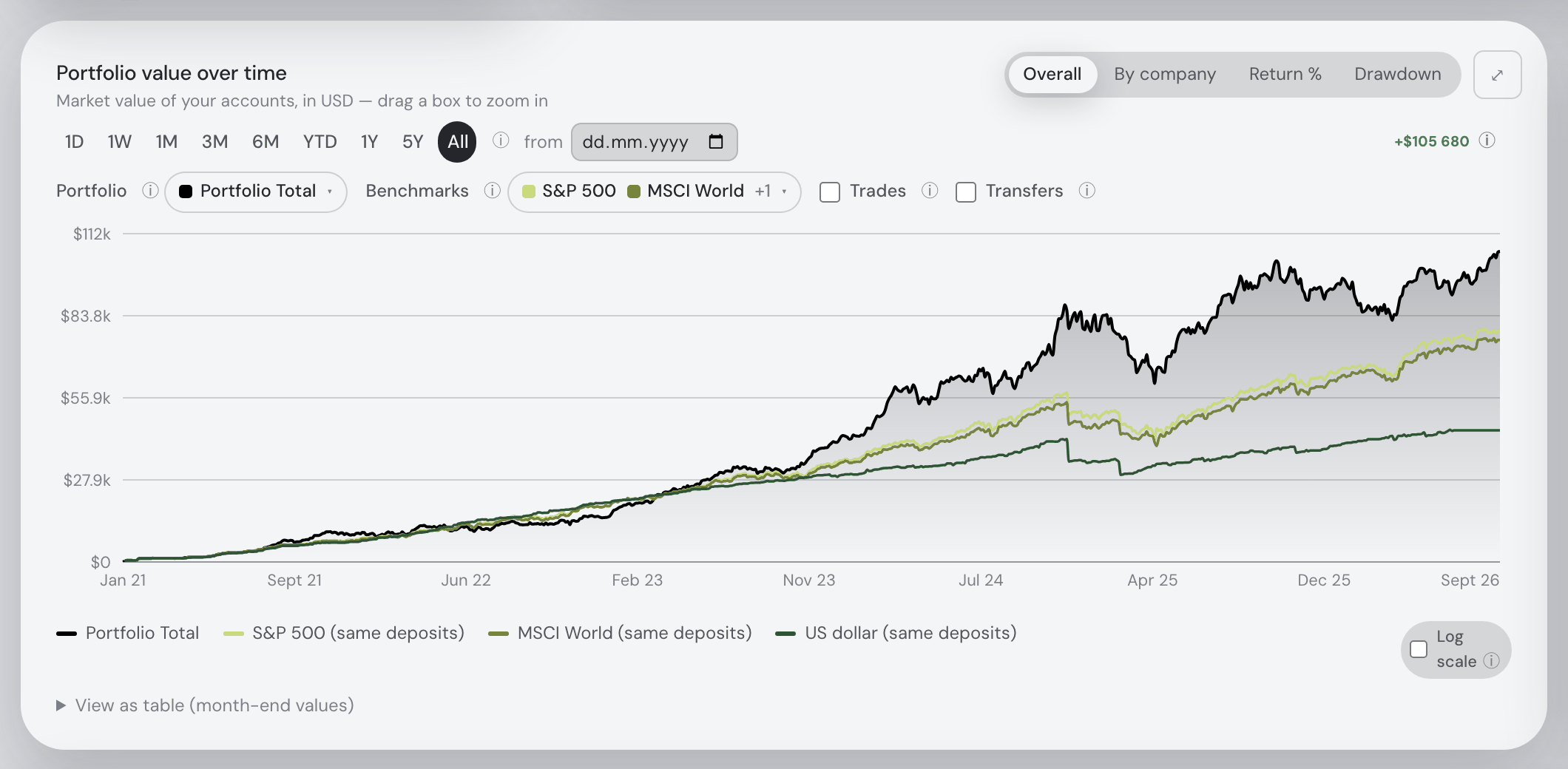
The right way is one multiplication per day. Value the position on each historical day in the currency it trades in, then convert that day's value at that day's rate. Your cost stays what your broker charged you, and your return separates cleanly into what the asset did and what the currency did. It costs more computation — a rate series per currency pair for the whole life of the portfolio, not a single number — which is exactly why it is the thing to check before you trust a total.
This is not a niche concern: it decides the numbers for anyone with accounts at two European brokers (the wider comparison is in the European investors guide) and for anyone holding coins priced in dollars beside euro-listed shares (the stocks-and-crypto guide). A second trap is smaller and catches people constantly: London quotes many shares in pence (GBX), not pounds. A tracker that reads 8,432 as pounds rather than pence values your holding a hundred times over, and the mistake hides well inside a large portfolio. And a third: some apps convert only the display, so the returns underneath are still computed per currency and then added together, which is not the same number as a return computed in one currency from the start.
The comparison
Each cell is what the vendor's own pages say, on the date in the footnote. Not described means the page does not mention it; not checked means we did not verify it and you should. A green ✓ marks whichever product leads a row on that row's own terms — sometimes ours, often not.
| Fortunest1 | Sharesight2 | Portfolio Performance3 | Parqet4 | Kubera5 | getquin6 | Ghostfolio7 | Delta8 | |
|---|---|---|---|---|---|---|---|---|
| Where it runs |
|
|
|
|
|
|
|
|
| Display currency |
|
|
|
|
|
|
|
|
| Which day's rate |
|
|
|
|
|
|
|
|
| Currencies covered |
|
|
|
|
|
|
|
|
| Where the rates come from |
|
|
|
|
|
|
|
|
| London pence (GBX) |
|
|
|
|
|
|
|
|
| Returns in one currency |
|
|
|
|
|
|
|
|
| Currency in the tax view |
|
|
|
|
|
|
|
|
| Free plan |
|
|
|
|
|
|
|
|
| Paid from |
|
|
|
|
|
|
|
|
| Where your data lives |
|
|
|
|
|
|
|
|
Cells were checked against the sources below on 7 September 2026; Portfolio Performance's, Sharesight's, getquin's and Ghostfolio's non-currency rows come from their pages as read on 19 August 2026. Prices are each vendor's list price and, for Fortunest, before VAT. "Not described" is a statement about those pages on that date, not about the product: a tracker that says nothing about pence listings may well handle them.
The verdicts
Fortunest — our pick
Best for: a history spread across currencies that has to add up in one of them.
Free without an account · Pro €6.99/mo or €69/yr
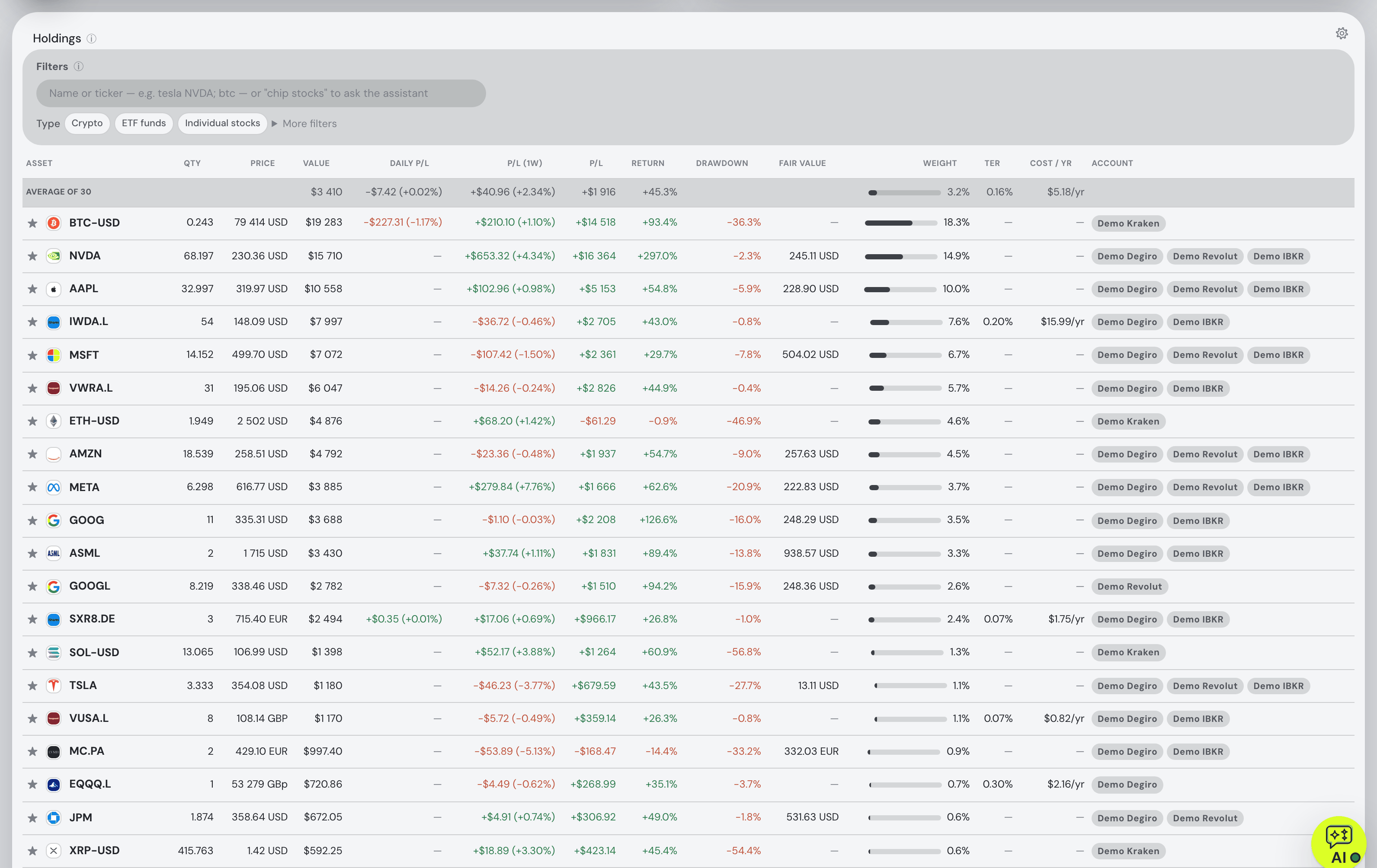
Every position is valued with live market data, split-corrected, and converted at each day's real exchange rate rather than today's; the display currency is a topbar control, and every amount on every tab respects it. London pence listings are handled. On top of that one currency the engine computes total P/L including realised gains, annualized TWR and money-weighted IRR, and seven benchmarks fed the same deposits you actually made, so the comparison is like-for-like rather than an index line dropped on top of yours. The Portfolio chapter spells out how each figure is derived — and the assistant is the shortcut through it: ask what your euro return is actually made of, or what a position was worth on a date, and it answers with the engine's own numbers, converting at that day's rate rather than today's. Ask it to switch the display currency and it re-values the trade plan and names both amounts. On Pro the same portfolio is reachable from Claude Code, Codex or another MCP client, with sensitive changes shown for approval before they run.
Where it falls short: we publish neither the number of currencies supported nor the rate provider, so you take the daily-rate claim on the docs' word until you check it against a contract note; there is no native mobile app yet; the tax tab's rulebook defaults to the Czech rules, with no per-country presets; and the MCP server for external agents needs Pro.
Portfolio Performance
Best for: auditable rates in a file you own.
Free — EPL 1.0
Portfolio Performance is the only product here that names its rate source and its history in one sentence: exchange rates "are retrieved from The European Central Bank (ECB) and go back until the year 1999 when the EUR was introduced on the financial markets". It also says the honest thing about them — they are reference rates and "will probably differ slightly from the real transaction rates that your broker or bank will use" — and lets you flip between direct and indirect quotation. Everything sits in a file on your own disk, free and open source, on Windows, macOS and Linux — the feature-by-feature comparison is on the Fortunest vs Portfolio Performance page.
Where it falls short: the currency chapter does not state a portfolio reference currency or how historical values are converted, so you are reading a manual rather than a promise; there is no phone app; and you do the importing and the maintenance yourself.
Parqet
Best for: German-speaking investors who want many currencies on a free plan.
Basis €0 · Plus €11.99/mo · Investor €29.99/mo
Parqet lists "40+ Währungen" — over forty currencies — on every tier including the free Basis plan, converted automatically to your home currency, alongside file import from more than fifty brokers and automatic syncing with five German ones. The Basis plan is unusually generous on the thing that usually costs money: one portfolio and one watchlist, but unlimited securities holdings and five further asset types.
Where it falls short: neither the rate source nor the conversion method appears anywhere on the pricing page; there is no statement about pence listings; the tax dashboard is German; and where the data is hosted is not stated.
Kubera
Best for: a cross-border balance sheet, not just a securities portfolio.
Essentials $250/yr · Black $2,500/yr · 14-day trial
Kubera makes multi-currency a central claim: "Multi-currency is not an afterthought for us — it's a problem we've lived through and solved." It aggregates banks and brokerages worldwide through Plaid, MX, Yodlee, Akoya, SnapTrade, Salt Edge and others, tracks tickers across US, Canadian, UK, European and Asian exchanges, and covers property, vehicles and private holdings besides.
Where it falls short: for all the emphasis, no page we read states the base-currency model, the rate source or which day's rate is applied to history; there is no free plan and the entry price is $250 a year; and data is encrypted at rest on AWS but explicitly "Not end-to-end".
getquin
Best for: connecting everything first and worrying about currency later.
Free 0 €/yr · Premium €89.99/yr · Wealth €149.99/yr
getquin's free plan carries unlimited bank and broker connections with real-time data and a net-worth overview, which is why it appears in a currency guide at all: for an investor with accounts in several countries, getting the positions in is half the problem. Returns come as IRR and TWR against a benchmark, and the data is stated to sit in Germany and Europe under AES-256.
Where it falls short: currency handling is not described anywhere we could find — not the count, not the source, not the conversion — so a multi-currency history is a leap of faith; AI analysis starts at €89.99 a year; and an account is required before you see anything.
Ghostfolio
Best for: self-hosting, with the currency question answered by reading the source.
Self-hosted free — AGPL-3.0 · Cloud Premium from US$48/yr, one-time
Ghostfolio is open source and built for Docker: run it on your own hardware and the data never leaves it, sign in with an anonymous token, import CSV or JSON or push transactions through the REST API. Benchmarks, an X-ray for cluster risk and fees and a FIRE calculator are included, and the hosted Premium tier is listed from US$48 a year, one-time.
Where it falls short: we did not verify its currency handling — its site renders client-side and we could not read the feature pages, so every currency row above says "not checked" rather than guessing. There are no broker connections at all, and no in-app assistant.
Delta
Best for: a phone-first tracker across crypto, stocks, funds and forex.
Basic free — 10 assets · PRO $53.88/yr · PRO+ $107.88/yr
Delta — branded on its own site as "Delta by etoro" — is available on iOS, Android, Windows, Mac and the web, connects wallets, exchanges and brokers with connections it describes as "strictly read-only", imports CSV, and tracks crypto, stocks, funds, commodities, indices and forex in one place. Portfolio History plots value and net invested over time; Gains Reporting on the paid tiers covers realised and unrealised gains, cost basis and exports "for your records or taxes".
Where it falls short: nothing on its site describes currency conversion, a base currency or a rate source, which is a real gap for a tracker aimed at global assets; the free tier stops at ten tracked assets and forty on PRO; multiple portfolios need PRO+; and the plan page notes that "Prices may vary depending on your location".
How we compared
We picked the eight trackers people weigh when their holdings span currencies, and read each vendor's own pricing, feature, help-centre and privacy pages. The rows are deliberately narrow: which day's rate, whose rates, how many currencies, whether the display currency moves, whether returns are computed in one currency. Where a page is silent the cell says "not described"; where we could not read a page at all it says "not checked" — Ghostfolio's site renders client-side and defeated us. We build Fortunest, so we are not neutral, and the row we most want to win is also the one where our own pages publish the least detail.
Questions people ask
Which portfolio tracker handles multiple currencies best?
On the criterion of this guide — every day of the history converted at that day's rate, London pence handled, a display currency you can switch, and returns computed in one currency — our pick is Fortunest, and we build it. Sharesight is the strongest alternative if you want a formal report: its multi-currency valuation report covers over 67 currencies using Open Exchange Rates. Portfolio Performance carries the European Central Bank's reference rates back to 1999 in your own file.
Why is my portfolio return wrong when I hold foreign shares?
Usually because the tracker converted the whole history at one rate. If a 10,000 dollar position bought when the euro was at parity is shown in euro at today's rate, its purchase cost is restated as something you never paid, and the currency move is silently added to or subtracted from the return. The fix is per-day conversion: value each day in the trading currency, then apply that day's rate. Check by comparing a single old buy's cost in the app with your broker's contract note.
How do portfolio trackers handle London shares quoted in pence?
London lists many shares in pence (GBX) rather than pounds, so a tracker that treats the quote as GBP overstates the position by a hundred times. Fortunest handles pence listings explicitly. The other vendors on this page do not mention pence on the pages we read, which is not the same as getting it wrong — import one London holding and check the value before you trust the total.
Can I switch the display currency of my portfolio?
In Fortunest yes, from the topbar, and every amount on every tab follows it. Sharesight has a base currency per portfolio plus a multi-currency valuation report that restates holdings in a currency you choose on a chosen date. Parqet states 40-plus currencies converted automatically to your home currency. Kubera says multi-currency runs through every layer. getquin, Ghostfolio and Delta do not describe switching on the pages we read.
Where do portfolio trackers get their exchange rates?
Two of the eight say. Portfolio Performance uses the European Central Bank's reference rates, back to 1999, and warns they will differ slightly from your broker's actual transaction rate. Sharesight uses intraday rates from Open Exchange Rates and lets you enter your own rate on a trade instead. The others, Fortunest included, do not name their source on their public pages — the useful question to ask any of them is which day's rate is applied, not whose.
Sources
- Fortunest — the Portfolio chapter (daily-rate conversion, display currency, TWR and IRR), the Taxes chapter and plans and pricing.
- Sharesight — multi-currency valuation report, adding foreign currency and features (7 September 2026); pricing and privacy pages as read on 19 August 2026.
- Portfolio Performance — the manual's currencies reference (7 September 2026) and the product site (19 August 2026).
- Parqet — Preise & Pläne (7 September 2026).
- Kubera — home and plans, portfolio tracker and security (7 September 2026).
- getquin — pricing (7 September 2026); performance and security pages as read on 19 August 2026.
- Ghostfolio — features and pricing (19 August 2026; both pages returned only a title when re-fetched on 7 September 2026).
- Delta — product site, PRO plans and features (7 September 2026).
Signals, analyses and assistant answers in Fortunest are informational — not financial or tax advice.