Guides · Fortunest facts reviewed 9 September 2026
Your portfolio inside Claude Code, Codex and any MCP agent: a portfolio tracker with an MCP server (2026)
If you already live in Claude Code, Codex or any other agent that speaks MCP and want it to read your actual holdings — and, after you approve it, change the dashboard — you need a portfolio tracker with an MCP server. Fortunest has one, as a Pro feature, for a hosted portfolio: a standard MCP endpoint over Streamable HTTP, plus a STDIO desktop bridge that requires a compatible build and a synchronized hosted portfolio, documented step by step for Codex and Claude Code. Wealthfolio does it free and locally. Parqet and getquin give you chat, not an agent.
The short answer
- Our pick if you use Claude Code, Codex or another MCP client: Fortunest — a standard MCP server, documented step by step for the Codex app, the Codex CLI and Claude Code: Streamable HTTP at
app.fortunest.ai/mcpfor the hosted portfolio, a STDIO bridge for the desktop app. Because the protocol is the open one those clients share, any other agent or model runtime that speaks MCP over Streamable HTTP or STDIO can be pointed at the same endpoints — the documented, supported set is Codex and Claude Code. The agent reads the live dashboard and can drive it; sensitive changes need approval unless a current permission covers them. Pro, €6.99 a month or €69 a year. - Free, open source and local: Wealthfolio — its MCP server binds to
127.0.0.1on desktop, names Claude Desktop, Claude Code, Cursor, Windsurf, Cline and VS Code as clients, and gates every connection behind a scoped, revocable token with an audit log. - Chat, not an agent: Parqet — its site describes a Claude integration (“Sprich mit deinem Portfolio”) and a ChatGPT one (“Recherche mit echtem Kontext”). No MCP server and no approval model are described on the pages we read.
- AI kept inside the product: getquin — “AI-Powered portfolio analysis” on Premium (€89.99 a year) and “Unlimited access to AI financial agents” on Wealth (€149.99 a year). Nothing about connecting your own agent.
- Bring your own everything: Ghostfolio — open source, self-hostable, with an experimental prompt you copy out into a chatbot yourself.
What an MCP connection actually does for an investor
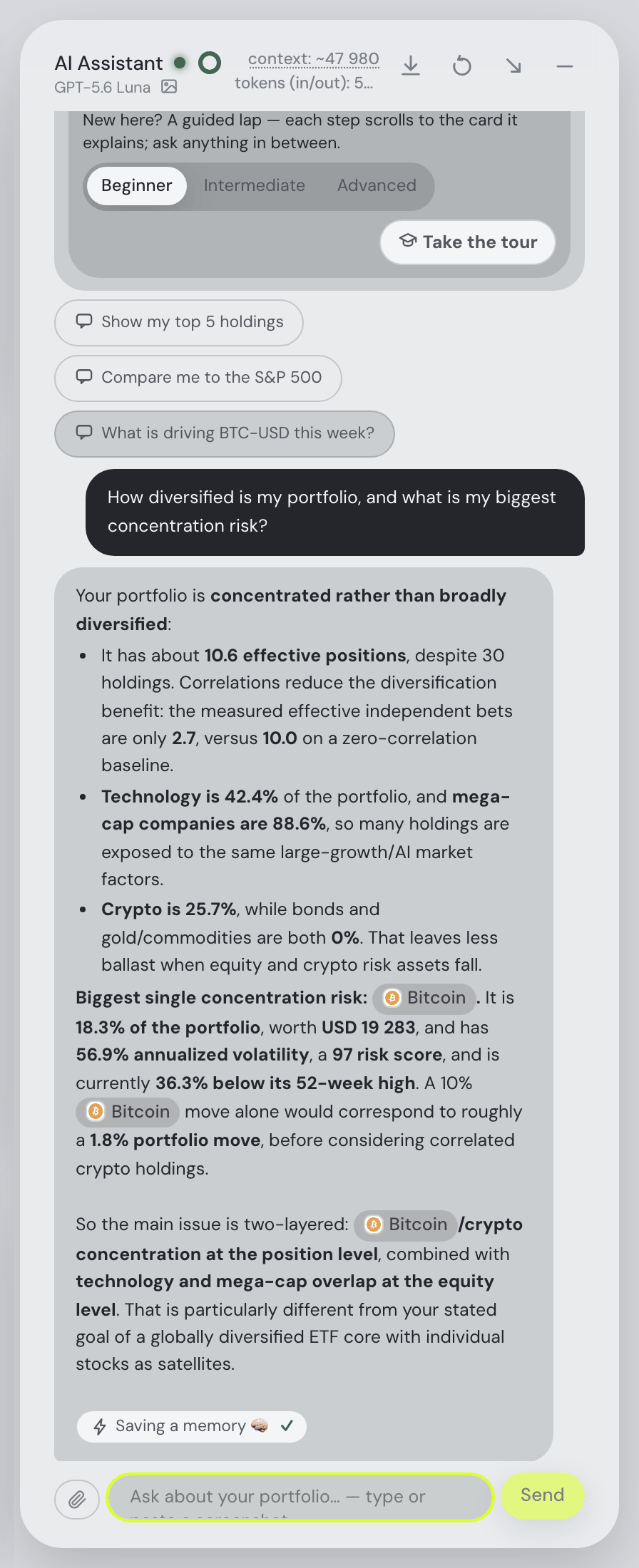
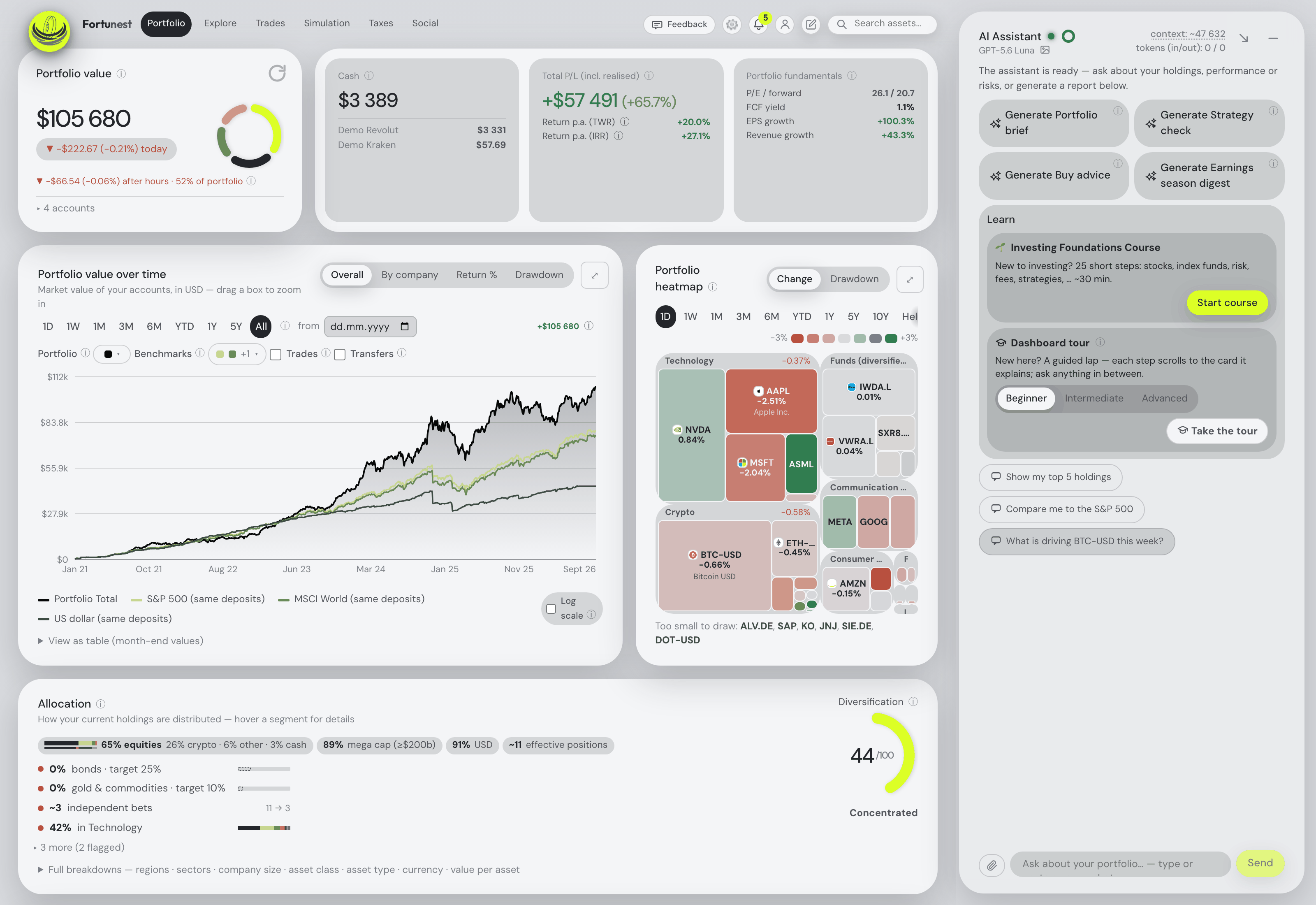
MCP is the connection protocol both Claude Code and Codex already speak, and it is the plumbing rather than the point. The point is that the agent stops guessing. Instead of pasting a screenshot or a table of holdings into a chat, it calls the tracker's own tools and gets the live numbers: what you hold, what it is worth in your display currency, how it has performed, where the concentration sits — in the client you were already working in.
The second half is that it can act. A connected agent in Fortunest uses the assistant's tools, calculations and context, and it can control one selected live dashboard and present attributed results — a command counts as complete only when that dashboard acknowledges it. Anything sensitive is shown with the exact inputs it would use, and you approve it once, reject it, or allow matching actions within argument bounds you choose for a limited time. That bounded permission defaults to 30 minutes and tops out at 8 hours. You can also approve all actions within one connection’s existing permissions for 1 hour or 8 hours; this does not grant new OAuth scopes. Later changes can invalidate a proposal or its undo, which is the right behaviour: a plan built on numbers that have since moved should not silently execute.
The third half — there are three — is the desktop app. In Settings → Assistant → External agents you connect the installed app's hosted portfolio, review both datasets and choose which one to keep; web and desktop then synchronise one portfolio and pause on conflicting edits. Your agent talks to a STDIO server named fortunest-desktop, pointed at the Fortunest executable.
Two guarantees are easy to assume and expensive to be wrong about. Agent result text cannot execute actions, and inline charts cannot fetch remote resources — so a model that reads something hostile in a filing summary cannot turn it into a command. And connecting an agent never exposes your provider API keys or your Fortunest login credentials. The setup walks through your chosen client with copyable commands, the consent step and a connection check, in the app and in the assistant manual alike.
Try a read-only connection first
- Open your hosted Fortunest portfolio and sign in to a Pro account. If this account is empty, Try with demo data provides a sample; otherwise use the holdings already there. Keep a dashboard open.
- Open Settings → Assistant → External agents → Connect to agent. Choose Codex or Claude Code and follow the current client-specific connection steps. Review the requested permissions at browser sign-in.
- Ask: “Summarise my top five holdings. Make no changes.” Compare the response with the Portfolio tab. Saving an MCP entry alone does not prove authentication succeeded.
- Keep this check read-only. Connection consent defines access; a sensitive action later needs approval unless covered by an active permission. The optional 1 hour or 8 hours connection-wide approval stays within existing scopes. Revoke the connection in the same settings section when finished.
Desktop requirement: use a compatible current build, keep the desktop app running, and connect its hosted portfolio first. Review both datasets and choose which to keep before synchronization. This bridge is an online, synchronized workflow; approvals and Undo are reviewed in the hosted app. Check published installer versions before assuming a downloaded build includes the latest connection workflow.
Worked example: check your five largest holdings
Question: which five positions make up the largest share of this portfolio? Start with an empty demo account on Pro, choose Try with demo data, and use EUR as the display currency. The example uses synthetic transactions; no personal portfolio is shown.
- Connect your MCP client using the steps above and keep the Fortunest dashboard open.
- Ask: “Summarise my top five holdings by current value and their combined portfolio weight. Make no changes.”
- In Portfolio → Holdings, sort by current value, largest first. Check that the same five symbols appear, that values use EUR, and that the combined weight equals the sum of the five position weights. Use unrounded weights when available; displayed percentages may round.
- Optionally ask the agent to present its result in the dashboard. Review the presentation approval if requested. This displays the readout; it does not buy, sell or edit holdings. The original read-only question needs no per-action approval after connection consent.
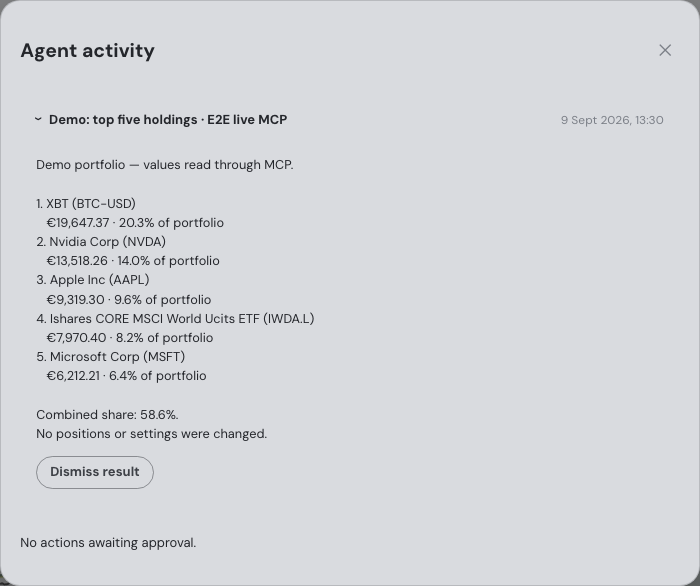
In this capture, Bitcoin, Nvidia, Apple, the MSCI World ETF and Microsoft account for 58.6% of the portfolio.
Check the result: download the question, five returned positions and verification record (JSON). The capture uses frozen market data. The download records the app's as-of date; it does not claim the quotes were fetched live that day. A fresh demo run uses available market data, so prices, ranking and percentages can change. Compare your agent's answer with your own Holdings table rather than requiring today's portfolio to match this screenshot.
The in-app assistant and an external agent are not the same thing
Confusing the two is the most common mistake here, and the plans differ. Fortunest's in-app assistant is a chat pane beside the dashboard on every tab; it is on the free plan, running by default on a hosted model with a small free budget, and you can point it at your own OpenAI, Anthropic or OpenRouter key, or at Ollama or LM Studio on your own machine. Its actions inside the app are automatically approved — there is no second dialog for a tab switch you just asked for.
An external agent is your Claude Code or Codex session, on your own subscription, reaching in from outside. No provider API key is needed for the Fortunest connection itself. Because the request comes from outside, it gets the stricter treatment: an Agent activity panel appears in Settings while an agent is connected, sensitive changes need the action approval or active permission described above, and completed action details and Undo are kept for seven days with minimal status history for ninety. External activity deliberately excludes your integrated chat history, so the two lanes stay legible.
A good first move after connecting is the read-only check the manual suggests: ask the agent to summarise your top five holdings and change nothing. If it comes back with your real positions, the grant took — a saved MCP configuration on its own does not mean authentication succeeded.
What the agent sees, and what it does not
A connected agent works through the assistant's own context — sent conversations, attachments, notes, memories, skills and reports — plus the live dashboard it has been pointed at. Imported raw CSV files are not automatically included in portfolio context. Attachments you deliberately send and authorized Assistant context can be read by the connected agent. Grants are made in that browser sign-in, require a recent sign-in, expire after 30 days, and are revocable earlier from the same settings panel.
The honest caveat is the one the manual itself states: review what you share with your chosen agent provider. Whatever the agent reads travels into your Claude or Codex session and therefore to that provider under their terms, not ours. If that is a line you would rather not cross, run Fortunest's desktop app with a local model instead, with cloud AI, hosted sync/MCP and sharing disabled, and review the separate online tax-calculation boundary — or use Wealthfolio, built around exactly that premise. The privacy chapter spells out what each mode sends.
The comparison
Each cell is what the vendor's own pages say, in the vendor's terms, on the date in the footnote. Not described means the page does not mention it. A green ✓ marks whichever product leads a row on that row's own terms — sometimes ours, often not.
| Fortunest1 | Wealthfolio2 | Parqet3 | getquin4 | Ghostfolio5 | |
|---|---|---|---|---|---|
| Agent clients named |
|
|
|
|
|
| How it connects |
|
|
|
|
|
| What the agent can read |
|
|
|
|
|
| What the agent can do |
|
|
|
|
|
| Approval model |
|
|
|
|
|
| Revoking & audit trail |
|
|
|
|
|
| Local / desktop option |
|
|
|
|
|
| Where the portfolio lives |
|
|
|
|
|
| Price for agent access |
|
|
|
|
|
Cells were checked against the sources below on 7 September 2026, except Ghostfolio's cloud pricing and copy-out prompt, checked on 19 August 2026 for our landing-page comparison. Prices are each vendor's list price before promotions and, for Fortunest, before VAT. "Not described" is a statement about those pages on that date, not about the product.
The verdicts
Fortunest — our pick
Best for: an investor who already works in Claude Code or Codex and wants the agent to read and change a full dashboard.
Free without an account · external agents on Pro, €6.99/mo or €69/yr
Fortunest is the only tracker here whose agent access is a two-way street with a real consent model behind it. One command adds the server to Claude Code or Codex, a browser sign-in shows the permissions being granted, and from then on the agent reads your live holdings, performance, tax lots and trade candidates, runs a what-if or a backtest, and changes settings — with sensitive changes approved individually or covered by an active permission. The desktop bridge extends the same thing to the installed app with one synchronised portfolio, and the grant expires after 30 days unless you renew it.
Where it falls short: agent access is Pro-only and free accounts cannot use MCP or portfolio sync at all; the desktop bridge needs the app running and its hosted portfolio connected first; and whatever the agent reads still goes to your own agent provider under their terms, which no consent dialog removes.
Wealthfolio
Best for: keeping the agent, the model and the data on your own machine.
Free and open source · Connect sync from $3.99/mo
Wealthfolio's MCP page is the most careful piece of security writing of the five. Access is a scoped token you create yourself, with an expiry from seven days to none; the desktop server binds to 127.0.0.1; agents reach data only through the same typed tool registry the built-in assistant uses, never the raw database; and every tool call is logged under Agent activity with its time, tool, outcome and token. A draft-only token can stage an activity but never commit it.
Where it falls short: the agent's reach stops at portfolio data — drafting activities and suggesting classifications rather than driving an application. Broker sync, device sync and household sharing sit behind the paid Connect subscription, which has no free tier. We did not check its importers, currencies or tax features here.
Parqet
Best for: German-speaking investors who want to talk to their portfolio in ChatGPT or Claude.
Basis €0 · Plus €11.99/mo · Investor €29.99/mo
Parqet's site advertises two AI integrations in its own words: a Claude one under “Sprich mit deinem Portfolio”, which answers questions and draws visualisations from your actual holdings, sectors and cashflows, and a ChatGPT one under “Recherche mit echtem Kontext”, for discussing ideas “auf Basis deiner echten Portfoliodaten statt allgemeiner Annahmen”. The examples shown are analytical — a dividend mix over the year, a concentration check. A genuinely useful lane, and a conversation rather than an agent.
Where it falls short: no MCP server, no Perplexity integration and no approval, permission or revocation model is described on the pages we read; the integrations are not listed as a feature of any plan, and the free Basis tier allows two integrations in total.
getquin
Best for: AI analysis you do not have to wire up yourself.
Free · Premium €89.99/yr · Wealth €149.99/yr
getquin keeps the intelligence inside its own product. The free plan carries unlimited bank and broker connections and essential analysis; Premium adds “AI-Powered portfolio analysis”, dividend KPIs and forecasting; Wealth adds financial planning, a retirement plan and “Unlimited access to AI financial agents”. For an investor who wants an answer rather than a setup, that is the shortest path in this table.
Where it falls short: nothing on its pricing page describes connecting an agent you already pay for, an MCP server, or what those “AI financial agents” may read or do. The AI is also the paid half of the product, so it is not like for like against a free assistant.
Ghostfolio
Best for: self-hosting the whole thing and wiring your own AI on top.
Self-hosted free — AGPL-3.0 · Cloud Premium from US$48/yr, one-time
Ghostfolio is the honest DIY answer. AGPL-3.0, runs in Docker on your own hardware, imports CSV and JSON and accepts transactions through a REST API; its README lists multi-account management, return on average investment over the usual windows, charts and a static risk analysis. Its AI story is an experimental prompt you copy into a chatbot yourself — which, with the API, is enough for a technical owner to build agent access of their own.
Where it falls short: no MCP server, consent model or audit trail is described, because there is no built-in agent to govern; there are no broker connections at all, so every trade arrives by file or API; and the cloud free tier is a summary rather than the whole product.
How we compared
We took the five trackers people name when they ask an assistant which portfolio app their AI agent can talk to, and read each vendor's own documentation, pricing and security pages rather than reviews. Where a page says nothing about a row, the cell says so — "not described" is about the page, not the product. Agent access changes fast, so every claim here is dated. We build Fortunest, so we are not neutral; the table is meant to be checkable rather than impartial, and each product's limits are in its own verdict, ours included.
Questions people ask
Is an MCP server safe for financial data?
It is as safe as its consent model, so read that before you connect. Fortunest's grant is made in a browser sign-in where you review the permissions, it expires after 30 days, and you can revoke it in Settings. Sensitive changes are shown with their exact inputs for you to approve once, reject, or allow within argument bounds for a limited time — 30 minutes by default, 8 hours at most. You can also approve all actions within the connection’s existing scopes for 1 hour or 8 hours. Connecting an agent never exposes your provider API keys or your Fortunest login. Wealthfolio takes the local route: scoped, revocable tokens and a server bound to 127.0.0.1.
Which AI agents can I connect to my portfolio?
Fortunest documents the Codex app, the Claude app, ChatGPT, the MCP Agent iPhone app (Siri and Shortcuts), the Codex CLI and Claude Code, over Streamable HTTP for the hosted portfolio and over a STDIO bridge for the installed desktop app. The server is standard MCP, so any other agent or model runtime that speaks the protocol over one of those two transports can be configured against the same endpoints; Codex and Claude Code are the documented, supported clients. Wealthfolio's MCP page names Claude Desktop, Claude Code, Cursor, Windsurf, Cline and VS Code. Parqet lists ChatGPT and Claude integrations of its own on its site. getquin's AI is inside its own product, and Ghostfolio offers a prompt you copy out — neither describes an MCP server. The exact commands are in the External agents section.
Does the MCP server work with the desktop app?
Yes, through a bridge rather than directly, with a compatible desktop release and a synchronized hosted portfolio. You connect the desktop app's hosted portfolio in Settings, review both datasets and choose which one to keep — a backup preserves the replaced inputs — after which web and desktop synchronise one portfolio. Your agent then runs a STDIO MCP server named fortunest-desktop, pointed at the Fortunest executable. The bridge opens browser sign-in itself, and the desktop app has to stay running. The download page has the builds; Windows is not yet code-signed.
What does the agent actually see when it reads my portfolio?
It uses the assistant's own tools, calculations and context — which includes sent conversations, attachments, notes, memories, skills and reports — and it can control one selected live dashboard. Imported raw CSV files are not automatically included in portfolio context. Attachments you deliberately send and authorized Assistant context can be read by the connected agent. External agent activity excludes your integrated chat history, and everything a connected agent did is listed under Agent activity in Settings. Whatever the agent reads does travel to your agent's own provider, so read their terms too.
Do I need a paid plan to connect Claude Code or Codex?
For Fortunest, yes: external agents over MCP are a Pro feature at €6.99 a month or €69 a year, and free accounts cannot use MCP or portfolio synchronisation. No provider API key is needed for the Fortunest connection itself — you use the agent subscription you already have. The in-app assistant is different: it answers on the free plan, on a small hosted budget or on a local model you run yourself. Wealthfolio's MCP server is part of a free, open-source app.
Sources
- Fortunest — the assistant manual's External agents and What you share and approve sections, the Privacy chapter and plans and pricing.
- Wealthfolio — product site, MCP Server (Agent Access), AI Assistant and Connect plans (7 September 2026).
- Parqet — product site, AI integrations section and Preise & Pläne (7 September 2026).
- getquin — pricing (7 September 2026) and its security page (19 August 2026).
- Ghostfolio — the source repository and README (7 September 2026), plus its features and pricing pages (19 August 2026).
Signals, analyses and assistant answers in Fortunest are informational — not financial or tax advice.