Guides · Updated 7 September 2026
The best AI portfolio tracker in 2026
If you want an assistant that answers about your holdings rather than the market in general — explaining any metric with the numbers the card is showing, filtering the holdings table from a sentence, pulling any company's quote, news, earnings and its own SEC filing, reading the positions out of a screenshot you paste — and that then changes the dashboard when you ask, runs on a model on your own machine, and on Pro hands the same portfolio to Claude Code, Codex or another MCP agent, Fortunest is our pick. Wealthfolio is the strongest local-first alternative; Portfolio Genius goes furthest towards trading for you.
The short answer
- Our pick: Fortunest — on one stated criterion: the assistant reads the actual portfolio and the screen you are on — explaining every metric on your own numbers, filtering holdings by a sentence, looking up any company's quote, news, earnings and SEC filing — drives the dashboard, takes attachments, runs on a local model, and on Pro plugs into Claude Code or Codex over MCP. No other product here does all five. Free plan included; Pro €69 a year.
- Local-first: Wealthfolio — open-source desktop app, Ollama as the default AI provider, an MCP server for Claude Code with read-only tokens. Free with your own key.
- Most models, and it will trade: Portfolio Genius — "over 21 AI models" from four providers, daily reviews, optional live execution through Alpaca. From $10 a month; no free plan.
- Your balance sheet inside ChatGPT or Claude: Kubera — connectors for five assistants plus a local-model export, over a net-worth ledger including property. From $250 a year.
- Your existing chatbot, cheaply: Parqet — ChatGPT, Claude and Perplexity integrations, two of them on the free Basis plan, with read or write scopes you choose.
What "the AI reads your portfolio" has to mean
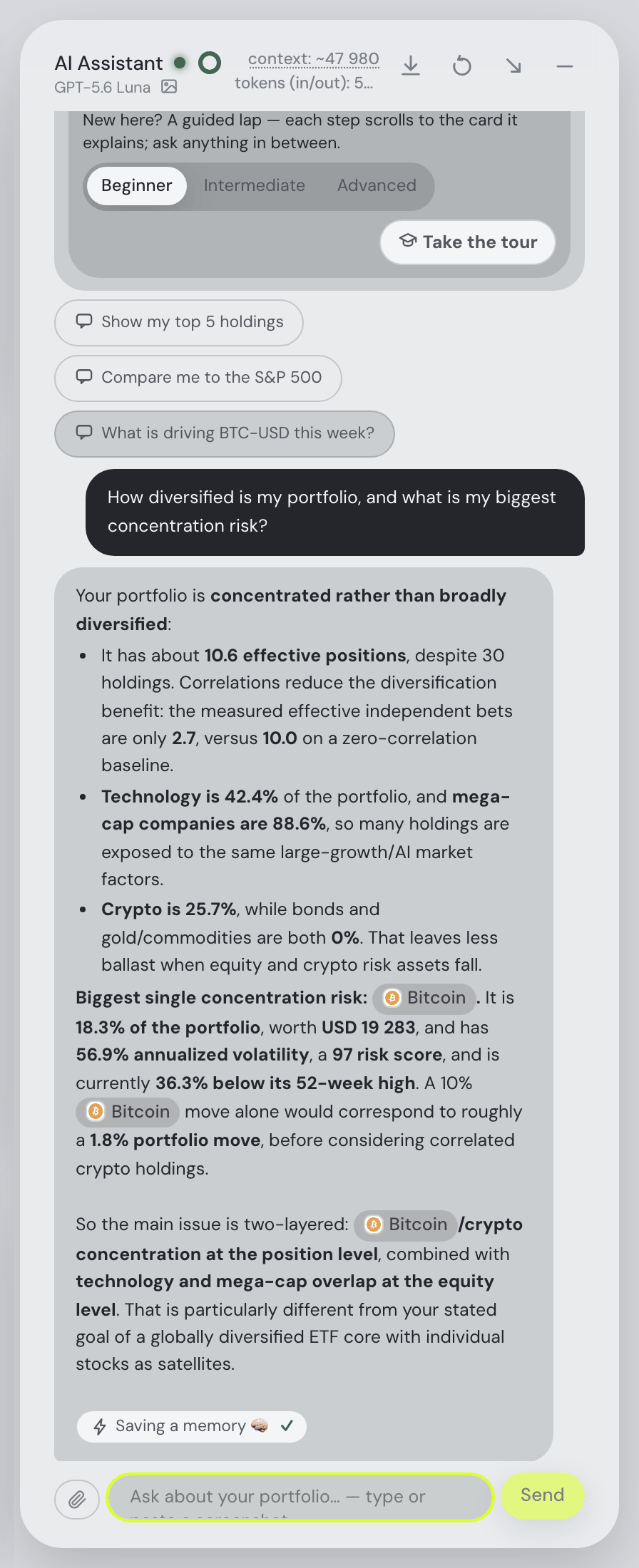
Almost every tracker on the market now says "AI". The word covers at least four different things, and the difference matters more than the branding does. The weakest version is a general market chatbot bolted to the side of the app: it knows what a P/E ratio is, and nothing about you. The next is a summary generated on a schedule — a weekly note about your holdings that you read rather than talk to. The third is your own assistant, in its own window, given a copy of your portfolio to reason over. The fourth is an assistant that lives inside the app, sees the state you are looking at, and can act on it.
Our criterion for this page is the fourth kind, spelled out as five checkable things: the assistant reads the actual portfolio rather than a description of it; it can change the dashboard on request; it accepts attachments, so a broker statement or a screenshot of a position list becomes data; it can run on a model on your own machine, so the conversation need never leave it; and — for people who already live in a terminal — an external agent such as Claude Code or Codex can reach the same portfolio through MCP. Fortunest is our pick because it is the only one of the seven that does all five, and we say that as the people who build it. (For the broader field, rather than the AI question alone, see the European investors guide.)
The fourth kind is worth wanting because it removes the copy-and-paste step, and copy-and-paste is where the errors live: a pasted table cannot know about yesterday's deposit. It matters just as much that the numbers come from the engine rather than the language model. In Fortunest the model reasons and explains; the effective position count, the sector weights and the concentration ranking in the screenshot beside this paragraph come from the same code that draws the allocation card.
Two caveats before the table. "It can act" is a spectrum with a sharp edge at the end — Portfolio Genius will place real orders through an Alpaca account, and Fortunest deliberately contains no order-placing code at all. And several vendors below describe their AI in a single sentence, so "Not described" appears often; it is a statement about the page on the date we read it, not about the product.
The comparison
Each cell is what the vendor's own pages say, in the vendor's terms, on the date in the footnote. A green ✓ marks whichever product leads a row on that row's own terms — sometimes ours, often not.
| Fortunest1 | Portfolio Genius2 | getquin3 | Parqet4 | AllInvestView5 | Wealthfolio6 | Kubera7 | |
|---|---|---|---|---|---|---|---|
| Where it runs |
|
|
|
|
|
|
|
| Account & free plan |
|
|
|
|
|
|
|
| What the assistant can see |
|
|
|
|
|
|
|
| What it can do |
|
|
|
|
|
|
|
| Models & providers |
|
|
|
|
|
|
|
| Local model |
|
|
|
|
|
|
|
| What the AI costs |
|
|
|
|
|
|
|
| Attachments |
|
|
|
|
|
|
|
| Prompt data & keys |
|
|
|
|
|
|
|
| External agents (MCP) |
|
|
|
|
|
|
|
| Getting the data in |
|
|
|
|
|
|
|
Cells were checked against the sources below on 7 September 2026; getquin's connection count is from its pages as read on 19 August 2026. Prices are each vendor's list price before promotions and, for Fortunest, before VAT. "Not described" is a statement about those pages on that date, not about the product — several of these assistants shipped in the last few months and are documented thinly.
The verdicts
Fortunest — our pick
Best for: an assistant that is part of the dashboard rather than a chat window beside it.
Free without an account · Pro €6.99/mo or €69/yr
The assistant sits on every tab and sees what you see: your holdings, the screen you are on, your last actions. Ask it about concentration, dividends or fees and you get the engine's own numbers back; tell it to do something — switch tabs, add a custom asset, change a setting, run a what-if trade, launch a backtest of your trade plan — and the result arrives as a card. Attach a broker statement, a PDF or a screenshot of a position list and it reads them. It runs on OpenAI, Anthropic, OpenRouter, or on Ollama and LM Studio locally, which is where the desktop app starts. Two things make it more than a chat window: the numbers in the answer are the engine's, not the model's arithmetic, and it can look outward as well as inward — name any company, held or not, and you get the quote, the ratios, the headlines, the next earnings date and the company's own results filing from the SEC. Pro adds the agentic half: an MCP server that gives Claude Code, Codex or another MCP client the same tools, context and reports, and control of one live dashboard, with sensitive actions shown for approval before they run. The detail is in the Assistant chapter.
Where it falls short: on the hosted web app a local model needs a tunnel, so "fully private AI" really means the desktop app; the free budget is small and metered in cost rather than questions; there is no native mobile app yet; the MCP server needs Pro; and the assistant places no orders, which is a deliberate limit rather than a missing feature.
Wealthfolio
Best for: a local-first, open-source app whose AI defaults to your own machine.
Core app free · Connect from $3.99/mo (Essentials $7.99/mo)
Wealthfolio runs on macOS, Windows, Linux, iPhone and iPad, or self-hosted in Docker, and keeps its data in a local SQLite file. Its assistant offers six providers — Ollama first, then Anthropic, OpenAI, Google AI, Groq and OpenRouter, plus any OpenAI-compatible endpoint — with read-only tools for holdings, performance, activities and allocation, and mutation tools that "always require explicit user confirmation". The MCP server exposes the same typed tools to Claude Desktop, Claude Code, Cursor, Windsurf, Cline and VS Code, with tokens read-only unless you widen them.
Where it falls short: broker sync and cross-device sync live in the paid Connect service, and its pages do not make clear which AI features need it; the docs describe no dashboard-driving beyond recording activities; and the Windows installer is known to trip SmartScreen, which its own FAQ documents.
Portfolio Genius
Best for: US accounts, many models, and letting an agent execute.
Lite $10/mo or $100/yr · Premium $20/mo or $200/yr · 7-day trial
Portfolio Genius syncs from "2,400+ institutions" through Plaid, imports CSV from Fidelity, Schwab, Vanguard, Robinhood, E*Trade and Interactive Brokers, and will read a screenshot of your holdings. It runs "over 21 AI models" from OpenAI, Google, Anthropic and xAI — five on Lite, all of them on Premium — for weekly or daily portfolio reviews, drift alerts and trade suggestions with a stated rationale. Its distinguishing feature is agentic trading: paper-trading bots on a leaderboard, and full auto-execution through a connected Alpaca brokerage account.
Where it falls short: no free plan and no local model described; the CSV list and the brokerage integrations are US-centric; nothing on the pages we read describes what happens to your prompt data or where it is stored; and the trading autopilot is a very different risk profile from a tracker.
Kubera
Best for: putting a whole net-worth balance sheet — property and private holdings included — into ChatGPT or Claude.
Essentials $250/yr · Black $2,500/yr · 14-day trial
Kubera has no assistant of its own; it is the data side of the connection. You authorise it in ChatGPT and mention @kubera, add it in Claude as a connector "powered by Model Context Protocol", wire it into Grok or the Gemini CLI, or export a markdown file and drop it into Ollama or LM Studio for a fully local session. The assistant then answers about your real net worth, allocation, crypto exposure and CAGR. Kubera states that it "never sees your chatbot interactions", and that data is encrypted at rest on AWS — explicitly "Not end-to-end", because the server has to read it.
Where it falls short: the price is an order of magnitude above the rest of this table; the exported data is "static per session", so you refresh to see changes; the assistant cannot change anything in Kubera; and there is no free plan.
Parqet
Best for: German-speaking investors who want their existing chatbot to read the portfolio.
Basis €0 · Plus €11.99/mo · Investor €29.99/mo
Parqet's answer to AI is integrations: over twenty external apps, including ChatGPT, Claude and Perplexity, that talk to your Parqet portfolio. You start in the external app, are redirected to Parqet to authorise, and choose which portfolios the integration may reach. Reading integrations "can view your data, but change nothing in your portfolio"; writing ones can create activities, but never inside your existing portfolios. Two integrations are included on the free Basis plan, five on Plus and twenty on Investor; the rest of the product is compared on the Fortunest vs Parqet page.
Where it falls short: there is no assistant inside Parqet, so nothing drives the app for you; the model, the cost and the privacy of the conversation are your chatbot provider's business, not Parqet's; and the site, the support and the tax dashboard are German-first.
getquin
Best for: the widest bank and broker coverage, with AI as a paid analysis layer.
Free 0 €/yr · Premium €89.99/yr · Wealth €149.99/yr
getquin's free plan is unusually generous on connections — unlimited bank and broker links, real-time data, a net-worth overview and what it calls essential portfolio analysis. The AI arrives above that: "AI-Powered portfolio analysis" on Premium, and "Unlimited access to AI financial agents" on Wealth, aimed at returns, risks, dividends and performance drivers. Data is stated to sit in Germany and Europe under AES-256; the head-to-head is on the Fortunest vs getquin page.
Where it falls short: the model and provider behind the AI are not named anywhere we could find, nor is what happens to the prompt; the assistant analyses rather than acts; there is no local option; and you need an account before you see anything at all.
AllInvestView
Best for: an AI assistant on a genuinely free plan, if ten holdings is enough.
Free forever — 10 holdings, 1 portfolio · paid plans priced on the page
AllInvestView is the only product here besides Fortunest that lists an AI assistant on its free tier. The free plan gives you ten holdings, five bonds and cash positions, five watchlist items, one portfolio, five-year performance tracking, broker CSV import with auto-detection, multi-currency across 80+ exchanges and tax reports for 12+ jurisdictions; linking a brokerage starts on Starter, which covers 40+ brokers.
Where it falls short: the assistant is a line item rather than a documented feature — the model, the data it sees and what it can do are all undescribed; the plan prices did not render when we fetched the pricing page; and ten holdings is a tight ceiling for anyone with more than one account.
How we compared
We took the products people name when they ask an assistant for "an AI portfolio tracker", and read each vendor's own pricing, feature, documentation and privacy pages rather than any review site. Every row is checkable on those pages on the date in the footnote, and where a page is silent the cell says so. We build Fortunest, so we are not neutral; what we offer instead is a stated criterion and a limits paragraph on our own product as unsparing as everybody else's. Two of the seven beat us outright: Wealthfolio on prompt privacy and agent access, Portfolio Genius on the number of models.
What the Fortunest assistant can actually tell you
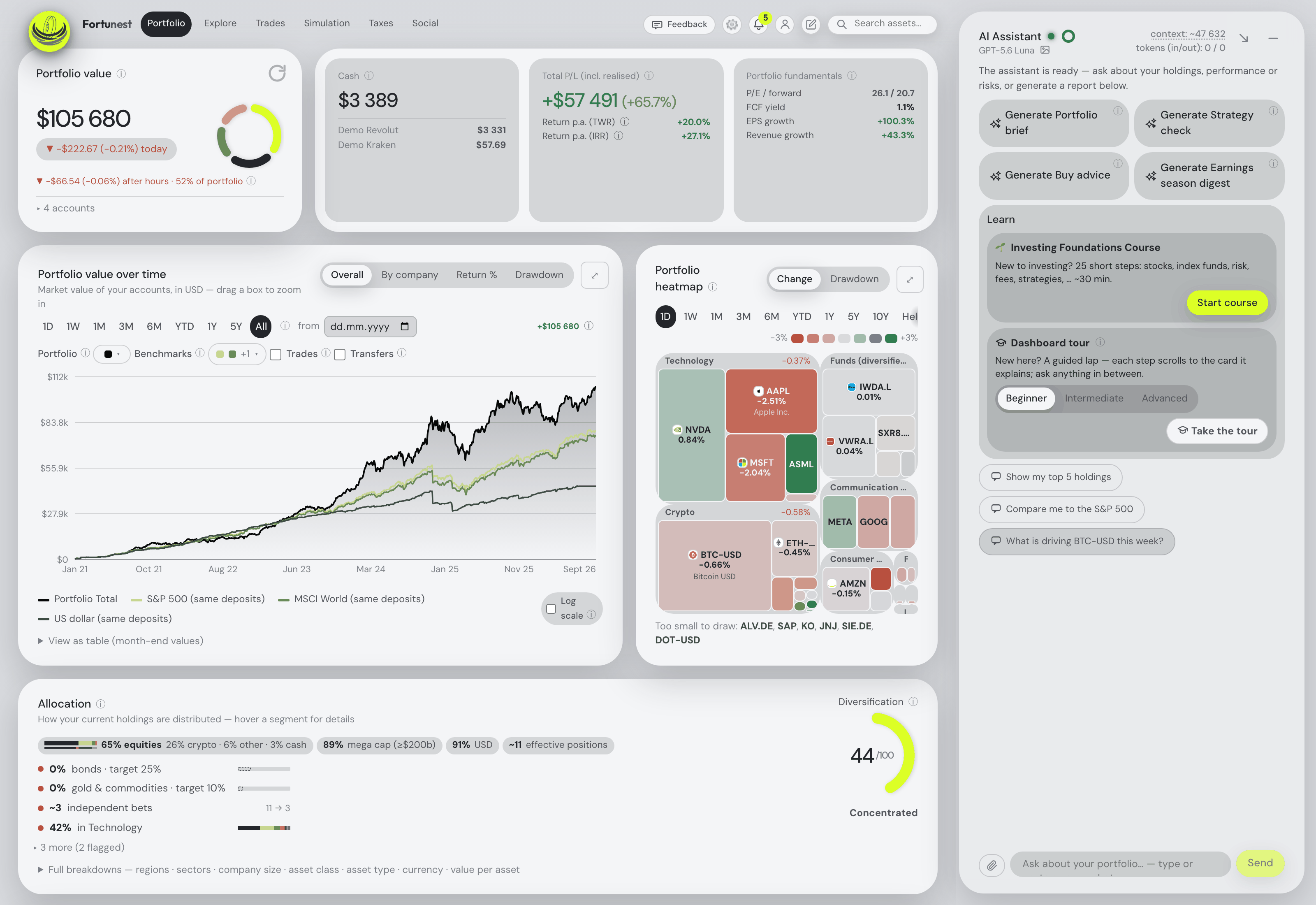
Since this is the criterion we ask to be judged on, here is the specific version rather than the adjective. Point at any figure on the screen and it explains both what the metric means and what your value means — TWR against IRR, Sharpe and Sortino, beta, maximum drawdown, the diversification score, effective positions, the fair-value gap, what a fund's TER costs you a year — using the numbers the card itself displays. Ask for "my worst performers this year" or "my best PEG holdings" and it sets the holdings filter and comments on what is left. Name any company, held or not, and you get the live quote, the valuation, growth, quality and debt ratios, the 52-week range, the analyst target, the latest headlines with links, the next earnings and dividend dates, and the company's own results filing from the SEC, so a question about a quarter quotes revenue, margins and guidance as the company wrote them. Missing data is reported with its reason rather than guessed. It will explain why the Trades tab scored a candidate the way it did and what limited the plan, interpret a what-if, a projection or a backtest with the assumptions behind it, give tax orientation on Pro — what is sellable tax-free, which lots mature within twelve months — and add an asset from a sentence, an attached file or a brokerage screenshot. Four one-click reports run a prompt you can read in full: Portfolio brief, Strategy check, Buy advice (scenarios to research, never advice) and, as a season wraps, an Earnings season digest. The full inventory is in what the AI can tell you about your portfolio; the agent side is in your portfolio inside Claude Code, Codex and any MCP agent.
Questions people ask
What is the best AI portfolio tracker in 2026?
On the criterion of this guide — an assistant that reads your real holdings, can change the dashboard, takes attachments, runs on a local model and plugs into Claude Code or Codex — our pick is Fortunest, and we build it. Wealthfolio is the strongest local-first alternative, with an open MCP server and Ollama as its default provider. Portfolio Genius goes furthest in the other direction: it will place the trades through an Alpaca account.
Can an AI portfolio assistant see my actual holdings?
It depends on the product. Fortunest's assistant sees your live holdings, the tab you are on and your last actions, answers with the same numbers the cards on screen display, and will look up any company you name, held or not. Wealthfolio's has read-only tools for holdings, performance, activities and allocation. Kubera exports your balance sheet into the chat session, static until you refresh it. Parqet lets you grant ChatGPT, Claude or Perplexity access to chosen portfolios. Portfolio Genius reads what you synced by Plaid, imported by CSV or uploaded as a screenshot.
Which portfolio tracker works with Claude Code or an MCP client?
Three of the seven. Wealthfolio ships an MCP server for Claude Desktop, Claude Code, Cursor, Windsurf, Cline and VS Code, with read-only tokens by default. Kubera is a connector for Claude, Perplexity, Grok and the Gemini CLI. Fortunest's Pro plan connects Claude Code and Codex over MCP to the live dashboard — hosted over Streamable HTTP, or a STDIO server run from the desktop app — and because it is a standard MCP server, other MCP clients can be pointed at it, though those two are the ones we document and support. Parqet's ChatGPT, Claude and Perplexity integrations are the same idea from the portfolio's side. The setup for ours is in the MCP guide.
Is there a portfolio AI that runs on a local model?
Yes. Wealthfolio's default provider is Ollama, running free on your own machine. Fortunest auto-detects Ollama and LM Studio, and on the desktop app a local model is where you start, so the conversation never leaves the machine; on the hosted web app a local model needs a tunnel. Kubera offers a markdown export you can drop into Ollama or LM Studio. The other four do not describe a local option. More in the privacy-first guide.
How much does the AI feature cost in a portfolio tracker?
It ranges from nothing to 250 dollars a year. Fortunest includes the assistant on the free plan with a small metered budget on our own key, and Pro at 6.99 euro a month or 69 euro a year doubles it. Wealthfolio's assistant is free with your own API key. AllInvestView lists an AI assistant on every plan including the free one. getquin puts AI analysis on Premium at 89.99 euro a year, Portfolio Genius charges from 10 dollars a month, and Kubera starts at 250 dollars a year.
Do these assistants send my portfolio to an AI company?
Any hosted model does, by definition, so read what each vendor says. Fortunest sends only the derived portfolio context an answer needs, never your raw CSVs, and nothing goes anywhere until you ask a question; API keys are encrypted on the server rather than kept in the browser. Wealthfolio keeps keys in a local key store and states the raw database is never handed to a model. Kubera states it never sees your chatbot conversations. Parqet, Portfolio Genius, getquin and AllInvestView do not describe prompt handling on the pages we read.
Sources
- Fortunest — the Assistant chapter (providers, actions, attachments, the free budget), external agents over MCP, the Privacy chapter on what reaches an LLM and plans and pricing.
- Portfolio Genius — portfoliogenius.ai, whose home page carries the plan table and the FAQ we quote (7 September 2026).
- getquin — pricing and getquin AI (7 September 2026); connection count and hosting from its pages on 19 August 2026.
- Parqet — Preise & Pläne and the integrations announcement (7 September 2026).
- AllInvestView — pricing (7 September 2026).
- Wealthfolio — product site, AI assistant docs, MCP server docs, Connect and the FAQ (7 September 2026).
- Kubera — home and plans, security, Kubera with AI assistants and how the chatbot integration works (7 September 2026).
Signals, analyses and assistant answers in Fortunest are informational — not financial or tax advice.