Guides · Updated 8 October 2026
Interactive Brokers portfolio tracker: the Flex token, the Activity Statement, or both
Interactive Brokers gives a tracker two ways in: a read-only Flex Web Service token that downloads a report you designed, and the yearly Activity Statement you probably already hand to your tax adviser. Lynx accounts produce exactly the same two, because Lynx clients log into the same Client Portal. Fortunest reads both — the token for keeping the last year current, the statements for the full history — and it is our pick for an IBKR account that has to sit beside other brokers and crypto. Sharesight connects with the same kind of token; Portfolio Performance and Parqet read a Flex file you run by hand.
The short answer
- The token keeps it current; the statements make it complete. A Flex query's own date period bounds every download, so a connection sees one rolling window. The yearly Activity Statements are the whole record — upload them once, and let the token carry on from there.
- Our pick: Fortunest — a direct Flex Web Service connection with your own token, and both IBKR files: the Activity Statement (dividends, withholding tax, interest, currency conversions, splits, share transfers) and a Flex Query CSV. Free without an account for the files; the connection needs a free Fortunest account. Pro is €69 a year.
- Also a live feed: Sharesight — an "Interactive Brokers (Web Service)" connection with a token and query ID, plus a Flex Query CSV for older trades. Standard buys and sells; short selling is not supported.
- Free and local: Portfolio Performance — an Activity Flex Query saved as XML and imported by hand, with a documented way to split IBKR's several currency balances into separate deposit accounts.
- Files only: Parqet — a Flex Query with Cash Transactions and Trades, exported as CSV and dragged in. getquin describes an open-banking connection; Ghostfolio describes no IBKR importer at all.
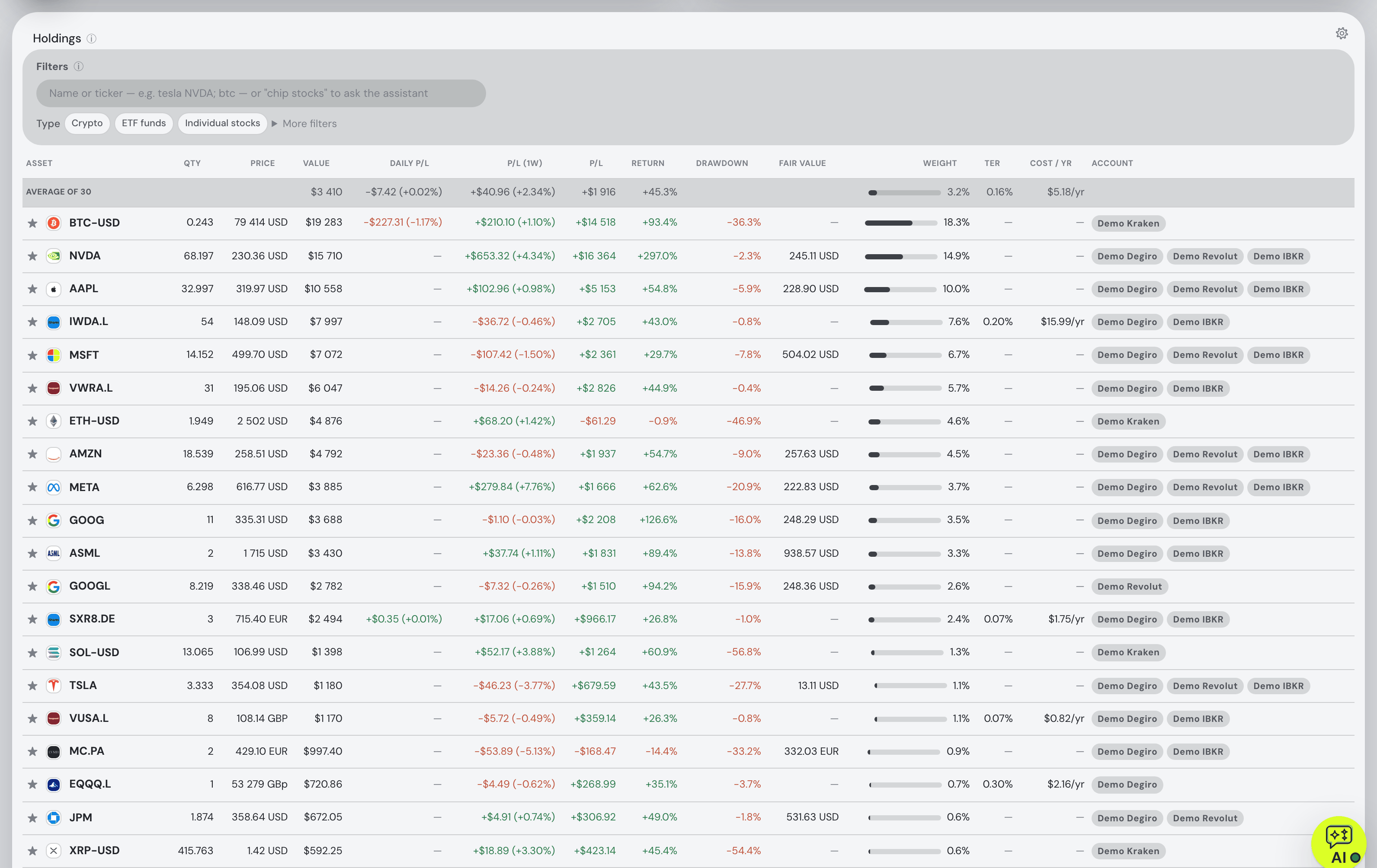
How to connect IBKR or Lynx, or export the history
The steps below follow the Interactive Brokers section of the docs and the connect form in the app. Both routes start in Client Portal, the same one Lynx clients use.
- Save an Activity Flex Query Open Performance & Reports → Flex Queries and create an Activity Flex Query with the sections Trades (executions), Open Positions (summary), Cash Transactions and Cash Report. Set the period to Last 365 Calendar Days and the format to XML, and note the query ID.
- Switch the Flex Web Service on and take a token On the same page open Flex Web Service Configuration, click the gear, turn the service on and press Generate A New Token. Give it a long expiry — an expired token stops every sync — and set the IP restriction IBKR offers. The token can only download reports; no trading scope exists for it.
- Paste both into Fortunest Signed in to the app, open ⚙ Settings → Data → Connect an account, pick IBKR / Lynx (Flex) and paste the token and the query ID. They are checked live and nothing is stored unless they work; the token is then encrypted at rest and never sent back to your browser.
- Add the years before the window Anything older than the query's 365 days arrives as opening positions — what you held, without the trades behind it. For the full record open Performance & Reports → Statements, choose the Activity statement, Annual, CSV, download every year and drop them all in together. No account is needed for files.
Upload the statements first, then connect: on its first sync the connection sees your IBKR files and stays on files first — it takes over the day after the newest row they cover, so the same trade is not counted twice. A brand-new or idle account may answer that it has no statement yet — Flex data comes out of IBKR's overnight run, so the first sync picks it up the day after the first activity.
What a tracker has to get right in an IBKR account
Three details separate a correct IBKR import from a tidy-looking one. Currency conversions are trades in their own right — selling EUR.USD is euros out and dollars in — and both legs have to land, or the cash in each currency drifts. Securities change identifiers: older statements print a North American security's CUSIP where newer ones print its ISIN, and a tracker that does not join them splits one holding into two. And moving to a new account number shows up as every position leaving one account and arriving in another; read naively, that is a sale and a purchase, and a lost holding period.
Fortunest handles all three. Conversions are read as the two cash movements they are; CUSIPs are converted using the listing exchange so a 2019 purchase and a 2022 sale are one holding; and when you upload the statements of both accounts (or one consolidated statement), a move between them is read as your own shares changing account — the Taxes tab keeps each lot's original purchase date, so the three-year time test still runs from the day you bought. Dividends and payments in lieu, the withholding tax taken from them, fees, interest, deposits, withdrawals, splits, reverse splits, ISIN changes and mergers come in too.
What does not: options, futures, bonds and CFDs are counted and reported on the Portfolio tab rather than imported, and a short position is not modelled — its sale and buy-back import as the trades they are. Once it is in, the account is part of one portfolio: the Portfolio tab converts every day at that day's rate and reports TWR and IRR against benchmarks fed your own deposits, and the assistant answers about the actual holdings. Add the exports of the other supported platforms or a Kraken key and it is all one history.
The trackers that read an Interactive Brokers account
Each cell is what the vendor's own pages say, checked in October 2026. Not described means the page we read does not mention it. A green ✓ marks whichever product leads a row on that row's own terms.
| Fortunest1 | Sharesight2 | Portfolio Performance3 | Parqet4 | getquin5 | Ghostfolio6 | |
|---|---|---|---|---|---|---|
| How IBKR gets in |
|
|
|
|
|
|
| What the pages say comes in |
|
|
|
|
|
|
| Lynx |
|
|
|
|
|
|
| Free plan |
|
|
|
|
|
|
| Paid from |
|
|
|
|
|
|
Cells were checked against the sources below in October 2026. Parqet's Interactive Brokers guide is a blog post dated 7 November 2022, so IBKR's menu names may have moved since. Prices are list prices before promotions and, for Fortunest, before VAT. "Not described" and "not mentioned" are statements about those pages on that date, not about the product.
The verdicts
Fortunest — our pick
Best for: an IBKR or Lynx account that has to become one portfolio with your other brokers and exchanges.
Free without an account · Pro €6.99/mo or €69/yr
It is the only tracker here that reads both IBKR files and connects the token as well, so the full history and the current year come from one place. The Activity Statement brings what a trades-only export leaves out — dividends, withholding tax, interest, currency conversions, splits and share transfers — and a move to a new account number keeps your purchase dates for the time test. Everything then shares one currency, one set of benchmarks and one assistant.
Where it falls short: the connection only sees the query's 365-day window, so the history before it has to come from statements; options, futures, bonds and CFDs are not imported and short positions are not modelled; a portfolio holds one direct IBKR connection, so several accounts are easier as files; there is no native mobile app yet; and the Taxes tab is Pro with a Czech-default rulebook and no per-country presets.
Portfolio Performance
Best for: a free, local tracker and an investor happy to re-run a report by hand.
Open source · Windows, macOS, Linux and mobile apps
Its own help pages document an Activity Flex Query importer: enable Account Information, Cash Transactions, Corporate Actions, Sales Tax Details and Trades, set "Include Currency Rates?" to Yes, run the query and import the XML through File → Import → Interactive Brokers: Activity Flex Query. Several IBKR accounts can come through one query.
Where it falls short: every update is a file you download and import yourself; and because a securities account has one reference account, IBKR's several currency balances need one deposit account each, named after the reference account.
Parqet
Best for: German-speaking investors already keeping other depots in Parqet.
Basis €0 · Plus €11.99/mo · Investor €29.99/mo
Parqet's guide has you create a Flex Query with the Cash Transactions and Trades sections, export it as CSV for the period you want and drag the file into the portfolio; it reads the activity data including the ISIN and states that no personal data is captured.
Where it falls short: file import only for IBKR — the autosync brokers named on the pricing page are five German ones; the guide dates from 2022; and the free tier is one portfolio with two integrations.
getquin
Best for: a connected portfolio with a community attached.
Free €0 · Premium €89.99/yr · Wealth €149.99/yr
getquin's help article for Interactive Brokers offers an open-banking "Automatic connection", picked when you create a portfolio, or manual entry. The free plan advertises unlimited bank and broker connections.
Where it falls short: the article does not say what syncs or how far back, and describes no file import — so the Activity Statement you already have cannot be the fallback.
Ghostfolio
Best for: running your own server and entering trades yourself.
Open source (AGPLv3) — self-hosted
Ghostfolio is free to self-host and imports activities through its own API in its own format, alongside manual entry.
Where it falls short: its project page describes no Interactive Brokers importer and no broker connections, so an IBKR history has to be converted into its format first.
For Czech and Slovak IBKR and Lynx clients
Two Czech tools are built around the tax return rather than the portfolio. Hedger names IBKR as a primary broker with a daily autosync, works out FIFO cost basis at ČNB rates, tracks the three-year test and exports XML for the tax portal — and says it is a free open beta whose numbers may contain errors. Taxomat lists Interactive Brokers and LYNX among 27+ platforms, says IBKR connects by API, and prepares the XML for MOJE daně. Fortunest is the tracker first: its Taxes tab (Pro) pairs every sale with the lots it consumed and shows which open lots have passed the time test, as orientation rather than a filing.
How we compared
We read each vendor's own help, import and pricing pages rather than a review site, and where a page says nothing about a row, the cell says so. We build Fortunest, so we are not neutral: the table is meant to be checkable rather than impartial, and every product's limits are in its verdict, ours included.
Questions people ask
Can a portfolio tracker read Interactive Brokers through an API?
Yes, through IBKR's Flex Web Service: you save an Activity Flex Query in Client Portal, switch the service on and generate a token. The token can only download reports, so it is read-only by construction. Fortunest and Sharesight both connect with a token and a query ID; Portfolio Performance and Parqet read a Flex Query file you run by hand instead.
Does it work for Lynx accounts?
Yes. Lynx clients log into the same IBKR Client Portal, so the Activity Statement, the Flex Query and the Flex Web Service token are the same as for an IBKR account, and Fortunest reads them the same way. Of the vendor pages we read for this guide, none of the other trackers mentions Lynx by name.
Activity Statement or Flex Query — which should I upload?
For a complete history, the yearly Activity Statements: one CSV per year, with dividends, withholding tax, fees, interest, currency conversions, splits and share transfers. A Flex Query file brings the trades. Pick one of the two for any stretch of time rather than both, because a Flex query exported per execution lists every fill on its own line while the statement adds an order's fills up, so a partly filled order could be counted twice.
Can I track several IBKR accounts?
Yes, as files: upload each account's yearly Activity Statement, or one consolidated statement covering them; rows two files share are counted once, and a move between two of your accounts keeps each lot's original purchase date when both sides are uploaded. A portfolio holds one direct IBKR connection, so with several accounts the statements are the simpler route.
Is there a free Interactive Brokers portfolio tracker?
Fortunest's free plan reads the Activity Statement and Flex Query files without an account and covers three accounts and fifty assets; the direct Flex connection needs a free Fortunest account. Portfolio Performance and Ghostfolio are open source. Sharesight's free plan is one portfolio with ten holdings, Parqet's Basis plan one portfolio, and getquin has a free plan. More in the free trackers guide.
Sources
- Fortunest — the Interactive Brokers walkthrough, connecting an account, every supported platform, the Taxes chapter and the Privacy chapter.
- Sharesight — Interactive Brokers partner page and pricing (October 2026).
- Portfolio Performance — ibflex import and home page (October 2026).
- Parqet — Zero-Click Import now supports Interactive Brokers and pricing (October 2026).
- getquin — Interactive Brokers help article and pricing (October 2026).
- Ghostfolio — project page on GitHub (October 2026).
- Interactive Brokers — Flex Web Service (October 2026). Hedger — hedger.cz; Taxomat — taxomat.cz (October 2026).
Signals, analyses and assistant answers in Fortunest are informational — not financial or tax advice.