Next-gen portfolio intelligence.
All you own, understood.

An AI portfolio tracker for stocks, crypto and multiple investment accounts. Understand performance, allocation and risk, or explore and analyse new assets; ask an AI assistant about your actual holdings and discuss investment strategy; backtest a suggested trade plan using your transaction history and cash flows. Available on the web, Windows and macOS. Your brokers and exchanges in one place, with an AI assistant that knows your actual holdings.

Try the app as a guest Try the live demo · no sign-up Start free · 14 days of Pro, no cardStart free trial Get the desktop app Feature tour

How your data is kept safe and private →

No card14 days of Pro free, no cardFree plan forever: 3 accounts, 50 assetsPro from €5.75/moThe desktop app stores your portfolio on your computerYour choice of AI: frontier or local LLM, MCP agents (Pro)

app.fortunest.ai
Open the live app: The Fortunest Portfolio tab: portfolio value across four accounts with a donut and its legend, total P/L with TWR and IRR, cash, value per asset as a pie, the value chart against MSCI World, the Nasdaq 100 and the US dollar with a tooltip open, the portfolio heatmap, and the AI assistant docked beside it plotting forward P/E against PEG for the top ten holdings.
Open the live app: The Fortunest Portfolio tab on a phone, on the demo portfolio: portfolio value across four accounts with its donut and today's change, cash, total P/L with time- and money-weighted yearly returns, the start of the value-over-time chart, and the tab bar with the AI assistant button.

The desktop app stores your portfolio on your computerYour choice of AI: frontier or local LLM, MCP agents (Pro)

The real dashboard, on demo data — open the live app and it is yours in a couple of clicks.

Your portfolio, step by step

Import your data

Broker CSVs, read-only API keys, a SnapTrade sign-in at your broker — or manual assets, even from a photo you hand the AI assistant.

See it all in one place

Every account, currency and asset class in one live value — with your cash, total P/L and yearly return.

Perform portfolio analytics

Break the portfolio down by asset, sector or region, see how your holdings move together, and read its diversification and volatility.

Discuss strategy with AI

An assistant that knows your actual holdings and remembers your strategy — on the AI model you choose, a local one included.

Explore markets and watchlists

Market heatmaps over any period, watchlists ranked by P/E and EPS trend, and the earnings and dividends coming up.

Set alerts that matter

Alerts for the whole portfolio, a category like Crypto, or a single stock — in the bell, and by email every day, week or month.

Connect your AI agents

Pro: connect the ChatGPT or Claude app, Codex or another MCP agent — it reads your portfolio, proposes actions, and you approve them.

Share, compare, get inspired

Compare with friends — percentages, never amounts — follow famous investors’ 13F filings, and see each group’s combined portfolio.

Watch the feature film and see every feature →

Beginner to advanced

With Fortunest you can go a great deal deeper into your portfolio than a tracker takes you. Real workflows, from a first portfolio to advanced analysis — every one works in the app today. Pick your level and scroll through.
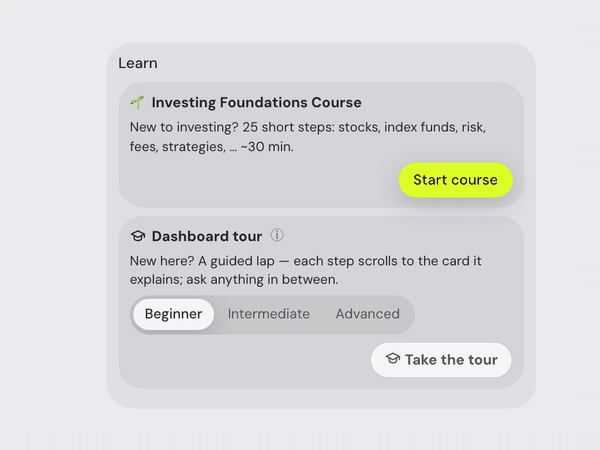
The assistant's Learn card: the Investing Foundations Course — 25 short steps on stocks, index funds, risk, fees and strategies, about 30 minutes — with its Start course button, above the Dashboard tour.

"I've never invested — where do I even start?"

A guided course in the chat, before your first trade — risk, fees, and a plan you can hold onto. Works on an empty dashboard.

So what should I buy?
Before any names — what is this money for?
Long-term growthRetirementJust learning for now

"Just tell me what to buy."

No hot picks: the assistant asks your goal, horizon and risk, saves them, then offers a framework and the simulator.

Hey Siri, how did my portfolio do this week?
Up 1.8% this week to €89,551 — Nvidia and Bitcoin did most of it. Three of your companies report earnings next week.
🎙 SiriShortcutsread-only

"Hey Siri — how did my portfolio do this week?"

A short spoken answer, read live from your portfolio. The MCP Agent iPhone app puts Fortunest behind Siri and Shortcuts — read-only. Set it up.
ClaudeChatGPT🎙 voice mode
Is my tech allocation getting too heavy?
Technology is 42% of your portfolio, most of it Nvidia and Apple — above the 30% you set as a target…

"Talk it through with Claude or ChatGPT — on the go."

Add Fortunest once as a connector in the Claude or ChatGPT app; in voice mode every answer uses your actual holdings, targets and risk.

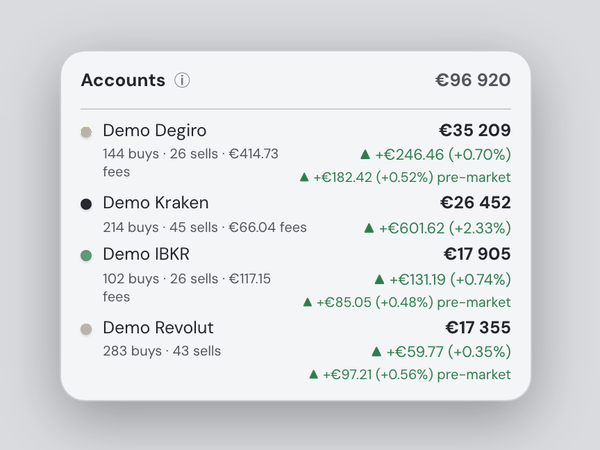
The Accounts list under Portfolio value: four demo accounts — Degiro, Kraken, IBKR and Revolut — each with its value, today's change and its buys, sells and fees, adding up to one total.

"I have accounts at three brokers — what is everything together worth?"

Drop each broker's export, or a whole folder: one combined portfolio, full history.
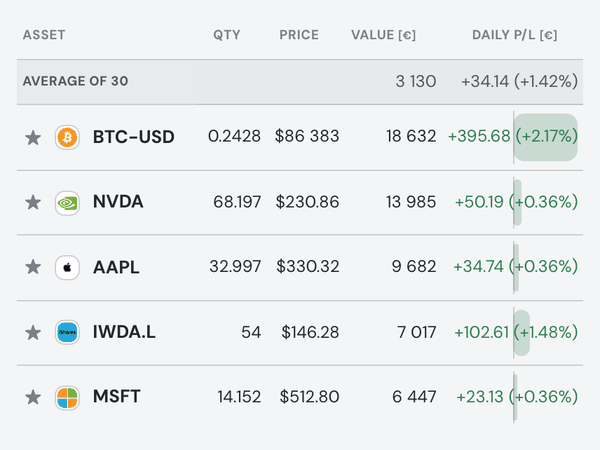
The Holdings table on demo data: Bitcoin at the top, then Nvidia, Apple, an MSCI World ETF and Microsoft, each with quantity, price, value and today's P/L in euros.

"My crypto lives on Kraken and a Trezor — show it next to my stocks."

Drop the raw exports: staking counted, transfers matched, nothing double-counted.
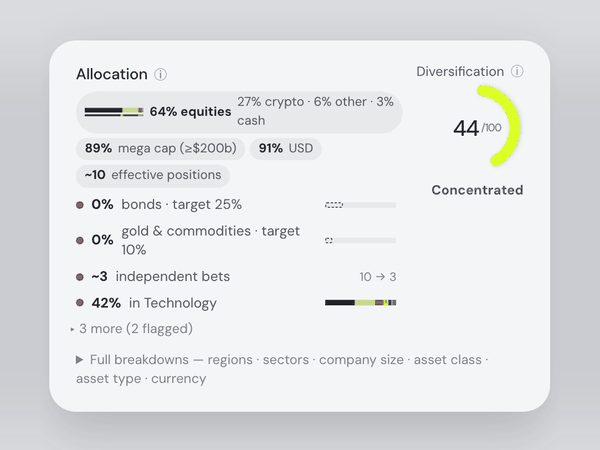
The Allocation card: 64% equities, 89% mega cap, 91% US dollar, about ten effective positions, flagged gaps such as 0% bonds against a 25% target, and a Diversification score of 44 out of 100, labelled Concentrated.

"Am I diversified — or is this secretly one big bet?"

A 0–100 score with plain-language takeaways, backed by six breakdowns.
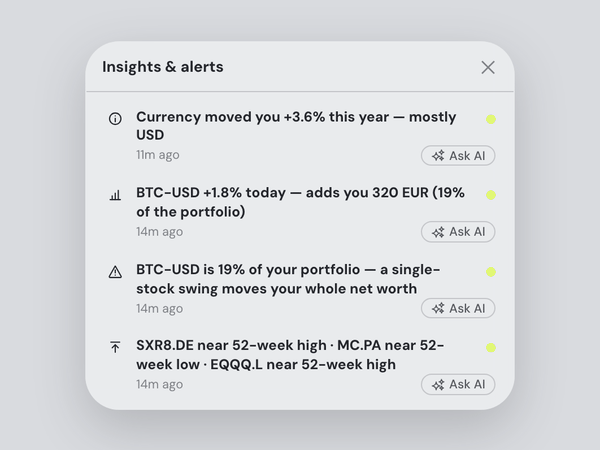
The Insights & alerts list: holdings near their 52-week high or low, what the currency did to the portfolio this year, Bitcoin's move today in euros, and a warning that one holding is 19% of the portfolio — each with an Ask AI button.

"What happened in my portfolio today — and why?"

Insights flag what moved you; the Portfolio brief ✨ links it to the news.
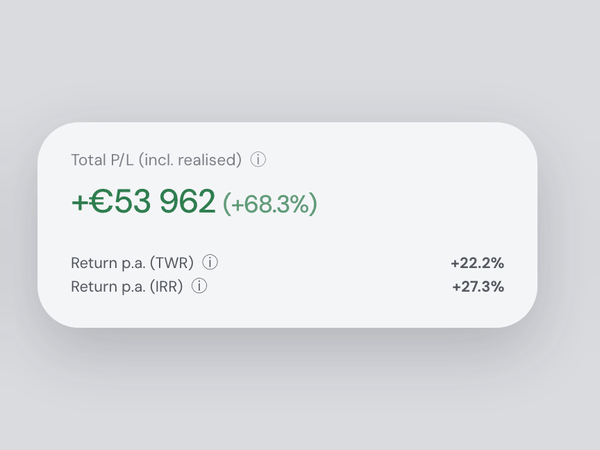
The Total P/L card, including realised gains, with the annual return measured two ways: time-weighted (TWR) and money-weighted (IRR).

"What's my real lifetime return — including what I sold?"

Total P/L includes realised gains; TWR and IRR give your yearly return.
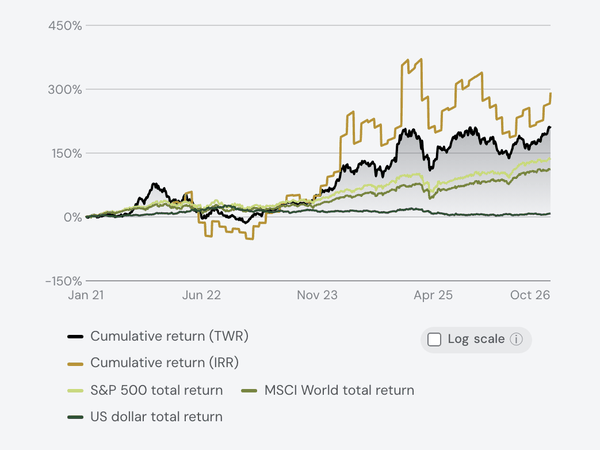
The Return over time chart: the portfolio's cumulative time-weighted and money-weighted return drawn against the S&P 500, MSCI World and US dollar total return since 2021.

"Would I have done better just buying the S&P 500?"

Benchmarks are flow-matched: the same deposits, on the same dates, in the index.
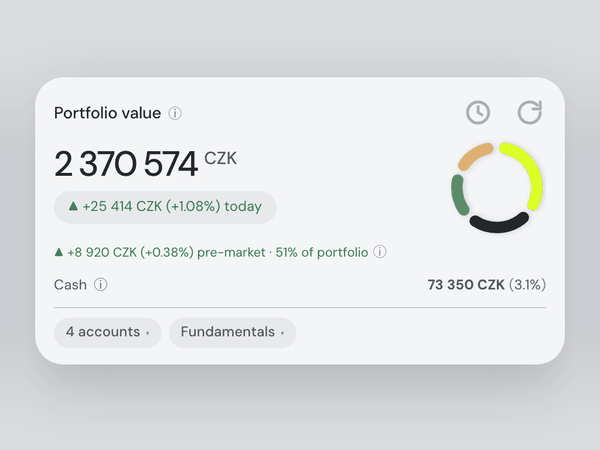
The Portfolio value card in Czech koruna: the total, today's change and the cash, all converted to CZK.

"My broker reports in dollars — I think in euros or koruna."

Every chart point, trade and dividend converts at that day's rate.

Why is my TWR different from my IRR?
Your TWR strips out deposit timing; IRR weights it. The gap means your 2024 top-ups were well-timed…

"I don't understand half of these finance terms."

Ask in plain words; the answer uses your actual portfolio, not a textbook.

Go to allocation
→ Portfolio · Allocation card expanded
Tech is 31% of the portfolio — mostly NVDA and your ETFs. Here's how the rest splits…

"Don't make me hunt through the dashboard — just take me there."

Type "Go to allocation": the app switches tab, scrolls to the card, and the assistant comments.
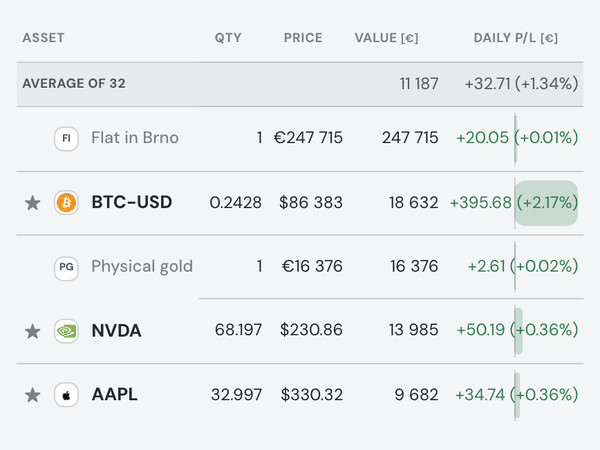
The Holdings table with two hand-added assets — a flat in Brno and physical gold — valued in euros among Bitcoin, Nvidia and Apple.

"I also own things without a ticker — a flat, some gold."

Add them with a date, price and growth estimate; they join allocation and history.
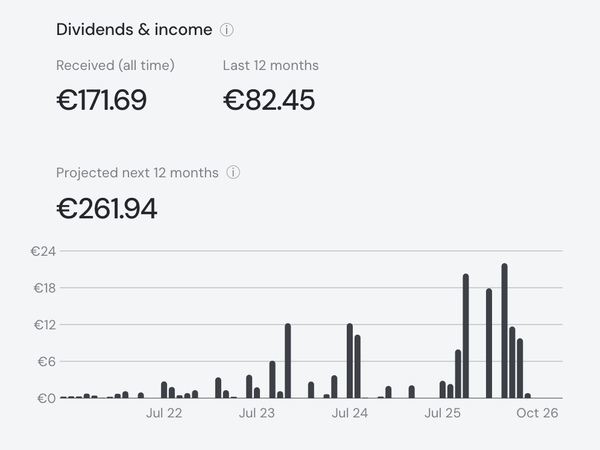
The Dividends & income card: received all time, the last 12 months and the projected next 12 months, above a bar chart of monthly payments since 2021.

"Which holdings actually pay me — and when's the next payment?"

Income history, a forward projection per holding, and upcoming pay dates.
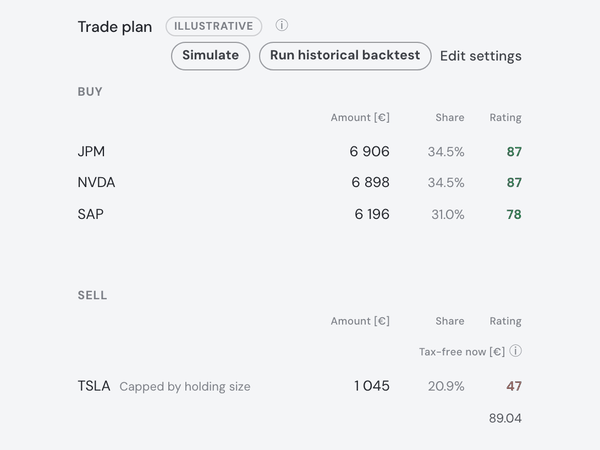
The Trade plan for €20,000 of new money: buys of JPMorgan, Nvidia and SAP with amount, share and rating, and below them the sell side, starting with Tesla.

"Put 20 000 in across three names, and sell 5 000 to rebalance while you are at it."

Invest is new money; Sell is separate, its proceeds stay cash. Your limits size the orders. Planner rules.

Strategy alignment78%
✓ quality compounders△ 9% single-name crypto

"I wrote down what I believe — does my portfolio still match it?"

Strategy check ✨ scores you against your saved thesis and suggests sized moves.
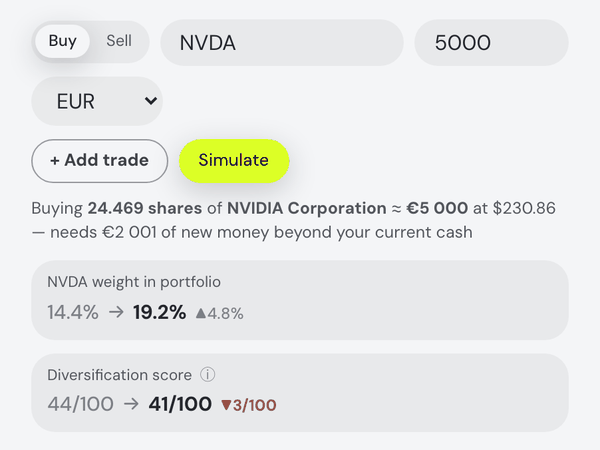
The What if I trade? card after simulating a €5,000 Nvidia buy: Nvidia's weight goes from 14.4% to 19.2% and the diversification score from 44 to 41.

"Show me what a trade does to my portfolio before I place it."

The what-if previews any buy or sell: new weight, diversification, weighted fundamentals.

What if I sell half of my Tesla?
→ Simulation · what-if prefilled & run
TSLA weight5.8 → 2.9%
Diversification68 → 71

"What if I sell half of my Tesla? Don't make me fill in the form."

The assistant prefills and runs the what-if, then sums up the simulator's real output.
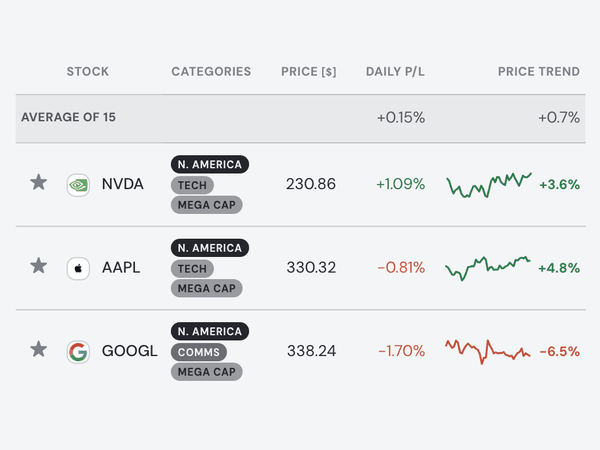
The Explore tab's Markets list of the largest companies: Nvidia, Apple and Alphabet with region, sector and size tags, price, daily move and a one-month trend line.

"Help me find candidates and compare them properly."

Explore any stock or smart-search ✨; compare ~20 fundamentals with a transparent signal.

AAPL 8-K · Q3 results new
✨ Beat on revenue, guidance raised — matters for 2.1% of your portfolio…

"It's earnings season — let me follow my companies' results in one place."

SEC EDGAR filings open in-app, new ones flagged; Earnings check ✨ digests them.
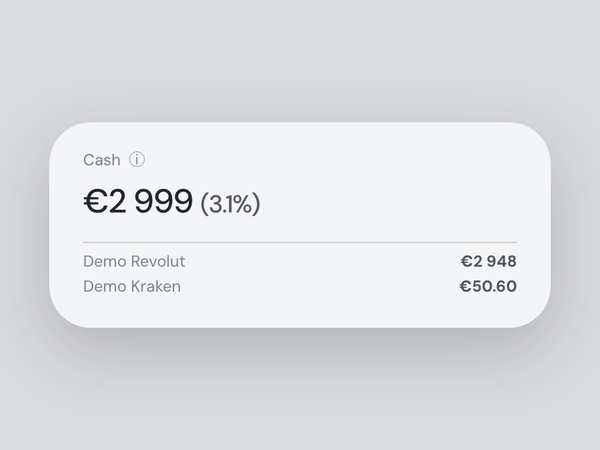
The Cash card: €2,999, 3.1% of the portfolio, split between the demo Revolut and Kraken accounts.

"How much of my money is sitting idle — and where?"

Cash per account, flagged by Insights; preview deploying it in the what-if.
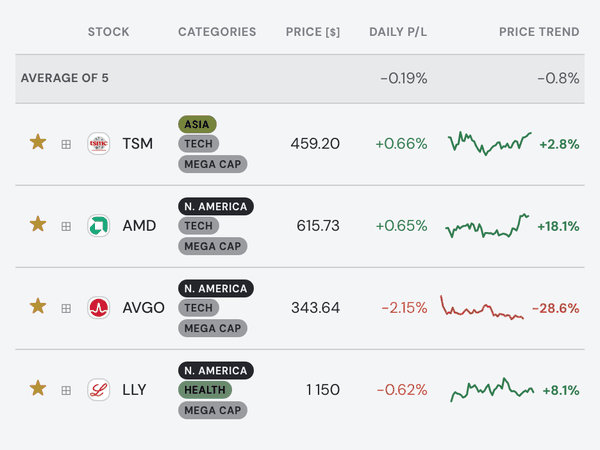
The Favourites list on the Explore tab with stocks the demo portfolio does not own starred — Taiwan Semiconductor, AMD and Broadcom on top — with their region, sector and size tags, prices and daily moves.

"Watch stocks I don't own yet — and nudge me when something matters."

Star anything into your watchlist; its fundamentals travel with the assistant.
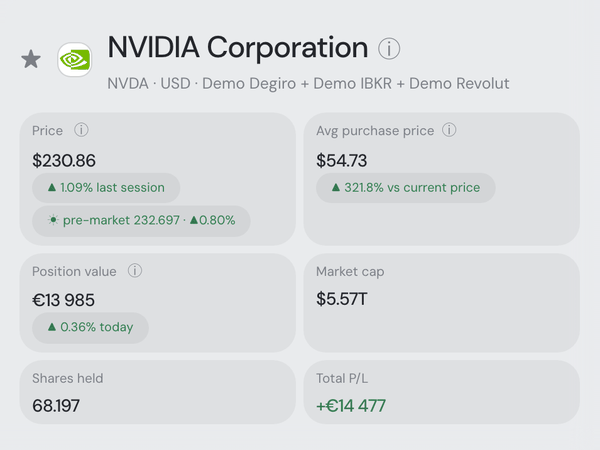
Nvidia's asset drawer: price with today's pre-market move, average purchase price, position value, market cap, shares held and total P/L.

"Before I add to a position, give me its full story on one screen."

Click any holding: charts with every trade, your average price, news, transactions.
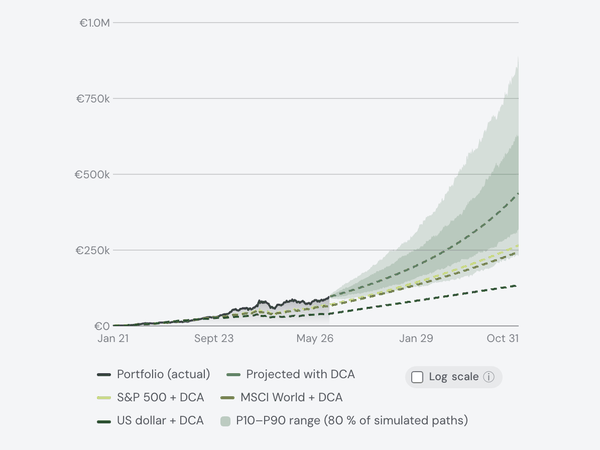
The Simulator's DCA projection: the portfolio's actual history, then its path with regular contributions inside an uncertainty band, against the S&P 500, MSCI World and US dollar with the same contributions.

"I want a DCA plan — and to see where it actually lands me."

The Future Simulator layers your contributions on, with benchmarks alongside.
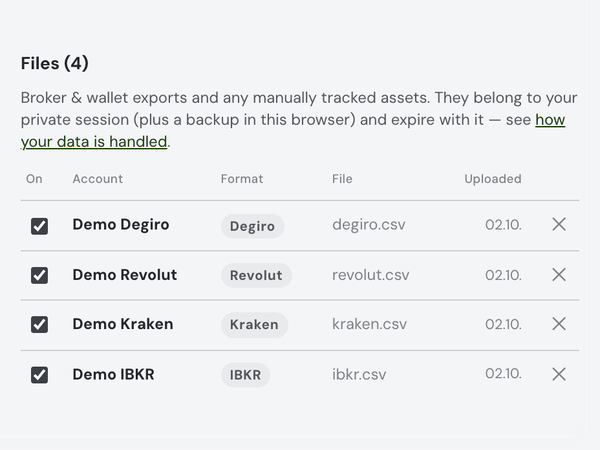
Settings, Data: the four demo broker files — Degiro, Revolut, Kraken and IBKR — each with its own on/off checkbox.

"Two people, four accounts — I want them separate and together."

Toggle each source; every account gets its own chart line.
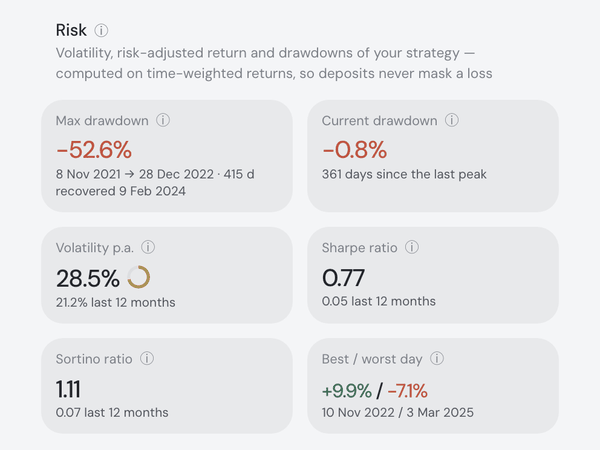
The Risk card: maximum drawdown with its peak, trough and recovery dates, current drawdown, volatility, Sharpe and Sortino ratios, and the best and worst day.

"Judge my portfolio like a fund — risk-adjusted, not just total return."

Sharpe, Sortino, dated drawdowns, beta, correlation — from time-weighted returns.
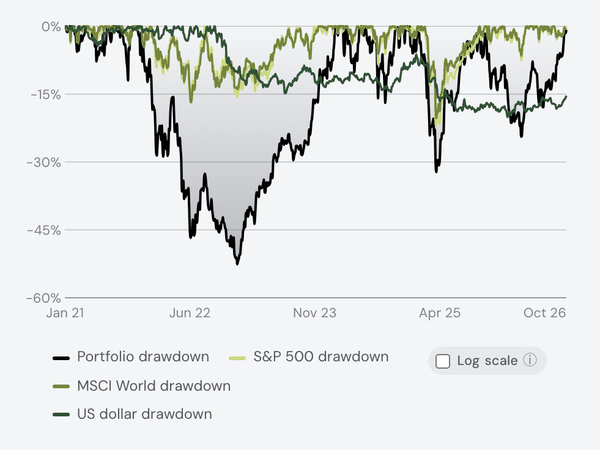
The value chart in Drawdown mode: the portfolio's fall below its running peak since 2021, drawn against the S&P 500 and MSCI World drawdowns, and the US dollar's.

"How deep were my crashes versus the index — and how long to recover?"

Drawdown mode: you underwater against every benchmark; log scale keeps lines readable.
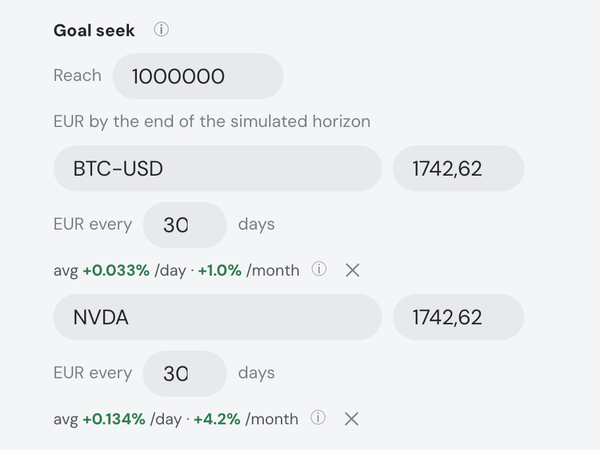
The Simulator's Goal seek tab: reach €1,000,000, and the solver sizes an equal contribution into each asset — 1,742.62 EUR every 30 days into Bitcoin and into Nvidia — to get there.

"Will I reach a million by 2035 — and what if I start withdrawing?"

Goal seek solves the needed contribution; withdrawals project with mirrored benchmarks.
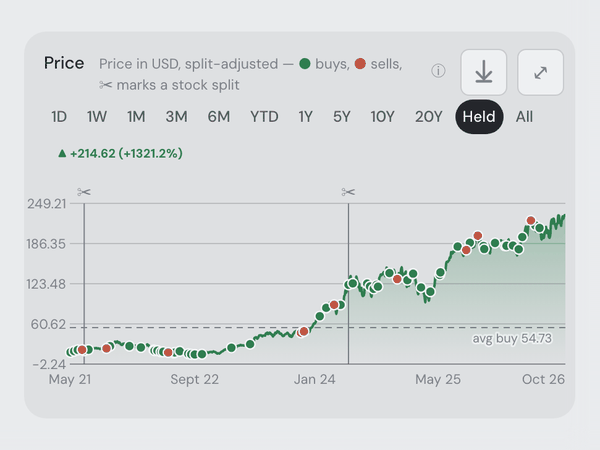
Nvidia's price chart in the asset drawer, split-adjusted: scissors mark its two stock splits, every buy and sell is a dot, and the average buy price a dashed line.

"Other tools corrupted my history at every stock split. Prove yours doesn't."

Valued at actually-traded prices times the shares you held; ISIN changes merge.

MATIC → POL conversion ✓
staking reward, net of fee ✓
pre-history balance flagged, not invented

"My crypto ledger is staking, delistings and transfers. Get it right."

Raw Kraken, Binance and Trezor ledgers, reconciled line by line.

Fortunest.app — local engine
assistant — Ollama @ localhost:11434
keys encrypted · data on your disk

"Keep my transactions on my disk and my AI prompts on a local model."

The desktop app with Ollama or LM Studio, hosted sync and Social off. Prices are still fetched by ticker; Pro taxes run on our server.
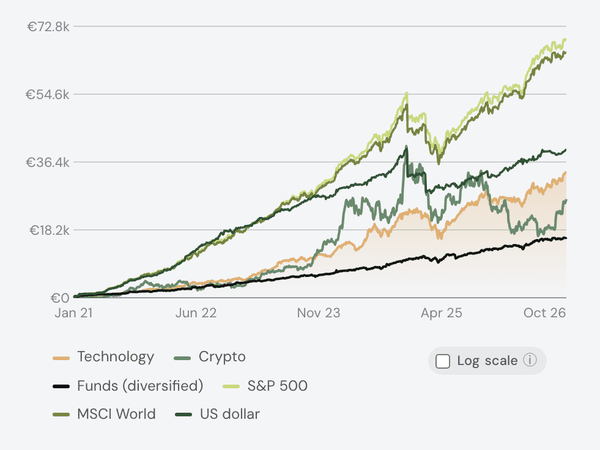
The value chart split into sector lines — Technology, Crypto and diversified funds — next to the S&P 500, MSCI World and US dollar benchmarks, since 2021.

"Which sector and asset class actually drove my last three years?"

Sector or asset-type lines; move the start date and benchmarks restart there.

"chip exposure" ✨
NVDAASML2 ETFs€44,700 · +0.8% today
📎 analyst-note.pdf → in context

"Query my holdings in natural language — and feed in my own research."

Quoted phrases filter by meaning; PDFs and screenshots join the chat.

Compare me to the S&P 500
chart → Return % · S&P 500 TR on
Over this window you're +9.6% vs the index's +7.1% — the gap opened after your March top-ups…

"Run the whole dashboard from the chat — charts, filters, even new assets."

Typed commands switch benchmarks and ranges, set filters, star favourites — even add a custom asset.
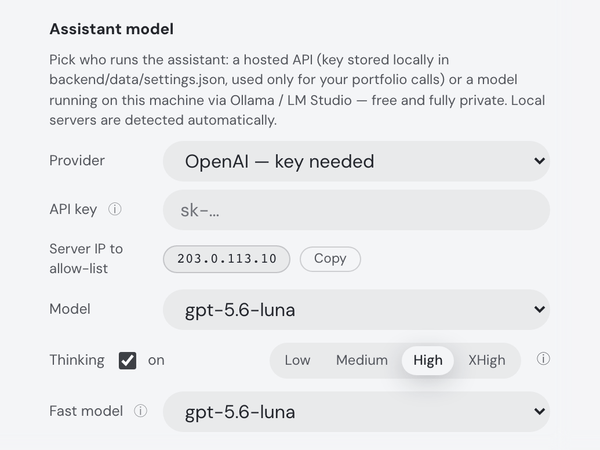
Settings, Assistant: the provider picker — a hosted API or a local model via Ollama / LM Studio — then the two model slots: Model, with its thinking level, and Fast model.

"Build me the chart I actually want — and let me tune which model does what."

Charts render inline on request; two model slots split reasoning from background work.

Real screenshots on the app’s synthetic demo portfolio, plus stylized vignettes where a capture can’t show the scenario. Every scenario runs in the live app today.

Any screen. One dashboard.

One dashboard that adapts to your phone, tablet or computer, with your portfolio and assistant always within reach.

Private by design

Choose where your portfolio lives and who can access it.

Two ways to run Fortunest — pick what fits your needs

Web app On our server

Your browserAny device
HTTPS
Fortunest serverFrankfurt, EU

Your portfolio database

  • API keys & 2FA encrypted at rest
  • Passwords hashed (argon2id)
  • HTTPS only, secure cookies
  • Your data is never sold
tickers only
Market prices
only what you allow
AI modelYou choose which

Any device, nothing to install

Desktop app On your computer

Fortunest appMac (Apple-signed) & Windows
your trades & holdings
Your databaseStored on your disk
questions & answers
Local AILM Studio or Ollama
Your Mac or PC
tickers only
Market pricesTickers only — never your amounts

Your portfolio stays on your disk

Desktop: your portfolio is stored locally

Keep your portfolio database on your Mac or Windows computer; cached analysis works offline. Prices are fetched by ticker; sync, Social and cloud AI are your choice.

Try the web app without an account

Guest data stays in a private server session, with a recovery copy in your browser.

Choose your AI provider

Run a local model or choose a cloud provider you trust. Your model receives the context needed to answer your questions.

Share on your terms

Share portfolio weights and relative performance, never amounts. Choose what friends see and turn sharing off anytime.

Control MCP agent access

Approve each connection and its permissions. Revoke access anytime, and review sensitive changes before they happen.

Privacy & your data →

A nest egg for everyone

Your first hundred deserves the same care as someone else’s million. Fortunest helps you understand your investments, whether you’re starting from zero or managing a portfolio built over years.

  • Start from zero. Learn the essentials with the Investing Foundations Course—no experience or portfolio needed.
  • Understand your portfolio. Guided walkthroughs explain the charts, numbers and tools at your level.
  • Find answers as you go. Built-in explanations and an AI assistant help you make sense of what you’re seeing.
Fortunest on an iPhone: the Portfolio tab with the value-per-asset chart and the largest positions, each with its owned quantity, value and one-week move.

What it costs

Start free, with no account or card. Pro adds tax tools, external agents, higher limits and a monthly AI budget.

Free No account needed to start
€0
Free forever. An account adds saving and social features.
Free 14-day Pro trialAll of Pro for your first 14 days. No card.
  • Holdings, performance, risk & dividends
  • Explore, simulate and plan trades
  • Backtest recommended trades
  • Follow 2 famous investors; create a friend group
  • AI assistant: local or hosted model
  • One-time AI budget with a verified account
  • Up to 3 accounts and 50 assets total
  • 3 watchlists, 20 assets total
  • Portfolio brief in Insights and by email
Create a free accountStarts your free 14-day Pro trial
Pro Yearly saves 18% — two months free
€5.75/month
€69 billed yearly · VAT added at checkout
Or €6.99/month, billed monthly.
Billed at checkout. To try Pro free for 14 days, pick Free.
Everything in Free, and:
  • MCP agents with revocable permissions
  • More investor follows and group analytics
  • Tax lots, sell optimizer & annual gains
  • Unlimited accounts and assets
  • Unlimited watchlists and watched assets
  • Every alert type, plus the portfolio brief
  • AI budget refilled monthly

Cancel any time. Full refund on request within 14 days of your first payment. Prices are shown in euros; at checkout you're billed in your local currency. VAT is added at checkout. Manage your plan · Assistant budget details · All alert types · Tax tools · Terms of service.

Common questions

What is Fortunest?

An AI portfolio tracker you can also talk to from the ChatGPT or Claude app: a personal investment dashboard that puts every broker, exchange and wallet into one live view — performance, allocation, risk and tax — with an AI assistant that reads your actual portfolio. Add Fortunest once as an MCP connector in ChatGPT (custom connectors depend on your plan) or Claude (its free plan allows one custom connector) and ask about your real holdings there; MCP is a Pro feature, included in the 14-day Pro trial every new account starts with. It is an investment dashboard, not an accounting or bookkeeping product. Setup: MCP server.

How much does Fortunest cost?

The core dashboard is free, with no account and no credit card. Pro is €6.99 a month or €69 a year — twelve months for the price of ten, €5.75 a month effective — and adds MCP connections, investor groups, expanded investor follows, tax tools, unlimited accounts and assets. VAT is added at checkout. Every new account starts with a 14-day Pro trial, with no card and nothing to cancel; afterwards anything above the free limits is kept, just hidden, until you go Pro. Details in Pricing.

Which brokers and exchanges does Fortunest support?

Broker CSV exports — Degiro, XTB, Revolut, eToro, Trading 212 and others — plus direct connections to exchanges such as Kraken and Binance, and hundreds of brokerages through SnapTrade. Transfers are matched so nothing is double-counted. The full list lives in Getting your data in.

Can I track assets my broker doesn't know about?

Yes — custom assets cover anything you can put a value on. Tell the assistant what you hold or attach a document, and it records the position for you; real estate, private holdings and collectibles sit in the same dashboard as your stocks.

Can I use Fortunest without an account?

Yes. Open the web app as a guest — no e-mail, no sign-up, no card — and explore the demo portfolio, upload broker CSV exports, connect a supported exchange or broker with a read-only API key, and ask the AI assistant on a one-time guest budget, within the Free plan's 3 accounts and 50 assets. Guest data sits in a private server session that is deleted after 12 hours without a visit, plus a backup in your browser that restores it when you come back in the same browser. Create an account from that browser later and what you built moves into it. An account is needed only for Pro, the Social tab and broker sign-ins through SnapTrade; for a portfolio stored on your own computer, use the desktop app. The details: Using a portfolio tracker without an account.

Where does my portfolio data live?

Guest uploads live in a private server session with a recovery copy in your browser. An account stores the portfolio durably on the server. On the desktop app, the engine and a portfolio database live on your computer, and cached analysis works offline. Optional Pro synchronization also stores portfolio inputs in your hosted account. More in Privacy.

Can I use my own AI model?

Yes — besides the hosted models, the assistant can run against a local model through Ollama or LM Studio, so portfolio questions never have to leave your machine. Setup is in The assistant.

Is there a mobile app?

The web app is built to work well on a phone today, and a native mobile app is in development. The desktop app for Mac & Windows is on the download page.

Does Fortunest give financial advice?

No. Signals, analyses and assistant answers are informational — the assistant explains and teaches, and every decision stays yours.

The desktop app

The same dashboard as a native Mac & Windows app: the engine runs on your computer, your portfolio sits in a database on your own disk.

  • Local by default. Transactions, settings and API keys stay in the app’s data folder. Pro on Mac can sync with the web app and external agents — you pick which dataset to keep; API keys never sync.
  • Prices from a licensed cache. Requests carry ticker symbols — every symbol you hold — never amounts, quantities or values. Logos, SEC filings and rates come from public sources, also by ticker.
  • Local AI. With LM Studio or Ollama the model runs on localhost, so AI questions stay on your machine. Sync and sharing have their own switches.
  • Cached analysis works offline. Dashboard, risk, dividends, simulations and trade recommendations run on the local price cache. The first run needs the network, as do fresh prices, Pro taxes, Social, sync and cloud AI.

The Mac build is signed and notarized by Apple; the Windows build is not code-signed yet. More in Privacy & your data.

Fortunest on a MacBook: portfolio value, cash and total P/L, the value chart against its benchmarks, the sector heatmap and the assistant's portfolio brief beside them.

Check your portfolio with Siri or discuss with Claude or ChatGPT live voice mode

A quick spoken update, or a conversation about your investments — at home or on the go.

  • Siri. Run your portfolio Shortcut to hear the latest value, moves and warnings.
  • Claude. Connect Fortunest and talk through your holdings, strategy and risk in voice mode.
  • ChatGPT. Connect Fortunest, fetch a portfolio summary in text chat first, then switch to live voice in the same chat. Live voice doesn’t refresh connected apps.

External agents need Fortunest Pro. Choose what they can access and revoke connections any time.