Next-gen portfolio intelligence.
All you own, understood.

An AI portfolio tracker for stocks, crypto and multiple investment accounts. Understand performance, allocation and risk; ask an assistant about your actual holdings; and backtest a trade plan using your transaction history and cash flows. Available on the web, Windows and macOS.

Free · No account · Your data stays yours

app.fortunest.ai
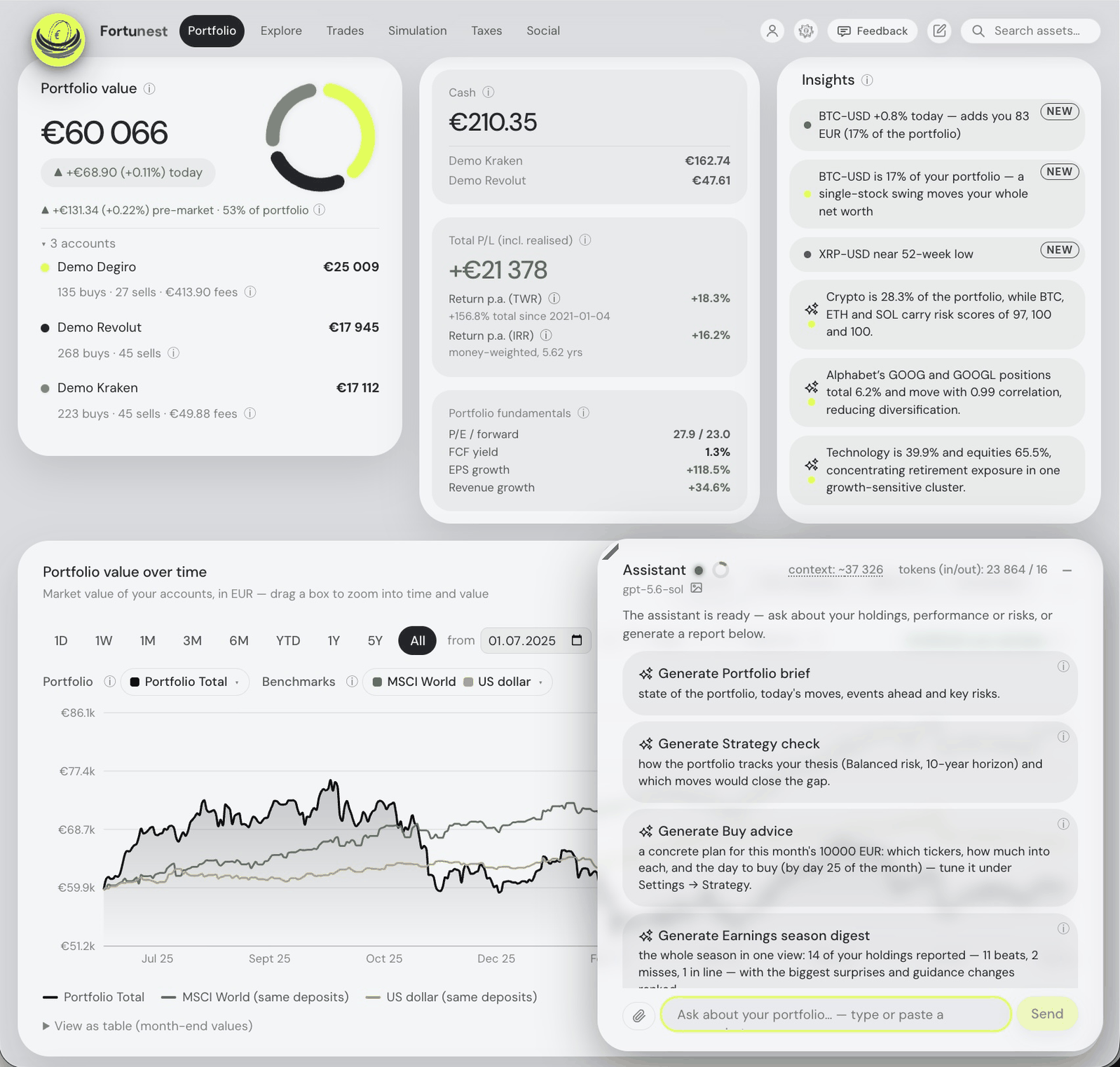
The Fortunest dashboard: portfolio value across three accounts, cash and total P/L with TWR and IRR, the AI insights column, the value chart against MSCI World and the US dollar, and the assistant open beside it.

The real dashboard, on demo data — open the live app and it is yours in a couple of clicks.

What can you do with it

With Fortunest you can go a great deal deeper into your portfolio than a tracker takes you. Real workflows, from a first portfolio to fund-grade analysis — every one works in the app today. Pick your level and scroll through.

🌱 Investing Foundations · step 2/25
So the course meets you where you are — pick whichever fits best.
Never investedDabbled a littleI have a plan already

"I've never invested — where do I even start?"

A guided course in the chat, before your first trade: what an investment actually is, the four things that decide your outcome, risk without the folklore, and how to write a plan you can hold onto. Works on a completely empty dashboard — nothing is loaded or bought for you.

So what should I buy?
Before any names — what is this money for?
Long-term growthRetirementJust learning for now

"Just tell me what to buy."

The one question that never gets a hot pick on day one. The assistant asks your goal, horizon and risk first — tap an answer or type your own, and it lands in your settings — then hands you the decision framework and the simulator instead of someone else's conviction.

Hey Siri, how did my portfolio do this week?
Up 1.8% this week to €89,551 — Nvidia and Bitcoin did most of it. Three of your companies report earnings next week.
🎙 SiriShortcutsread-only

"Hey Siri — how did my portfolio do this week?"

Ask out loud, hear a short spoken answer read live from your portfolio: value and the week's move, what drove it, your biggest holdings, warnings, the trade plan. Fortunest speaks MCP and the MCP Agent iPhone app puts it behind Siri and Shortcuts — connect once, then just ask. Read-only: nothing changes unless you open the app. Set it up.

ClaudeChatGPT🎙 voice mode
Is my tech allocation getting too heavy?
Technology is 42% of your portfolio, most of it Nvidia and Apple — above the 30% you set as a target…

"Talk it through with Claude or ChatGPT — on the go."

Add Fortunest as a connector in the Claude or ChatGPT app once, and your live portfolio joins the conversation: discuss your investments or what the markets are doing in voice mode on a walk or a commute, and every answer refers to your actual holdings, targets and risk rather than a generic take.

degiro.csvrevolut.csvibkr.csv→
Portfolio value€248,391
Today+1.2%

"I have accounts at three brokers — what is everything together worth?"

Drop each broker's export onto the value tile — or a whole folder. One combined portfolio: live prices, cash per account, history back to your first trade.

Kraken staking reward · net of fees ✓
Trezor transfer matched to withdrawal ✓
BTCETH valued live, next to your stocks

"My crypto lives on Kraken and a Trezor — show it next to my stocks."

Drop the raw exchange and wallet exports. Staking rewards counted, wallet transfers matched so nothing is double-counted, coins priced live in your allocation.

Diversification72 / 100
regionssectorssizescurrencies

"Am I diversified — or is this secretly one big bet?"

A 0–100 score with plain-language takeaways, backed by six breakdowns — regions, sectors, company sizes, asset types, currencies, value per holding.

▲ NVDA biggest impact today
3 earnings this weekidle cash 2.1%
✨ Portfolio brief — tied to today's headlines

"What happened in my portfolio today — and why?"

The Insights strip flags what moved you and what's ahead; the one-click Portfolio brief ✨ ties today's moves to actual news, risks and watch items.

TWR / yr11.4%
IRR / yr10.8%
Total P/L+€38,420
includes everything you already sold

"What's my real lifetime return — including what I sold?"

Total P/L counts realised gains, and TWR / IRR show your annualized return two honest ways — the performance of your decisions and of your money.

YouS&P 500 · same deposits

"Would I have done better just buying the S&P 500?"

Benchmarks are flow-matched — what the same deposits on the same dates would be worth in the index instead. A fair comparison, not a marketing one.

EURUSDCZK
Every point, that day's rate€248,391

"My broker reports in dollars — I think in euros or koruna."

Switch the display currency and everything converts — each historical chart point, trade and dividend at that day's exchange rate, not today's.

Why is my TWR different from my IRR?
Your TWR strips out deposit timing; IRR weights it. The gap means your 2024 top-ups were well-timed…

"I don't understand half of these finance terms."

Ask the assistant in plain language — it sees your actual portfolio and whatever you have open, so answers are about your money, not textbook definitions.

Go to allocation
→ Portfolio · Allocation card expanded
Tech is 31% of the portfolio — mostly NVDA and your ETFs. Here's how the rest splits…

"Don't make me hunt through the dashboard — just take me there."

Type "Go to allocation", "Show Risk" or "Which are my top 5 holdings" into the chat — the app switches tabs, scrolls to the card, sets the filter, and the assistant comments with the card's own numbers.

Flat in Brno 2019 · €210,000 · +3%/yr ✓
Physical gold 2021 · €12,000 · +6%/yr ✓
joins allocation & history as "Other assets"

"I also own things without a ticker — a flat, some gold."

Add them as manual assets with a date, price and your growth estimate — they join the portfolio, the allocation and the history chart, toggleable any time.

last 12 m: €1,842next pay date · Aug 14

"Which holdings actually pay me — and when's the next payment?"

Monthly income history, totals, a forward projection per holding with yield-on-cost — and upcoming ex-dividend and pay dates on the events calendar.

buy 20 000 €3 buyssell 5 000 €
ASML 7 400 € 37%
VWCE 6 900 € 35%
NVO 5 700 € 28%

"Put 20 000 in across three names, and sell 5 000 to rebalance while you are at it."

Invest is new money; Sell is separate and its proceeds stay cash. One company rating orders the candidates, while your targets and limits shape the amounts. The plan explains any unspent money or fewer orders. Planner rules.

Strategy alignment78%
✓ quality compounders△ 9% single-name crypto

"I wrote down what I believe — does my portfolio still match it?"

Strategy check ✨ scores the portfolio against your saved thesis, horizon and risk tolerance — what fits, what diverges, and concrete sized moves to consider.

what-if: buy 5 000 € NVDA
Weight4.1 → 6.0%
Diversification71 → 68

"Show me what a trade does to my portfolio before I place it."

The what-if simulator previews any buy or sell: the position's new weight, the diversification score per dimension, the shift in your weighted fundamentals.

What if I sell half of my Tesla?
→ Simulation · what-if prefilled & run
TSLA weight5.8 → 2.9%
Diversification68 → 71

"What if I sell half of my Tesla? Don't make me fill in the form."

Ask the what-if in plain words: the assistant switches to Simulation, prefills and runs the trade, then summarizes the impact — allocation, risk, realized P/L — from the simulator's real output.

StockP/E · FCF yield · PEG · signal
ASML31 · 3.1% · 1.4 · BUY
MSFT34 · 2.6% · 2.1 · HOLD

"Help me find candidates and compare them properly."

Explore any listed stock — or smart-search ✨ with a phrase. Compare ~20 fundamentals side by side, with a transparent signal whose reasons are spelled out.

AAPL 8-K · Q3 results new
✨ Beat on revenue, guidance raised — matters for 2.1% of your portfolio…

"It's earnings season — let me follow my companies' results in one place."

Recent filings straight from SEC EDGAR open in-app; the Earnings check ✨ digests each one with portfolio-level takeaways. New filings get flagged since your last visit.

Revolut cash€1,240
Kraken cash€310
2.1% of the portfolio sits idle

"How much of my money is sitting idle — and where?"

The cash tile breaks it down per account and the Insights strip flags it unprompted. Preview deploying it with the what-if simulator before you act.

★ ASML added to watchlist ✓
✨ That's the third semiconductor name on your list — the sector is already 18% of your portfolio.

"Watch stocks I don't own yet — and nudge me when something matters."

Star anything into your watchlist; its fundamentals travel with the assistant, which can comment proactively as you work — never repeating itself.

● buys● sellsintraday on 1D/1W

"Before I add to a position, give me its full story on one screen."

Click any holding: zoomable value and price charts with every buy and sell marked, your average purchase price as a line, news with AI summaries, all transactions.

DCA 500 €/mo · VWCEprojected diversification 74

"I want a DCA plan — and to see where it actually lands me."

The Future Simulator projects your portfolio forward with your contributions layered in, benchmarks alongside and the diversification score projected too.

☑ Degiro (me) €142,180
☑ IBKR (spouse) €94,010
☐ Binance excluded, kept

"Two people, four accounts — I want them separate and together."

Every source has its own toggle, every account its own chart line and badge — one household view, or any subset, without deleting anything.

Sharpe0.92
Sortino1.31
Max DD−18.4%
β vs S&P 500 · 0.87deposits never count as gains

"Judge my portfolio like a fund — risk-adjusted, not just total return."

Volatility, Sharpe and Sortino, drawdowns with exact peak→trough→recovery dates, beta and correlation against every benchmark — all from time-weighted returns.

"How deep were my crashes versus the index — and how long to recover?"

The drawdown mode draws an underwater plot of you against every benchmark; a log-scale return view keeps huge and modest lines readable together.

goal seek → 1 850 €/mo closes the gap

"Will I reach a million by 2035 — and what if I start withdrawing?"

Goal seek solves the contribution that reaches your target; periodic selling projects withdrawals, with benchmarks mirroring them so the comparison stays fair.

history valued at actually-traded prices

"Other tools corrupted my history at every stock split. Prove yours doesn't."

Adjusted closes are un-adjusted with the split calendar and multiplied by the shares you actually held each day; ISIN changes collapse onto one position.

MATIC → POL conversion ✓
staking reward, net of fee ✓
pre-history balance flagged, not invented

"My crypto ledger is staking, delistings and transfers. Get it right."

Raw Kraken, Binance and Trezor ledgers parsed transaction by transaction — swaps, redenominations and transfers reconciled, assumptions always flagged.

$ uvicorn app.main:app
ollama detected — llama-3.3 · 32k context
keys encrypted · data on your disk

"Run it fully local — my transactions and AI prompts never leave my machine."

Use the desktop app with Ollama or LM Studio for local portfolio analysis. Keep hosted synchronization and Social sharing off, and choose a local model for AI prompts. Market-data requests still fetch prices for the symbols you view.

techhealthcarecashstart: 01.01.2023

"Which sector and asset class actually drove my last three years?"

Decompose the value history into per-sector and per-type lines; move the chart's start date and the benchmarks restart there too — "since 2023" is a fair fight.

"chip exposure" ✨
NVDAASML2 ETFs€44,700 · +0.8% today
📎 analyst-note.pdf → in context

"Query my holdings in natural language — and feed in my own research."

A quoted phrase filters holdings semantically; PDFs and screenshots go straight into the chat. The Context window shows exactly what the model sees.

Compare me to the S&P 500
chart → Return % · S&P 500 TR on
Over this window you're +9.6% vs the index's +7.1% — the gap opened after your March top-ups…

"Run the whole dashboard from the chat — charts, filters, even new assets."

Typed commands switch benchmarks and chart ranges, set holdings filters, star favourites, flip dark mode — even create a custom asset from a described purchase, asking for any missing details first.

chart: dividends vs cash — rendered by the assistant
conversation: thinking modelbackground: fast model

"Build me the chart I actually want — and let me tune which model does what."

Ask for any analysis and the assistant renders an interactive chart inline, exportable as PNG. Two model slots: a strong one for reasoning, a fast one for background AI.

Stylized illustrations — every scenario runs in the live app today.

Any screen. One dashboard.

One dashboard that adapts to your phone, tablet or computer, with your portfolio and assistant always within reach.

Features.

Free: the core dashboard, up to 3 accounts and 50 assets, and transaction-based backtesting. Pro: MCP connections to Claude Code, Codex and compatible agents, investor-group analysis, expanded 13F follows and tax tools. Start without an account; social features need a free account. See plans.

01Portfolio

Performance, across every account

Value, fees, TWR and IRR, with benchmarks matched to your deposits.

Allocation & risk

Six allocation views, diversification, volatility and drawdowns.

Holdings & portfolio heatmap

Sortable holdings and a sector map of what you own. Heatmap

Income, events & insights

Dividend income, earnings dates, filings and portfolio signals.

Simple view, arranged by you

Choose your cards and drag them into order, on phone or desktop. Simple view

Charts you can take with you

Maximize a chart, explore the detail and save a PNG.

02Data sources

Broker and exchange CSV

29 platforms — Degiro, IBKR, Revolut, Saxo.

Six direct connections

Read-only keys: Kraken, Binance, Coinbase.

More brokers via SnapTrade

Schwab, Fidelity, Robinhood, and more.

A licensed price feed

Split-correct history, automatic fallback.

Thirty display currencies

Converted at that day's rate, never today's.

Whatever no export covers

Real estate, gold, gems — fixed APY or live.

Credentials are encrypted at rest, and there is no order-placing code in the app — a test asserts it. Free plans hold three accounts and up to 50 assets across them; Pro lifts both.

03The assistant

A chat that knows your portfolio

Your holdings, current view and saved memories inform its answers.

Reports & dashboard actions

Ask for a brief, filter holdings, build a trade plan or run a simulation.

Your choice of model

Hosted models, your own key, or local Ollama and LM Studio.

External agents via MCP · Pro

Connect Codex, Claude Code, the Claude and ChatGPT apps or another MCP agent — even Siri, through the MCP Agent iPhone app — for two-way dashboard communication: read portfolio context, send actions and receive their results, and bring analyses and charts back into Fortunest. MCP guide & permissions

Attachments, charts & exports

Discuss images and PDFs, explore live tickers and save chart-rich conversations.

Learn as you go

Guided app walkthroughs and an investing course that starts from zero.

Built-in chat starts on a small free budget, or uses your own key or local model. External-agent connections and web–desktop portfolio synchronization require Pro. The desktop bridge needs a release that supports it and a synchronized hosted portfolio; check your download version. You control what you share.

04Explore

Markets & watchlists

Search stocks, funds and crypto; browse major indices and drag discoveries into your lists. Markets

Heatmaps, from market to sector

Map indices or favourites; zoom into sectors and colour by price changes or drawdowns. Heatmaps

Fundamentals & the macro picture

Valuation, growth and profitability beside rates, the yield curve and risk indicators.

05Trades

Scoring you can tune

Adjust the inputs to one company rating. Scoring weights

Follow the consensus · Pro

Use followed-fund ownership in your research, trade scoring and consensus-shift alerts. Consensus

From trade plan to simulation

Build a buy-and-sell plan, copy it or test a trade’s impact before deciding. The plan

Illustrative only — orientation for your own decisions, never financial advice. The whole tab is documented in The Trades tab.

06Simulation

Try a trade before you make it

Compare its effect on allocation, diversification and realized P/L.

Projections & goal seeking

Model regular buying and withdrawals, or find the contribution for your goal.

Backtest your trade plan · Free

Replay recommended trades using your actual transactions and cash flows; compare the strategy with your history and a passive portfolio. How backtesting works

Projections use past average returns. Historical replay shows its data coverage and assumptions, including zero fees and slippage. Neither predicts future results.

07Social

Friends, feeds & leaderboards

Share charts, compare performance and choose which relative figures friends can see.

Compare group portfolios

See what your friends hold together, then compare their allocation and overlap with yours. Group portfolios

Track Super Investors’ 13F filings

Follow two investors free; Pro expands access and adds group conviction and changes over time. 13F tracking guide

Friends, their group portfolio and two investor follows are free with an account; investor groups and expanded investor follows require Pro. Friends share only the relative figures they choose. Fund filings are delayed snapshots, not live trades.

08Taxes · Pro

Every open tax lot

Cost, date, time-test day. Tax lots

Plan a sale

Least tax — FIFO or exact solve. Optimizer

Realized gains, year by year

Proceeds, exempt, net taxable. CSV

In the paid Pro plan only. Defaults follow Czech rules and every one is yours to change. Illustrative — not a filing. What the engine does and does not model is in The Taxes tab.

Private by design

Choose where your portfolio lives and who can access it.

Desktop: your portfolio stays local

Store your portfolio on your Mac or Windows computer and analyse it offline. Cloud sync and online services are optional.

Try the web app without an account

Guest data stays in a private server session, with a recovery copy in your browser.

Choose your AI provider

Run a local model or choose a cloud provider you trust. Your model receives the context needed to answer your questions.

Share on your terms

Share portfolio weights and relative performance, never amounts. Choose what friends see and turn sharing off anytime.

Control MCP agent access

Approve each connection and its permissions. Revoke access anytime, and review sensitive changes before they happen.

Privacy & your data →

A nest egg for everyone

Your first hundred deserves the same care as someone else’s million. Fortunest helps you understand your investments, whether you’re starting from zero or managing a portfolio built over years.

  • Start from zero. Learn the essentials with the Investing Foundations Course—no experience or portfolio needed.
  • Understand your portfolio. Guided walkthroughs explain the charts, numbers and tools at your level.
  • Find answers as you go. Built-in explanations and an AI assistant help you make sense of what you’re seeing.
Fortunest on an iPhone: the Portfolio tab with the value-per-asset chart and the largest positions, each with its owned quantity, value and one-week move.

How it compares

Five portfolio trackers, nine key differences. Explore each comparison for details and sources.

Compare Fortunest Portfolio Performance Sharesight getquin Ghostfolio
Main focus Portfolio analysis & decisions Open-source desktop tracking Dividends & tax reports Net worth & investor community Self-hosted wealth tracking
Platforms Web & mobile web; Mac / Windows Windows, Mac, Linux; mobile companion Web & mobile Web, iOS & Android Web & mobile web
AI & external agents Local or cloud assistant; MCP: Pro Not described No portfolio assistant described Analysis: Premium; agents: Wealth Copy-out prompt; no in-app assistant described
Data & privacy Hosted or local desktop; optional online services Local file; online price lookups Hosted cloud Hosted in Europe Self-hosted or hosted cloud
Portfolio imports Broker sync, files & chat CSV, PDF & manual entry 200+ broker integrations Bank / broker sync, files & manual Files & REST API
Analysis & planning Risk, valuations & trade simulations Returns, risk & rebalancing Returns, dividends & paid risk reports Portfolio analytics; planning: Wealth Performance & risk; FIRE: Premium
Tax reporting Lots, gains & sale planning: Pro Tax entries; no tax report described Accountant-ready reports: paid plans No tax report described No tax report described
Sharing Friends & feed; investor groups: Pro Community forum Portfolio sharing with accountants Investor feed & discussions Shareable portfolio links
Free & paid Free; Pro €6.99/mo + VAT Free & open source 10 holdings free; paid plans Free; Premium & Wealth subscriptions Free self-hosting; paid cloud available
Explore further See plans → Full comparison → Full comparison → Full comparison → Full comparison →

Compare all eight trackers →Browse comparison guides →

Summary reviewed 14 September 2026. Features and plans change; follow the comparisons for qualifications and source-check dates.

Sources & methodology

These are short factual descriptions, not scores. “Not described” refers to the cited product documentation, not proof that a feature is absent. Main focus summarizes the workflows each product emphasizes. Prices are list prices; taxes may apply.

Local storage does not mean every feature is offline: Fortunest’s cloud AI, Pro tax calculations, sharing and optional hosted sync send their selected inputs. The Privacy chapter explains these boundaries. Detailed plan limits, metrics and platform support are in each linked comparison.

  1. Fortunest — plans and pricing, the Taxes chapter, supported platforms and the Privacy chapter.
  2. Portfolio Performance — product site and its manual.
  3. Sharesight — pricing, features and privacy policy pages.
  4. getquin — pricing, AI, performance stock forum and security & data privacy pages.
  5. Ghostfolio — features, pricing and FAQ pages, and the source repository.

What it costs

Start free, with no account or card. Pro adds tax tools, external agents, higher limits and a monthly AI budget.

Free No account needed to start
€0
Free forever. An account adds saving and social features.
  • Holdings, performance, risk & dividends
  • Explore, simulate and plan trades
  • Backtest recommended trades
  • Follow 2 famous investors; create a friend group
  • AI assistant: local or hosted model
  • One-time AI budget with a verified account
  • Up to 3 accounts and 50 assets total
  • 3 watchlists, 20 assets total
  • Portfolio brief in Insights and by email
Pro Yearly saves 18% — two months free
€5.75/month
€69 billed yearly · VAT added at checkout
Or €6.99/month, billed monthly.
Everything in Free, and:
  • MCP agents with revocable permissions
  • More investor follows and group analytics
  • Tax lots, sell optimizer & annual gains
  • Unlimited accounts and assets
  • Unlimited watchlists and watched assets
  • Every alert type, plus the portfolio brief
  • AI budget refilled monthly

Cancel any time. Full refund on request within 14 days of your first payment. Prices are shown in euros; at checkout you're billed in your local currency. VAT is added at checkout. Manage your plan · Assistant budget details · All alert types · Tax tools.

Common questions

What is Fortunest?

An AI portfolio tracker: a personal investment dashboard that puts every broker, exchange and wallet into one live view — performance, allocation, risk and tax — with an AI assistant that reads your actual portfolio. It is an investment dashboard, not an accounting or bookkeeping product.

How much does Fortunest cost?

The core dashboard is free, with no account and no credit card. Pro is €6.99 a month or €69 a year — twelve months for the price of ten, €5.75 a month effective — and adds MCP connections, investor groups, expanded investor follows, tax tools, unlimited accounts and assets. VAT is added at checkout. Details in Pricing.

Which brokers and exchanges does Fortunest support?

Broker CSV exports — Degiro, XTB, Revolut, eToro, Trading 212 and others — plus direct connections to exchanges such as Kraken and Binance, and hundreds of brokerages through SnapTrade. Transfers are matched so nothing is double-counted. The full list lives in Getting your data in.

Can I track assets my broker doesn't know about?

Yes — custom assets cover anything you can put a value on. Tell the assistant what you hold or attach a document, and it records the position for you; real estate, private holdings and collectibles sit in the same dashboard as your stocks.

Do I need an account?

No. The dashboard works without one — an account only becomes involved when you subscribe to Pro or use features that need one, like the social feed.

Where does my portfolio data live?

Guest uploads live in a private server session with a recovery copy in your browser. An account stores the portfolio durably on the server. On the desktop app, the engine and a portfolio database live on your computer and work offline. Optional Pro synchronization also stores portfolio inputs in your hosted account. More in Privacy.

Can I use my own AI model?

Yes — besides the hosted models, the assistant can run against a local model through Ollama or LM Studio, so portfolio questions never have to leave your machine. Setup is in The assistant.

Is there a mobile app?

The web app is built to work well on a phone today, and a native mobile app is in development. The desktop app for Mac & Windows is on the download page.

Does Fortunest give financial advice?

No. Signals, analyses and assistant answers are informational — the assistant explains and teaches, and every decision stays yours.

The desktop app

The same dashboard as a native Mac & Windows app — the full engine runs on your computer, your portfolio lives in a database on your own disk, and it keeps working without an internet connection.

  • Local by default, synchronized if you choose. Transactions, settings and API keys live in the app’s data folder. In desktop releases that support Pro synchronization, you can connect a hosted portfolio for web–desktop sync and external agents; review which dataset to keep before synchronization starts. API keys stay out of the sync.
  • Market prices from a shared, licensed cache. The app reads quotes and price history from the Fortunest server's pooled market-data cache and keeps its own local copy — those requests carry the ticker symbols you view and your licence sign-in, never your holdings, quantities or values. Market-data requests do not upload portfolio quantities or values.
  • A local AI assistant. Pair it with LM Studio or Ollama and the model runs on localhost — AI questions stay on your machine. Optional portfolio sync and social sharing have separate controls.
  • Works offline. The dashboard, risk, dividends, simulations and trade recommendations all keep running from the local price cache — charts simply show the last fetched prices until you're back online.

The Mac build is signed and notarized by Apple — it opens straight from the download. The full privacy picture is in Privacy & your data.

Fortunest on a MacBook: portfolio value, cash and total P/L, the value chart against its benchmarks, the sector heatmap and the assistant's portfolio brief beside them.

Check your portfolio with Siri or discuss with Claude or ChatGPT live voice mode

A quick spoken update, or a conversation about your investments — at home or on the go.

  • Siri. Run your portfolio Shortcut to hear the latest value, moves and warnings.
  • Claude. Connect Fortunest and talk through your holdings, strategy and risk in voice mode.
  • ChatGPT. Connect Fortunest, fetch a portfolio summary in text chat first, then switch to live voice in the same chat. Live voice doesn’t refresh connected apps.

External agents need Fortunest Pro. Choose what they can access and revoke connections any time.